
Aliyun cdn访问日志下载
1、日志下载代码(cdn.py)(请在Linux系统下运行)
#!/usr/bin/python2.7

# -*- coding:utf-8 -*-

import sys,os,gzip,json,requests,urllib

import base64,hmac,time,uuid,ConfigParser

from hashlib import sha1

download_path=os.path.join(os.path.dirname(os.path.abspath(__file__)),"download")

cdn_server_address = 'https://cdn.aliyuncs.com'

class read_config(object):

    '''

    解析配置文件

    '''

    def __init__(self):

        self._CONFIGFILE=os.path.join(os.path.dirname(os.path.abspath(__file__)), "aliyun.ini")

        self._config=ConfigParser.ConfigParser()

        self._config.read(self._CONFIGFILE)

        self._access_id = self._config.get('Credentials', 'accesskeyid')

        self._access_key = self._config.get('Credentials', 'accesskeysecret')

        self._Action = self._config.get('Must', 'Action')

        self._DomainName = self._config.get('Must', 'DomainName')

        self._Must_list=self._config.items('Select')

        self._user_param={}

    @property

    def access_key_id(self):

        return self._access_id

    @property

    def access_key_secret(self):

        return self._access_key

    @property

    def user_params(self):

        if self._Action and self._DomainName:

            self._user_param['Action'] = self._Action

            self._user_param['DomainName'] = self._DomainName

            for i in self._Must_list:

                self._user_param[i[0]] = i[1]

            return self._user_param

class read_write(object):

    '''

    保存已下载过的日志

    '''

    def __init__(self):

        self._logfilename = os.path.join(os.path.dirname(os.path.abspath(__file__)), ".download")

    @property

    def read(self):

        try:

            with open(self._logfilename, 'rb', ) as f:

                logfile = f.read()

                logfile = json.loads(logfile)

                if len(logfile) > 20:

                    logfile.pop(0)

            return logfile

        except IOError as f:

            return []

    def write(self,logfile):

        with open(self._logfilename, "wb") as f:

            file = json.dumps(logfile)

            f.write(file)

class GZipTool(object):

    """

    压缩与解压gzip

    """

    def __init__(self, bufSize=1024 * 8):

        self.bufSize = bufSize

        self.fin = None

        self.fout = None

    def compress(self, src, dst):

        self.fin = open(src, 'rb')

        self.fout = gzip.open(dst, 'wb')

        self.__in2out()

    def decompress(self, gzFile, dst):

        self.fin = gzip.open(gzFile, 'rb')

        self.fout = open(dst, 'wb')

        self.__in2out()

    def __in2out(self, ):

        while True:

            buf = self.fin.read(self.bufSize)

            if len(buf) < 1:

                break

            self.fout.write(buf)

        self.fin.close()

        self.fout.close()

def percent_encode(str):

    res = urllib.quote(str.decode('UTF-8').encode('utf8'), '')

    res = res.replace('+', '%20')

    res = res.replace('*', '%2A')

    res = res.replace('%7E', '~')

    return res

def compute_signature(parameters, access_key_secret):

    '''

    :param parameters: 生成签名需要的数据

    :param access_key_secret: 访问阿里云需要的key

    :return: 返回签名信息

    '''

    sortedParameters = sorted(parameters.items(), key=lambda parameters: parameters[0])

    canonicalizedQueryString = ''

    for (k,v) in sortedParameters:

        canonicalizedQueryString += '&' + percent_encode(k) + '=' + percent_encode(v)

    stringToSign = 'GET&%2F&' + percent_encode(canonicalizedQueryString[1:])

    h = hmac.new(access_key_secret + "&", stringToSign, sha1)

    signature = base64.encodestring(h.digest()).strip()

    return signature

def compose_url(readconfig):

    '''

    :param user_params: 生成第一次请求URL所需要的参数

    :param readconfig: 配置文件对象

    :return: 第一次请求的URL

    '''

    timestamp = time.strftime("%Y-%m-%dT%H:%M:%SZ", time.gmtime())

    parameters = { \

            'Format'        : 'JSON', \

            'Version'       : '2014-11-11', \

            'AccessKeyId'   : readconfig.access_key_id, \

            'SignatureVersion'  : '1.0', \

            'SignatureMethod'   : 'HMAC-SHA1', \

            'SignatureNonce'    : str(uuid.uuid1()), \

            'TimeStamp'         : timestamp, \

   }

    for key in readconfig.user_params.keys():

        if  readconfig.user_params[key]:

            parameters[key] = readconfig.user_params[key]

    signature = compute_signature(parameters, readconfig.access_key_secret)

    parameters['Signature'] = signature

    url = cdn_server_address + "/?" + urllib.urlencode(parameters)

    return url

def make_request(readconfig,readwrite):

    '''

    :param user_params: 生成第一次请求URL所需要的参数

    :param readconfig: 配置文件对象

    :param readwrite: 读取和保存已下载过的文件对象

    :return: 返回一个字典,key为日志文件名,value为日志的URL地址

    '''

    url = compose_url(readconfig)

    path_dic={}

    try:

        res=requests.get(url)

        res=res.json()

        res=res['DomainLogModel']['DomainLogDetails']['DomainLogDetail']

        logfile = readwrite.read

        for i in res:

            if i['LogName'] not in logfile:

                logfile.append(i['LogName'])

                path_dic[i['LogName']]=i['LogPath']

        readwrite.write(logfile)

        return path_dic

    except Exception:

        return False

def download(download_path,readconfig,readwrite):

    '''

    :param download_path: 日志URL

    :param user_params: 生成第一次请求URL所需要的参数

    :param readconfig: 配置文件对象

    :param readwrite: 读取和保存已下载过的文件对象

    :return:

    '''

    link_path=make_request(readconfig,readwrite)

    if link_path:

        for name,path in link_path.items():

            filename=os.path.join(download_path,name)

            logname=filename[:-3]+'.txt'

            pathurl="https://%s" %path

            r = requests.get(pathurl)

            with open(filename, 'wb') as f:

                f.write(r.content)

            GZipTool().decompress(filename, logname)

            os.remove(filename)

    os.system("find %s -type f -mtime +7 |xargs rm -rf" % download_path)

if __name__ == '__main__':

    readconfig = read_config()

    readwrite=read_write()

    if not readconfig.user_params:

        sys.exit(1)

    else:

        download(download_path,readconfig,readwrite)
2、配置文件内容(aliyun.ini)
[Credentials]

accesskeyid =

accesskeysecret =

[Must]

Action =

DomainName =

[Select]

LogDay=

PageSize=

PageNumber=
3、文件结构图
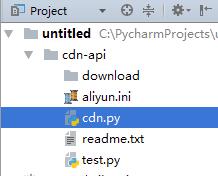
4、阿里云日志下载API接口
https://help.aliyun.com/document_detail/27224.html?spm=a2c4g.11186623.6.704.vz36cV
https://docs-aliyun.cn-hangzhou.oss.aliyun-inc.com/cn/cdn/0.1.99/assets/api/callmethod_sdk_python.zip #python版本签名生成代码
Aliyun cdn访问日志下载的更多相关文章
- centos LAMP第二部分apache配置 下载discuz!配置第一个虚拟主机 安装Discuz! 用户认证 配置域名跳转 配置apache的访问日志 配置静态文件缓存 配置防盗链 访问控制 apache rewrite 配置开机启动apache tcpdump 第二十节课
centos LAMP第二部分apache配置 下载discuz!配置第一个虚拟主机 安装Discuz! 用户认证 配置域名跳转 配置apache的访问日志 配置静态文件缓存 配置防盗链 ...
- iNeedle日志下载功能问题
问题: iNeedle系统本身包含日志下载功能,主要是将web服务器中的用户访问日志按照一定条件进行筛选并下载,提供管理者分析.但是这次的测试中发现iNeedle日志下载一直会卡住,web界面显示正在 ...
- Hadoop第8周练习—Pig部署及统计访问日志例子
:搭建Pig环境 :计算每个IP点击次数 内容 运行环境说明 1.1 硬软件环境 线程,主频2.2G,6G内存 l 虚拟软件:VMware® Workstation 9.0.0 build- ...
- nginx自动切割访问日志
Web 访问日志 (access_log) 记录了所有外部客户端对Web服务器的访问行为,包含了客户端IP,访问日期,访问的URL资源,服务器返回的HTTP状态码等重要信息. 一条典型的Web访问日志 ...
- 使用 awstats 分析 Nginx 的访问日志(IBM)
前言 在我的上一篇文章<使用 Nginx 提升网站访问速度>中介绍了 Nginx 这个 HTTP 服务器以及如何通过它来加速网站的访问速度.在实际的网站运营中,我们经常需要了解到网站的访问 ...
- 打包发布到NPM并通过CDN访问
本文主要讲述基于webpack编写js包文件后上传到npm,并通过cdn进行访问. 创建项目 在自己新建的文件夹下执行如下代码: npm init name: (mtmap) version: (1. ...
- 使用awstat分析Nginx的访问日志
在我的上一篇文章<使用 Nginx 提升网站访问速度>中介绍了 Nginx 这个 HTTP 服务器以及如何通过它来加速网站的访问速度.在实际的网站运营中,我们经常需要了解到网站的访问情况, ...
- nginx访问日志中添加接口返回值
因为nginx作为web服务器时,会代理后端的一些接口,这时访问日志中只能记录访问接口的status码,也就是说,只能获得200.404 这些的值 那么如何获得接口返回的response值呢? 下面开 ...
- 登录日志的访问日志的 统计 MapReduce
登录日志的访问日志的 统计 MapReduce <!-- https://mvnrepository.com/artifact/org.apache.hadoop/hadoop-commo ...
随机推荐
- ERROR: unable to bind listening socket for address '127.0.0.1:9000': Address already in use (98) [30-Jan-2018 16:12:27] ERROR: FPM initialization failed解决方法
1.php启动之后发现访问nginx出现502错误,检查nginx.conf发现指定的php socket不存在 2.解决方法nginx修改陈这样,直接把绿色部门的socket写成本地地址+端口就可以 ...
- Access导出excel
SELECT * INTO [excel .xls].Sheet1 FROM tableName
- 软件调用QML的两种方式
一.两种方式 二.方式1[对窗口的控制权在QML] 三.方式2[对窗口的控制权在C++]
- Linux 使用statvfs读取文件系统信息
本文转载自:https://blog.csdn.net/papiping/article/details/6980573 在测试过程中,f_bfree的值比f_frsize的值大于10%的尺寸大小,意 ...
- 再谈 tp的 实例化 类 的自动加载
表示一个域名下的所有/任何主机 使用 的格式是: [*.] example.com 其中 , example.com叫着 裸域名. (这个example.com/net/org不能被注册, 被保留) ...
- dede的使用-2
自己开发站点的规律, 跟cms开发的规律应该是一样的, 而且应该学习和借鉴cms的开发规律方法和思想.比如也要分站点的内容性质, 是文章类站点, 还是图片类, 还是shopping类等. 也要分栏目. ...
- php的__autoload和php的__call
首先, __call是php语言自身就具有的一种语言features...,不是thinkphp的语言特征. 关于__call参考: http://love-love-l.blog.163.com/b ...
- nowcoder 合并回文子串
链接:https://www.nowcoder.com/acm/contest/6/C来源:牛客网题目输入两个字符串A和B,合并成一个串C,属于A和B的字符在C中顺序保持不变.如"abc&q ...
- nohup 让进程在后台可靠运行的几种方法
1. nohup nohup 无疑是我们首先想到的办法.顾名思义,nohup 的用途就是让提交的命令忽略 hangup 信号. nohup 的使用是十分方便的,只需在要处理的命令前加上 nohup 即 ...
- go 一波走起
$ go run helloworld.go 运行 $ go build helloworld.go 编译 该命令生成一个名为helloworld的可执行的二进制文件,可以随时运行它 $ ./hell ...