
纯CSS打造萌萌哒大白
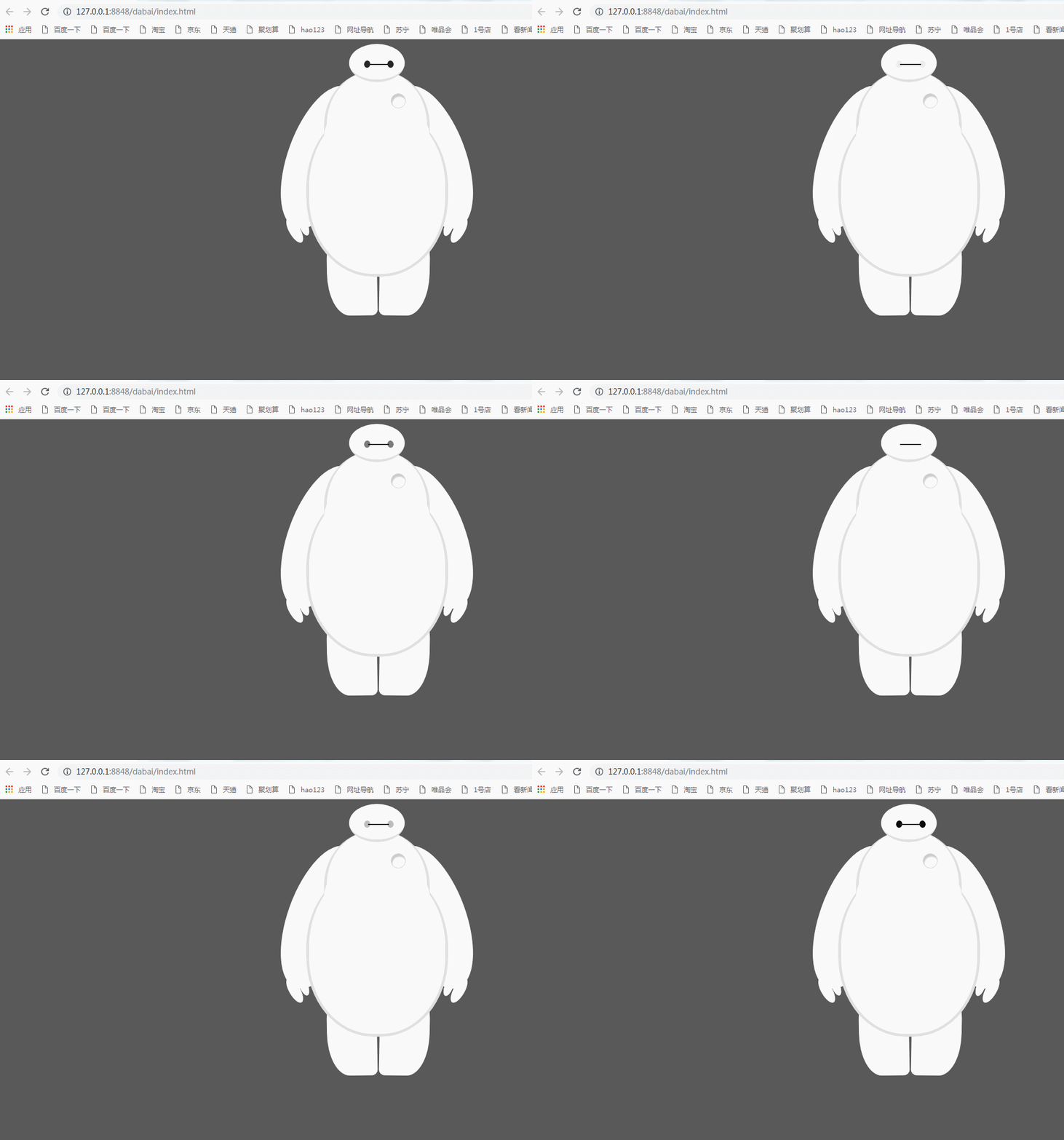
HTML部分:
<body>

        <div id="baymax">

        <!-- 定义头部,包括两个眼睛、嘴 -->

        <div id="head">

            <div id="eye"></div>

            <div id="eye2"></div>

            <div id="mouth"></div>

        </div>

        <!-- 定义躯干,包括心脏 -->

        <div id="torso">

            <div id="heart"></div>

        </div>

        <!-- 定义肚子腹部,包括 cover(和躯干的连接处) -->

        <div id="belly">

            <div id="cover"></div>

        </div>

        <!-- 定义左臂,包括一大一小两个手指 -->

        <div id="left-arm">

            <div id="l-bigfinger"></div>

            <div id="l-smallfinger"></div>

        </div>

        <!-- 定义右臂,同样包括一大一小两个手指 -->

        <div id="right-arm">

            <div id="r-bigfinger"></div>

            <div id="r-smallfinger"></div>

        </div>

        <!-- 定义左腿 -->

        <div id="left-leg"></div>

        <!-- 定义右腿 -->

        <div id="right-leg"></div>

    </div>

    </body>
css样式:
     <style>

 body {

     background: #595959;

 }

 #baymax {

     /*设置为 居中*/

     margin: 0 auto;

     /*高度*/

     height: 600px;

     /*隐藏溢出*/

     overflow: hidden;

 }

 #head {

     height: 64px;

     width: 100px;

     /*以百分比定义圆角的形状*/

     border-radius: 50%;

     /*背景*/

     background: #fff;

     margin: 0 auto;

     margin-bottom: -20px;

     /*设置下边框的样式*/

     border-bottom: 5px solid #e0e0e0;

     /*属性设置元素的堆叠顺序;

     拥有更高堆叠顺序的元素总是会处于堆叠顺序较低的元素的前面*/

     z-index:;

     /*生成相对定位的元素*/

     position: relative;

 }

 #eye,

 #eye2 {

     width: 11px;

     height: 13px;

     background: #282828;

     border-radius: 50%;

     position: relative;

     top: 30px;

     left: 27px;

     /*旋转该元素*/

     transform: rotate(8deg);

 /*眼睛的动画*/

     animation:myfirst 5s;

     -moz-animation:myfirst 5s; /* Firefox */

     -webkit-animation:myfirst 5s; /* Safari and Chrome */

      -o-animation:myfirst 5s; /* Opera */

       animation-iteration-count:infinite;/*动画无限的循环*/

 }

 #eye2 {

     /*使其旋转对称*/

     transform: rotate(-8deg);

     left: 69px;

     top: 17px;

     animation:myfirst 5s;

    -moz-animation:myfirst 5s; /* Firefox */

    -webkit-animation:myfirst 5s; /* Safari and Chrome */

     -o-animation:myfirst 5s; /* Opera */

     animation-iteration-count:infinite;

 }

 @keyframes myfirst

 {

 from {background:black;}

 to {background:white;}

 }

 @-moz-keyframes myfirst /* Firefox */

 {

 from {background:black;}

 to {background:white;}

 }

 @-webkit-keyframes myfirst /* Safari and Chrome */

 {

 from {background:black;}

 to {background:white;}

 }

 @-o-keyframes myfirst /* Opera */

 {

 from {background:black;}

 to {background:white;}

 }

 #mouth {

     width: 38px;

     height: 1.5px;

     background: #282828;

     position: relative;

     left: 34px;

     top: 10px;

 }

 #torso,

 #belly {

     margin: 0 auto;

     height: 200px;

     width: 180px;

     background: #fff;

     border-radius: 47%;

     /*设置边框*/

     border: 5px solid #e0e0e0;

     border-top: none;

     z-index:;

 }

 #belly {

     height: 300px;

     width: 245px;

     margin-top: -140px;

     z-index:;

 }

 #cover {

     width: 190px;

     background: #fff;

     height: 150px;

     margin: 0 auto;

     position: relative;

     top: -20px;

     border-radius: 50%;

 }

 #heart{

   width:25px;

   height:25px;

   border-radius:50%;

   position:relative;

   /*向边框四周添加阴影效果*/

   box-shadow:2px 5px 2px #ccc inset;

   right:-115px;

   top:40px;

   z-index:;

   border:1px solid #ccc;

 }

 #left-arm,

 #right-arm {

     height: 270px;

     width: 120px;

     border-radius: 50%;

     background: #fff;

     margin: 0 auto;

     position: relative;

     top: -350px;

     left: -100px;

     transform: rotate(20deg);

     z-index: -1;

 }

 #right-arm {

     transform: rotate(-20deg);

     left: 100px;

     top: -620px;

 }

 #l-bigfinger,

 #r-bigfinger {

     height: 50px;

     width: 20px;

     border-radius: 50%;

     background: #fff;

     position: relative;

     top: 250px;

     left: 50px;

     transform: rotate(-50deg);

 }

 #r-bigfinger {

     left: 50px;

     transform: rotate(50deg);

 }

 #l-smallfinger,

 #r-smallfinger {

     height: 35px;

     width: 15px;

     border-radius: 50%;

     background: #fff;

     position: relative;

     top: 195px;

     left: 66px;

     transform: rotate(-40deg);

 }

 #r-smallfinger {

     background: #fff;

     transform: rotate(40deg);

     top: 195px;

     left: 37px;

 }

 #left-leg,

 #right-leg {

     height: 170px;

     width: 90px;

     border-radius: 40% 30% 10px 45%;

     background: #fff;

     position: relative;

     top: -640px;

     left: -45px;

     transform: rotate(-1deg);

     z-index: -2;

     margin: 0 auto;

 }

 #right-leg {

     background: #fff;

     border-radius:30% 40% 45% 10px;

     margin: 0 auto;

     top: -810px;

     left: 50px;

     transform: rotate(1deg);

 }

 </style>
纯CSS打造萌萌哒大白的更多相关文章
- 【CSS Demo】纯 CSS 打造 Flow-Steps 导航
low-Steps 导航效果常用于需要表示执行步骤的交互页面,效果如下: 步骤一 步骤二 步骤三 通常使用图片来实现 Flow-Steps 效果,但此方法的灵活性不足,当内容变化较大时就可能需要重 ...
- Expression构建DataTable to Entity 映射委托 sqlserver 数据库里面金额类型为什么不建议用float,实例告诉你为什么不能。 sql server 多行数据合并成一列 C# 字符串大写转小写,小写转大写,数字保留,其他除外 从0开始用U盘制作启动盘装Windows10系统(联想R720笔记本)并永久激活方法 纯CSS打造淘宝导航菜单栏 C# Winform
Expression构建DataTable to Entity 映射委托 1 namespace Echofool.Utility.Common { 2 using System; 3 using ...
- 纯CSS打造银色MacBook Air(完整版)
上一篇:<selection伪元素小解> ::selection{ background:blue; color:red; }p{font-size:14px;} 作者主页:myvin 博 ...
- 纯CSS打造可折叠树状菜单
1:Html代码 <li> <label for="subsubfolder1">下级</label> <input id="s ...
- 纯CSS打造BiliBili样式博客主题
前言 一直以来,我都在思考如何减少不必要的JS代码,仅通过CSS来实现博客园主题美化.CSS有很多魔法代码,例如:before,iconfont,order,等等,利用好这些技巧,也能实现很好美化效果 ...
- HTML5 CSS3专题 纯CSS打造相冊效果
转载请标明出处:http://blog.csdn.net/lmj623565791/article/details/30993277 今天偶然发现电脑里面还有这种一个样例.感觉效果还不错,不记得啥时候 ...
- HTML5 CSS3专题 纯CSS打造相册效果
转载请标明出处:http://blog.csdn.net/lmj623565791/article/details/30993277 今天偶然发现电脑里面还有这样的一个例子,感觉效果还不错,不记得啥时 ...
- 学用纯CSS打造可折叠树状菜单
随着CSS3的发布,国外研究正如火如荼,但在国内还有很多人抱着IE不支持CSS3的想法,始终无动于衷不肯去学习.但是历史告诉我们,好的东西必将盛行,CSS3也终将也会替代CSS2,下面就和大家分享一个 ...
- 纯 css 打造一个小提示 tooltip
最后编辑:2019/11/26 前 无意间在寻找资料时候,发现一个不错的小提示,查看源码竟然是纯手工 css 编写(文章底部参考链接). 效果 使用的特性 css2 中的 attr 函数,所以现在(2 ...
随机推荐
- Jenkins 主备master-slave模式搭建
jenkins的版本是2.70,使用下来感觉是一个不错的版本,至于如何搭建jenkins,在此就不多说了,推荐的方法是先安装tomcat,然后再加jenkins.war放在tomcat的webapp路 ...
- [LeetCode] 577. Employee Bonus_Easy tag: SQL
Select all employee's name and bonus whose bonus is < 1000. Table:Employee +-------+--------+---- ...
- Java Selenium - 浏览器操作
浏览器主要操作方法来自接口 org.openqa.selenium.WebDriver , 实现于org.openqa.selenium.remote.RemoteWebDriver这个类,然后不同浏 ...
- WinRAR 5.40 & 4.20 & 3.93 的注册码 - rarreg.key
把下面的数据复制到“记事本”中,用文件名“rarreg.key”命名该文件,保存到WinRAR安装文件夹即完成注册. 以下4个Key随便选一个复制都可以. WinRAR 5.40 版Key,复制箭头中 ...
- Ubuntu16.04源的问题
今天执行下列语句 sudo apt-get update报错 安装redis时 sudo apt-get install redis-server报错 报错内容大致如下: 在网上查了一下是源的问题,我 ...
- 工作流引擎--swamp
什么是工作流引擎(Workflow Engine ) 例如开发一个系统最关键的部分不是系统的界面,也不是和数据库之间的信息交换,而是如何根据业务逻辑开发出符合实际需要的程序逻辑并确保其稳定性.易维 ...
- CMake使用总结(转的)+自己的实践心得
来自https://www.mawenbao.com/note/cmake.html 总结CMake的常用命令,并介绍有用的CMake资源. CMake意为cross-platform make,可用 ...
- Ubuntu下orbbec mini 无法正常显示图像问题
最近用orbbec的深度摄像头采集RGBD图像,Windows下一切OK.但是Ubuntu下出现了不少问题.总结一下 1.将设备插到USB,先确定电脑能否正常识别设备 Ubuntu下是不需要安装驱动的 ...
- LeetCode108.将有序数组转换为二叉搜索树
将一个按照升序排列的有序数组,转换为一棵高度平衡二叉搜索树. 本题中,一个高度平衡二叉树是指一个二叉树每个节点 的左右两个子树的高度差的绝对值不超过 1. 示例: 给定有序数组: [-10,-3,0, ...
- sqlserver备份还原数据库时报占用错误
.做项目时遇到这种情形:原来的test_dev数据库,想复制出test_ft供测试用.此时备份test_dev出test_backup文件,想直接还原成test_ft时会报占用错误. 还原数据库:Th ...