
Linux环境nginx的配置
1.创建nginx运行账户www并加入到www组,不允许www用户直接登录系统,查看创建。
groupadd www
useradd -g www www -s /bin/false
tail /etc/passwd
2.进入nginx的配置文件目录
cd /usr/local/nginx/conf
3.看一下目录下文件
ll
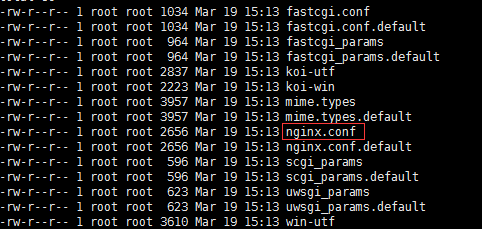
4.编辑配置文件nginx.conf,可以一项一项配置使用【/usr/local/nginx/sbin/nginx -t】查看是否配置出错。
vi nginx.conf
4.1、上边创建了用户,#user nobody 打开注释,修改为user www www
4.2、worker_processes 2; #设置值和CPU核心数一致
4.3、error_log定义错误日志文件的位置及输出级别【debug / info / notice / warn / error / crit】
error_log /usr/local/nginx/logs/error.log error;
user  www www;#用来指定nginx worker进程运行用户以及用户组,默认nobody账号运行

worker_processes  1;#指定nginx要开启的子进程数量,运行过程中监控每个进程消耗内存(一般几M~几十M不等)根据实际情况进行调整,通常数量是CPU内核数量的整数倍

#定义错误日志文件的位置及输出级别【debug / info / notice / warn / error / crit】

error_log  /usr/local/nginx/logs/error.log error;

#error_log  logs/error.log  notice;

#error_log  logs/error.log  info;

#用来指定进程id的存储文件的位置

#pid        logs/nginx.pid;

#用于指定一个进程可以打开最多文件数量的描述

worker_rlimit_nofile 1024;

#针对nginx服务器的工作模式的一些操作配置

events {

    worker_connections  1024;#指定最大可以同时接收的连接数量,这里一定要注意,最大连接数量是和worker processes共同决定的

    multi_accept on;#配置指定nginx在收到一个新连接通知后尽可能多的接受更多的连接

    use epoll;#配置指定了线程轮询的方法,如果是linux2.6+,使用epoll,如果是BSD如Mac请使用Kqueue

}

http {

    include       mime.types;#指定在当前文件中包含另一个文件的指令

    default_type  application/octet-stream;#指定默认处理的文件类型可以是二进制

    log_format  main  '$remote_addr - $remote_user [$time_local] "$request" '

                      '$status $body_bytes_sent "$http_referer" '

                      '"$http_user_agent" "$http_x_forwarded_for"';

    access_log  /usr/local/nginx/logs/access.log  main;##用于指定该虚拟主机服务器中的访问记录日志存放路径,main是上边log_format定义的格式

    sendfile        on;#配置on让sendfile发挥作用,将文件的回写过程交给数据缓冲去去完成,而不是放在应用中完成,这样的话在性能提升有有好处

    tcp_nopush     on;#让nginx在一个数据包中发送所有的头文件,而不是一个一个单独发

    tcp_nodelay on;#让nginx不要缓存数据,而是一段一段发送,如果数据的传输有实时性的要求的话可以配置它,发送完一小段数据就立刻能得到返回值,但是不要滥用哦

    #keepalive_timeout  0;

    keepalive_timeout  65;#给客户端分配连接超时时间,服务器会在这个时间过后关闭连接。一般设置时间较短,可以让nginx工作持续性更好

    client_header_timeout 10;#设置请求头的超时时间

    client_body_timeout 10;#设置请求体的超时时间

    send_timeout 10;#指定客户端响应超时时间,如果客户端两次操作间隔超过这个时间,服务器就会关闭这个链接

    limit_conn_zone $binary_remote_addr zone=addr:5m;#设置用于保存各种key的共享内存的参数,

    limit_conn addr 100; #给定的key设置最大连接数

    gzip  on;#是告诉nginx采用gzip压缩的形式发送数据。这将会减少我们发送的数据量

    gzip_disable "msie6";#为指定的客户端禁用gzip功能。我们设置成IE6或者更低版本以使我们的方案能够广泛兼容

    gzip_types text/plain text/css application/json application/javascript text/xml application/xml application/xml+rss text/javascript;

    #主要负责负载均衡的配置,通过默认的轮询调度方式来分发请求到后端服务器

    #-- max_fails:表示失败最大次数,超过失败最大次数暂停服务

    #-- fail_timeout:表示如果请求受理失败,暂停指定的时间之后重新发起请求

    upstream nginxServer {

        ip_hash;#指定请求调度算法,默认是weight权重轮询调度,可以指定

        server localhost:8000 max_fails=3 fail_timeout=3s;#可以用localhost,调用同一台服务器上server,也可以用ip或域名,代理其他服务器

        server 60.110.110.60:8001 down;#表示该主机暂停服务

        server 60.110.110.60:8002 max_fails=3 fail_timeout=3s;

        server 60.110.110.60:8003 max_fails=3 fail_timeout=3s;

        server 60.110.110.60:8004 max_fails=3 fail_timeout=3s;

        server 60.110.110.60:8005 max_fails=3 fail_timeout=3s;

    }

    server {

        listen       80;

        server_name www.xxx.cn;#指定ip地址或者域名,多个配置之间用空格分隔

        charset utf-8;

        #access_log  logs/host.access.log  main;

        #location / {

        #    root   html;

        #    index  index.html index.htm;

        #    proxy_pass http://nginxServer/;

        #    proxy_set_header Host $host;

        #    proxy_set_header X-Real-IP $remote_addr;

        #    proxy_set_header X-Forwarded-For $proxy_add_x_forwarded_for;

        #}

        #error_page  404              /404.html;#用于指定该虚拟主机服务器中访问错误日志的存放路径

        rewrite ^(.*)$ https://$host$1 permanent;#强制http访问https端口。如果不用https协议注掉

        # redirect server error pages to the static page /50x.html

        #

        error_page   500 502 503 504  /50x.html;

        location = /50x.html {

            root   html;

        }

        # proxy the PHP scripts to Apache listening on 127.0.0.1:80

        #

        #location ~ \.php$ {

        #    proxy_pass   http://127.0.0.1;

        #}

        # pass the PHP scripts to FastCGI server listening on 127.0.0.1:9000

        #

        #location ~ \.php$ {

        #    root           html;

        #    fastcgi_pass   127.0.0.1:9000;

        #    fastcgi_index  index.php;

        #    fastcgi_param  SCRIPT_FILENAME  /scripts$fastcgi_script_name;

        #    include        fastcgi_params;

        #}

        # deny access to .htaccess files, if Apache's document root

        # concurs with nginx's one

        #

        #location ~ /\.ht {

        #    deny  all;

        #}

    }


    # another virtual host using mix of IP-, name-, and port-based configuration

    #

    #server {

    #    listen       8000;

    #    listen       somename:8080;

    #    server_name  somename  alias  another.alias;

    #    location / {

    #        root   html;

    #        index  index.html index.htm;

    #    }

    #}

    # HTTPS server

    server {

        listen       443 ssl;

        server_name  www.xxx.cn;

        ssl_certificate      cert/www.xxx.cn.pem;

        ssl_certificate_key  cert/www.xxx.cn.key;

        ssl_session_cache    shared:SSL:1m;

        ssl_session_timeout  5m;

        ssl_ciphers ECDHE-RSA-AES128-GCM-SHA256:ECDHE:ECDH:AES:HIGH:!NULL:!aNULL:!MD5:!ADH:!RC4;

        ssl_protocols TLSv1 TLSv1.1 TLSv1.2;

        ssl_prefer_server_ciphers  on;

        location / {

            root   html;

            index  index.html index.htm;

            proxy_pass http://nginxServer/;

            proxy_set_header Host $host;

            proxy_set_header X-Real-IP $remote_addr;

            proxy_set_header X-Forwarded-For $proxy_add_x_forwarded_for;

        }

    }

}
5.启动
/usr/local/nginx/sbin/nginx
6.重新加载
/usr/local/nginx/sbin/nginx -s reload
7.重启
/usr/local/nginx/sbin/nginx -s reopen
8.停止
/usr/local/nginx/sbin/nginx -s stop
9.设置开机启动
vi /etc/init.d/nginx
#! /bin/bash

# chkconfig: - 85 15

PATH=/usr/local/nginx

DESC="nginx daemon"

NAME=nginx

DAEMON=$PATH/sbin/$NAME

CONFIGFILE=$PATH/conf/$NAME.conf

PIDFILE=$PATH/logs/$NAME.pid

SCRIPTNAME=/etc/init.d/$NAME

set -e

[ -x "$DAEMON" ] || exit 0

do_start() {

$DAEMON -c $CONFIGFILE || echo -n "nginx already running"

}

do_stop() {

$DAEMON -s stop || echo -n "nginx not running"

}

do_reload() {

$DAEMON -s reload || echo -n "nginx can't reload"

}

case "$1" in

start)

echo -n "Starting $DESC: $NAME"

do_start

echo "."

;;

stop)

echo -n "Stopping $DESC: $NAME"

do_stop

echo "."

;;

reload|graceful)

echo -n "Reloading $DESC configuration..."

do_reload

echo "."

;;

restart)

echo -n "Restarting $DESC: $NAME"

do_stop

do_start

echo "."

;;

*)

echo "Usage: $SCRIPTNAME {start|stop|reload|restart}" >&2

exit 3

;;

esac

exit 0
将上方脚本代码cp到vi的nginx文件中,修改其中的PATH路径改为自己的安装路径。
然后授权
chmod a+x /etc/init.d/nginx
/etc/init.d/nginx start

/etc/init.d/nginx stop

chkconfig --add /etc/init.d/nginx

service nginx start

service nginx stop

chkconfig nginx on

chkconfig nginx off
Linux环境nginx的配置的更多相关文章
- VMware Linux 下 Nginx 安装配置 - Tomcat 配置 (二)
准备工作 相关浏览: VMware Linux 下 Nginx 安装配置 (一) 1. 选在 /usr/local/ 下创建 softs 文件夹,通过 ftp 命令 把 apache-tomcat-7 ...
- Linux环境下Swap配置方法
Linux环境下Swap配置方法 场景: 今天下午安装一个CentOS6.5操作系统,忘记配置swap分区.看看如何安装系统之后,增加和删除swap分区.方法如下:1.内存占用情况[root@josh ...
- 【云和恩墨】性能优化:Linux环境下合理配置大内存页(HugePage)
原创 2016-09-12 熊军 [云和恩墨]性能优化:Linux环境下合理配置大内存页(HugePage) 熊军(老熊) 云和恩墨西区总经理 Oracle ACED,ACOUG核心会员 PC S ...
- VMware Linux 下 Nginx 安装配置 - nginx.conf 配置 [负载两个 Tomcat] (三)
首先启动Nginx 1. 相关浏览 两个 Tomcat 配置: VMware Linux 下 Nginx 安装配置 - Tomcat 配置 (二) Nginx 安装配置启动: VMware Linu ...
- Linux环境下如何配置IP地址、MAC地址
Linux环境下如何配置IP地址.MAC地址 1.配置IP地址 进入配置IP地址路径,进行修改即可 cd /etc/network vim interface 加入以下内容: iface eth0 i ...
- Linux环境Hive安装配置及使用
Linux环境Hive安装配置及使用 一.Hive Hive环境前提 二.Hive架构原理解析 三.Hive-1.2.2单机安装流程 (1) 解压apache-hive-1.2.2-bin.tar.g ...
- Linux环境ZooKeeper安装配置及使用
Linux环境ZooKeeper安装配置及使用 一.ZooKeeper 1.1 zookeeper作用 1.2 zookeeper角色 1.3 zookeeper功能 二.集群规划 三.安装流程 (1 ...
- Linux环境Hadoop安装配置
Linux环境Hadoop安装配置 1. 准备工作 (1)linux配置IP(NAT模式) (2)linux关闭防火墙 (3)设置主机名 (4)设置映射 (5)设置免密登录 2. 安装jdk (1)上 ...
- linux安装nginx并配置负载均衡
linux上安装nginx比较简单: 前提是需要有gcc或者g++ 1.yum需要的依赖 yum -y install openssl openssl-devel 2.解压pcre库.zlib库 ...
随机推荐
- spark.yarn.jar和spark.yarn.archive的使用
启动Spark任务时,在没有配置spark.yarn.archive或者spark.yarn.jars时, 会看到不停地上传jar非常耗时:使用spark.yarn.archive可以大大地减少任务的 ...
- Spark SQL内置函数
Spark SQL内置函数官网API:http://spark.apache.org/docs/latest/api/scala/index.html#org.apache.spark.sql.fun ...
- tf运作方式之共享变量
转自:https://docs.pythontab.com/tensorflow/how_tos/variable_scope/ 这个讲的不错,能够更理解tf.get_Variable()了.创建时有 ...
- react 使用 redux 的时候 用 ref获取子组件的state
由于 redux是无状态的,所以当我们在子组件中使用了 redux的时候,再父组件中,使用 ref 来获取子组件的state时,发现为一个空对象. 其实这个是有解决方案法的,原因在于 我们使用的 r ...
- 关于bjam编译自己模块出错的问题
将这个目录下C:\Users\Regubed的user-config.jam改为下面内容 # MSVC configurationusing msvc : 9.0 ; # Python configu ...
- shell基础:通配符和其他特殊符号
这些东西可以用来批量删除:用× 通配符 其实就是基本用来匹配文件名
- Mysql8.0.11安装以及注意事项
一.环境配置 首先在官网下载最新的mysql8.0.11数据库,解压到你需要放置的盘符最好不要有中文,然后新建MYSQL_HOME,参数为mysql解压后安装文件的bin文件路径如我的:变量名:MYS ...
- [6]Windows内核情景分析 --APC
APC:异步过程调用.这是一种常见的技术.前面进程启动的初始过程就是:主线程在内核构造好运行环境后,从KiThreadStartup开始运行,然后调用PspUserThreadStartup,在该线程 ...
- django 静态css js文件配置
参考:http://blog.csdn.net/liqiancao/article/details/66151287
- jQuery选择器--:selected和:checked
:selected 概述 匹配所有选中的option元素 <!DOCTYPE html> <html> <head> <meta charset=" ...