
windows python3.7安装numpy问题的解决方法
我的是win7的系统,去python官网下载python3.7安装
CMD #打开命令窗口
pip install numpy #在cmd中输入
提示 需要c++14.0,
解决办法:
1, 进入https://www.lfd.uci.edu/~gohlke/pythonlibs/#wordcloud
我的是win10的系统,去python官网下载python3.7安装
CMD #打开命令窗口
pip install numpy #在cmd中输入
提示 需要c++14.0,
解决办法:
1, 进入https://www.lfd.uci.edu/~gohlke/pythonlibs/#wordcloud
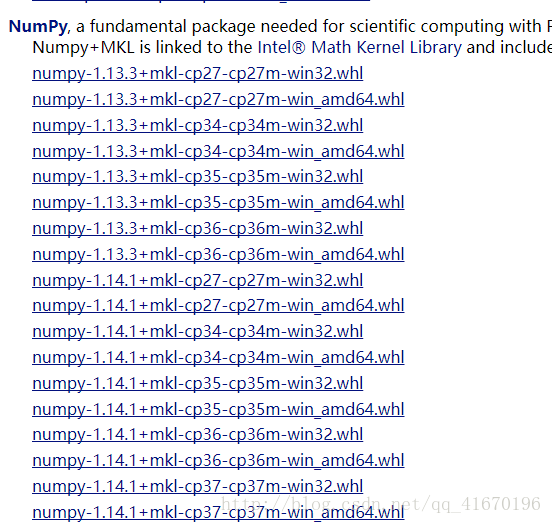
根据我的电脑和安装的python我下载最后一个,保存在python目录下,随后cmd进入该目录,
输入pip install numpy‑1.14.1+mkl‑cp37‑cp37m‑win_amd64.whl 即可
C:\Users\12345\AppData\Local\Programs\Python\Python37\Scripts>pip install numpy-1.14.3+mkl-cp37-cp37m-win_amd64.whl Processing c:\users\12345\appdata\local\programs\python\python37\scripts\numpy-1.14.3+mkl-cp37-cp37m-win_amd64.whl Installing collected packages: numpy Successfully installed numpy-1.14.3+mkl
同样的 安装pandas 的方法也是一样的
下载后 复制到\Users\12345\AppData\Local\Programs\Python\Python37\Scripts>
pip install pandas-0.23.0-cp37-cp37m-win_amd64.whl
安装图形界面seaborn 也一样
pip install seaborn-0.8.1-py2.py3-none-any.whl
但是安装matplotlib遇到了 error: Microsoft Visual C++ 14.0 is required. Get it with "Microsoft Visual C++ Build Tools": http://landinghub.visualstudio.com/visual-cpp-build-tools
解决方法是下载
http://1445568.ch1.data.tv002.com:443/down/fd9282f666dce22ef8848171236f456a-3287928/visualcppbuildtools_full.exe?cts=f-D120A234A24A43F105e1&ctp=120A234A24A43&ctt=1528324956&limit=1&spd=150000&ctk=17728aba100ad4e1159d27227523f6da&chk=fd9282f666dce22ef8848171236f456a-3287928&mtd=1
下载完成后重新pip install matplotlib-2.2.2-cp37-cp37m-win_amd64.whl
C:\Users\12345\AppData\Local\Programs\Python\Python37\Scripts>pip install matplotlib-2.2.2-cp37-cp37m-win_amd64.whl

Processing c:\users\12345\appdata\local\programs\python\python37\scripts\matplotlib-2.2.2-cp37-cp37m-win_amd64.whl

Requirement already satisfied: six>=1.10 in c:\users\12345\appdata\local\programs\python\python37\lib\site-packages (from matplotlib==2.2.2) (1.11.0)

Requirement already satisfied: pyparsing!=2.0.4,!=2.1.2,!=2.1.6,>=2.0.1 in c:\users\12345\appdata\local\programs\python\python37\lib\site-packages (from matplotlib==2.2.2) (2.2.0)

Requirement already satisfied: pytz in c:\users\12345\appdata\local\programs\python\python37\lib\site-packages (from matplotlib==2.2.2) (2018.4)

Requirement already satisfied: python-dateutil>=2.1 in c:\users\12345\appdata\local\programs\python\python37\lib\site-packages (from matplotlib==2.2.2) (2.7.3)

Requirement already satisfied: cycler>=0.10 in c:\users\12345\appdata\local\programs\python\python37\lib\site-packages (from matplotlib==2.2.2) (0.10.0)

Collecting kiwisolver>=1.0.1 (from matplotlib==2.2.2)

  Retrying (Retry(total=4, connect=None, read=None, redirect=None, status=None)) after connection broken by 'ConnectTimeoutError(<pip._vendor.urllib3.connection.VerifiedHTTPSConnection object at 0x000001AEFF3E5F60>, 'Connection to 10.180.28.148 timed out. (connect timeout=15)')': /simple/kiwisolver/

  Retrying (Retry(total=3, connect=None, read=None, redirect=None, status=None)) after connection broken by 'ConnectTimeoutError(<pip._vendor.urllib3.connection.VerifiedHTTPSConnection object at 0x000001AEFF3E5B38>, 'Connection to 10.180.28.148 timed out. (connect timeout=15)')': /simple/kiwisolver/

  Retrying (Retry(total=2, connect=None, read=None, redirect=None, status=None)) after connection broken by 'ConnectTimeoutError(<pip._vendor.urllib3.connection.VerifiedHTTPSConnection object at 0x000001AEFF3E59E8>, 'Connection to 10.180.28.148 timed out. (connect timeout=15)')': /simple/kiwisolver/

  Retrying (Retry(total=1, connect=None, read=None, redirect=None, status=None)) after connection broken by 'ConnectTimeoutError(<pip._vendor.urllib3.connection.VerifiedHTTPSConnection object at 0x000001AEFF407B70>, 'Connection to 10.180.28.148 timed out. (connect timeout=15)')': /simple/kiwisolver/

  Using cached https://files.pythonhosted.org/packages/31/60/494fcce70d60a598c32ee00e71542e52e27c978e5f8219fae0d4ac6e2864/kiwisolver-1.0.1.tar.gz

Requirement already satisfied: numpy>=1.7.1 in c:\users\12345\appdata\local\programs\python\python37\lib\site-packages (from matplotlib==2.2.2) (1.14.3+mkl)

Requirement already satisfied: setuptools in c:\users\12345\appdata\local\programs\python\python37\lib\site-packages (from kiwisolver>=1.0.1->matplotlib==2.2.2) (39.0.1)

Installing collected packages: kiwisolver, matplotlib

  Running setup.py install for kiwisolver ... done

Successfully installed kiwisolver-1.0.1 matplotlib-2.2.2
本文参考https://blog.csdn.net/qq_41670196/article/details/79374385
windows python3.7安装numpy问题的解决方法的更多相关文章
- windows下python安装Numpy、Scipy、matplotlib模块(转载)
python下载链接 Numpy下载链接 python中Numpy包的安装及使用 Numpy包的安装 准备工作 Python安装 pip安装 将pip所在的文件夹添加到环境变量path路径中 ...
- windows下mysql中文乱码, 配置解决方法
内容源自:windows下mysql中文乱码, 配置解决方法 解决方法:打开mysql安装目录,打开my.ini文件(如果只有my-default.ini文件,先将其改名为my.ini!!!) 修改内 ...
- Python使用easy-install安装时报UnicodeDecodeError的解决方法
Python使用easy-install安装时报UnicodeDecodeError的解决方法,有需要的朋友可以参考下. 问题描述: 在使用easy-install安装matplotlib.pypar ...
- Windows 共享无线上网 无法启动ICS服务解决方法(WIN7 ICS服务启动后停止)
Windows 共享无线上网 无法启动ICS服务解决方法(WIN7 ICS服务启动后停止) ICS 即Internet Connection Sharing,internet连接共享,可以使局域网上其 ...
- SQL2008R2安装碰到问题的解决方法(iso文件用对应的工具)
SQL2008R2安装碰到问题的解决方法 安装谁不会啊,这么简单,是啊,可是匹配包时就不是那么顺利啊.就像以前的Ruby还专挑匹配版本的包一样,不像现在的Py自动为我们找,这是Mar 7贴在Q ...
- [Q]“获取AutoCAD安装信息时失败...”解决方法
“获取AutoCAD安装信息时失败...”解决方法:在“setup.exe”上右键,以管理员权限运行即可.
- npm install安装时忘记--save解决方法
title: npm install安装时忘记--save解决方法 date: 2017-05-07 20:17:54 tags: npm categories: --- 网上还有一个解决方案就是: ...
- VS2017无法进入安装界面问题的解决方法
VS2017无法进入安装界面问题的解决方法 打开C:\Program Files (x86)\Microsoft Visual Studio\Installer\vs_installer.exe也没有 ...
- DirectX SDK (June 2010)安装错误S1023,解决方法
转自:http://hi.baidu.com/rootcat/item/6730f15f85e2c1958c12ed81 DirectX SDK (June 2010)安装错误S1023,解决方法 导 ...
随机推荐
- iOS web view 与 js 交互
移动应用中许多复杂的且经常改动的页面会使用H5进行代替native,这里就会使用到js和webview的交互 iOS里面,UIWebView提供了方法stringByEvaluatingJavaScr ...
- Oracle中使用透明网关链接到Sqlserver(转)
测试环境介绍 1.ORACLEServer Database version:10.2.0 IP:192.168.1.5 ORACLE_HOME:D:\oracle\product\10.2.0\ ...
- IBM Thread and Monitor Dump Analyzer for Java解决生产环境中的性能问题
这个工具的使用和 HeapAnalyzer 一样,非常容易,同样提供了详细的 readme 文档,这里也简单举例如下: #/usr/java50/bin/java -Xmx1000m -jar jca ...
- [leetcode]Maximal Rectangle @ Python
原题地址:https://oj.leetcode.com/problems/maximal-rectangle/ 题意:Given a 2D binary matrix filled with 0's ...
- 微信小程序 scroll-view 实现锚点跳转
在微信小程序中,使用 scroll-view 实现长页面的标记跳转,官方文档中没有例子演示,锚点标记主要是使用<scroll-view> 的 scroll-into-view 属性. 实现 ...
- QueryRunner类实战
先上一个登录代码---判断登录是否成功 1.c3p0-config.xml <?xml version="1.0" encoding="UTF-8"?&g ...
- 【LeetCode】240. Search a 2D Matrix II
Search a 2D Matrix II Write an efficient algorithm that searches for a value in an m x n matrix. Thi ...
- redis性能测试报告
服务器配置:16核心,64G 250个并发读:250个并发写性能[内容8千byte] 163为读:164为写:
- MySQL权限和用户安全
MySQL访问控制分为两个阶段阶段1: 检查用户是否可以连接到mysql server 阶段2: 检查用户执行的sql是否已经被授权
- Chrome 调试技巧: 调整网速
为了方便调试某些内容,比如我想网速设置为 1kb每秒,甚至0kb每秒. 1.打开chrome DevTool ,切换到 "Network".找到最右侧 "Online&q ...