
cordova(安卓)(腾讯信鸽注册绑定与反绑定) 插件开发
腾讯信鸽快速开发指南
http://developer.xg.qq.com/index.php/Android_SDK%E5%BF%AB%E9%80%9F%E6%8C%87%E5%8D%97
本文参考
http://bbs.phonegap100.com/thread-1160-1-1.html
1.java代码
安卓项目目录结构如下:
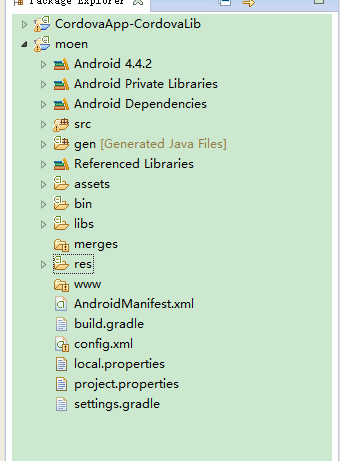
在这里我们开发一个腾讯推送注册用户插件,java代码如下
 /*

  * PhoneGap is available under *either* the terms of the modified BSD license *or* the

  * MIT License (2008). See http://opensource.org/licenses/alphabetical for full text.

  *

  * Copyright (c) 2005-2010, Nitobi Software Inc.

  * Copyright (c) 2011, IBM Corporation

  */

 package com.cordova.plugin.tencent;

 import org.json.JSONArray;

 import org.json.JSONException;

 import org.apache.cordova.CallbackContext;

 import org.apache.cordova.CordovaPlugin;

 import android.content.Context;

 import android.content.Intent;

 import com.tencent.android.tpush.XGIOperateCallback;

 import com.tencent.android.tpush.XGPushManager;

 import com.tencent.android.tpush.service.XGPushService;

 public class XinGe extends CordovaPlugin {

     @Override

     // action 插件方法

     // args 传递过来的参数,获取方法为args.getString(数组中的位置);

     // callbackContext 回调函数

     public boolean execute(String action, JSONArray args,

             final CallbackContext callbackContext) throws JSONException {

         Context context = this.cordova.getActivity();

         // 判断要调用的方法

         if (action.equals("registerPush")) {

             // 获取第一个参数,用户名

             String userName = args.getString(0);

             // 调用方法

             this.registerPush(context, callbackContext, userName);

             return true;

         } else if (action.equals("unregisterPush")) {

             // 反注册,取消推送

             XGPushManager.unregisterPush(context);

             return true;

         }

         // 回调失败的函数

         callbackContext.error("该方法不存在!");

         return false;

     }

     // 推送注册

     private void registerPush(Context context,

             final CallbackContext callbackContext, String userName) {

         // 推送别名注册方法,可以根据别名进行推送

         XGPushManager.registerPush(context, userName, new XGIOperateCallback() {

             @Override

             public void onSuccess(Object data, int flag) {

                 // 回调成功的函数

                 callbackContext.success();

             }

             @Override

             public void onFail(Object data, int errCode, String msg) {

                 // 回调失败的函数

                 callbackContext.error(msg);

             }

         });

         // 在XGPushManager.registerPush(context)或其它版本的注册接口之后调用以下代码

         // 使用ApplicationContext

         // 兼容MIUI V6

         Intent service = new Intent(context, XGPushService.class);

         context.startService(service);

     }

 }
然后在res/xml/config.xml文件中加入以下配置
   <feature name="<service_name>">

         <param name="android-package" value="<full_name_including_namespace>" />

     </feature>
在这里service_name值得是java代码中的类名,full_name_including_namespace只的是报名+类名,在这里我的配置是
     <feature name="XinGe" >

         <param

             name="android-package"

             value="com.cordova.plugin.tencent.XinGe" />

     </feature>
2.js代码
在assets/www/cordova_plugins.js中进行修改
第4到13行,第160行是自行添加内容
 cordova.define('cordova/plugin_list',

 function (require, exports, module) {

     module.exports = [

     {

         // js所在位置

         "file": "plugins/com.cordova.plugin.tencent/www/android/xinGe.js",

         // js中的id

         "id": "com.cordova.plugin.tencent.xinGe",

         // 通过window.tencentXinGe直接获取插件

         "clobbers": [

             "tencentXinGe"

         ]

     },

     //pg自带插件配置

     {

         "file": "plugins/org.apache.cordova.camera/www/CameraConstants.js",

         "id": "org.apache.cordova.camera.Camera",

         "clobbers": ["Camera"]

     },

     {

         "file": "plugins/org.apache.cordova.camera/www/CameraPopoverOptions.js",

         "id": "org.apache.cordova.camera.CameraPopoverOptions",

         "clobbers": ["CameraPopoverOptions"]

     },

     {

         "file": "plugins/org.apache.cordova.camera/www/Camera.js",

         "id": "org.apache.cordova.camera.camera",

         "clobbers": ["navigator.camera"]

     },

     {

         "file": "plugins/org.apache.cordova.camera/www/CameraPopoverHandle.js",

         "id": "org.apache.cordova.camera.CameraPopoverHandle",

         "clobbers": ["CameraPopoverHandle"]

     },

     {

         "file": "plugins/org.apache.cordova.file/www/DirectoryEntry.js",

         "id": "org.apache.cordova.file.DirectoryEntry",

         "clobbers": ["window.DirectoryEntry"]

     },

     {

         "file": "plugins/org.apache.cordova.file/www/DirectoryReader.js",

         "id": "org.apache.cordova.file.DirectoryReader",

         "clobbers": ["window.DirectoryReader"]

     },

     {

         "file": "plugins/org.apache.cordova.file/www/Entry.js",

         "id": "org.apache.cordova.file.Entry",

         "clobbers": ["window.Entry"]

     },

     {

         "file": "plugins/org.apache.cordova.file/www/File.js",

         "id": "org.apache.cordova.file.File",

         "clobbers": ["window.File"]

     },

     {

         "file": "plugins/org.apache.cordova.file/www/FileEntry.js",

         "id": "org.apache.cordova.file.FileEntry",

         "clobbers": ["window.FileEntry"]

     },

     {

         "file": "plugins/org.apache.cordova.file/www/FileError.js",

         "id": "org.apache.cordova.file.FileError",

         "clobbers": ["window.FileError"]

     },

     {

         "file": "plugins/org.apache.cordova.file/www/FileReader.js",

         "id": "org.apache.cordova.file.FileReader",

         "clobbers": ["window.FileReader"]

     },

     {

         "file": "plugins/org.apache.cordova.file/www/FileSystem.js",

         "id": "org.apache.cordova.file.FileSystem",

         "clobbers": ["window.FileSystem"]

     },

     {

         "file": "plugins/org.apache.cordova.file/www/FileUploadOptions.js",

         "id": "org.apache.cordova.file.FileUploadOptions",

         "clobbers": ["window.FileUploadOptions"]

     },

     {

         "file": "plugins/org.apache.cordova.file/www/FileUploadResult.js",

         "id": "org.apache.cordova.file.FileUploadResult",

         "clobbers": ["window.FileUploadResult"]

     },

     {

         "file": "plugins/org.apache.cordova.file/www/FileWriter.js",

         "id": "org.apache.cordova.file.FileWriter",

         "clobbers": ["window.FileWriter"]

     },

     {

         "file": "plugins/org.apache.cordova.file/www/Flags.js",

         "id": "org.apache.cordova.file.Flags",

         "clobbers": ["window.Flags"]

     },

     {

         "file": "plugins/org.apache.cordova.file/www/LocalFileSystem.js",

         "id": "org.apache.cordova.file.LocalFileSystem",

         "clobbers": ["window.LocalFileSystem"],

         "merges": ["window"]

     },

     {

         "file": "plugins/org.apache.cordova.file/www/Metadata.js",

         "id": "org.apache.cordova.file.Metadata",

         "clobbers": ["window.Metadata"]

     },

     {

         "file": "plugins/org.apache.cordova.file/www/ProgressEvent.js",

         "id": "org.apache.cordova.file.ProgressEvent",

         "clobbers": ["window.ProgressEvent"]

     },

     {

         "file": "plugins/org.apache.cordova.file/www/fileSystems.js",

         "id": "org.apache.cordova.file.fileSystems"

     },

     {

         "file": "plugins/org.apache.cordova.file/www/requestFileSystem.js",

         "id": "org.apache.cordova.file.requestFileSystem",

         "clobbers": ["window.requestFileSystem"]

     },

     {

         "file": "plugins/org.apache.cordova.file/www/resolveLocalFileSystemURI.js",

         "id": "org.apache.cordova.file.resolveLocalFileSystemURI",

         "merges": ["window"]

     },

     {

         "file": "plugins/org.apache.cordova.file/www/android/FileSystem.js",

         "id": "org.apache.cordova.file.androidFileSystem",

         "merges": ["FileSystem"]

     },

     {

         "file": "plugins/org.apache.cordova.file/www/fileSystems-roots.js",

         "id": "org.apache.cordova.file.fileSystems-roots",

         "runs": true

     },

     {

         "file": "plugins/org.apache.cordova.file/www/fileSystemPaths.js",

         "id": "org.apache.cordova.file.fileSystemPaths",

         "merges": ["cordova"],

         "runs": true

     },

     {

         "file": "plugins/org.apache.cordova.file-transfer/www/FileTransferError.js",

         "id": "org.apache.cordova.file-transfer.FileTransferError",

         "clobbers": ["window.FileTransferError"]

     },

     {

         "file": "plugins/org.apache.cordova.file-transfer/www/FileTransfer.js",

         "id": "org.apache.cordova.file-transfer.FileTransfer",

         "clobbers": ["window.FileTransfer"]

     },

     {

         "file": "plugins/org.apache.cordova.inappbrowser/www/inappbrowser.js",

         "id": "org.apache.cordova.inappbrowser.inappbrowser",

         "clobbers": ["window.open"]

     }];

     module.exports.metadata =

     // TOP OF METADATA

     {

         //版本号

         "com.cordova.tencentXinGe": "1.0.0",

         "org.apache.cordova.camera": "0.3.3",

         "org.apache.cordova.file": "1.3.1",

         "org.apache.cordova.file-transfer": "0.4.7",

         "org.apache.cordova.inappbrowser": "0.5.3"

     }

     // BOTTOM OF METADATA

 });
在assets/www/plugins中新增com.cordova.plugin.tencent/www/android文件夹,其中新增xinGe.js,代码如下
 //注册com.cordova.plugin.tencent.xinGe同cordova_plugins.js中id

 cordova.define("com.cordova.plugin.tencent.xinGe", function (require, exports, module) {

 var cordova = require('cordova');

 var Tencent = function () {

     //success 注册成功执行方法

     //fail 注册失败执行方法

     //推送注册

     Tencent.prototype.registerPush = function (success, fail, userName) {

         //'XinGe'对应我们在java文件中定义的类名

         //registerPush对应我们在这个类中调用的自定义方法

         //userName是我们客户端传递给这个方法的参数,是个string字段

         cordova.exec(success, fail, 'XinGe', 'registerPush', [userName])

     }

     //推送反注册

     Tencent.prototype.unregisterPush = function () {

         cordova.exec(null, null, 'XinGe', 'unregisterPush', [])

     }

 }

 var tencent = new Tencent();

 module.exports = tencent;

 });
在应用中使用
             //注意需要初始化pg才能起作用

             //推送绑定

             window.tencentXinGe.registerPush(function () {

                 console.log('注册成功!');

             }, function (mes) {

                 console.log('注册失败!', mes);

             },

             //全局变量用户名

             config.userMes.name);
这样我们就可以进行推送了
cordova(安卓)(腾讯信鸽注册绑定与反绑定) 插件开发的更多相关文章
- 吐槽在cocos2dx游戏接入腾讯信鸽的坑
腾讯信鸽是用来在后台推送消息给移动应用客户端使用,接入方法很简单,在信鸽官网注册个账号 http://xg.qq.com/xg,然后注册一个应用,在后台页面获得ACCESS ID, ACCESS KE ...
- 背水一战 Windows 10 (21) - 绑定: x:Bind 绑定, x:Bind 绑定之 x:Phase, 使用绑定过程中的一些技巧
[源码下载] 背水一战 Windows 10 (21) - 绑定: x:Bind 绑定, x:Bind 绑定之 x:Phase, 使用绑定过程中的一些技巧 作者:webabcd 介绍背水一战 Wind ...
- 绑定: x:Bind 绑定, x:Bind 绑定之 x:Phase, 使用绑定过程中的一些技巧
背水一战 Windows 10 之 绑定 x:Bind 绑定 x:Bind 绑定之 x:Phase 使用绑定过程中的一些技巧 示例1.演示 x:Bind 绑定的相关知识点Bind/BindDemo.x ...
- 背水一战 Windows 10 (22) - 绑定: 通过 Binding 绑定对象, 通过 x:Bind 绑定对象, 通过 Binding 绑定集合, 通过 x:Bind 绑定集合
[源码下载] 背水一战 Windows 10 (22) - 绑定: 通过 Binding 绑定对象, 通过 x:Bind 绑定对象, 通过 Binding 绑定集合, 通过 x:Bind 绑定集合 作 ...
- 背水一战 Windows 10 (19) - 绑定: TemplateBinding 绑定, 与 RelativeSource 绑定, 与 StaticResource 绑定
[源码下载] 背水一战 Windows 10 (19) - 绑定: TemplateBinding 绑定, 与 RelativeSource 绑定, 与 StaticResource 绑定 作者:we ...
- 背水一战 Windows 10 (18) - 绑定: 与 Element 绑定, 与 Indexer 绑定, TargetNullValue, FallbackValue
[源码下载] 背水一战 Windows 10 (18) - 绑定: 与 Element 绑定, 与 Indexer 绑定, TargetNullValue, FallbackValue 作者:weba ...
- vb小菜一枚--------早期绑定和后期绑定
早期绑定和后期绑定 Visual Studio 2005 其他版本 将对象分配给对象变量时,Visual Basic 编译器会执行一个名为 binding 的进程.如果将对象分配给声明为特定对 ...
- KnockoutJS 3.X API 第四章 数据绑定(3) 控制流if绑定和ifnot绑定
if绑定目的 if绑定一般是格式是data-bind=if:attribute,if后所跟属性或表达式的值应为bool值(也可以是非bool值,当非空字符串时则为真),if绑定的作用与visible绑 ...
- KnockoutJS 3.X API 第四章 表单绑定(7) event绑定
目的 event绑定即为事件绑定,即当触发相关DOM事件的时候回调函数.例如keypress,mouseover或者mouseout等 例如: Mouse over me Details var vi ...
随机推荐
- MDX 查询原型
本篇文章记录 SBS 中 MDX 查询原型,可以根据这些查询原型来解决实际项目中的问题. 1. 查询在 2004年1月2日 - 2004年3月1日之间购买过 Bikes 产品的用户. SELECT ( ...
- postgresql ltree类型
最近一个月使用Postgresql的时候,经常遇到ltree的数据,感觉有些别扭,可是有绕不过去.今天决心整理一下,以后使用方便一些. 一.简介 ltree是Postgresql的一个扩展类型,由两位 ...
- SpringBoot使用Mybatis注解开发教程-分页-动态sql
代码示例可以参考个人GitHub项目kingboy-springboot-data 一.环境配置 1.引入mybatis依赖 compile( //SpringMVC 'org.springframe ...
- Linux cut命令用法
cut是一个选取命令,就是将一段数据经过分析,取出我们想要的.一般来说,选取信息通常是针对“行”来进行分析的,并不是整篇信息分析的. (1)其语法格式为: cut [-bn] [file] 或 cu ...
- C#中Invoke的用法1
invoke和begininvoke 区别 一直对invoke和begininvoke的使用和概念比较混乱,这两天看了些资料,对这两个的用法和原理有了些新的认识和理解. 首先说下,invoke和be ...
- C# Chart使用总结 2 ---------chart悬停选定数值操作
1.用鼠标悬停事件处理 private void Form1_Load(object sender, EventArgs e) { //connStr = connPath1 + conn2; fil ...
- pid 控制算法
http://blog.csdn.net/huangkangying/article/details/78129148 https://zh.wikipedia.org/wiki/PID%E6%8E% ...
- MySQL 大致测试更新时间
1:需求:把一个2千万条数据的一个表,随机更新其中的二十行需要大致多久? DROP TABLE IF EXISTS test20; CREATE TABLE test20( id INT AUTO_I ...
- [Python]编码声明:是coding:utf-8还是coding=urf-8呢
推荐: #!/usr/bin/env python3 # -*- coding: utf-8 -*- 我们知道在Python源码的头文件中要声明编码方式,如果你不只是会用到ascii码,很多人都写得都 ...
- Codeforces Round #277.5 (Div. 2)C——Given Length and Sum of Digits...
C. Given Length and Sum of Digits... time limit per test 1 second memory limit per test 256 megabyte ...