
V-rep学习笔记:关节力矩控制
- Torque or force mode
When the joint motor is enabled and the control loop is disabled, then the joint will try to reach the desired target velocity given the maximum torque/force it is capable to deliver. When that maximum torque/force is very high, the target velocity is instantaneously reached and the joint operates in velocity control, otherwise it operates at the specified torque/force until the desired target velocity is reached (torque/force control).
如果想要对关节进行力控制VREP中没有现成的函数,只能通过间接的方式:将目标速度设的足够大(不可能短时间达到),然后在关节控制脚本中修改源代码,设置并返回关节最大力矩或通过simSetJointForce函数设置关节最大力矩,这样关节就可以一直按照设置的最大力矩运转,从而达到调节关节力矩的目的。
When the joint motor is enabled and the control loop is enabled, then the user has 3 control modes available:
- Custom control: a joint control callback script will be in charge of controlling the dynamic behaviour of the joint, allowing you to control the joint with any imaginable algorithm.
- Position control (PID): the joint will be controlled in position via a PID controller that will adjust the joint velocity in following way (the Δt divider is to keep the controller independent of the selected controller time step):

- Spring-damper mode: the joint will act like a spring-damper system via a force/torque modulation:

根据上面的思路,在做一些底层控制涉及到调节关节力矩时可以通过修改关节控制回调脚本(脚本默认进行PID控制,控制量为关节速度),按照需求计算力矩并返回给VREP的物理引擎,这种方式比调用simSetJointForce函数要方便很多。下面是一个简单的例子:新建一个场景,添加一个连杆并将其用转动关节连接到大地。然后双击转动关节图标,将其设置为力矩模式,进行Custom control。修改关节控制脚本(joint control callback scripts):
-- Following data is handed over from V-REP:

init,revolute,cyclic,jointHandle,passCnt,totalPasses,currentPos,targetPos,errorValue,effort,dynStepSize,lowLimit,highLimit,targetVel,maxForceTorque,velUpperLimit=...

--Retrieves the current simulation time

local t = simGetSimulationTime()

forceOrTorqueToApply = math.sin(math.pi * t / )

maxVelocity = 9.0e+04

-- Following data must be returned to V-REP:

return forceOrTorqueToApply,maxVelocity

-- forceOrTorqueToApply: the maximum force/torque that the joint will be able to exert

-- maxVelocity: max. velocity allowed.
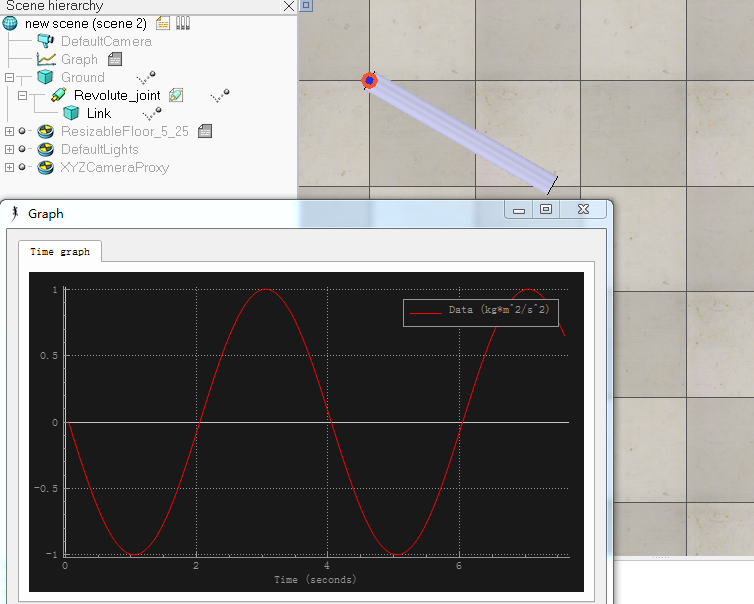
添加一个Graph记录关节转矩,从下图可以看出关节力矩按照正弦函数变化,周期为4s,与预期一致:
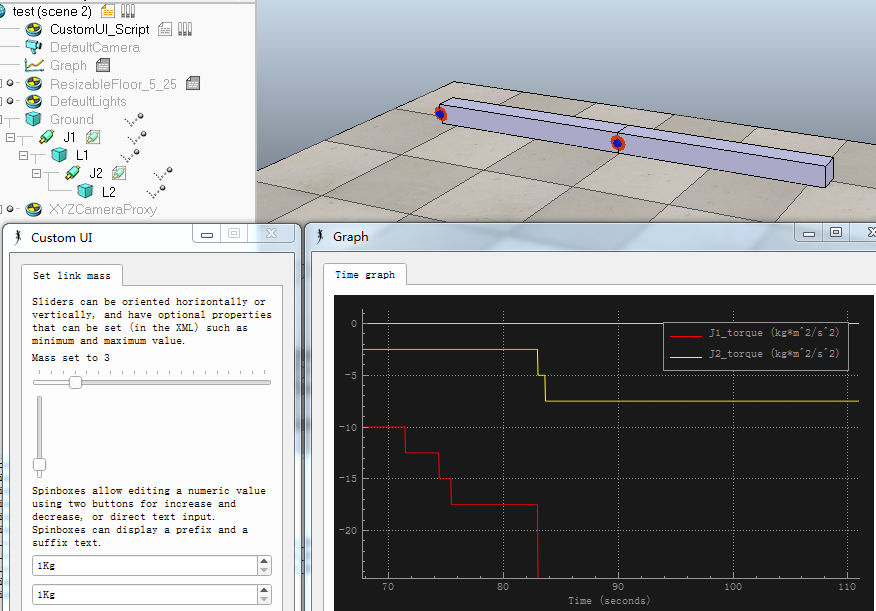
下面一个例子中,根据静力平衡条件计算关节转矩,使得二连杆机构在重力作用下能保持平衡。两个密度均匀的连杆长度为0.5m,初始质量均为1Kg,可以通过自定义界面上的两个滑动条来改变连杆质量,并设置相应的信号,关节控制脚本中读取信号变化计算力矩。
CustomeUI:
function sliderChange(ui, id, newVal)

    simExtCustomUI_setLabelText(ui, ,'Mass set to '..newVal)

    if id ==    then

        simSetShapeMassAndInertia(L1_handle, newVal, L1_inertiaMatrix, L1_centerOfMass)

        simSetFloatSignal('L1_mass', newVal)

    elseif id ==  then

        simSetShapeMassAndInertia(L2_handle, newVal, L2_inertiaMatrix, L2_centerOfMass)

        simSetFloatSignal('L2_mass', newVal)

    end

end

if (sim_call_type==sim_childscriptcall_initialization) then

    xml = [[

<ui>

<tabs>

        <tab title="Set link mass">

            <label text="Sliders can be oriented horizontally or vertically, and have optional properties that can be set (in the XML) such as minimum and maximum value." wordwrap="true" />

            <label text="" id="3000" wordwrap="true" />

            <hslider id="3001" tick-position="above" tick-interval="1" minimum="1" maximum="20" onchange="sliderChange" />

            <vslider id="3002" minimum="1" maximum="20" onchange="sliderChange" />

            <label text="Spinboxes allow editing a numeric value using two buttons for increase and decrease, or direct text input. Spinboxes can display a prefix and a suffix text." wordwrap="true" />

            <spinbox minimum="1" maximum="20" suffix="Kg"/>

            <spinbox minimum="1" maximum="20" suffix="Kg" />

            <stretch />

        </tab>

</tabs>

</ui>

]]

    ui = simExtCustomUI_create(xml)

    L1_handle = simGetObjectHandle('L1')

    L2_handle = simGetObjectHandle('L2')

    L1_mass,L1_inertiaMatrix,L1_centerOfMass = simGetShapeMassAndInertia(L1_handle)

    L2_mass,L2_inertiaMatrix,L2_centerOfMass = simGetShapeMassAndInertia(L2_handle)

    simSetFloatSignal('L1_mass', L1_mass)

    simSetFloatSignal('L2_mass', L2_mass)

end

if (sim_call_type==sim_childscriptcall_actuation) then

end

if (sim_call_type==sim_childscriptcall_sensing) then

end

if (sim_call_type==sim_childscriptcall_cleanup) then

    simSetShapeMassAndInertia(L1_handle, , L1_inertiaMatrix, L1_centerOfMass)

    simSetShapeMassAndInertia(L2_handle, , L2_inertiaMatrix, L2_centerOfMass)

    simExtCustomUI_destroy(ui)

end
J1 joint control callback scripts:
init,revolute,cyclic,jointHandle,passCnt,totalPasses,currentPos,targetPos,errorValue,effort,dynStepSize,lowLimit,highLimit,targetVel,maxForceTorque,velUpperLimit=...

local m1 = simGetFloatSignal('L1_mass')

local m2 = simGetFloatSignal('L2_mass')

forceOrTorqueToApply = (2.5*m1 + 7.5*m2)

maxVelocity = 9.0e+04

-- Following data must be returned to V-REP:

return forceOrTorqueToApply,maxVelocity
J2 joint control callback scripts:
init,revolute,cyclic,jointHandle,passCnt,totalPasses,currentPos,targetPos,errorValue,effort,dynStepSize,lowLimit,highLimit,targetVel,maxForceTorque,velUpperLimit=...

local m2 = simGetFloatSignal('L2_mass')

forceOrTorqueToApply = (2.5 * m2)

maxVelocity = 9.0e+04

-- Following data must be returned to V-REP:

return forceOrTorqueToApply,maxVelocity
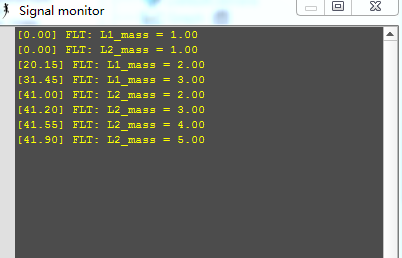
为了在仿真过程中查看信号变量,可以将模型signal monitor(Models/other/signal monitor.ttm)拖入场景中,显示信号的变化:
signal monitor.ttm
参考:
How do I simulate a torque motor?
V-rep学习笔记:关节力矩控制的更多相关文章
- Python学习笔记 - day4 - 流程控制
Python流程控制 Python中的流程控制主要包含两部分:条件判断和循环. Python的缩进和语法 为什么要在这里说缩进和语法,是因为将要学习的条件判断和分支将会涉及到多行代码,在java.c等 ...
- 0039 Java学习笔记-多线程-线程控制、线程组
join线程 假如A线程要B线程去完成一项任务,在B线程完成返回之前,不进行下一步执行,那么就可以调用B线程的join()方法 join()方法的重载: join():等待不限时间 join(long ...
- AMQ学习笔记 - 19. 问题解决 - 控制Atomikos的日志输出
概述 在使用Atomikos为ActiveMQ提供JTA支持时,Atomikos在控制台打印了繁琐的日志.这里介绍如何控制Atomikos日志输出的粒度. 解决方案 基于以下三个事实: Atomiko ...
- Linux C语言编程学习笔记 (1)进程控制入门
想进行Linux系统开发已经很久了,一直没有付诸实践.今日终于开始学习Linux下的C语言编程,研究一天,终于大概弄明白了Linux系统进程管理的一些基本概念和编程方法,总结下来以方便大家学习和自己实 ...
- PYTHON 学习笔记2 流程控制工具以及函数定义、匿名函数
前言 在上一节的学习中.已经介绍了几种基本类型.包括字符串的定义,以及字符串中索引.切片.字符串拼接的使用方法.以及基本的整形数据运算.一些之前都没有了解过的运算符.比如 ** 乘方 //整数除法等. ...
- Java学习笔记五——流程控制
分支结构 Java提供了两种常见的分支控制结构:if语句和switch语句. if语句 if语句使用布尔值或布尔表达式(表达式结果为布尔值),if语句有3中形式: 第一种形式: if (5 > ...
- PHP学习笔记2-流程控制
条件控制:if <?php function getLevel($score){ if($score>=90){ return "优秀"; }elseif($score ...
- StackExchange.Redis学习笔记(四) 事务控制和Batch批量操作
Redis事物 Redis命令实现事务 Redis的事物包含在multi和exec(执行)或者discard(回滚)命令中 和sql事务不同的是,Redis调用Exec只是将所有的命令变成一个单元一起 ...
- 【原】Java学习笔记007 - 流程控制
package cn.temptation; public class Sample01 { public static void main(String[] args) { // for循环 // ...
随机推荐
- DOM事件监听器
DOM事件监听器,允许一个事件触发多个方法.在实际工作中应用比较多. 它的调用形式如下: <body> <div> DOM事件监听器,允许一个事件触发多个方法. </di ...
- [转] 学会fetch的用法
fetch是web提供的一个可以获取异步资源的api,目前还没有被所有浏览器支持,它提供的api返回的是Promise对象,所以你在了解这个api前首先得了解Promise的用法.参考阮老师的文章 那 ...
- 【Java】 剑指offer(34) 二叉树中和为某一值的路径
本文参考自<剑指offer>一书,代码采用Java语言. 更多:<剑指Offer>Java实现合集 题目 输入一棵二叉树和一个整数,打印出二叉树中结点值的和为输入整数的所有 ...
- Python 导入requests报错No module named requests
刚开始是在Pycharm里面,发现就是不对,导入老提示No module named requests这个错误.后面发现是指向的python.exe路径不对,到setting里面设置换一下路径就好.
- 记录一个mysql的case when用法
SELECT wle.*, CASE WHEN '2017-08-10 14:00:00' > wle.et THEN '回看' WHEN wle.st >= '2017-08-10 14 ...
- i春秋 “百度杯”CTF比赛 十月场 web题 Backdoor
0x00: 打开题目,题目中告诉我们这题是文件泄露. 0x01: 通过扫描目录,发现可以扫到的有3个文件 index.php flag.php robots.txt 但是浏览flag.php它告诉我们 ...
- serialVersionUID 序列化
http://www.mkyong.com/java-best-practices/understand-the-serialversionuid/ 简单来说,Java的序列化机制是通过在运行时判断类 ...
- android studio 查看预览所有屏幕分辨率下的显示
你可以打开在窗口的右侧预览面板设置上的布局.你可以通过修改面板顶部面板改变各种选项来修改预览,包括预览设备,主题,平台版本等等,可以同时预览多个设备上布局,可以从“设备”选项中下拉”预览所有屏幕的尺寸 ...
- loj#2128. 「HAOI2015」数字串拆分 矩阵乘法
目录 题目链接 题解 代码 题目链接 loj#2128. 「HAOI2015」数字串拆分 题解 \(f(s)\)对于\(f(i) = \sum_{j = i - m}^{i - 1}f(j)\) 这个 ...
- 洛谷.4897.[模板]最小割树(Dinic)
题目链接 最小割树模板.具体见:https://www.cnblogs.com/SovietPower/p/9734013.html. ISAP不知为啥T成0分了.. Dinic: //1566ms ...