
Ubuntu sudo apt-get update提示 Failed to fetch,解决办法
问题:
执行sudo apt-get update提示:Failed to fetch
chen@ubuntu:~/soft/Python-2.7.$ sudo apt-get update

Get: http://ppa.launchpad.net/fkrull/deadsnakes-python2.7/ubuntu xenial InRelease [2,281 B]

Err: http://ppa.launchpad.net/fkrull/deadsnakes-python2.7/ubuntu xenial InRelease

  Clearsigned file isn't valid, got 'NOSPLIT' (does the network require authentication?)

Fetched , B in 0s (, B/s)

Reading package lists... Done

E: Failed to fetch http://ppa.launchpad.net/fkrull/deadsnakes-python2.7/ubuntu/dists/xenial/InRelease  Clearsigned file isn't valid, got 'NOSPLIT' (does the network require authentication?)

E: Some index files failed to download. They have been ignored, or old ones used instead.
但是在虚拟机里面直接访问:http://ppa.launchpad.net/fkrull/deadsnakes-python2.7/ubuntu 是可以的啊
一、删除文件
sudo rm -rf /var/lib/apt/lists
二、删除所有源

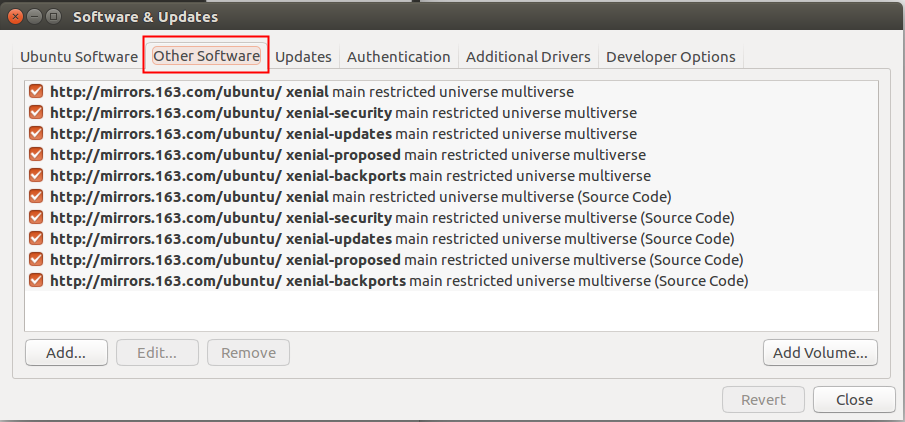
三、修改源
sudo vi /etc/apt/sources.list
里面写入163的源
deb http://mirrors.163.com/ubuntu/ xenial main restricted universe multiverse

deb http://mirrors.163.com/ubuntu/ xenial-security main restricted universe multiverse

deb http://mirrors.163.com/ubuntu/ xenial-updates main restricted universe multiverse

deb http://mirrors.163.com/ubuntu/ xenial-proposed main restricted universe multiverse

deb http://mirrors.163.com/ubuntu/ xenial-backports main restricted universe multiverse

deb-src http://mirrors.163.com/ubuntu/ xenial main restricted universe multiverse

deb-src http://mirrors.163.com/ubuntu/ xenial-security main restricted universe multiverse

deb-src http://mirrors.163.com/ubuntu/ xenial-updates main restricted universe multiverse

deb-src http://mirrors.163.com/ubuntu/ xenial-proposed main restricted universe multiverse

deb-src http://mirrors.163.com/ubuntu/ xenial-backports main restricted universe multiverse
查看源
四、测试
再次sudo apt-get update
提示如下:
guchen@ubuntu:~/soft/Python-2.7.$ sudo apt-get update

Get: http://mirrors.163.com/ubuntu xenial InRelease [2,281 B]

Get: http://mirrors.163.com/ubuntu xenial-security InRelease [2,281 B]

Err: http://mirrors.163.com/ubuntu xenial InRelease

  Clearsigned file isn't valid, got 'NOSPLIT' (does the network require authentication?)

Err: http://mirrors.163.com/ubuntu xenial-security InRelease

  Clearsigned file isn't valid, got 'NOSPLIT' (does the network require authentication?)

Get: http://mirrors.163.com/ubuntu xenial-updates InRelease [2,281 B]

Err: http://mirrors.163.com/ubuntu xenial-updates InRelease

  Clearsigned file isn't valid, got 'NOSPLIT' (does the network require authentication?)

Get: http://mirrors.163.com/ubuntu xenial-proposed InRelease [2,281 B]

Err: http://mirrors.163.com/ubuntu xenial-proposed InRelease

  Clearsigned file isn't valid, got 'NOSPLIT' (does the network require authentication?)

Get: http://mirrors.163.com/ubuntu xenial-backports InRelease [2,281 B]

Err: http://mirrors.163.com/ubuntu xenial-backports InRelease

  Clearsigned file isn't valid, got 'NOSPLIT' (does the network require authentication?)

Fetched , B in 0s (19.8 kB/s)

Reading package lists... Done

E: Failed to fetch http://mirrors.163.com/ubuntu/dists/xenial/InRelease  Clearsigned file isn't valid, got 'NOSPLIT' (does the network require authentication?)

E: Failed to fetch http://mirrors.163.com/ubuntu/dists/xenial-security/InRelease  Clearsigned file isn't valid, got 'NOSPLIT' (does the network require authentication?)

E: Failed to fetch http://mirrors.163.com/ubuntu/dists/xenial-updates/InRelease  Clearsigned file isn't valid, got 'NOSPLIT' (does the network require authentication?)

E: Failed to fetch http://mirrors.163.com/ubuntu/dists/xenial-proposed/InRelease  Clearsigned file isn't valid, got 'NOSPLIT' (does the network require authentication?)

E: Failed to fetch http://mirrors.163.com/ubuntu/dists/xenial-backports/InRelease  Clearsigned file isn't valid, got 'NOSPLIT' (does the network require authentication?)

E: Some index files failed to download. They have been ignored, or old ones used instead.
五、切换认证
怎么还提示:does the network require authentication?
需要权限??
解决方法:将software$updates中的Authentication换一个试试

六、成功
最后再执行一下:
sudo apt-get clean
sudo apt-get update
guchen@ubuntu:~/soft/Python-2.7.$ sudo apt-get update

Get: http://mirrors.163.com/ubuntu xenial InRelease [247 kB]

Get: http://mirrors.163.com/ubuntu xenial-security InRelease [107 kB]

Get: http://mirrors.163.com/ubuntu xenial-updates InRelease [109 kB]

Get: http://mirrors.163.com/ubuntu xenial-proposed InRelease [260 kB]

Get: http://mirrors.163.com/ubuntu xenial-backports InRelease [107 kB]

Get: http://mirrors.163.com/ubuntu xenial/main Sources [868 kB]

Get: http://mirrors.163.com/ubuntu xenial/restricted Sources [4,808 B]

Get: http://mirrors.163.com/ubuntu xenial/universe Sources [7,728 kB]

Get: http://mirrors.163.com/ubuntu xenial/multiverse Sources [179 kB]

Get: http://mirrors.163.com/ubuntu xenial/main amd64 Packages [1,201 kB]

Get: http://mirrors.163.com/ubuntu xenial/main i386 Packages [1,196 kB]

Get: http://mirrors.163.com/ubuntu xenial/main Translation-en [568 kB]

Get: http://mirrors.163.com/ubuntu xenial/main amd64 DEP-11 Metadata [733 kB]

Get: http://mirrors.163.com/ubuntu xenial/main DEP-11 64x64 Icons [409 kB]

Get: http://mirrors.163.com/ubuntu xenial/restricted amd64 Packages [8,344 B]

Get: http://mirrors.163.com/ubuntu xenial/restricted i386 Packages [8,684 B]

Get: http://mirrors.163.com/ubuntu xenial/restricted Translation-en [2,908 B]

Get: http://mirrors.163.com/ubuntu xenial/restricted amd64 DEP-11 Metadata [186 B]

Get: http://mirrors.163.com/ubuntu xenial/universe amd64 Packages [7,532 kB]

Get: http://mirrors.163.com/ubuntu xenial-backports/universe DEP-11 64x64 Icons [1,789 B]

Get: http://mirrors.163.com/ubuntu xenial-backports/multiverse amd64 DEP-11 Metadata [216 B]

Get: http://mirrors.163.com/ubuntu xenial-backports/multiverse DEP-11 64x64 Icons [29 B]

Fetched 53.4 MB in 18s (, kB/s)

AppStream cache update completed, but some metadata was ignored due to errors.

Reading package lists... Done
终于搞定啦
备注:
最好把DNS设置一下
sudo vi /etc/resolv.conf
在里面添加
nameserver 8.8.8.8
重启网络服务
sudo service networking restart
Ubuntu sudo apt-get update提示 Failed to fetch,解决办法的更多相关文章
- ubuntu Linux 测试PHP却提示下载文件的解决办法
ubuntu Linux 测试PHP却提示下载文件的解决办法 一般这种情况都是在刚刚开始配置环境时出现的, 输入 sudo a2enmod php5 看提示如果出现“$ This module ...
- Ubuntu字符界面输入密码始终提示错误 login incorrect 解决办法
方法1. 先输入用户名按enter,然后ctrl+alt+f7 切换回图形界面,然后再切换到字符界面输密码 方法2.先输入用户名按enter,然后关闭小键盘上的numlock按键再打开,再输入密码 f ...
- ubuntu下修改mysql默认字符编码出现的Job failed to start解决办法
ubuntu下修改mysql默认字符编码出现的Job failed to start解决办法 前几天卸掉了用了好多年的Windows,安装了Ubuntu12.04,就开始各种搭环境.今天装好了MySQ ...
- Typora配置PicGo时,提示Failed to fetch【Bug集中营】
Typora配置PicGo时,提示Failed to fetch 两者配置的端口不一致造成的 打开Typora,选择文件-偏好设置-图像-验证图片上传选项,点击验证图片上传选项 会提示错误:Faile ...
- Ubuntu下Linux配置内核各种常见错误和解决办法
镜像下载.域名解析.时间同步请点击阿里云开源镜像站 这篇把Ubuntu下Linux配置内核各种常见错误和解决办法给大家讲解一下,希望可以帮助到大家. 一.Ubuntu系统中缺少各种依赖包导致的问题 1 ...
- Mac打开应用提示已损坏的解决办法
相信很多升级了最新Mac系统的用户在打开一些应用的时候都会出现“应用XX已损坏”的系统提示,安装这些应用的时候总是提示“已损坏,移至废纸篓”这类信息,根本无法打开应用. Mac打开应用提示已损坏的解决 ...
- vs智能提示突然消失的解决办法 (vs2008 vs2010 vs2012 智能提示)
vs智能提示突然消失的解决办法 (vs2008 vs2010 vs2012 智能提示) 下面一段话是网上找到的解决方案: 重置Visual Studio可以解决此问题,方法是从开始->Micro ...
- Win8.1安装VirtualSVN Server发生service visualSVN Server failed to start解决办法
Service 'VisualSVN Server' failed to start. Please check VisualSVN Server log in Event Viewer for mo ...
- Win7 64bit 安装VisualSVN出现报错:Servic 'VisualSVN Server' failed to start.解决办法
问题描述: Win7 64bit 安装VisualSVN时出现报错: Servic 'VisualSVN Server' failed to start.Please check VisualSVN ...
随机推荐
- delphi BLE 学习
TBluetoothLE 控件 TBluetoothLE.FManager: TBluetoothLEManager; class constructor TBluetoothLEManager.Cr ...
- Maven中dependencyManagement使用
在Maven中dependencyManagement的作用其实相当于一个对所依赖jar包进行版本管理的管理器. 在dependencyManagement下申明的dependencies,Maven ...
- MVC地址输出变为小写
其实个人不知道有什么区别,看到大多数都是小写,还是小写吧 去nuget安装一个第三方,然后对路由简单修改一下 插件名称:LowercaseRoutesMVC 方法名:MapRouteLowercase ...
- Spring、Springboot常用注解:@Qualifier(不定时更新)
1.@Qualifier 出现场景: 老项目中有多个实现类实现同一个接口时,或者一个项目中有多个数据源时,spring容器不知道该注入哪个实现类或者使用哪个数据源,该注解就派上用场. 1)多实现类实现 ...
- STL - Vector迭代器简单应用之计算元素和
Description 用vector向量容器装入10个整数,然后,使用迭代器iterator和accumulate算法统计出这10个元素的和 Solution #include "stda ...
- svn 的限制
*.o *.lo *.la *.al .libs *.so *.so.[0-9]* *.a *.pyc *.pyo *.rej *~ #*# .#* .*.swp .DS_Store *.exe *. ...
- 好一个Time_Wait状态(TCP/IP)
首先简单介绍一下Time_Wait是个什么鬼: 在TCP/IP协议中,我们都知道有三次握手四次挥手的过程,先来一个简单的图: 各个状态和基本的过程想必了解过TCP/IP协议的人都清楚,本次介绍的主题只 ...
- 面试-Android之java基础
1.HashMap是否为线程安全. 不安全的. 2.int[] a ={1,2,3,4}; int[]b =a ; b[0]=3; a[0]的值是改变的. 3.组合模式 安卓listview的不同ce ...
- word 标题序号
设置标题的序号. 1>设置二级标题的序号 步骤一: 步骤二: 步骤三: 步骤四: 2>设置三级标题的序号 程序员的基础教程:菜鸟程序员
- 面向对象的JavaScript-001
一. Question是父类,MultipleChoiceQuestion和DragDropQuestion是子类 二. 1. <script> // 面向对象 function Ques ...