
C# winfrom 存取图片到数据库(二进制,image)
1.读取本地图片到PictureBox
 public void InageShow(PictureBox PB)

        {

            OpenFileDialog openfile = new OpenFileDialog();

            openfile.Title = " 请选择客户端longin的图片";

            openfile.Filter = "Login图片 (*.jpg;*.bmp;*png)|*.jpeg;*.jpg;*.bmp;*.png|AllFiles(*.*)|*.*";

            if (DialogResult.OK == openfile.ShowDialog())

            {

                try

                {

                    Bitmap bmp = new Bitmap(openfile.FileName);

                    pictureBox1.Image = bmp;

                    pictureBox1.SizeMode = PictureBoxSizeMode.Zoom;

                   //字面是对当前图片进行了二进制转换

                    MemoryStream ms = new MemoryStream();

                    bmp.Save(ms, System.Drawing.Imaging.ImageFormat.Gif);

                    byte[] arr = new byte[ms.Length];

                    ms.Position = ;

                    ms.Read(arr, , (int)ms.Length);

                    ms.Close();

                    //直接返这个值放到数据就行了

                   string ee = Convert.ToBase64String(arr);

                }

                catch { }

            }

        }
2.根据图片路径将本地图片存入数据库
        private void button2_Click(object sender, EventArgs e)

        {

            //获取用户打开的路径然转换成二进制存入数据库

            OpenFileDialog ofd = new OpenFileDialog();

            ofd.Filter = "*jpg|*.JPG|*.GIF|*.GIF|*.BMP|*.BMP";

            if (ofd.ShowDialog() == DialogResult.OK)

            {

                string filePath = ofd.FileName;//图片路径

                FileStream fs = new FileStream(filePath, FileMode.Open);

                byte[] imageBytes = new byte[fs.Length];

                BinaryReader br = new BinaryReader(fs);

                imageBytes = br.ReadBytes(Convert.ToInt32(fs.Length));//图片转换成二进制流

                string strSql = string.Format("insert into [PointSchool].[dbo].[Table_Image] ([image]) values (@image)");

                int count = Write(strSql, imageBytes);

                if (count > )

                {

                    MessageBox.Show("成功!");

                }

                else

                {

                    MessageBox.Show("失败!");

                }

            }

        }
        private int Write(string strSql, byte[] imageBytes)

        {

            string connStr = "server=.;database=PointSchool;User =sa; pwd =123";

            using (SqlConnection conn = new SqlConnection(connStr))

            {

                using (SqlCommand cmd = new SqlCommand(strSql, conn))

                {

                    try

                    {

                        conn.Open();

                        SqlParameter sqlParameter = new SqlParameter("@image", SqlDbType.Image);

                        sqlParameter.Value = imageBytes;

                        cmd.Parameters.Add(sqlParameter);

                        int rows = cmd.ExecuteNonQuery();

                        return rows;

                    }

                    catch (Exception e)

                    {

                        throw;

                    }

                }

            }

        }
3.picturebox的Image 转换成二进制存入数据库
    public byte[] PhotoImageInsert(System.Drawing.Image imgPhoto)

        {

            //将Image转换成流数据,并保存为byte[]

            MemoryStream mstream = new MemoryStream();

            imgPhoto.Save(mstream, System.Drawing.Imaging.ImageFormat.Bmp);

            byte[] byData = new Byte[mstream.Length];

            mstream.Position = ;

            mstream.Read(byData, , byData.Length);

            mstream.Close();

            return byData;

        }
  string strSql = string.Format("insert into [PointSchool].[dbo].[Table_Image] ([image]) values (@image)");

            int count = Write(strSql, BBBB);

            if (count > )

            {

                MessageBox.Show("成功!");

            }

            else

            {

                MessageBox.Show("失败!");

            }
注:添加方法在上面
4.读取二进制转换成图片
        public void PicboxShow(PictureBox pictureBox2)

        {

            byte[] imagebytes = null;

            //打开数据库

            SqlConnection con = new SqlConnection("server=.;database=PointSchool;User =sa; pwd =123");

            con.Open();

            SqlCommand com = new SqlCommand("select top 1* from Table_Image", con);

            SqlDataReader dr = com.ExecuteReader();

            while (dr.Read())

            {

                imagebytes = (byte[])dr.GetValue();

            }

            dr.Close();

            com.Clone();

            con.Close();

            MemoryStream ms = new MemoryStream(imagebytes);

            Bitmap bmpt = new Bitmap(ms);

            pictureBox2.Image = bmpt;

        }

   pictureBox2.SizeMode = PictureBoxSizeMode.Zoom;
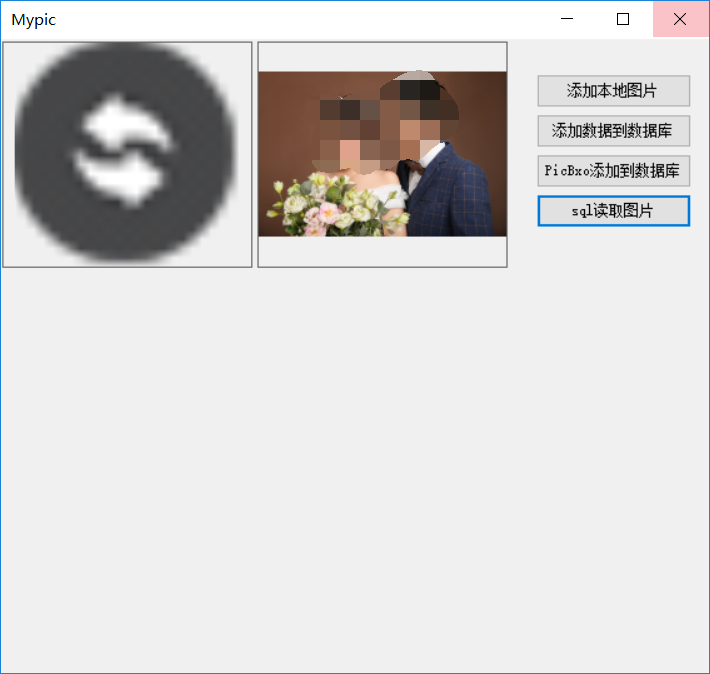
界面图
C# winfrom 存取图片到数据库(二进制,image)的更多相关文章
- sqlite3的图片的(二进制数据)存取操作
sqlite3的图片的(二进制数据)存取操作 前言 上篇介绍了sqlite3的一些常用插入操作方法和注意事项,在实际项目中遇到了图片缓存的问题,由于服务器不是很稳定,且受到外界环境的干扰(例如断电 ...
- 将数据库二进制图片导出显示到EPPlus Excel2007中
1.EPPlus Excel 控件可以参考我的另一篇博客:http://blog.163.com/pei_huiping/blog/static/206573067201281810549984/ 这 ...
- C#图片转换成二进制流并且保存到sql server数据库
注意:我要存储文件二进制流的列的类型是text,不是image类型. 我已经实现了从数据库中读取text类型的二进制流,,现在就是不知道怎么存进去. 我的部分关键代码: StreamReader sr ...
- iOS FMDB的使用(增,删,改,查,sqlite存取图片)
iOS FMDB的使用(增,删,改,查,sqlite存取图片) 在上一篇博客我对sqlite的基本使用进行了详细介绍... 但是在实际开发中原生使用的频率是很少的... 这篇博客我将会较全面的介绍FM ...
- [转载]mongoDB学习笔记——存取图片(C#)
作为一个NoSql数据库的代表,存取多媒体数据,应该是强项吧?那么,图片在mongoDB里是如何存取的呢?(其实,关系型数据库存取图片也一点问题没有,所以我看NoSql的强项不在于是否存储多媒体,而在 ...
- mongoDB学习笔记——存取图片(C#)
作为一个NoSql数据库的代表,存取多媒体数据,应该是强项吧?那么,图片在mongoDB里是如何存取的呢?(其实,关系型数据库存取图片也一点问题没有,所以我看NoSql的强项不在于是否存储多媒体,而在 ...
- C#图片存入数据库及其读出显示
<1>将图片转换成二进制插入数据库 FileStream fs = new FileStream("D:\\Add.ico",FileMode.Open); byte[ ...
- [转]C#将image中的显示的图片转换成二进制
本文转自:http://www.cnblogs.com/shuang121/archive/2012/07/09/2582654.html .将Image图像文件存入到数据库中 我们知道数据库里的Im ...
- C#将image中的显示的图片转换成二进制
原文:C#将image中的显示的图片转换成二进制 1.将Image图像文件存入到数据库中 我们知道数据库里的Image类型的数据是"二进制数据",因此必须将图像文件转换成字节数组才 ...
随机推荐
- 3、数据类型一:strings
题外: 学习过程参考三份资料:<Redis入门指南>.<Redis实战>.http://redis.io 后面的学习笔记中会引入它们的内容或代码,在这里统一说明,后面笔记中便不 ...
- nginx root与alias区别
引用于文章https://blog.csdn.net/line_aijava/article/details/71473793 root: Sets the root directory for re ...
- Linux Centos 7 RabbitMQ 安装
下载地址:http://www.rabbitmq.com/releases/rabbitmq-server/ 找到rabbitmq-server-3.6.15-1.el7.noarch.rpm 第一步 ...
- easyui datagrid combobox下拉框获取数据问题
最近在使用easyui的datagrid,在可编辑表格中添加一个下拉框,查了下API,可以设置type : 'combobox',来做下拉框,这下拉框是有了,可是这后台数据怎么传过来呢,通过查API可 ...
- 如何将Excel日期快速转化为文本格式?
Excel表中日期格式其实是数值,有时候需要原样转成文本,有时候也要将文本转成日期. 我发现了一个方法,估计是最快的了.不需要用那一堆year() month()之类的函数. 快速将日期格式转化为文本 ...
- java 蓝桥杯算法提高 出现次数最多的整数
思路:其实这道题不是太难,但是这个题太坑了,提交了好多次都不是100,后来才知道,一定一定要在输入数组数据之前先判断一下输进去的n的范围,一定一定要注意,否则就是跟我下面的图片一样的效果了,泪奔~ 问 ...
- UV-Sprite动画
[UV-Sprite动画] 下文以单行Sprite纹理作为动画贴图.首先需要输入纹理宽度.Sprint数量.速度: 计算每个Sprite的像素宽与UV宽: 根据_Time,计算当前显示第几个Sprit ...
- Spket,eclipse下安装Spket插件,格式化js
点击菜单 Help => Install New SoftWare => add 如图 name框输入:Skept Location框输入:http://www.agpad.com/upd ...
- Python学习笔记_从CSV读取数据写入Excel文件中
本示例特点: 1.读取CSV,写入Excel 2.读取CSV里具体行.具体列,具体行列的值 一.系统环境 1. OS:Win10 64位英文版 2. Python 3.7 3. 使用第三方库:csv. ...
- Linux下Maven的安装与使用
pache Maven,是一个软件(特别是Java软件)项目管理及自动构建工具,由Apache软件基金会所提供.基于项目对象模型(POM)概念,Maven利 用一个中央信息片断能管理一个项目的构建.报 ...