
邂逅Sass和Compass之Compass篇
本文主要讲解Compass的内容,众所周知Compass是Sass的工具库,如果对Sass不甚了解的同学可以移步 邂逅Sass和Compass之Sass篇 Sass本身只是一个“CSS预处理器”,Compass在它的基础上,封装了一系列的模块和模板,补充了Sass的功能。
1.Compass的安装
和Sass一样,Compass也是用Ruby语言开发的,所以在安装Sass之前必须先安装Ruby,安装Ruby的过程就不再赘述,安装好Ruby后可以直接在命令行输入下面的命令
sudo gem install compass
windows在cmd中输入,但是需要省略前面的sudo。
正常情况下,Compass(连同Sass)就安装好了。
2.Compass初始化一个项目
接下来,要创建一个属于我们自己的Compass项目,假定它的名字叫做learn-compass-init,那么在命令行输入
compass create learn-compass-init
在当前的目录下就会生成一个learn-compass-init子目录(提示:windows玩家可以在需要创建的文件中按住shift+鼠标右键选择在此处打开命令行窗口)。
进入刚刚创建的子目录
cd learn-compass-init
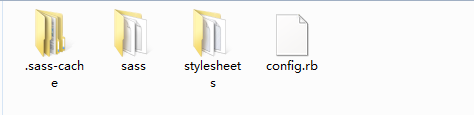
你会看到如下结构,其中config.rb文件,是项目的配置文件。还有两个子目录sass和stylesheets,前者存放我们需要编写的Sass源文件,后者存放编译后的css文件
3.Compass编译一个项目
了解Sass的都知道,我们编写的后缀名为scss的文件只有编译成css文件,才能用在我们的网站上,所以Compass提供了一系列的编译命令。 在项目的根目录运行如下命令
compass compile
会将Sass子目录中的后缀名scss文件编译成css文件,并保存在stylesheets子目录中。
有人会说修改一次scss文件就需要执行一遍compass compile太过麻烦,所以compass还提供了自动编译命令如下
compass watch
运行该命令后,只要scss文件发生修改,就会自动编译成stylesheets子目录中对应css文件。
默认状态下,编译出来的css文件会带有大量的注释,但是我们的只需要压缩后的css文件,这时就需要使用如下命令
compass compile --output-style compressed
4.Compass中的模块
Comapss采用模块结构,不同的模块提供不同的功能,我们在开发中可以按需来引入模块,下面我将着重讲述一下各个模块的主要功能。
Compass内置了六大模块,其中包括如下
-   reset

-   css3

-   layout

-   typography

-   utilities

-   helpers
Reset模块:是浏览器的重置模块,减少浏览器的差异性,即重置浏览器间的差异性。
Layout模块:提供了页面布局的控制能力,比如讲一个容器内的子元素横向纵向占满。
值得注意的是,只有Reset模块和Layout模块是需要显式指定引入的,即只要@import "compass" 就可以引入其他模块。
css3模块:提供了跨浏览器的css3的能力,相信你用过以后再也不会因为加浏览器前缀而头疼不已。
Helpers模块:内含一系列的函数,跟Sass中的函数列表很像(用的很少但是功能很强大)。
Typography模块:修饰文本的样式,垂直韵律。
Utilities模块:可以说Compass将没有办法放到其他模块的内容都放在了该模块中。
其实Compass还提供了Browser Support的方法:它主要用于配置Compass默认支持哪些浏览器,对于指定的浏览器默认支持到哪一个版本,一旦修改就会影响其他六个模块的输出,需要针对不同的浏览器做不同的适配。
关于各个模块使用办法以及特色我将会下面的文章中一一讲述。
*:first-child {
margin-top: 0 !important;
}
body>*:last-child {
margin-bottom: 0 !important;
}
/* BLOCKS
=============================================================================*/
p, blockquote, ul, ol, dl, table, pre {
margin: 15px 0;
}
/* HEADERS
=============================================================================*/
h1, h2, h3, h4, h5, h6 {
padding: 0;
font-weight: bold;
-webkit-font-smoothing: antialiased;
}
h1 tt, h1 code, h2 tt, h2 code, h3 tt, h3 code, h4 tt, h4 code, h5 tt, h5 code, h6 tt, h6 code {
font-size: inherit;
}
/*
h1 {
font-size: 28px;
color: #000;
}
h2 {
font-size: 24px;
border-bottom: 1px solid #ccc;
color: #000;
}
h3 {
font-size: 18px;
}
h4 {
font-size: 16px;
}
h5 {
font-size: 14px;
}
h6 {
color: #777;
font-size: 14px;
}
*/
body>h2:first-child, body>h1:first-child, body>h1:first-child+h2, body>h3:first-child, body>h4:first-child, body>h5:first-child, body>h6:first-child {
margin-top: 0;
padding-top: 0;
}
a:first-child h1, a:first-child h2, a:first-child h3, a:first-child h4, a:first-child h5, a:first-child h6 {
margin-top: 0;
padding-top: 0;
}
h1+p, h2+p, h3+p, h4+p, h5+p, h6+p {
margin-top: 10px;
}
/* LINKS
=============================================================================*/
a {
color: #4183C4;
text-decoration: none;
}
a:hover {
text-decoration: underline;
}
/* LISTS
=============================================================================*/
ul, ol {
padding-left: 30px;
}
ul li > :first-child,
ol li > :first-child,
ul li ul:first-of-type,
ol li ol:first-of-type,
ul li ol:first-of-type,
ol li ul:first-of-type {
margin-top: 0px;
}
ul ul, ul ol, ol ol, ol ul {
margin-bottom: 0;
}
dl {
padding: 0;
}
dl dt {
font-size: 14px;
font-weight: bold;
font-style: italic;
padding: 0;
margin: 15px 0 5px;
}
dl dt:first-child {
padding: 0;
}
dl dt>:first-child {
margin-top: 0px;
}
dl dt>:last-child {
margin-bottom: 0px;
}
dl dd {
margin: 0 0 15px;
padding: 0 15px;
}
dl dd>:first-child {
margin-top: 0px;
}
dl dd>:last-child {
margin-bottom: 0px;
}
/* CODE
=============================================================================*/
pre, code, tt {
font-size: 12px;
font-family: Consolas, "Liberation Mono", Courier, monospace;
}
code, tt {
margin: 0 0px;
padding: 0px 0px;
white-space: nowrap;
border: 1px solid #eaeaea;
background-color: #f8f8f8;
border-radius: 3px;
}
pre>code {
margin: 0;
padding: 0;
white-space: pre;
border: none;
background: transparent;
}
pre {
background-color: #f8f8f8;
border: 1px solid #ccc;
font-size: 13px;
line-height: 19px;
overflow: auto;
padding: 6px 10px;
border-radius: 3px;
}
pre code, pre tt {
background-color: transparent;
border: none;
}
kbd {
-moz-border-bottom-colors: none;
-moz-border-left-colors: none;
-moz-border-right-colors: none;
-moz-border-top-colors: none;
background-color: #DDDDDD;
background-image: linear-gradient(#F1F1F1, #DDDDDD);
background-repeat: repeat-x;
border-color: #DDDDDD #CCCCCC #CCCCCC #DDDDDD;
border-image: none;
border-radius: 2px 2px 2px 2px;
border-style: solid;
border-width: 1px;
font-family: "Helvetica Neue",Helvetica,Arial,sans-serif;
line-height: 10px;
padding: 1px 4px;
}
/* QUOTES
=============================================================================*/
blockquote {
border-left: 4px solid #DDD;
padding: 0 15px;
color: #777;
}
blockquote>:first-child {
margin-top: 0px;
}
blockquote>:last-child {
margin-bottom: 0px;
}
/* HORIZONTAL RULES
=============================================================================*/
hr {
clear: both;
margin: 15px 0;
height: 0px;
overflow: hidden;
border: none;
background: transparent;
border-bottom: 4px solid #ddd;
padding: 0;
}
/* TABLES
=============================================================================*/
/*
table th {
font-weight: bold;
}
table th, table td {
border: 1px solid #ccc;
padding: 6px 13px;
}
table tr {
border-top: 1px solid #ccc;
background-color: #fff;
}
table tr:nth-child(2n) {
background-color: #f8f8f8;
}*/
.postBody a:link, .postBody a:visited, .postBody a:active ,.postBody a,.postBody a:hover,{
text-decoration: none;
}
a:hover{
cursor: pointer;
}
/* IMAGES
=============================================================================*/
img {
max-width: 100%
}
-->
邂逅Sass和Compass之Compass篇的更多相关文章
- 邂逅Sass和Compass之Sass篇
对于一个从后台转到前端的web开发者来说,最大的麻烦就是写CSS,了解CSS的人都知道,它可以开发网页样式,但是没法用它编程,感觉耦合性相当的高,如果想要方便以后维护,只能逐句修改甚至重写相当一部分的 ...
- compass和sass很好的两篇文章
Sass是一种"CSS预处理器",可以让CSS的开发变得简单和可维护.但是,只有搭配Compass,它才能显出真正的威力. 本文介绍Compass的用法.毫不夸张地说,学会了Com ...
- Visual Studio 2013使用SASS和Compass--SASS和Compass安装
你需要安装ruby 你需要安装SASS/Compass 安装sass,在命令行中输入: $ gem install sass 你可能会问gem是什么?gem是ruby的包管理器.包的概念呢,就是一个为 ...
- Sass学习笔记之入门篇
Sass又名SCSS,是CSS预处理器之一,,它能用来清晰地.结构化地描述文件样式,有着比普通 CSS 更加强大的功能. Sass 能够提供更简洁.更优雅的语法,同时提供多种功能来创建可维护和管理的样 ...
- sass语法一(变量篇)
文件后缀名 sass有两种后缀名的文件:一种后缀名为sass,不使用大括号和分号:另一种是我们这里使用的scss文件,这种和我们平时使用的css文件格式差不多,使用大括号和分号. //后缀名为sass ...
- 分享15款很实用的 Sass 和 Compass 工具
Sass 是 CSS 的扩展,增加了嵌套规则,变量,混入功能等很多更多.它简化了组织和维护 CSS 代码的成本.Compass 是一个开源的 CSS 框架,使得使用 CSS3 和流行的设计模式比以往任 ...
- 【Sass初级】开始使用Sass和Compass
转自:http://www.w3cplus.com/preprocessor/beginner/getting-started-with-sass-and-compass.html 如果你的朋友.同事 ...
- 学习Sass 的基本语法规则[Sass和compass学习笔记]
自从发现可编程的css语法 Sass和基于Sass的css库compass 一个给我的感觉像c# 另外一个给我的感觉像.NET Framework,一切都为了提升开发效率和降低开发大型web的门槛. ...
- sass&compass&grunt
1. compass compile path/to/project//编译scss compass watch path/to/project//自动监视文件变化 2.mixin @include ...
随机推荐
- laravel5.1 使用中间表的多对多关联
用户表user 标签表tag 中间表user_tag(user_id,tag_id) 在user模型中定义tags关联如下: public function tags() { return $this ...
- python中如何优雅使用import
http://note.youdao.com/noteshare?id=c55be6a8565f5eb586aa52244b3af010
- 3.6 scikit-learn:Python中的机器学习
sklearn实战-乳腺癌细胞数据挖掘(博主亲自录制视频教程) https://study.163.com/course/introduction.htm?courseId=1005269003&am ...
- java rmi远程方法调用实例
RMI的概念 RMI(Remote Method Invocation)远程方法调用是一种计算机之间利用远程对象互相调用实现双方通讯的一种通讯机制.使用这种机制,某一台计算机上的对象可以调用另外一台计 ...
- 使用quartz.jar 、quartz-jobs.jar 实现定时任务 。实现 定时采集 接口数据
前言 定时任务管理,在java中有很多种的方式 ,有java自带的注解方式@Scheduled 等 ,现在我要说的是一种也是使用比较广泛的一种quartz管理 使用此类 需要的加jar包有 quar ...
- WdatePicker日历控件动态设置属性参数值
首先吐槽一下需求人员给了我一个很坑的需求:WdatePicker日历控件里面选择的最小时间(minDate)的值是级联动态改变的,而且这个值要从数据库获取,这样子只能使用 ajax 来发起请求获取mi ...
- ELK 企业内部日志分析系统
生产环境配置 亿级规模,建议64G内存+8核CPU ES JVM占用一半内存 生产环境的3节点的集群 https://blog.csdn.net/xuduorui/article/details/79 ...
- [php]HTTP协议头解析
(Request-Line) GET /static/imgs/bqpd.jpg HTTP/1.1 Accept image/png, image/svg+xml, image/*;q=0.8, */ ...
- mybatis错误总结
1:传递多个参数失败 Parameter 'username' not found. Available parameters are [0, 1, param1, param2] dao层错误写 ...
- jQuery.pin.js笔记
jQuery.pin.js是一个把元素钉在页面上某个位置的插件,它能够将某个元素一直挂在一个固定的位置而不论滚动条是否滚动. 特点: 1. 可以钉住一个元素,主要作用就是滚动超出的时候不会隐藏而是一直 ...