
C#做的在线升级小程序
转自原文C#做的在线升级小程序
日前收到一个小任务,要做一个通用的在线升级程序。更新的内容包括一些dll或exe或、配置文件。升级的大致流程是这样的,从服务器获取一个更新的配置文件,经过核对后如有新的更新,则会从服务器下载相应的文件更新到被升级的程序目录下。如果被升级的程序在升级之前已经启动,程序则会强制关闭它,待到升级完成之后重新启动相应的程序。在升级之前程序会自动备份一次,以防升级失败造成程序不能运行。
定义数据实体
    public class FileENT

    {

        public string FileFullName { get; set; }

        public string Src { get; set; }

        public string Version { get; set; }

        public int Size { get; set; }

        public UpdateOption Option { get; set; }

    }
下面这个类时程序的一些参数,包括了系统的配置参数,为了程序能通用一点,就加了配置上去。
    public class AppParameter

    {

        /// <summary>

        /// 备份路径

        /// </summary>

        public static string BackupPath = ConfigurationManager.AppSettings["backupPath"];

        /// <summary>

        /// 更新的URL

        /// </summary>

        public static string ServerURL = ConfigurationManager.AppSettings["serverURL"];

        /// <summary>

        /// 本地更新文件全名

        /// </summary>

        public static string LocalUPdateConfig = ConfigurationManager.AppSettings["localUPdateConfig"];

        /// <summary>

        /// 版本号

        /// </summary>

        public static string Version = ConfigurationManager.AppSettings["version"];

        /// <summary>

        /// 更新程序路径

        /// </summary>

        public static string LocalPath = AppDomain.CurrentDomain.BaseDirectory;

        /// <summary>

        /// 主程序路径

        /// </summary>

        public static string MainPath = ConfigurationManager.AppSettings["mainPath"];

        /// <summary>

        /// 有否启动主程序

        /// </summary>

        public static bool IsRunning = false;

        /// <summary>

        /// 主程序名

        /// </summary>

        public static List<string> AppNames = ConfigurationManager.AppSettings["appName"].Split(';').ToList();

    }
AppParameter
接着就介绍程序的代码
程序是用窗体来实现的,下面三个是窗体新添加的三个字段
private bool isDelete = true;    //是否要删除升级配置

private bool runningLock = false;//是否正在升级

private Thread thread;           //升级的线程
载入窗体时需要检查更新,如果没有更新就提示”暂时无更新”;如果有更新的则先进行备份,备份失败的话提示错误退出更新。
if (CheckUpdate())

{

    if (!Backup())

    {

        MessageBox.Show("备份失败!");

        btnStart.Enabled = false;

        isDelete = true;

        return;

    }

}

else

{

    MessageBox.Show("暂时无更新");

    this.btnFinish.Enabled = true;

    this.btnStart.Enabled = false;

    isDelete = false;

    this.Close();

}
在这些操作之前还要检测被更新程序有否启动,有则将其关闭。
            List<string> processNames = new List<string>();

            string mainPro = string.Empty;

            processNames.AddRange(AppParameter.AppNames);

            for (int i = ; i < processNames.Count; i++)

            {

                processNames[i] = processNames[i].Substring(processNames[i].LastIndexOf('\\')).Trim('\\').Replace(".exe", "");

            }

            mainPro = processNames.FirstOrDefault();

            AppParameter.IsRunning = ProcessHelper.IsRunningProcess(mainPro);

            if (AppParameter.IsRunning)

            {

                MessageBox.Show("此操作需要关闭要更新的程序,请保存相关数据按确定继续", "提示", MessageBoxButtons.OK, MessageBoxIcon.Warning);

                foreach (string item in processNames)

                    ProcessHelper.CloseProcess(item);

            }
另外上面用到的CheckUpdate( )和Backup( )方法如下
        /// <summary>

        /// 检查更新 有则提示用户 确认后下载新的更新配置

        /// </summary>

        /// <returns>用户确认信息</returns>

        public static bool CheckUpdate()

        {

            bool result = false;

            HttpHelper.DownLoadFile(AppParameter.ServerURL, AppParameter.LocalPath + "temp_config.xml");

            if (!File.Exists(AppParameter.LocalUPdateConfig))

                result = true;

            else

            {

                long localSize = new FileInfo(AppParameter.LocalUPdateConfig).Length;

                long tempSize = new FileInfo(AppParameter.LocalPath + "temp_config.xml").Length;

                if (localSize >= tempSize) result = false;

                else result = true;

            }

            if (result)

            {

                if (File.Exists(AppParameter.LocalUPdateConfig)) File.Delete(AppParameter.LocalUPdateConfig);

                File.Copy(AppParameter.LocalPath + "temp_config.xml", AppParameter.LocalUPdateConfig);

            }

            else

                result = false;

            File.Delete(AppParameter.LocalPath + "temp_config.xml");

            return result;

        }

        /// <summary>

        /// 备份

        /// </summary>

        public static bool Backup()

        {

            string sourcePath = Path.Combine(AppParameter.BackupPath, DateTime.Now.ToString("yyyy-MM-dd HH_mm_ss")+"_v_"+AppParameter.Version + ".rar");

            return ZipHelper.Zip(AppParameter.MainPath.Trim() , sourcePath);

        }
下面则是更新部分的代码,使用了多线程。出于两方面的考虑,一是进度条需要;二是如果用单线程,万一更新文件下载时间过长或者更新内容过多,界面会卡死。
/// <summary>

/// 更新

/// </summary>

public void UpdateApp()

{

    int successCount = ;

    int failCount = ;

    int itemIndex = ;

    List<FileENT> list = ConfigHelper.GetUpdateList();

    if (list.Count == )

    {

        MessageBox.Show("版本已是最新", "提示", MessageBoxButtons.OK, MessageBoxIcon.Information);

        this.btnFinish.Enabled = true;

        this.btnStart.Enabled = false;

        isDelete = false;

        this.Close();

        return;

    }

    thread = new Thread(new ThreadStart(delegate

    {

        #region thread method

        FileENT ent = null;

        while (true)

        {

            lock (this)

            {

                if (itemIndex >= list.Count)

                    break;

                ent = list[itemIndex];

                string msg = string.Empty;

                if (ExecUpdateItem(ent))

                {

                    msg = ent.FileFullName + "更新成功";

                    successCount++;

                }

                else

                {

                    msg = ent.FileFullName + "更新失败";

                    failCount++;

                }

                if (this.InvokeRequired)

                {

                    this.Invoke((Action)delegate()

                    {

                        listBox1.Items.Add(msg);

                        int val = (int)Math.Ceiling(1f / list.Count * );

                        progressBar1.Value = progressBar1.Value + val >  ?  : progressBar1.Value + val;

                    });

                }

                itemIndex++;

                if (successCount + failCount == list.Count && this.InvokeRequired)

                {

                    string finishMessage = string.Empty;

                    if (this.InvokeRequired)

                    {

                        this.Invoke((Action)delegate()

                        {

                            btnFinish.Enabled = true;

                        });

                    }

                    isDelete = failCount != ;

                    if (!isDelete)

                    {

                        AppParameter.Version = list.Last().Version;

                        ConfigHelper.UpdateAppConfig("version", AppParameter.Version);

                        finishMessage = "升级完成,程序已成功升级到" + AppParameter.Version;

                    }

                    else

                        finishMessage = "升级完成,但不成功";

                    MessageBox.Show(finishMessage, "提示", MessageBoxButtons.OK, MessageBoxIcon.Information);

                    runningLock = false;

                }

            }

        }

        #endregion

    }));

    runningLock = true;

    thread.Start();

}

/// <summary>

/// 执行单个更新

/// </summary>

/// <param name="ent"></param>

/// <returns></returns>

public bool ExecUpdateItem(FileENT ent)

{

    bool result = true;

    try

    {

        if (ent.Option == UpdateOption.del)

            File.Delete(ent.FileFullName);

        else

            HttpHelper.DownLoadFile(ent.Src, Path.Combine(AppParameter.MainPath, ent.FileFullName));

    }

    catch { result = false; }

    return result;

}
只开了一个子线程,原本是开了5个子线程的,但是考虑到多线程会导致下载文件的顺序不确定,还是用回单线程会比较安全。线程是用了窗体实例里的thread字段,在开启线程时还用到runningLock标识字段,表示当前正在更新。当正在更新程序时关闭窗口,则要提问用户是否结束更新,若用户选择了是则要结束那个更新进程thread了,下面则是窗口关闭的时间FormClosing事件的方法。
if (runningLock )

{

if (MessageBox.Show("升级还在进行中,中断升级会导致程序不可用,是否中断",

"提示", MessageBoxButtons.YesNo, MessageBoxIcon.Asterisk) == DialogResult.Yes)

{

if (thread != null) thread.Abort();

isDelete = true;

AppParameter.IsRunning = false;

}

    else

    {

        e.Cancel = true;

        return;

    }

}

if (isDelete) File.Delete(AppParameter.LocalUPdateConfig);
在这里还要做另一件事,就是把之前关了的程序重新启动。
try

{

    if (AppParameter.IsRunning) ProcessHelper.StartProcess(AppParameter.AppNames.First());

}

catch (Exception ex)

{

    MessageBox.Show("程序无法启动!" + ex.Message, "错误", MessageBoxButtons.OK, MessageBoxIcon.Error);

}
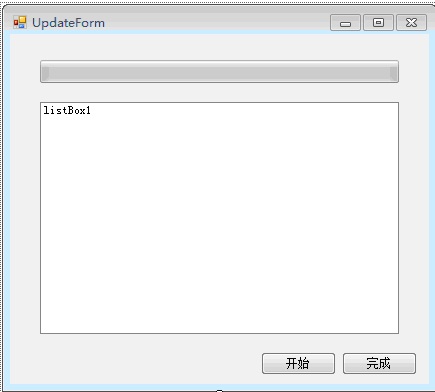
在这里展示一下更新的界面。挺丑的,别笑哈。
更新程序的配置信息如下
1   <appSettings>

2     <add key="backupPath" value="C:\Users\Administrator\Desktop\temp\backup"/>

3     <add key="serverURL" value="http://localhost:8015/updateconfig.xml"/>

4     <add key="localUPdateConfig" value="E:\HopeGi\Code\MyUpdate\MyUpdate\bin\Debug\updateconfig.xml"/>

5     <add key="version" value="2"/>

6     <add key="mainPath" value="C:\Users\Administrator\Desktop\temp\main"/>

7     <add key="appName" value="D:\test.exe"/>

8   </appSettings>
完整文档下载:
http://pan.baidu.com/share/link?shareid=443378&uk=85241834或者通过本博客百度网盘资源公开目录下载
博客内的百度网盘资源公开目录下载

C#做的在线升级小程序的更多相关文章
- Flash在线签名小程序,可回放,动态导出gif图片
需求: 公司为了使得和客户领导签字的时候记录下来,签字过程,可以以后动态回放演示,最好是gif图片,在网页上也容易展示,文件也小. 解决过程: 始我们去寻找各种app,最终也没有找到合适的,后来我在f ...
- 做一个开源的小程序登录模块组件(token)
先了解下SSO 对于单点登陆浅显一点的说就是两种,一种web端的基于Cookie.另一种是跨端的基于Token,一般想要做的都优先做Token吧,个人建议,因为后期扩展也方便哦. 小程序也是呢,做成t ...
- python开发_tkinter_自己做的猜数字小程序
读到这篇文章[python 3.3下结合tkinter做的猜数字程序]的时候,就复制了代码,在自己机器上面跑了一下 源程序存在一个缺陷: 即当用户答对了以后,用户再点击'猜'按钮,最上面的提示标签还会 ...
- 【小程序分享篇 二 】web在线踢人小程序,维持用户只能在一个台电脑持登录状态
最近离职了, 突然记起来还一个小功能没做, 想想也挺简单,留下代码和思路给同事做个参考. 换工作心里挺忐忑, 对未来也充满了憧憬与担忧.(虽然已是老人, 换了N次工作了,但每次心里都和忐忑). 写写代 ...
- 微信小程序来了,小程序都能做些什么
2017年的微信大动作就是微信小程序了,到底小程序都能做些什么?这是很多人关注的热点,小程序开发对企业又有什么帮助呢?下面让厦门微信小程序开发公司来为你就分析下. 微信小程序与APP的关系 ...
- 在线制作一键生成微信小程序实现原理之需求分析
随着微信小程序接口不断的放开,小程序在今年或许是明年必将成为商家的一个标配,这个标配的标准就是要开发周期短,费用低,功能实用.只有这样才能让线下的广大商家快速接入.现在也有好多公司开发出了一键生成快速 ...
- 用Taro做个微信小程序Todo, 小白工作记录
微信小程序框架: Taro 做微信小程序的框架, 几个比较主流的: 官方的WePY: https://tencent.github.io/wepy/document.html#/ 美团的mpvue: ...
- 微信小程序踩坑集合
1:官方工具:https://mp.weixin.qq.com/debug/w ... tml?t=1476434678461 2:简易教程:https://mp.weixin.qq.com/debu ...
- 微信小程序学习指南
作者:初雪链接:https://www.zhihu.com/question/50907897/answer/128494332来源:知乎著作权归作者所有.商业转载请联系作者获得授权,非商业转载请注明 ...
随机推荐
- 程序设计入门-C语言基础知识-翁恺-第五周:函数-详细笔记(五)
目录 第五周:函数 5.1 函数 5-2 使用函数 5.3 课后习题 第五周:函数 5.1 函数 什么是函数? 函数是一块代码,接受零个或多个参数,做一件事情,并返回零个或一个值. 函数声明语法 返回 ...
- HDU1575 Tr A
解题思路:矩阵快速幂模板题,见代码: #include<cstdio> #include<cstring> #include<algorithm> using na ...
- javascript进阶修炼之一——javascript必备操做
动态选择方法及属性 使用方括号操作符,比点操作符功能更强大.因为可以在[ ]方括号中使用任何代表成员名称的内容访问对象.包括字面量,保存着成员名称的变量,名称组合,三元操作符.所有这些内容都会被处理成 ...
- tableau-详细级别表达式——2、阵列分析
tableau做阵列分析 合作时间越长的客户对销售额的贡献越大吗? 下面的视图按照客户首次购买的年份将客户分组,以便对比各个阵列的年度销售贡献额. 每个客户的最早订单日期将体现出首次购买日期.不过,由 ...
- Prism patterns & practices Developer Center
Prism https://docs.microsoft.com/en-us/previous-versions/msp-n-p/ff648465(v=pandp.10) Prism provides ...
- Windows10安装MySQL8.0
1.到MySQL官网下载安装包:https://dev.mysql.com/downloads/mysql/:选择8.0版本: 2.将下载好的安装包(mysql-8.0.12-winx64 .zip) ...
- Oracle基础查询
select * from teacher--女性老师编号.姓名select tno,tname,gendar from teacher where gendar='女'--姓韩的女性老师编号.姓名. ...
- Terraform 多云管理工具
1. 介绍 Terraform is a tool for building, changing, and versioning infrastructure safely and efficie ...
- RK3288 usb 摄像头旋转
系统:Android 5.1 下面实现了摄像头 180 度旋转,旋转角度只需修改 orientation. diff --git a/hardware/rockchip/camera/CameraHa ...
- RK3288 error: undefined reference to 'LOGD'
HAL层和JNI层中的打印都必须包含下面的宏和头文件. 比如:LOGD.LOGE等等. #define LOG_TAG "TEST_LED" #include <utils/ ...