
vue 时间选择器组件
vue 时间选择器组件
组件效果:
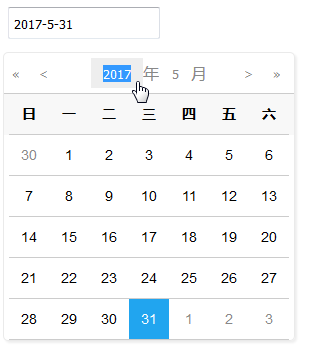
单文件组件:
<template>

<div class="date-pickers">

  <!--date为computed计算属性中得到的值 focus调用初始化日期方法-->

<input type="text" placeholder="选择日期" @focus="trueDateBox" :value="date" readonly/>

<!--基于ATUI的输入框,和input没有太大区别-->

<!--<at-input type="data" placeholder="输入提示" @focus="trueDateBox" :value="date" readonly style="width:200px;display: inline-block;"></at-input>-->

  <transition name="fade">

  <div class="date-box" v-if="dateBoxFlag">

  <div class="day-select" style="height:40px;text-align: center">

  <div>

  <button @click="reduceYear"><<</button>

  <button @click="reduceMonth"><</button>

  </div>

  <div>

  <input type="text" @click="selected" v-model="year"/>年

  <input type="text" @click="selected" v-model="month"/>月

  </div>

  <div>

  <button @click="addMonth">></button>

  <button @click="addYear">>></button>

  </div>

  </div>

  <div class="day-screen">

  <div style="padding: 0;margin: 0">

  <span v-for="week in week">{{ week }}</span>

</div>

<div @click="selectDay" style="padding: 0;margin: 0">

  <span v-for="day in previousMonth" class="previousMonth"> {{ day }} </span>

<span v-for="day in monthDay[month - 1]" :class="isActive(day)" class="currentMonth">{{ day }}</span>

<span v-for="day in nextMonth" class="nextMonth">{{ day }}</span>

</div>

</div>

</div>

</transition>

</div>

</template>

<script>

export default {

  name: 'datePickers',

  data () {

    return {

      dateBoxFlag: false,

      year: 0,

      month: 0,

      day: 0,

      previousMonth: [],

      nextMonth: [],

      week: ['日', '一', '二', '三', '四', '五', '六'],

      monthDay: [31, 28, 31, 30, 31, 30, 31, 31, 30, 31, 30, 31],

      dateTime:""

    }

  }, props: {

    oldTime: ""

  },

  mounted:function () {

    console.log(this.oldTime)

    if (this.oldTime != null) {

      var date = new Date(parseInt(this.oldTime.replace("/Date(", "").replace(")/", ""), 10));

      //月份为0-11,所以+1,月份小于10时补个0

      var month = date.getMonth() + 1 < 10 ? "0" + (date.getMonth() + 1) : date.getMonth() + 1;

      var currentDate = date.getDate() < 10 ? "0" + date.getDate() : date.getDate();

      this.year=date.getFullYear();

      this.month=month;

      this.day=currentDate;

      this.$emit('datatime',this.date);

    }

  },

  computed: {

    date () {

      if (this.year == 0 || this.month == 0 || this.day == 0) {

        return '';

      }

      return this.year + '-' + this.month + '-' + this.day;

    }

  },

  watch: {

    year: function (val) {

      let reg = /^[1-9]\d*$/g;

      if (!reg.test(val)) {

        let date = new Date();

        this.year = date.getFullYear();

      }

      if (val < 0) {

        this.year = 1;

      }

      if (val > 10000) {

        this.year = 10000;

      }

      this.dayScreen();

    },

    month: function (val) {

      let reg = /^[1-9]\d*$/g;

      if (!reg.test(val)) {

        let date = new Date();

        this.month = date.getMonth() + 1;

      }

      if (val < 1) {

        this.month = 1;

      }

      if (val > 12) {

        this.month = 12;

      }

      this.dayScreen();

    },

  },

  methods: {

    // 突出显示当前日期

    isActive (index) {

      if (index == this.day) {

        return {

          active: true,

        }

      }

    },

    // 显示日期盒子并初始化

    trueDateBox () {

      if (this.date === '') {

        let date = new Date();

        this.year = date.getFullYear();

        if (this.isLeapYear(this.year)) {

          this.monthDay[1] = 29;

        } else {

          this.monthDay[1] = 28;

        }

        this.month = date.getMonth() + 1;

        this.day = date.getDate();

      }

      this.dayScreen();

      this.dateBoxFlag = true;

    },

    // 增减年份

    addYear () {

      this.year++;

      if (this.isLeapYear(this.year)) {

        this.monthDay[1] = 29;

      } else {

        this.monthDay[1] = 28;

      }

    },

    reduceYear () {

      this.year--;

      if (this.isLeapYear(this.year)) {

        this.monthDay[1] = 29;

      } else {

        this.monthDay[1] = 28;

      }

    },

    // 增减月份

    addMonth () {

      this.month++;

      if (this.month > 12) {

        this.month = 1;

        this.year++;

      }

    },

    reduceMonth () {

      this.month--;

      if (this.month < 1) {

        this.month = 12;

        this.year--;

      }

    },

    // 获取input里的文字

    selected (e) {

      e.target.select();

    },

    // 选择日期

    selectDay (e) {

      let targetClass = e.target.className;

      if (targetClass == 'previousMonth') {

        if (this.month == 1) {

          this.month = 12;

          this.year--;

        } else {

          this.month = this.month - 1;

        }

        this.day = parseInt(e.target.innerText);

      } else if (targetClass == 'nextMonth') {

        if (this.month == 12) {

          this.month = 1;

          this.year++;

        } else {

          this.month = this.month + 1;

        }

        this.day = parseInt(e.target.innerText);

      } else {

        this.day = parseInt(e.target.innerText);

      }

      this.$emit('datatime',this.date);

      this.dateBoxFlag = false;

    },

    // 日期显示

    dayScreen () {

      // 上一个月

      let firstDate = new Date(this.year, this.month - 1, 1);

      let firstWeek = firstDate.getDay();

      let preMonthDay = null;

      if (this.month == 1) {

        preMonthDay = this.monthDay[11];

      } else {

        preMonthDay = this.monthDay[this.month - 2];

      }

      for (let i = 0; i < preMonthDay; i++) {

        this.previousMonth[i] = i + 1;

      }

      if (firstWeek == 0) {

        this.previousMonth = this.previousMonth.slice(-7);

      } else {

        this.previousMonth = this.previousMonth.slice(-firstWeek);

      }

      // 下一个月

      let endDate = new Date(this.year, this.month - 1, this.monthDay[this.month - 1]);

      let endWeek = endDate.getDay();

      let nextMonthDay = null;

      if (this.month == 12) {

        nextMonthDay = this.monthDay[0];

      } else {

        nextMonthDay = this.monthDay[this.month];

      }

      for (let i = 0; i < nextMonthDay; i++) {

        this.nextMonth[i] = i + 1;

      }

      if (endWeek == 6) {

        this.nextMonth = this.nextMonth.slice(0, 7);

      } else {

        this.nextMonth = this.nextMonth.slice(0, 6 - endWeek);

      }

    },

    // 判断是否是闰年

    isLeapYear (year) {

      return (year % 100 == 0 ? (year % 400 == 0 ? true : false) : (year % 4 == 0 ? true : false));

    },

  }

}

</script>

<style>

.date-pickers {

  width: 280px;

  position: relative;

}

.date-pickers > input {

  width: 50%;

  height: 20px;

  padding: 5px;

}

.date-pickers .fade-enter-active, .date-pickers .fade-leave-active {

  transition: all 0.5s;

}

.date-pickers .fade-enter, .date-pickers .fade-leave-active {

  opacity: 0;

  transform: translateY(-10px);

}

.date-pickers > .date-box {

  width: 100%;

  border: 1px solid #EAEAEA;

  border-radius: 5px;

  box-shadow: 2px 2px 2px #eee;

  background: white;

  position: absolute;

  bottom: 38px;

  left: 0px;

  z-index: 99;

}

.date-pickers > div div.day-select {

  display: flex;

  padding: 5px 0;

  height: 30px;

  line-height: 30px;

  color: #888888;

  border-bottom: 1px solid #ccc;

}

.date-pickers > div div.day-select input,

.date-pickers > div div.day-select button {

  border: none;

  background: white;

  text-align: center;

  color: #888888;

  cursor: pointer;

}

.date-pickers > div div.day-select > div:nth-child(1),

.date-pickers > div div.day-select > div:nth-child(3) {

  width: 20%;

}

.date-pickers > div div.day-select > div:nth-child(2) {

  width: 60%;

  display: flex;

  justify-content: center;

}

.date-pickers > div div.day-select > div:nth-child(2) input:hover {

  background: #eee;

}

.date-pickers > div div.day-select > div:nth-child(2) input:nth-child(1) {

  width: 50px;

}

.date-pickers > div div.day-select > div:nth-child(2) input:nth-child(2) {

  width: 30px;

}

.date-pickers > div div.day-screen > div {

  width: 280px;

  padding: 0 5px;

  display: flex;

  font-size: 14px;

  justify-content: flex-start;

  flex-wrap: wrap;

}

.date-pickers > div div.day-screen > div span {

  width: 40px;

  height: 40px;

  text-align: center;

  line-height: 40px;

  border-bottom: 1px solid #ccc;

}

.date-pickers > div div.day-screen > div:nth-child(1) {

  font-weight: bold;

  background: #F8F8F8;

}

.date-pickers > div div.day-screen > div:nth-child(2) span {

  cursor: pointer;

  color: black;

}

.date-pickers > div div.day-screen > div:nth-child(2) span:hover, .date-pickers > div div.day-screen > div:nth-child(2) span.active {

  background: #21A5EF;

  color: white;

}

.date-pickers > div div.day-screen > div:nth-child(2) span.previousMonth,

.date-pickers > div div.day-screen > div:nth-child(2) span.nextMonth {

  color: #888888;

}

/*# sourceMappingURL=style.css.map */

</style>
vue引用该单文件组件,会在页面显示一个输入框,点击后出现日期选择器。但是页面调用需要获取父组件的默认值并向父组件传递日期选择结果。(默认为空时可以不向子组件传值)
<datePickers v-on:datatime="datatime" :oldTime="$store.state.Jtnc.seeobjs.DJSJ" v-if="isRouterAlive" class="inputStyle" ></datePickers>
 v-on:datatime="datatime"向子组件传递了一个方法,子组件调用方法后可将选定日期值值传回父组件。
父组件方法:datatime
/*时间处理*/

      datatime(theTime){

        this.modifyModel.DJSJ = theTime;

      },
子组件调用(在选择日期的方法selectDay中调用):
this.$emit('datatime',this.date);

:oldTime="$store.state.Jtnc.seeobjs.DJSJ"将默认的日期值传入子组件,子组件通过props接收,看到组件时将看到默认日期。
props: {

      oldTime: ""

    }
v-if="isRouterAlive"为强制刷新组件的开关,由于该组件会在打开页面时加载,而默认日期如果在打开模态框时传入,所以在打开模态框时强行刷新组件,可看到默认日期。
将数据渲染在模态框中是调用this.reload()刷新组件。(https://www.cnblogs.com/s313139232/p/9176820.html)
 /*组件刷新*/

      reload () {

        this.isRouterAlive = false;

        this.$nextTick(() => (this.isRouterAlive = true))

      },
组件源代码:
.vue文件:
<template>
<div class="date-pickers">
<input type="text" placeholder="选择日期" @focus="trueDateBox" :value="date" readonly />
<transition name="fade">
<div class="date-box" v-if="dateBoxFlag">
<div class="day-select">
<div>
<button @click="reduceYear">«</button>
<button @click="reduceMonth"><</button>
</div>
<div>
<input type="text" @click="selected" v-model="year" />年
<input type="text" @click="selected" v-model="month" />月
</div>
<div>
<button @click="addMonth">></button>
<button @click="addYear">»</button>
</div>
</div>
<div class="day-screen">
<div>
<span v-for="week in week">{{ week }}</span>
</div>
<div @click="selectDay">
<span v-for="day in previousMonth" class="previousMonth"> {{ day }} </span>
<span v-for="day in monthDay[month - 1]" v-bind:class="isActive(day)" class="currentMonth">{{ day }}</span>
<span v-for="day in nextMonth" class="nextMonth">{{ day }}</span>
</div>
</div>
</div>
</transition>
</div>
</template> <script>
export default {
name: 'datePickers',
data () {
return {
dateBoxFlag: false,
year: 0,
month: 0,
day: 0,
previousMonth: [],
nextMonth: [],
week: ['日', '一', '二', '三', '四', '五', '六'],
monthDay: [31, 28, 31, 30, 31, 30, 31, 31, 30, 31, 30, 31],
}
},
computed: {
date () {
if (this.year == 0 || this.month == 0 || this.day == 0) {
return '';
}
return this.year + '-' + this.month + '-' + this.day;
}
},
watch: {
year: function (val) {
let reg = /^[1-9]\d*$/g;
if (!reg.test(val)) {
let date = new Date();
this.year = date.getFullYear();
}
if (val < 0) {
this.year = 1;
}
if (val > 10000) {
this.year = 10000;
}
this.dayScreen();
},
month: function (val) {
let reg = /^[1-9]\d*$/g;
if (!reg.test(val)) {
let date = new Date();
this.month = date.getMonth() + 1;
}
if (val < 1) {
this.month = 1;
}
if (val > 12) {
this.month = 12;
}
this.dayScreen();
},
},
methods: {
// 突出显示当前日期
isActive (index) {
if (index == this.day) {
return {
active: true,
}
}
},
// 显示日期盒子并初始化
trueDateBox () {
if (this.date === '') {
let date = new Date();
this.year = date.getFullYear();
if (this.isLeapYear(this.year)) {
this.monthDay[1] = 29;
} else {
this.monthDay[1] = 28;
}
this.month = date.getMonth() + 1;
this.day = date.getDate();
}
this.dayScreen();
this.dateBoxFlag = true;
},
// 增减年份
addYear () {
this.year++;
if (this.isLeapYear(this.year)) {
this.monthDay[1] = 29;
} else {
this.monthDay[1] = 28;
}
},
reduceYear () {
this.year--;
if (this.isLeapYear(this.year)) {
this.monthDay[1] = 29;
} else {
this.monthDay[1] = 28;
}
},
// 增减月份
addMonth () {
this.month++;
if (this.month > 12) {
this.month = 1;
this.year++;
}
},
reduceMonth () {
this.month--;
if (this.month < 1) {
this.month = 12;
this.year--;
}
},
// 获取input里的文字
selected (e) {
e.target.select();
},
// 选择日期
selectDay (e) {
let targetClass = e.target.className;
if (targetClass == 'previousMonth') {
if (this.month == 1) {
this.month = 12;
this.year--;
} else {
this.month = this.month - 1;
}
this.day = parseInt(e.target.innerText);
} else if (targetClass == 'nextMonth') {
if (this.month == 12) {
this.month = 1;
this.year++;
} else {
this.month = this.month + 1;
}
this.day = parseInt(e.target.innerText);
} else {
this.day = parseInt(e.target.innerText);
}
this.dateBoxFlag = false;
},
// 日期显示
dayScreen () {
// 上一个月
let firstDate = new Date(this.year, this.month - 1, 1);
let firstWeek = firstDate.getDay();
let preMonthDay = null;
if (this.month == 1) {
preMonthDay = this.monthDay[11];
} else {
preMonthDay = this.monthDay[this.month - 2];
}
for (let i = 0; i < preMonthDay; i++) {
this.previousMonth[i] = i + 1;
}
if (firstWeek == 0) {
this.previousMonth = this.previousMonth.slice(-7);
} else {
this.previousMonth = this.previousMonth.slice(-firstWeek);
}
// 下一个月
let endDate = new Date(this.year, this.month - 1, this.monthDay[this.month - 1]);
let endWeek = endDate.getDay();
let nextMonthDay = null;
if (this.month == 12) {
nextMonthDay = this.monthDay[0];
} else {
nextMonthDay = this.monthDay[this.month];
}
for (let i = 0; i < nextMonthDay; i++) {
this.nextMonth[i] = i + 1;
}
if (endWeek == 6) {
this.nextMonth = this.nextMonth.slice(0, 7);
} else {
this.nextMonth = this.nextMonth.slice(0, 6 - endWeek);
}
},
// 判断是否是闰年
isLeapYear (year) {
return (year % 100 == 0 ? (year % 400 == 0 ? true : false) : (year % 4 == 0 ? true : false));
},
}
}
</script> <style lang="scss">
.date-pickers {
width: 280px;
padding: 5px;
position: relative;
>input {
width: 50%;
height: 20px;
padding: 5px;
}
.fade-enter-active, .fade-leave-active {
transition: all 0.5s;
}
.fade-enter, .fade-leave-active {
opacity: 0;
transform: translateY(-10px);
}
>div {
width: 100%;
border: 1px solid #EAEAEA;
border-radius: 5px;
box-shadow: 2px 2px 2px #eee;
background: white;
position: absolute;
top: 50px;
left: 0px;
z-index: 99;
div.day-select {
display: flex;
padding: 5px 0;
height: 30px;
line-height: 30px;
color: #888888;
border-bottom: 1px solid #ccc;
input, button {
border: none;
background: white;
text-align: center;
color: #888888;
cursor: pointer;
}
>div:nth-child(1), >div:nth-child(3) {
width: 20%;
}
>div:nth-child(2) {
width: 60%;
display: flex;
justify-content: center;
input:hover {
background: #eee;
}
input:nth-child(1) {
width: 50px;
}
input:nth-child(2) {
width: 30px;
}
}
}
div.day-screen {
>div {
width: 280px;
padding: 0 5px;
display: flex;
font-size: 14px;
justify-content: flex-start;
flex-wrap: wrap;
span {
width: 40px;
height: 40px;
text-align: center;
line-height: 40px;
border-bottom: 1px solid #ccc;
}
}
>div:nth-child(1) {
font-weight: bold;
background: #F8F8F8;
}
>div:nth-child(2) {
span {
cursor: pointer;
color: black;
&:hover, &.active {
background: #21A5EF;
color: white;
}
}
span.previousMonth, span.nextMonth {
color: #888888;
}
}
}
}
}
</style>
组件js文件:
Vue.component('datepickers', {

    template: `

    <div class="date-pickers">

        <input type="text" placeholder="选择日期" @focus="trueDateBox" :value="date" readonly />

        <transition name="fade">

            <div class="date-box" v-if="dateBoxFlag">

                <div class="day-select">

                    <div>

                        <button @click="reduceYear">«</button>

                        <button @click="reduceMonth"><</button>

                    </div>

                    <div>

                        <input type="text" @click="selected" v-model="year" />年

                        <input type="text" @click="selected" v-model="month" />月

                    </div>

                    <div>

                        <button @click="addMonth">></button>

                        <button @click="addYear">»</button>

                    </div>

                </div>

                <div class="day-screen">

                    <div>

                        <span v-for="week in week">{{ week }}</span>

                    </div>

                    <div @click="selectDay">

                        <span v-for="day in previousMonth" class="previousMonth"> {{ day }} </span>

                        <span v-for="day in monthDay[month - 1]" v-bind:class="isActive(day)" class="currentMonth">{{ day }}</span>

                        <span v-for="day in nextMonth" class="nextMonth">{{ day }}</span>

                    </div>

                </div>

            </div>

        </transition>

    </div>

    `,

    name: 'datePickers',

    data() {

        return {

            dateBoxFlag: false,

            year: 0,

            month: 0,

            day: 0,

            previousMonth: [],

            nextMonth: [],

            week: ['日', '一', '二', '三', '四', '五', '六'],

            monthDay: [31, 28, 31, 30, 31, 30, 31, 31, 30, 31, 30, 31],

        }

    },

    computed: {

        date () {

            if (this.year == 0 || this.month == 0 || this.day == 0) {

                return '';

            }

            return this.year + '-' + this.month + '-' + this.day;

        },

    },

    watch: {

        year: function (val) {

            let reg = /^[1-9]\d*$/g;

            if (!reg.test(val)) {

                let date = new Date();

                this.year = date.getFullYear();

            }

            if (val < 0) {

                this.year = 1;

            }

            if (val > 10000) {

                this.year = 10000;

            }

            this.dayScreen();

        },

        month: function (val) {

            let reg = /^[1-9]\d*$/g;

            if (!reg.test(val)) {

                let date = new Date();

                this.month = date.getMonth() + 1;

            }

            if (val < 1) {

                this.month = 1;

            }

            if (val > 12) {

                this.month = 12;

            }

            this.dayScreen();

        },

    },

    methods: {

        // 突出显示当前日期

        isActive (index) {

            if (index == this.day) {

                return {

                    active: true,

                }

            }

        },

        // 显示日期盒子并初始化

        trueDateBox() {

            if (this.date == '') {

                let date = new Date();

                this.year = date.getFullYear();

                if (this.isLeapYear(this.year)) {

                    this.monthDay[1] = 29;

                } else {

                    this.monthDay[1] = 28;

                }

                this.month = date.getMonth() + 1;

                this.day = date.getDate();

            }

            this.dayScreen();

            this.dateBoxFlag = true;

        },

        // 增减年份

        addYear() {

            this.year++;

            if (this.isLeapYear(this.year)) {

                this.monthDay[1] = 29;

            } else {

                this.monthDay[1] = 28;

            }

        },

        reduceYear() {

            this.year--;

            if (this.isLeapYear(this.year)) {

                this.monthDay[1] = 29;

            } else {

                this.monthDay[1] = 28;

            }

        },

        // 增减月份

        addMonth() {

            this.month++;

            if (this.month > 12) {

                this.month = 1;

                this.year++;

            }

        },

        reduceMonth() {

            this.month--;

            if (this.month < 1) {

                this.month = 12;

                this.year--;

            }

        },

        // 获取input里的文字

        selected(e) {

            e.target.select();

        },

        // 选择日期

        selectDay(e) {

            let targetClass = e.target.className;

            if (targetClass == 'previousMonth') {

                if (this.month == 1) {

                    this.month = 12;

                    this.year--;

                } else {

                    this.month = this.month - 1;

                }

                this.day = parseInt(e.target.innerText);

            } else if (targetClass == 'nextMonth') {

                if (this.month == 12) {

                    this.month = 1;

                    this.year++;

                } else {

                    this.month = this.month + 1;

                }

                this.day = parseInt(e.target.innerText);

            } else {

                this.day = parseInt(e.target.innerText);

            }

            this.dateBoxFlag = false;

        },

        // 日期显示

        dayScreen() {

            // 上一个月

            let firstDate = new Date(this.year, this.month - 1, 1);

            let firstWeek = firstDate.getDay();

            let preMonthDay = null;

            if (this.month == 1) {

                preMonthDay = this.monthDay[11];

            } else {

                preMonthDay = this.monthDay[this.month - 2];

            }

            for (let i = 0; i < preMonthDay; i++) {

                this.previousMonth[i] = i + 1;

            }

            if (firstWeek == 0) {

                this.previousMonth = this.previousMonth.slice(-7);

            } else {

                this.previousMonth = this.previousMonth.slice(-firstWeek);

            }

            // 下一个月

            let endDate = new Date(this.year, this.month - 1, this.monthDay[this.month - 1]);

            let endWeek = endDate.getDay();

            let nextMonthDay = null;

            if (this.month == 12) {

                nextMonthDay = this.monthDay[0];

            } else {

                nextMonthDay = this.monthDay[this.month];

            }

            for (let i = 0; i < nextMonthDay; i++) {

                this.nextMonth[i] = i + 1;

            }

            if (endWeek == 6) {

                this.nextMonth = this.nextMonth.slice(0, 7);

            } else {

                this.nextMonth = this.nextMonth.slice(0, 6 - endWeek);

            }

        },

        // 判断是否是闰年

        isLeapYear(year) {

            return (year % 100 == 0 ? (year % 400 == 0 ? true : false) : (year % 4 == 0 ? true : false));

        },

    }

});
css文件:
.date-pickers {

  width: 280px;

  padding: 5px;

  position: relative; }

  .date-pickers > input {

    width: 50%;

    height: 20px;

    padding: 5px; }

  .date-pickers .fade-enter-active, .date-pickers .fade-leave-active {

    transition: all 0.5s; }

  .date-pickers .fade-enter, .date-pickers .fade-leave-active {

    opacity: 0;

    transform: translateY(-10px); }

  .date-pickers > div {

    width: 100%;

    border: 1px solid #EAEAEA;

    border-radius: 5px;

    box-shadow: 2px 2px 2px #eee;

    background: white;

    position: absolute;

    top: 50px;

    left: 0px;

    z-index: 99; }

    .date-pickers > div div.day-select {

      display: flex;

      padding: 5px 0;

      height: 30px;

      line-height: 30px;

      color: #888888;

      border-bottom: 1px solid #ccc; }

      .date-pickers > div div.day-select input,

      .date-pickers > div div.day-select button {

        border: none;

        background: white;

        text-align: center;

        color: #888888;

        cursor: pointer; }

      .date-pickers > div div.day-select > div:nth-child(1),

      .date-pickers > div div.day-select > div:nth-child(3) {

        width: 20%; }

      .date-pickers > div div.day-select > div:nth-child(2) {

        width: 60%;

        display: flex;

        justify-content: center; }

        .date-pickers > div div.day-select > div:nth-child(2) input:hover {

          background: #eee; }

        .date-pickers > div div.day-select > div:nth-child(2) input:nth-child(1) {

          width: 50px; }

        .date-pickers > div div.day-select > div:nth-child(2) input:nth-child(2) {

          width: 30px; }

    .date-pickers > div div.day-screen > div {

      width: 280px;

      padding: 0 5px;

      display: flex;

      font-size: 14px;

      justify-content: flex-start;

      flex-wrap: wrap; }

      .date-pickers > div div.day-screen > div span {

        width: 40px;

        height: 40px;

        text-align: center;

        line-height: 40px;

        border-bottom: 1px solid #ccc; }

    .date-pickers > div div.day-screen > div:nth-child(1) {

      font-weight: bold;

      background: #F8F8F8; }

    .date-pickers > div div.day-screen > div:nth-child(2) span {

      cursor: pointer;

      color: black; }

      .date-pickers > div div.day-screen > div:nth-child(2) span:hover, .date-pickers > div div.day-screen > div:nth-child(2) span.active {

        background: #21A5EF;

        color: white; }

    .date-pickers > div div.day-screen > div:nth-child(2) span.previousMonth,

    .date-pickers > div div.day-screen > div:nth-child(2) span.nextMonth {

      color: #888888; }

/*# sourceMappingURL=style.css.map */
项目源代码:https://github.com/huanghaibin91/Date-Pickers
原项目效果:https://huanghaibin91.github.io/Date-Pickers/
vue 时间选择器组件的更多相关文章
- 基于vue开发的多功能的时间选择器组件,开箱即用
好一段时间没有写过博客了,在国庆期间心血来潮优化了一个组件,在日常开发中时常会有需求用到时间选择器,不同的项目需求可能会不一样.近期开发的几个项目中就有需求用到这样的选择器,由于以前有用到相关的组件, ...
- ant design vue 时间选择器只能到最大日期
<a-date-picker :disabledDate="disabledEndDate" style="width: 100%" placehold ...
- element-ui组件中时间选择器设置时间禁用
DateTimePicker 日期时间选择器 组件代码 <el-date-picker v-model="value1" type="datetime" ...
- Vue 2.0 组件库总结
UI组件 element - 饿了么出品的Vue2的web UI工具套件 Vux - 基于Vue和WeUI的组件库 mint-ui - Vue 2的移动UI元素 iview - 基于 Vuejs 的开 ...
- VUE常用UI组件插件及框架
UI组件及框架 element - 饿了么出品的Vue2的web UI工具套件 mint-ui - Vue 2的移动UI元素 iview - 基于 Vuejs 的开源 UI 组件库 Keen-UI - ...
- Bootstrap-datepicker日期时间选择器的简单使用
日期时间选择器 目前,bootstrap有两种日历.datepicker和datetimepicker,后者是前者的拓展. Bootstrap日期和时间组件: 使用示例: 从左到右依次是十年视图.年视 ...
- Flutter中的日期、格式化日期、日期选择器组件
Flutter中的日期和时间戳 //獲取當前日期 DateTime _nowDate = DateTime.now(); print(_nowDate);//2019-10-29 10:57:20.3 ...
- elementUi的时间选择器在IE浏览器的赋值问题--前端
项目技术:vue+elementUi,组件化 出现的问题:在IE浏览器(IE10+),唤醒组件加载赋值,表单中el-input等框赋值正确,el-date-picker选择器没有显示所附的值(或显示p ...
- 使用vue与element组件
1.安装element npm i element-ui -S 2.引入 在main.js写入一下内容 import Vue from 'vue'; import ElementUI from 'el ...
随机推荐
- GitLab+Rancher实践DevOps【转载】
摘要 本文描述使用自建GitLab和Rancher实践持续集成/持续交付流水线的过程,并用Rancher实现容器编排和蓝绿发布. GitLab持续集成 GitLab持续集成/持续交付流程图:部署Git ...
- Filter学习(三)Filter(过滤器)常见应用
一.统一全站字符编码 通过配置参数charset指明使用何种字符编码,以处理Html Form请求参数的中文问题: package com.web.filter; import java.io.IOE ...
- Tornado之架构概述图
一.Tornado之架构概述图 二.Application类详细分析: #!/usr/bin/env python # -*- coding: utf8 -*- # __Author: "S ...
- E519: Option not supported: fileencodings
怒转,来自http://blog.chinaunix.net/uid-10671107-id-2943841.html,感谢分享. vim中文乱码,原来是编译就除了问题,看来还不一定是不是坑爹的red ...
- dict 没有 key 的情况
如何处理, 请参考下文, 主要是要理解思路, https://www.polarxiong.com/archives/Python-%E6%93%8D%E4%BD%9Cdict%E6%97%B6%E ...
- yugabyte cloud native db 基本试用
备注: 测试环境使用docker进行安装试用 1. 安装 a. Download mkdir ~/yugabyte && cd ~/yugabyte wget https://down ...
- Serf 了解
Introduction to Serf Welcome to the intro guide to Serf! This guide will show you what Serf is, expl ...
- caddy server 几个常用插件
1.log日志 log /var/www/log/example.log 2.目录访问 browse 3.gzip压缩 gzip 4.自主ssl证书 tls /path/ssl/exa ...
- 使用PHP类库PHPqrCode生成二维码
PHPqrCode是一个PHP二维码生成类库,利用它可以轻松生成二维码,官网提供了下载和多个演示demo, 查看地址:http://phpqrcode.sourceforge.net/. 下载官 ...
- mysql导入外部sql脚本的方法
版权声明:本文为博主原创文章.未经博主同意不得转载. https://blog.csdn.net/u011043843/article/details/29689853 导入的方法分为两种:一是採用图 ...