
An Autofac Lifetime Primer
Or, “Avoiding Memory Leaks in Managed Composition”
Understanding lifetime can be pretty tough when you’re new to IoC. Even long-time users express vague fears and misgivings when it comes to this subject, and disconcerting issues – components not being disposed, steadily climbing memory usage or an OutOfMemoryException – have bitten many of us at one time or another.
Avoiding lifetime issues when using an IoC container is generally straightforward, but doing so successfully is more a question of application design rather than just container API usage. There’s lots of good advice out there, but very little of it tells the complete story from beginning to end. I’ve attempted to do that with this rather long article, and hope that with a bit of feedback from you it can be shaped into a useful reference.
This article is about Autofac, but the broad issues are universal – even if you’re not an Autofac user, chances are there’s something to learn about your container of choice.
What Leaks?
Let’s begin with the issue that in all likelihood brought you here. Tracking containers like Autofac hold references to the disposable components they create.
By disposable we mean any component that implements the BCL’s IDisposable interface (or is configured with anOnRelease() action):
interface IMyResource { … }

class MyResource : IMyResource, IDisposable { … }
When an instance of MyResource is created in an Autofac container, the container will hold a reference to it even when it is no longer being used by the rest of the program. This means that the garbage collector will be unable to reclaim the memory held by that component, so the following program will eventually exhaust all available memory and crash:
var builder = new ContainerBuilder();

builder.RegisterType<MyResource>().As<IMyResource>();

using (var container = builder.Build())

{

    while (true)

        var r = container.Resolve<IMyResource>(); // Out of memory!

}
This is a far cry from typical CLR behaviour, which is one more reason why it is good to get away from thinking about an IoC container as a replacement for new. If we’d just created MyResource directly in the loop, there wouldn’t be any problem at all:
while (true)

    var r = new MyResource(); // Fine, feed the GC
Transitive Dependencies
Looking at the code above you might be tempted to think that the problem only surfaces when disposable components are resolved directly from the container. That’s not really the case - every disposable component created by the container is tracked, even those created indirectly to satisfy dependencies.
interface IMyService { }

class MyComponent : IMyService

{

    // Dependency on a service provided by a disposable component

    public MyComponent(IMyResource resource) { … }

}
If a second component is resolved that depends on a service provided by a disposable component, the memory leak still occurs:
while (true)

    // Still holds instances of MyResource

    var s = container.Resolve<IMyService>();
Results Returned from Delegate Factories
Rather than calling Resolve() directly on an IContainer we might instead take a dependency on an Autofac delegate factory type like Func<T>:
interface IMyService2

{

    void Go();

}

class MyComponent2 : IMyService2

{

    Func _resourceFactory;

    public MyComponent(Func<IMyResource> resourceFactory)

    {

        _resourceFactory = resourceFactory;

    }

    public void Go()

    {

        while (true)

            var r = _resourceFactory(); // Still out of memory.

    }

}
Now in the main loop we only resolve one component instance and call the Go() method.
using (var container = builder.Build())

{

    var s = container.Resolve<IMyService2>();

    s.Go();

}
Even though we’ve only called the container once directly, the leak is still there.
Why does Autofac behave this way?
It might seem that there are several traps here, though there’s really only one – and it is worth reiterating:
Autofac will track every disposable component instance that it creates, no matter how that instance is requested.
This isn’t, of course, the end of the road. Autofac is very carefully designed to make resource management easier than programming without a container. Notice I slipped in the word resource there? The ‘memory leaks’ we’re talking about are a result of preventing another kind of ‘leak’ – the resources that are managed through IDisposable.
What are Resources?
Traditionally, a resource might be defined as anything with finite capacity that must be shared between its users.
In the context of components in an IoC container, a resource is anything with acquisition and release phases in its lifecycle. Many low-level examples exist, such as components that rely on items from the list below, but it is also very common to find high-level application constructs with similar semantics.
- Locks (e.g.
Monitor.Enter()andMonitor.Exit()) - Transactions (
Begin()andCommit()/Abort()) - Event subscriptions (
+=and-=) - Timers (
Start()andDispose()) - Machine resources like sockets and files (usually
Open()/Create()andClose()) - Waiting worker threads (
Create()andSignal())
In .NET there’s a standard way to represent resource semantics on a component by implementing IDisposable. When such a component is no longer required, the Dispose() method must be called to complete the ‘release’ phase.
Not Calling Dispose() is most often a Bug
You can read some interesting discussions via Kim Hamilton’s and Joe Duffy’s articles on the topic of when Dispose() must be called.
There’s a fairly strong consensus that more often than not, failing to call Dispose() will lead to a bug, regardless of whether or not the resource in question is protected by a finalizer (or SafeHandle).
What is less clear is how applications and APIs should be structured so that Dispose() can be called reliably and at the correct time.
IDisposable and Ownership
Before IoC (assuming you use it now) there were probably two approaches you could apply to calling Dispose():
- The C#
usingstatement - Ad-hoc
IDisposable and using are a match made in heaven, but they only apply when a resource’s lifetime is within a single method call.
For everything else, you need to find a strategy to ensure resources are disposed when they’re no longer required. The most widely-attempted one is based around the idea that whatever object acquires the resource should also release it. I pejoratively call it “ad-hoc” because it doesn’t work consistently. Eventually you’ll come up against one (and likely more) of the following issues:
Sharing: When multiple independent components share a resource, it is very hard to figure out when none of them requires it any more. Either a third party will have to know about all of the potential users of the resource, or the users will have to collaborate. Either way, things get hard fast.
Cascading Changes: Let’s say we have three components – A uses B which uses C. If no resources are involved, then no thought needs to be given to how resource ownership or release works. But, if the application changes so that C must now own a disposable resource, then both A and B will probably have to change to signal appropriately (via disposal) when that resource is no longer needed. The more components involved, the nastier this one is to unravel.
Contract vs. Implementation: In .NET we’re encouraged to program to a contract, not an implementation. Well-designed APIs don’t usually give details of the implementation type, for example an Abstract Factory could be employed to create caches of different sizes:
public ICache CreateCache(int maximumByteSize);  // Abstract Factory

interface ICache // : IDisposable?

{

    void Add(object key, object value, TimeSpan ttl);

    bool TryLookup(object key, out object value);

}
The initial implementation may return only MemoryCache objects, that have no resource management requirements. However, because we may in future create a FileCache implementation, does that mean that ICache should be disposable?
The root of the problem here is that for any contract, it is conceivable that there will one day be an implementation that is disposable.
This particular problem is exacerbated by loosely-coupled systems like those built with IoC. Since components only know about each other through contracts (services) and never their implementation types, there really isn’t any way for one component to determine whether it should try to dispose another.
IoC to the Rescue!
There is a viable solution out there. As you can guess, a) in typical enterprise and web applications and b) at a certain level of granularity IoC containers provide a good solution to the resource management problem.
To do this, they need to take ownership of the disposable components that they create.
But this is only part of the story – they also need to be told about the units of work that the application performs. This is how the container will know to dispose components and release references, avoiding the memory leak problems that will otherwise occur.
Why not have the container use WeakReference just to be safe? A solution that relies on WeakReference is afflicted by the same problems as not calling Dispose() at all. Allowing components to be garbage collected before the enclosing unit of work is complete can lead to a whole class of subtle load- and environment-dependent bugs. Many higher-level resources are also unable to be properly released within a finalizer.
Units of Work
As they run, enterprise and web applications tend to perform tasks with a defined beginning and end. These tasks might be things like responding to a web request, handling an incoming message, or running a batch process over some data.
These are tasks in the abstract sense – not to be confused with something like Task or any of the asynchronous programming constructs. To make this clearer, we’ll co-opt the term ‘unit of work’ to describe this kind of task.
Determining where units of work begin and end is the key to using Autofac effectively in an application.
Lifetime Scopes: Implementing Units of Work with Autofac
Autofac caters to units of work through lifetime scopes. A lifetime scope (ILifetimeScope) is just what it sounds like – a scope at the completion of which, the lifetime of a set of related components will end.
Component instances that are resolved during the processing of a unit of work get associated with a lifetime scope. By tracking instantiation order and ensuring that dependencies can only be satisfied by components in the same or a longer-lived lifetime scope, Autofac can take responsibility for disposal when the lifetime scope ends.
Going back to our original trivial example, the leak we observed can be eliminated by creating and disposing a new lifetime scope each time we go through the loop:
// var container = …

while (true)

{

    using (var lifetimeScope = container.BeginLifetimeScope())

    {

        var r = lifetimeScope.Resolve<IMyResource>();

        // r, all of its dependencies and any other components

        // created indirectly will be released here

    }

}
This is all it takes to avoid memory and resources leaks with Autofac.
Don’t resolve from the root container. Always resolve from and then release a lifetime scope.
Lifetime scopes are extremely flexible and can be applied to a huge range of scenarios. There are a few handy things to know that might not be immediately obvious.
Lifetime Scopes can Exist Simultaneously
Many lifetime scopes can exist simultaneously on the same container. This is how incoming HTTP requests are handled in the Autofac ASP.NET integration, for example. Each request causes the creation of a new lifetime scope for handling it; this gets disposed at the end of the request.
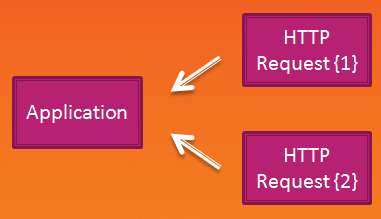
Note that we call the root of the lifetime scope hierarchy the ‘Application’ scope, because it will live for the duration of an application run.
Lifetime Scopes can be Nested
The container itself is the root lifetime scope in an Autofac application. When a lifetime scope is created from it, this sets up a parent-child relationship between the nested scope and the container.
When dependencies are resolved, Autofac first attempts to satisfy the dependency with a component instance in the scope in which the request was made. In the diagram below, this means that the dependency on an NHibernate session is satisfied within the scope of the HTTP request and the session will therefore be disposed when the HTTP request scope ends.

When the dependency resolution process hits a component that cannot be resolved in the current scope – for example, a component configured as a Singleton using SingleInstance(), Autofac looks to the parent scope to see if the dependency can be resolved there.
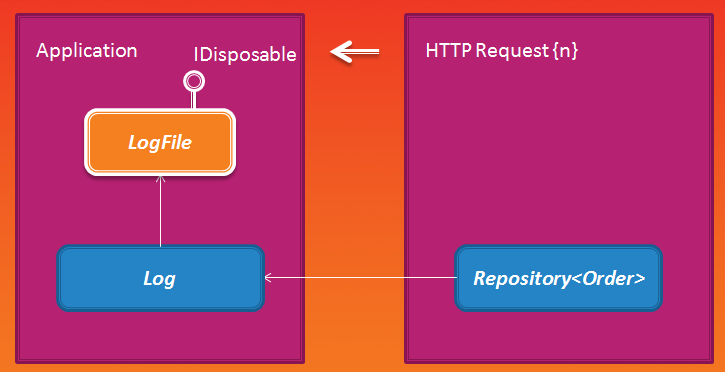
When the resolve operation has moved from a child scope to the parent, any further dependencies will be resolved in the parent scope. If the SingleInstance() component Log depends on LogFile then the log file dependency will be associated with the root scope, so that even when the current HTTP request scope ends, the file component will live on with the log that depends on it.
Lifetime scopes can be nested to arbitrary depth:
var ls1 = container.BeginLifetimeScope();

var ls2 = ls1.BeginLifetimeScope();

// ls1 is a child of the container, ls2 is a child of ls1
Sharing is driven by Lifetime Scopes
At this point in our discussion of lifetime management (you thought we were going to talk about memory leaks but that’s just how I roped you in!) it is worth mentioning the relationship between lifetime scopes and how Autofac implements ‘sharing’.
By default, every time an instance of a component is needed (either requested directly with the Resolve() method or as a dependency of another component) Autofac will create a new instance and, if it is disposable, attach it to the current lifetime scope. All IoC containers that I know of support something like this kind of ‘transient lifestyle’ or ‘instance per dependency.’
Also universally supported is ‘singleton’ or ‘single instance’ sharing, in which the same instance is used to satisfy all requests. In Autofac, SingleInstance() sharing will associate an instance with the root node in the tree of active lifetime scopes, i.e. the container.
There are two other common sharing modes that are used with Autofac.
Matching Scope Sharing
When creating a scope, it is possible to give it a name in the form of a ‘tag’:
// For each session concurrently managed by the application

var sessionScope = container.BeginLifetimeScope("session");

// For each message received in the session:

var messageScope = sessionScope.BeginLifetimeScope("message");

var dispatcher = messageScope.Resolve<IMessageDispatcher>();

dispatcher.Dispatch(…);
Tags name the levels in the lifetime scope hierarchy, and they can be used when registering components in order to determine how instances are shared.
builder.RegisterType<CredentialCache>()

    .InstancePerMatchingLifetimeScope("session");
In this scenario, when processing messages in a session, even though we always Resolve() dependencies from themessageScopes, all components will share a single CredentialCache at the session level.
Current Scope Sharing
While occasionally units of work are nested multiple layers deep, most of the time a single executable will deal with only one kind of unit of work.
In a web application, the ‘child’ scopes created from the root are for each HTTP request and might be tagged with"httpRequest". In a back-end process, we may also have a two-level scope hierarchy, but the child scopes may be per-"workItem".
Many kinds of components, for example those related to persistence or caching, need to be shared per unit of work, regardless of which application model the component is being used in. For these kinds of components, Autofac provides theInstancePerLifetimeScope() sharing model.
If a component is configured to use an InstancePerLifetimeScope() then at most a single instance of that component will be shared between all other components with the same lifetime, regardless of the level or tag associated with the scope they’re in. This is great for reusing components and configuration between different applications or services in the same solution.
Lifetime Scopes don’t have any Context Dependency
It is completely acceptable to create multiple independent lifetime scopes on the same thread:
var ls1 = container.BeginLifetimeScope();

var ls2 = container.BeginLifetimeScope();

// ls1 and ls2 are completely independent of each other
It is also perfectly safe to share a single lifetime scope between many threads, and to end a lifetime scope on a thread other than the one that began it.
Lifetime scopes don’t rely on thread-local storage or global state like the HTTP context in order to do their work.
Components can Create Lifetime Scopes
The container can be used directly for creating lifetime scopes, but most of the time you won’t want to use a global container variable for this.
All a component needs to do to create and use lifetime scopes is to take a dependency on the ILifetimeScope interface:
class MessageDispatcher : IMessageDispatcher

{

    ILifetimeScope _lifetimeScope;

    public MessageDispatcher(ILifetimeScope lifetimeScope)

    {

        _lifetimeScope = lifetimeScope;

    }

    public void OnMessage(object message)

    {

        using (var messageScope = _lifetimeScope.BeginLifetimeScope())

        {

            var handler = messageScope.Resolve<IMessageHandler>();

            handler.Handle(message);

        }

    }

}
The ILifetimeScope instance that is injected will be the one in which the component ‘lives.’
Owned Instances
Owned instances (Owned<T>) are the last tale in Autofac’s lifetime story.
An owned instance is a component that comes wrapped in its own lifetime scope. This makes it easier to keep track of how a component should be released, especially if it is used outside of a using statement.
To get an owned instance providing service T, you can resolve one directly from the container:
var ownedService = container.Resolve<Owned<IMyService>>();
In lifetime terms, this is equivalent to creating a new lifetime scope from the container, and resolving IMyService from that. The only difference is that the IMyService and the lifetime scope that holds it come wrapped up together in a single object.
The service implementation is available through the Value property:
// Value is IMyService

ownedService.Value.DoSomething();
When the owned instance is no longer needed, it and all of its disposable dependencies can be released by disposing theOwned<T> object:
ownedService.Dispose();
Combining with Func Factories
Autofac automatically provides Func<T> as a service when T is registered. As we saw in an earlier example, components can use this mechanism to create instances of other components on the fly.
class MyComponent2 : IMyService2

{

    Func<IMyResource> _resourceFactory;

    public MyComponent(Func<IMyResource> resourceFactory)

    {

        _resourceFactory = resourceFactory;

    }

    public void Go()

    {

        while (true)

            var r = _resourceFactory(); // Out of memory.

    }

}
Components that are returned from Func<T> delegates are associated with the same lifetime scope as the delegate itself. If that component is itself contained in a lifetime scope, and it creates a finite number of instances through the delegate, then there’s no problem – everything will be cleaned up when the scope completes.
If the component calling the delegate is a long-lived one, then the instances returned from the delegate will need to be cleaned up eagerly. To do this, Owned<T> can be used as the return value of a factory delegate:
class MyComponent2 : IMyService2

{

    Func<Owned<IMyResource>> _resourceFactory;

    public MyComponent(Func<Owned<IMyResource>> resourceFactory)

    {

        _resourceFactory = resourceFactory;

    }

    public void Go()

    {

        while (true)

            using (var r = _resourceFactory())

                // Use r.Value before disposing it

    }

}
Func<T> and Owned<T> can be combined with other relationship types to define relationships with a clearer intent than just taking a dependency on ILifetimeScope.
Do I really have to think about all this stuff?
That concludes our tour of lifetime management with Autofac. Whether you use an IoC container or not, and whether you use Autofac or another IoC container, non-trivial applications have to deal with the kinds of issues we’ve discussed.
Once you’ve wrapped your mind around a few key concepts, you’ll find that lifetime rarely causes any headaches. On the plus side, a huge range of difficult application design problems around resource management and ownership will disappear.
Just remember:
- Autofac holds references to all the disposable components it creates
- To prevent memory and resource leaks, always resolve components from lifetime scopes and dispose the scope at the conclusion of a task
- Effectively using lifetime scopes requires that you clearly map out the unit of work structure of your applications
- Owned instances provide an abstraction over lifetime scopes that can be cleaner to work with
Happy programming!
https://nblumhardt.com/2011/01/an-autofac-lifetime-primer/
An Autofac Lifetime Primer的更多相关文章
- Ioc:autofac lifetime scope.
During application execution, you’ll need to make use of the components you registered. You do this ...
- 管理Scope和Lifetime
Nick Blumhardt’s Autofac lifetime primer 是一个学习Autofac Scope和Lifetime的好地方.这里有很多未理解的,混淆的概念,因此我们将尝试在这里完 ...
- AutoFac文档6(转载)
目录 开始 Registering components 控制作用域和生命周期 用模块结构化Autofac xml配置 与.net集成 深入理解Autofac 指导 关于 词汇表 实例生命周期 实例生 ...
- Memory leak by misusing Autofac
Recently I’ve found out that we can easily cause a memory leaks in our .net application by improper ...
- Autofac is designed to track and dispose of resources for you.
https://autofaccn.readthedocs.io/en/latest/best-practices/ Autofac is designed to track and dispose ...
- 【译】WebAPI,Autofac,以及生命周期作用域
说明 原文地址:http://decompile.it/blog/2014/03/13/webapi-autofac-lifetime-scopes/ 介绍 这是一篇关于AutoFac的生命周期作用域 ...
- Autofac.Integration.Owin
public static IAppBuilder UseAutofacMiddleware(this IAppBuilder app, ILifetimeScope container) { if ...
- Autofac.Integration.Mvc.Owin分析
using System; using System.ComponentModel; using System.Diagnostics.CodeAnalysis; using System.Secur ...
- OWIN support for the Web API 2 and MVC 5 integrations in Autofac
Currently, in the both the Web API and MVC frameworks, dependency injection support does not come in ...
随机推荐
- weblogic、hibernate 包冲突
解决办法: 在weblogic 配置 [paths]项中 添加antlr-2.7.7.jar,该jar包应该位于引用weblogic.jar之前,使启动时不再加载weblogic中的低版本的antl ...
- 转-redux-saga
React+Redux Cycle(来源:https://www.youtube.com/watch?v=1QI-UE3-0PU) 让我惊讶的是,redux-saga 的作者竟然是一名金融出身的在 ...
- windows 按时自动化任务
参考文章: 1. 巧用Windows 7计划任务设置定时提醒 http://jingyan.baidu.com/article/acf728fd279fe5f8e510a333.html 2. cmd ...
- ssh/scp免密码登录传输
# 本地服务器生成key(直接回车默认) ssh-keygen # 将key传输到要登录的服务器 ssh-copy-id -i /root/.ssh/id_rsa.pub root@IP地址 # 输入 ...
- asp.net core microservices 架构之 分布式自动计算(一)
一:简介 自动计算都是常驻内存的,没有人机交互.我们经常用到的就是console job和sql job了.sqljob有自己的宿主,与数据库产品有很关联,暂时不提.console job使 ...
- 【sqlite】VS2013中C#读取SQLite数据
从“火车采集器”(免费版)中获取的网页数据,本地只能自动保存为SQLite数据,(在工具-数据转换中切换).收费版还可以用MySql.SqlServer 今天就记录一下C#读取Sqlite数据 创建一 ...
- maven docker plugin 常见问题解决
1. maven 项目必须使用小写,不然会一直有500 的错误 500: HTTP 500InternalServerError 2. docker server 连接数超了 Fail ...
- 利用mysqldump备份mysql
mysqldump备份机制:通过给定的参数信息和系统表数据,来一张表一张表地获取数据并生成insert语句插入备份文件中,这样由于时间点不一致,就会导致数据不一致,然而对于一个要求强一致性的系统来说, ...
- idea创建文件类型失败(xml之类的失效
https://blog.csdn.net/sutongxuevip/article/details/72832754
- Spring RESTful之@ModelAttribute
@ModelAttribute有俩个位置,一个是在方法体中,下面这个demo的用意就是每次controller@RequestMapping方法被调用之前都会走这个方法,并向Model中(@Reque ...