
Spring boot + Gradle + Eclipse打war包发布总结
首先感谢两位博主的分享
http://lib.csdn.net/article/git/55444?knId=767
https://my.oschina.net/alexnine/blog/540651
buildscript {

    ext {

        springBootVersion = '1.5.2.RELEASE'

    }

    repositories {

        maven { url 'http://maven.aliyun.com/nexus/content/groups/public/' }

        jcenter()

    }

    dependencies {

        classpath("org.springframework.boot:spring-boot-gradle-plugin:${springBootVersion}")

    }

}

group 'com.gzkit'

version '1.0.1-SNAPSHOT'

apply plugin: 'java'

apply plugin: 'eclipse'
apply plugin: 'eclipse-wtp'

apply plugin: 'org.springframework.boot'

apply plugin: 'war'

compileJava {

    options.encoding = 'UTF-8'

    options.compilerArgs << "-Xlint:unchecked" << "-Xlint:deprecation"

}

sourceCompatibility = 1.7

targetCompatibility = 1.7

[javadoc, compileTestJava]*.options*.encoding = 'UTF-8'

repositories {

    mavenLocal()

    maven { url 'http://maven.aliyun.com/nexus/content/groups/public/' }

    jcenter()

}

configurations {

    provided

    //compile.exclude module: "spring-boot-starter-tomcat"

    //compile.exclude group: 'org.apache.tomcat'

    //compile.exclude group: 'org.apache.tomcat.embed'

    all*.exclude module: 'spring-boot-starter-logging'

}

ext {

    shiroVersion = '1.3.2'

}

dependencies {

    provided('org.springframework.boot:spring-boot-starter-web'){

        exclude module: "spring-boot-starter-tomcat"

    }

    compile('org.springframework.boot:spring-boot-starter-freemarker')

    compile('org.springframework.boot:spring-boot-starter-undertow')

    compile('org.springframework.boot:spring-boot-starter-log4j2')

    compile('org.springframework.boot:spring-boot-starter-mail')

    //compile('org.springframework.boot:spring-boot-starter-data-redis')

    // spring session

    //compile('org.springframework.session:spring-session')

    // apache shiro

    compile("org.apache.shiro:shiro-core:$shiroVersion")

    compile("org.apache.shiro:shiro-web:$shiroVersion")

    compile("org.apache.shiro:shiro-spring:$shiroVersion")

    compile("org.apache.shiro:shiro-ehcache:$shiroVersion")

    // mybatis support

    compile('org.mybatis.spring.boot:mybatis-spring-boot-starter:1.1.1')

    compile('tk.mybatis:mapper-spring-boot-starter:1.1.1')

    // apache commons

    compile('org.apache.commons:commons-lang3:3.4')

    compile('org.apache.commons:commons-collections4:4.1')

    // apache poi (excel/word)

    compile('org.apache.poi:poi:3.14')

    compile('org.apache.poi:poi-ooxml:3.14')

    // alibaba datasource

    runtime('com.alibaba:druid:1.0.27')

    // mysql jdbc driver

    runtime('mysql:mysql-connector-java')

    // log4j2 needs disruptor to enable async logger

    runtime('com.lmax:disruptor:3.3.5')

    //compile files('libs/common-uams-2.2.4.jar')

    testCompile('org.springframework.boot:spring-boot-starter-test')

}
两个地方要注意
第一是apply plugin: 'eclipse-wtp',用来生成Eclipseweb项目的插件(web-tool-platform)
如果不加,在server栏里面的Tomcat上右键,选择Add and Remove…中没有可发布的项目,加上运行后去掉也可以,不知道为啥,应该是已经生成Eclipseweb项目的插件(web-tool-platform)
第二是
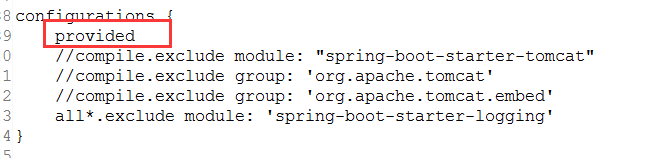
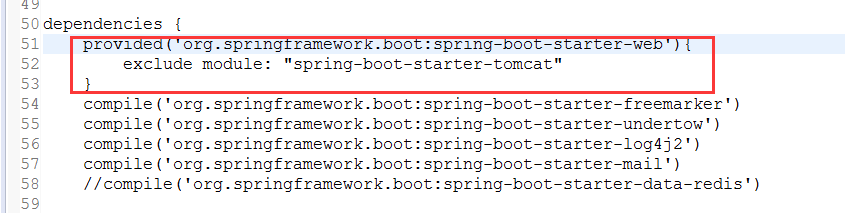
主要是添加war包的支持,其次的话就是在spring-boot-starter-tomcat处改为provided。provided和compile的区别在与前者是在调试使用时会加载对应的包,但是 在打包时不会讲对应的包加入到war包的lib中而后者则是两种情况都要调用对应的包。
最后是要修改启动Spring的类
public class MonolithicPlatformApplication extends SpringBootServletInitializer{

    @Override

    protected SpringApplicationBuilder configure(SpringApplicationBuilder builder) {

        // TODO Auto-generated method stub

        return builder.sources(MonolithicPlatformApplication.class);

    }

    public static void main(String[] args) {

        SpringApplication.run(MonolithicPlatformApplication.class, args);

    }

    @Bean

    public EmbeddedServletContainerCustomizer containerCustomizer() {

        return new EmbeddedServletContainerCustomizer() {

            @Override

            public void customize(ConfigurableEmbeddedServletContainer container) {

                // ErrorPage error401Page = new ErrorPage(HttpStatus.UNAUTHORIZED, "/401.html");

                ErrorPage error404Page = new ErrorPage(HttpStatus.NOT_FOUND, "/static/404.html");

                ErrorPage error500Page = new ErrorPage(HttpStatus.INTERNAL_SERVER_ERROR, "/static/500.html");

                container.addErrorPages(error404Page, error500Page);

            }

        };

    }

}
这里继承SpringBootServletInitializer 并重写其中的configure方法目的是使用Spring框架的Servlet3.0支持。并且允许我们可以配置项目从serclet容器中启动。
修改完成之后就可以启动了
另外配上application.yml的配置
server:

    undertow:

        accesslog:

            enabled: true

            dir: target/log

            pattern: combined

    compression:

        enabled: true

        min-response-size: 1

    port: 8080

    session:

        timeout: 1800 # in seconds

spring:

    datasource:

        url: jdbc:mysql://121.201.97.113:3306/km_lis_new?characterEncoding=UTF-8&useSSL=false

        username: root

        password: Zqit3503

        type: com.alibaba.druid.pool.DruidDataSource # 使用druid数据源

        driver-class-name: com.mysql.jdbc.Driver

        maxActive: 2

        initialSize: 1

    redis:

        host: 192.168.1.104

        #password: redispassword

        port: 6379

        pool:

          max-idle: 100

          min-idle: 1

          max-active: 1000

          max-wait: -1

#        database: 0 # database index used by this connection

#        port: 6379

#        host: 192.168.1.104

#        pool:

#            max-active: 30

#            min-idle: 0

#            max-wait: 1500 # milliseconds

#            max-idle: 20

#        timeout: 2000 # connection timeout in milliseconds

    freemarker:

        check-template-location: true

        content-type: text/html

        expose-request-attributes: true

        expose-session-attributes: true

        request-context-attribute: request

        template-loader-path=classpath: /templates/

        settings:

            locale: zh_CN

            template_update_delay: 0

            tag_syntax: auto_detect

            default_encoding: UTF-8

            output_encoding: UTF-8

            url_escaping_charset: UTF-8

            date_format: yyyy-MM-dd

            time_format: HH:mm:ss

            datetime_format: yyyy-MM-dd HH:mm:ss

            number_format: \#.##

            classic_compatible: true

            template_exception_handler: rethrow # ignore, debug, html_debug, rethrow

            whitespace_stripping: true

        expose-spring-macro-helpers: true

        suffix: .ftl

        charset: UTF-8

        cache: false

    mvc:

        static-path-pattern: /static/**

    messages:

        basename: i18n/ui_messages

    mail:

        host: smtp.qq.com

        username: 554840442@qq.com

        password: mjevcothmfqybbib #使用QQ邮箱SMTP服务需要生成授权码,而非QQ密码

        sendTo: 554840442@qq.com

        disasterTitle: 手动切换容灾模式

        disasterContent: 会话共享项目-发送邮件功能-手动切换容灾模式~~~~

        normalTitle: 手动切换正常模式

        normalContent: 会话共享项目-发送邮件功能-手动切换正常模式~~~~

        autoTitle: 自动切换运行模式

        autoContent: 会话共享项目-发送邮件功能-自动切换运行模式~~~~

        properties:

            mail:

                smtp:

                    auth: true

                    starttls:

                        enable: true

                        required: true

mybatis:

    config-location: classpath:mybatis-config.xml

    mapper-locations: classpath:mapper/**/*Mapper.xml

    type-aliases-package: com.kmlis.entity
Spring boot + Gradle + Eclipse打war包发布总结的更多相关文章
- 如何将spring boot项目打包成war包
一.修改打包形式 在pom.xml里设置 <packaging>war</packaging> 二.移除嵌入式tomcat插件 在pom.xml里找到spring-boot-s ...
- spring boot将jar包转换成war包发布
spring boot将jar包转换成war包发布步骤 将<packaging>jar</packaging>修改为<packaging>war</packa ...
- spring boot开发为什么使用jar包
spring boot既可以打成war发布,也可以找成jar包发布. jar包:直接通过内置tomcat运行,不需要额外安装tomcat.如需修改内置tomcat的配置,只需要在spring boot ...
- Axis2使war包发布为WebService
首先 吐槽下 Axis2的Eclipse插件.不好用,而且局限性大.并且添加包的过程...会及其痛苦.(懂的自然懂) 而且 发布的aar文件,不能解压缩重新打包再压缩...尝试过添加 jar包,但报错 ...
- 使用intelliJ创建 spring boot + gradle + mybatis站点
Spring boot作为快速入门是不错的选择,现在似乎没有看到大家写过spring boot + gradle + mybatis在intellij下的入门文章,碰巧.Net同事问到,我想我也可以写 ...
- spring boot + gradle + mybatis
使用intelliJ创建 spring boot + gradle + mybatis站点 Spring boot作为快速入门是不错的选择,现在似乎没有看到大家写过spring boot + gr ...
- spring boot 在eclipse里启动正常,但打包后启动不起来
现象描述: spring boot 在eclipse里启动正常,但打包后启动不起来. 错误日志如下: D:\Project>java -jar MKKY_CMS.jar . ____ _ __ ...
- 精尽Spring Boot源码分析 - Jar 包的启动实现
该系列文章是笔者在学习 Spring Boot 过程中总结下来的,里面涉及到相关源码,可能对读者不太友好,请结合我的源码注释 Spring Boot 源码分析 GitHub 地址 进行阅读 Sprin ...
- Tomcat下使用war包发布项目
Tomcat下使用war包发布项目 转自<Tomcat下使用war包发布项目 >,地址:http://blog.csdn.net/wy818/article/details/7240294 ...
随机推荐
- Ubuntu下使用openssl为apache2配置ssl
安装apache2 sudo apt-get install apache2 安装openssl 一般系统自带,可以通过openssl version查看,如果没有, sudo apt-get ins ...
- django-xhtml2pdf的使用(加入图片,指定字体,设置样式)
新博客地址:http://muker.net/django-xhtml2pdf.html 这里仅仅讨论直接利用html生成pdf这种最常见也最简单的情况. 1.要利用html生成带中文的pdf要指定中 ...
- 转载 vi替换windows换行符为linux换行符
1.用vi打开指定文本文件:vi filename.c 2.按 Esc 键,进入命令模式: 3.按 : 键 (按 Shift 键不放后,同时按 : 键)进入命令输入状态: 4.在冒号后输入:%s/^M ...
- ruby 的数组操作
转自:http://fujinbing.iteye.com/blog/1126232 1. & [ 1, 1, 3, 5 ] & [ 1, 2, 3 ] # => [1, 3] ...
- autoconf 简单demo试用
1. 安装工具 yum install -y automake 2. 基本项目 a. 项目参考结构 ├── AUTHORS ├── COPYING ├── ChangeLog ├── Makefi ...
- 使用dnSpy对目标程序(EXE或DLL)进行反编译修改并编译运行
本文为原创文章.源代码为原创代码,如转载/复制,请在网页/代码处明显位置标明原文名称.作者及网址,谢谢! 本文使用的工具下载地址为: https://github.com/cnxy/dnSpy/arc ...
- java之反射概述
类加载器和反射 类加载器: 1 类的加载过程: 当程序要使用某个类时,如果该类还未被加载到内存中,则系统会通过加载.连接.初始化三步骤来实现对这个类进行初始化. 加载:就是指将class文件读入内存 ...
- 福勒(Martin Fowler)
福勒(Martin Fowler),在面向对象分析设计.UML.模式.软件开发方法学.XP.重构等方面,都是世界顶级的专家,现为Thought Works公司的首席科学家.Thought Works是 ...
- ORACLE 12C RMAN 功能增强
在ORACLE 12C中对rman的功能有了不少增强,在以前的文章中写过RMAN RECOVER TABLE功能,这里另外补充rman增强的两个小功能(sql语句和数据文件分割)数据库版本 SQL&g ...
- 笔记本设置wifi热点并抓包
现在很多人喜欢蹭wifi热点,这里演示一下怎么利用笔记本设置wifi热点来钓鱼.本机是win10操作系统. 一.设置笔记wifi热点:右键点击右下角网络图标 -> 打开“网络和Internet设 ...