
java模拟http/https post请求
1.Post请求失败的代码
try {

             HttpResponse response = httpClient.execute(httpPost);

             HttpEntity entity = response.getEntity();

             result = EntityUtils.toString(entity, "UTF-8");

             Util.log("API,POST回来的数据是:");

             Util.log(result);

         } catch (ConnectionPoolTimeoutException e) {

             log.e("http get throw ConnectionPoolTimeoutException(wait time out)");

         } catch (ConnectTimeoutException e) {

             log.e("http get throw ConnectTimeoutException");

         } catch (SocketTimeoutException e) {

             log.e("http get throw SocketTimeoutException");

         }  catch (Exception e) {

             log.e("http get throw Exception");

         } finally {

             httpPost.abort();

         }
之前每次代码执行到上述代码的第二行的时候,会等一段时间然后会捕获到Exception异常。
2.分析问题
当然捕获的Exception这个异常太大了我们不便于分析,我们查看一下httpClient.execute(HttpUriRequest uri)的方法;

发下这个方法会抛出IOException, ClientProtocolException这两个异常,但是在调用方法的时候并没有明确捕获他们两个。
3.得出结论
所以很有可能在执行post请求的过程中,遇到了这两个问题,果然我们把代码完善之后
try {

            httpClient = new SSLClient();

            HttpResponse response = httpClient.execute(httpPost);

            HttpEntity entity = response.getEntity();

            result = EntityUtils.toString(entity, "UTF-8");

            Util.log("API,POST回来的数据是:");

            Util.log(result);

        } catch (ConnectionPoolTimeoutException e) {

            log.e("http get throw ConnectionPoolTimeoutException(wait time out)");

        } catch (ConnectTimeoutException e) {

            log.e("http get throw ConnectTimeoutException");

        } catch (SocketTimeoutException e) {

            log.e("http get throw SocketTimeoutException");

        } catch (ClientProtocolException e) {

            log.e("http get throw ClientProtocolException");

        } catch (IOException e) {

            e.printStackTrace();

        } catch (Exception e) {

            log.e("http get throw Exception");

        } finally {

            httpPost.abort();

        }
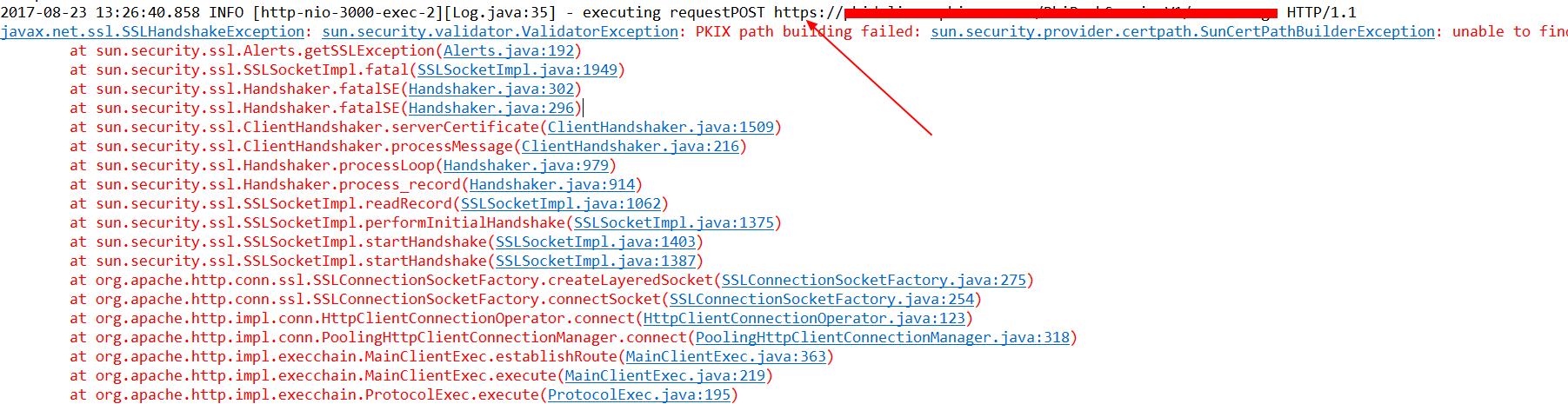
上述,完善完毕代码后捕捉到了IOException异常,我们把异常打印出来看到了如下信息。
4.解决问题
通过在网上查询可知,这是缺少安全证书时出现的异常,解决方案如下:
- 等待Oracle/Google/Mozilla等等组织信任CNNIC,算了,洗洗睡吧
- 使用Java的TrustManager忽略所有的SSL请求的证书,仅仅用于开发测试,限于篇幅不做介绍了
- 导入目标网站的证书,然后在开始调用之前,指定keystore就ok了,本文介绍下该方法
目前我们采用第二种方案:由于请求的URL是HTTPS的,为了避免需要证书,所以用一个类继承DefaultHttpClient类,忽略校验过程。
编写一个SSLClient类
package com.phicomm.smarthome.sharedwifi.util;

import java.security.cert.CertificateException;

import java.security.cert.X509Certificate;

import javax.net.ssl.SSLContext;

import javax.net.ssl.TrustManager;

import javax.net.ssl.X509TrustManager;

import org.apache.http.conn.ClientConnectionManager;

import org.apache.http.conn.scheme.Scheme;

import org.apache.http.conn.scheme.SchemeRegistry;

import org.apache.http.conn.ssl.SSLSocketFactory;

import org.apache.http.impl.client.DefaultHttpClient;

public class SSLClient extends DefaultHttpClient {

    public SSLClient() throws Exception {

        super();

        SSLContext ctx = SSLContext.getInstance("TLS");

        X509TrustManager tm = new X509TrustManager() {

            @Override

            public void checkClientTrusted(X509Certificate[] chain, String authType) throws CertificateException {

                // TODO Auto-generated method stub

            }

            @Override

            public void checkServerTrusted(X509Certificate[] chain, String authType) throws CertificateException {

                // TODO Auto-generated method stub

            }

            @Override

            public X509Certificate[] getAcceptedIssuers() {

                // TODO Auto-generated method stub

                return null;

            }

        };

        ctx.init(null, new TrustManager[] { tm }, null);

        SSLSocketFactory ssf = new SSLSocketFactory(ctx, SSLSocketFactory.ALLOW_ALL_HOSTNAME_VERIFIER);

        ClientConnectionManager ccm = this.getConnectionManager();

        SchemeRegistry sr = ccm.getSchemeRegistry();

        sr.register(new Scheme("https", 443, ssf));

    }

}
对应的实现类:
public HttpResponse sendPostToService(String url, Object pushData) throws IOException, KeyStoreException,

            UnrecoverableKeyException, NoSuchAlgorithmException, KeyManagementException {

        if (!hasInit) {

            init();

        }

        String result = null;

        HttpPost httpPost = new HttpPost(url);

        StringEntity postEntity = new StringEntity(pushData.toString(),

                ContentType.create("application/x-www-form-urlencoded", "UTF-8"));

        // 设置一些Http头信息

        httpPost.addHeader("Content-Type", "application/x-www-form-urlencoded");

        httpPost.addHeader("connection", "Keep-Alive");

        httpPost.addHeader("user-agent", "Mozilla/4.0 (compatible; MSIE 6.0; Windows NT 5.1;SV1)");

        // 将发送内容填装

        httpPost.setEntity(postEntity);

        // 设置请求器的配置

        httpPost.setConfig(requestConfig);

        // 打印待发送的数据

        Util.log("=====API,POST过去的数据是:");

        Util.log("executing request" + httpPost.getRequestLine());

        Util.log("请求头信息===" + httpPost.getAllHeaders().toString());

        Util.log("请求状态行===" + httpPost.getRequestLine());

        Util.log("请求配置===" + httpPost.getConfig());

        Util.log("请求实体===" + httpPost.getEntity().getContentEncoding() + httpPost.getEntity().getContentType()

                + httpPost.getEntity().getContent());

        HttpResponse response = null;

        try {

            // 忽略所有的SSL请求的证书

            httpClient = new SSLClient();

            response = httpClient.execute(httpPost);

            HttpEntity entity = response.getEntity();

            result = EntityUtils.toString(entity, "UTF-8");

            // 打印得到的响应信息

            Util.log("API,POST回来的数据是:");

            Util.log("=====Entity:" + result);

            Util.log("=====Headers:" + response.getAllHeaders());

            Util.log("=====StatusLine:" + response.getStatusLine());

            Util.log("=====Locale:" + response.getLocale());

        } catch (ConnectionPoolTimeoutException e) {

            log.e("http get throw ConnectionPoolTimeoutException(wait time out)");

        } catch (ConnectTimeoutException e) {

            log.e("http get throw ConnectTimeoutException");

        } catch (SocketTimeoutException e) {

            log.e("http get throw SocketTimeoutException");

        } catch (ClientProtocolException e) {

            log.e("http get throw ClientProtocolException");

        } catch (IOException e) {

            e.printStackTrace();

        } catch (Exception e) {

            log.e("http get throw Exception");

        } finally {

            httpPost.abort();

        }

        return response;

    }
在第36行使用自定义的SSLClient来忽略掉验证要求
另外注意在postMan中模拟调用的时候我们是用的x-www-form-urlencoded格式的数据请求,就是application/x-www-from-urlencoded,会将表单内的数据转换为键值对。
当action为get时候,浏览器用x-www-form-urlencoded的编码方式把form数据转换成一个字串(name1=value1&name2=value2...),然后把这个字串append到url后面,用?分割,加载这个新的url。 当action为post时候,浏览器把form数据封装到http body中,然后发送到server。
所以我们需要对传进来的数据做一下处理:
// 拼接x-www-form-urlencoded格式的请求参数
String www_url = "coverimg=" + pushMsgModel.getCoverimg() + "&mode=" + pushMsgModel.getMode() + "&msgcontent="
+ pushMsgModel.getMsgContent() + "&msgtype=" + pushMsgModel.getMsgtype() + "&outline="
+ pushMsgModel.getOutline() + "&saveRecord=" + pushMsgModel.getSaveRecord() + "&source="
+ pushMsgModel.getSource() + "&ticker=" + pushMsgModel.getTicker() + "×tamp="
+ pushMsgModel.getTimestamp() + "&title=" + pushMsgModel.getTitle() + "&uid=" + pushMsgModel.getUid()
+ "&url=" + pushMsgModel.getUrl();
logger.info("x-www-form-urlencoded格式的请求参数为:" + www_url);
最后效果如下:

java模拟http/https post请求的更多相关文章
- java 模拟浏览器发送post请求
java使用URLConnection发送post请求 /** * 向指定 URL 发送POST方法的请求 * * @param url * 发送请求的 URL * @param param * 请求 ...
- java模拟http的get和post请求
如题,使用Java模拟GET和POST请求.使用GET可以实现网页抓取,使用POST可以实现对某些网站登录的暴力破解.不过仅是练习,实际意义不大. import java.io.IOException ...
- java中模拟http(https)请求的工具类
在java中,特别是java web中,我们经常需要碰到的一个场景是我们需要从服务端去发送http请求,获取到数据,而不是直接从浏览器输入请求网址获得相应.比如我们想访问微信接口,获取其返回信息. 在 ...
- java模拟post请求发送json
java模拟post请求发送json,用两种方式实现,第一种是HttpURLConnection发送post请求,第二种是使用httpclient模拟post请求, 方法一: package main ...
- 上curl java 模拟http请求
最近,我的项目要求java模拟http请求,获得dns解决 tcp处理过的信息特定的连接. java api提供urlConnection apache提供的httpClient都不能胜任该需求,二次 ...
- curl java 模拟http请求
curl java 模拟http请求 直接上代码: public static void main(String args[]) throws Exception { String url = &qu ...
- java模拟http请求
java模拟http发送请求,第一种是HttpURLConnection发送post请求,第二种是使用httpclient模拟post请求, 方法一: package main.utils; impo ...
- JAVA模拟HTTP post请求上传文件
在开发中,我们使用的比较多的HTTP请求方式基本上就是GET.POST.其中GET用于从服务器获取数据,POST主要用于向服务器提交一些表单数据,例如文件上传等.而我们在使用HTTP请求时中遇到的比较 ...
- [Java] 模拟HTTP的Get和Post请求
在之前,写了篇Java模拟HTTP的Get和Post请求的文章,这篇文章起源与和一个朋友砍飞信诈骗网站的问题,于是动用了Apache的comments-net包,也实现了get和post的http请求 ...
随机推荐
- iOS开发之--使用storyboard下,tabbar小图标和文字颜色的设置
在开发项目的时候,如果是使用故事版设计的架构,那么在设置tabbar小图标的时候,可能会出现一点小问题, 成功的设置方法如下: 1.设置seleectedImage和image,其实就是非选中状态的图 ...
- phpstrom如何定义文件打开的方式
今天想vue结合PHP来小写一段代码,但是发现自己把vue的文件放进去,会显示text文本,在刚开始的时候,编辑器会提示我们以什么格式打开,我没在意的选择了text,结果悲催了,那么在设置里面的哪个选 ...
- codevs 5962 [SDOI2017]数字表格
输入描述 Input Description [题解] 对于蓝色部分预处理前缀积. 然后在用除法分块搞一下. O(Q*sqrt(min(n,m))*logn+nlogn) #include<c ...
- PMP十大知识领域整理
2018-7-28至2018-12-8历时4个多月,学写了PMP(拍马屁),感觉自己经历了,哇-唉-哦-嗯这四个阶段 刚开始觉得如遇圣经,被PMP的知识体系和老师的精彩课程深深震撼! 后来觉得很多东西 ...
- 【BZOJ4808/3175】马/[Tjoi2013]攻击装置 最小割
[BZOJ4808]马 Description 众所周知,马后炮是中国象棋中很厉害的一招必杀技."马走日字".本来,如果在要去的方向有别的棋子挡住(俗称"蹩马腿" ...
- Android - ViewPager实现Gallery效果
RelativeLayout viewPagerContainer = (RelativeLayout) headerView.findViewById(R.id.content_pager_layo ...
- Struts入门(三)深入Struts用法讲解
访问Servlet API Action搜索顺序 动态方法调用 指定多个配置文件 默认Action Struts 后缀 接收参数 处理结果类型 1.访问Servlet API 首先我们了解什么是Ser ...
- 原生封装的ajax
原生封装的ajax的代码如下: //将数据转换成 a=1&b=2格式; function json2url(json){ var arr = []; //加随机数防止缓存; json.t = ...
- Python--paramiko库:连接远程服务器操作文件
import paramikofrom loggingutils.mylogger import logger as log class SSHConnection(object): def __in ...
- Results from queries can be retrieved into local variables
w将查询结果赋值给本地变量. http://dev.mysql.com/doc/refman/5.7/en/stored-program-variables.html Results from que ...