
Nuget server on IIS6 returns 404
Nuget server on IIS6 returns 404 when downloading package after upgrade
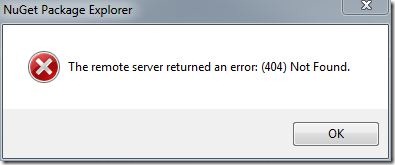
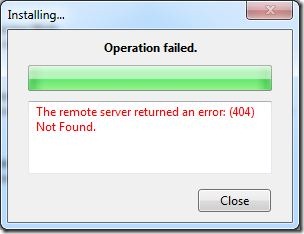 We updated our nuget server today and ran into a problem where regardless of package selected or whether it's through the nuget package manager or the nuget package explorer, the server returns 404 (File Not Found).
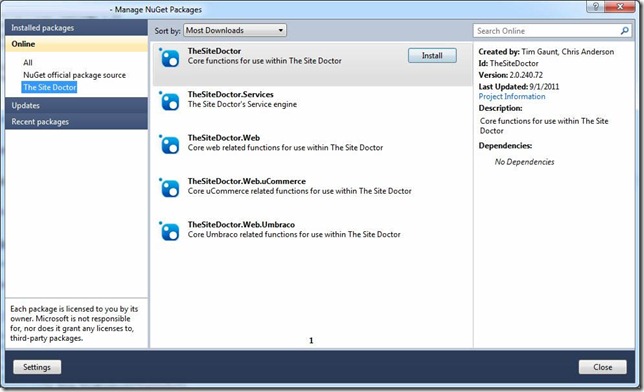
What was odd about this was that the packages exist and the feed was valid:
There are a couple of comments about this online e.g.: Codeplex Discussion 246387 but nothing helped. It took a while to work out that it was caused by a slight change to the way the nuget server makes it's calls. Comparing the IIS logs between the old and new version of nuget server, the previous version of nuget server would redirect the user directly to the nupkg file:
2011-04-21 08:47:46 W3SVC1759424837 192.168.1.1 GET /Packages/TheSiteDoctor.2.0.235.68.nupkg - 80 - 192.168.1.2 Package-Installer/1.2.20325.9034+(Microsoft+Windows+NT+6.1.7601+Service+Pack+1) 200 0 0
On the new one however, it passes the various requests through a new MVC route "download":
2011-09-01 11:31:16 W3SVC1759424837 192.168.1.1 GET /download/TheSiteDoctor/2.0.235.68 - 80 - 192.168.1.2 Package-Installer/1.2.20325.9034+(Microsoft+Windows+NT+6.1.7601+Service+Pack+1) 404 0 3
This is fine if your nuget server is running on IIS7, it will "just work". However if you're running IIS6 you'll need to make one additional change which is mapping all request through the aspnet_isapi.dll (a wildcard mapping). This is easy enough:
- 1. Open the site's properties in IIS6
- 2. Navigate to the "Home Directory" tab
- 3. Click the "Configuration" button:
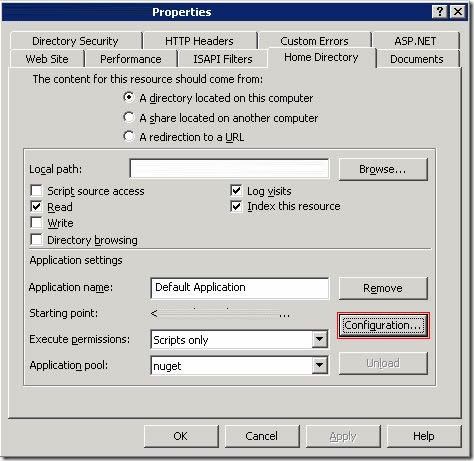
- This will then open the "Application Configuration" window:
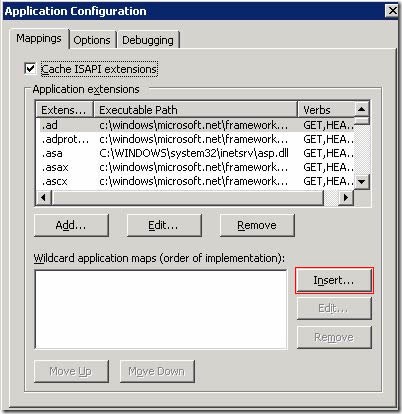
- Now you'll need to add the aspnet_isapi.dll mapping, the path of this will depend on the whether you're running Windox 64bit or not:
32bit Framework: c:\windows\microsoft.net\framework\v4.0.30319\aspnet_isapi.dll
64bit Framework: c:\windows\microsoft.net\framework64\v4.0.30319\aspnet_isapi.dll
Make sure you uncheck the "Verify that file exists" checkbox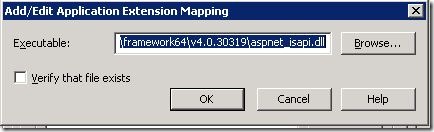
Et voila your packages should all be working again.
Leave a comment if you need any additional help or it helped you.
Nuget server on IIS6 returns 404的更多相关文章
- .NET持续集成与自动化部署之路第二篇——使用NuGet.Server搭建公司内部的Nuget(包)管理器
使用NuGet.Server搭建公司内部的Nuget(包)管理器 前言 Nuget是一个.NET平台下的开源的项目,它是Visual Studio的扩展.在使用Visual Studio开发基 ...
- 搭建公司内部的NuGet Server
随着公司业务慢慢的拓展,项目便会越来越来多,很多项目会依赖其他项目DLL,比如一些底层的技术框架DLL引用,还有各业务系统的也有可能会有引用的可能. 项目多,交叉引用多,如果要是有一个DLL更新,那就 ...
- 分析nuget源码,用nuget + nuget.server实现winform程序的自动更新
源起 (个人理解)包管理最开始应该是从java平台下的maven开始吧,因为java的开发大多数是基于开源组件开发的,一个开源包在使用时很可能要去依赖其他的开源包,而且必须是特定的版本才可以.以往在找 ...
- Windows Server 2003 IIS6.0+PHP5(FastCGI)+MySQL5环境搭建教程
准备篇 一.环境说明: 操作系统:Windows Server 2003 SP2 32位 PHP版本:php 5.3.14(我用的php 5.3.10安装版) MySQL版本:MySQL5.5.25 ...
- org.codehaus.xfire.XFireRuntimeException: Could not invoke service.. Server returned error code = 404 for URI.. Check server logs for details
严重: Servlet.service() for servlet jsp threw exceptionorg.codehaus.xfire.XFireRuntimeException: Could ...
- Nuget Server 搭建
每个女人都有很多包包:其实男人也有,但只有会写程序的男人才有 -- 代码世界中的大"包"小"包".这些大包小包,有花钱买的,有从开源市场淘的,也有自己或同事亲手 ...
- nuget.server搭建及实际测试
1.背景 由于所做项目越来越多,会积累一些公用组件,而每个项目中组件引用中如果组件有更新或者新增为了方便需要一个专门的工具进行管理,那么nuget就是不错的选择. 2.安装nuget.server 这 ...
- Server response error code:404, error:{"ret":-1, "msg":"invalid appkey"}
Server response error code:404, error:{"ret":-1, "msg":"invalid appkey" ...
- [译]Nuget.Server
原文 NuGet.Server是一个包,可用于使一个ASP.NET应用host一个package feed . 使用VS创建一个新的空WEB应用,添加Nuget.Server包. 配置应用的Packa ...
随机推荐
- Linux 基础——权限管理命令chown、chgrp
一.chown命令与chgrp命令的作用 有时你需要改变文件或目录的属主,比如有人离职或开发人员创建了一个在测试或生产环境中需要归属在系统账户下的应用.Linux提供了两个命令来实现这个功能:chow ...
- EasyUi–7.tab和datagrid和iframe的问题
1. 多个tab切换,第2个不显示 动态添加tab Iframe页面的方法 展开 折叠 <script type="text/javascript"> $(functi ...
- EF – 5.DbSet与DbContext,数据更新奥秘
5.6.4 <DbSet与DbContext> 介绍DbSet与DbContext中的核心属性及重要方法. 5.6.5 <数据更新的奥秘> 这一讲极为重要,因为它揭示出了En ...
- python开发学习-day03(set集合、collection系列 、深浅拷贝、函数)
s12-20160116-day03 *:first-child { margin-top: 0 !important; } body>*:last-child { margin-bottom: ...
- 20179202《Linux内核原理与分析》第一周作业
实验一 Linux 系统简介 这一节主要学习了Linux的历史,重要人物以及学习Linux的方法.Linux和Windows在是否收费.软件与支持.安全性.可定制性和应用范畴等方面都存在着区别.目前感 ...
- 关于 Unity 版本升级后可能会引起偶发光照图错乱的问题
近期项目遇到一个奇怪的问题,使用 Unity 2017 版本升级后,团队中某些人的机器光照图总是不正确,而有的人是正确的,一直不知道为什么. 为了查到这个奇怪问题的原因,首先查看了美术的在 Max 中 ...
- 工厂bean和bean工厂
FactoryBean(工厂bean):是bean的加工工厂,是对已知Bean的加工,是一个接口,要实现三个方法: ① Object getObject()可以对bean进行加工添加功能. ② Cla ...
- React Native 系列(九)
前言 本系列是基于React Native版本号0.44.3写的.很多的App都使用了Tab标签组件,例如QQ,微信等等,就是切换不同的选项,显示不同的内容.那么这篇文章将介绍RN中的Tab标签组件. ...
- 在eclipse中安装TestNG
https://www.cnblogs.com/baixiaozheng/p/4989856.html 1.可借助Eclipse的Marketplace来安装TestNG Eclipse插件 a.打开 ...
- Python 面向对象编程——初见
<什么是面向对象> 面向对象编程(Object Oriented Programming),简称OOP,是一种程序设计思想.OOP把对象作为程序的基本单元,一个对象包含了数据和操作数据的 ...