
Centos 6 之samba 搭建
学习linux从实践做起。
实验环境:vmware,cenots 6,xshell
注意:使用vmware 时,网络连接设置成桥接,和宿主机位于同一个网段。
实验需求:模拟实际公司文件服务器。 新建SHARE 文件夹,权限所有人公开
新建IT 文件夹,只对IT部门员工开放
新建DE文件夹,对于DE部门员工开放
实验步骤:
1:由于selinux设置不懂,和iptables 只了解皮毛,为了不必要的麻烦:
关闭selinux :
 [root@localhost ~]# vi /etc/selinux/config

 # This file controls the state of SELinux on the system.

 # SELINUX= can take one of these three values:

 #     enforcing - SELinux security policy is enforced.

 #     permissive - SELinux prints warnings instead of enforcing.

 #     disabled - No SELinux policy is loaded.

 SELINUX=disabled

 # SELINUXTYPE= can take one of these two values:

 #     targeted - Targeted processes are protected,

 #     mls - Multi Level Security protection.

 SELINUXTYPE=targeted
关闭iptables:
 [root@localhost ~]# service iptables stop;chkconfig iptables off;chkconfig --list | grep iptables

 iptables: Setting chains to policy ACCEPT: filter          [  OK  ]

 iptables: Flushing firewall rules:                         [  OK  ]

 iptables: Unloading modules:                               [  OK  ]

 iptables           :off    :off    :off    :off    :off    :off    :off
2:reboot,查看并且确保生效
 [root@localhost ~]# reboot

 之后,继续查看

 [root@localhost ~]# chkconfig --list | grep iptables

 iptables           :off    :off    :off    :off    :off    :off    :off
3:新建SHARE,IT,DE文件夹并设置权限
 [root@localhost ~]# mkdir -m  /home/SHARE /home/IT /home/DE

 [root@localhost ~]# ls -l /home/

 total

 drwxrwx---.  root root  Dec  : DE

 drwxrwx---.  root root  Dec  : IT

 drwxrwx---.  root root  Dec  : SHARE
4:新建用户组SHARE,IT,DE,新建IT1,IT2用户,新建DE1,DE2用户(IT1,IT2,DE1,DE2属于SHARE组,IT1,IT2属于IT组,DE1,DE2属于IT组)
 [root@localhost ~]#  groupadd SHARE;groupadd IT;groupadd DE

 [root@localhost ~]# cat /etc/group

 ...

 SHARE:x::

 IT:x::

 DE:x::
[root@localhost ~]# useradd IT1;usermod -s /sbin/nologin IT1 ;gpasswd -a IT1 IT; useradd IT2;usermod-s /sbin/nologin IT2 ;gpasswd -a IT2 IT; useradd DE1;usermod  -s /sbin/nologin DE1 ;gpasswd -a DE1 DE;useradd DE2 ;usermod -s /sbin/nologin DE2 ;gpasswd -a DE2 DE; gpasswd -a IT1 SHARE ;gpasswd -a IT2 SHARE;gpasswd -a DE1 SHARE; gpasswd -a DE2 SHARE

[root@localhost ~]# cat /etc/group

...

public:x::IT1,IT2,DE1,DE2

IT:x::IT1,IT2

DE:x::DE1,DE2

IT1:x::

IT2:x::

DE1:x::

DE2:x::
5:安装samba
[root@localhost ~]# yum -y install samba samba-client samba-swat
 [root@localhost ~]# rpm -qa | grep samba

 samba-winbind-clients-3.6.-.el6_7.x86_64

 samba-swat-3.6.-.el6_7.x86_64

 samba-client-3.6.-.el6_7.x86_64

 samba-3.6.-.el6_7.x86_64

 samba-winbind-3.6.-.el6_7.x86_64

 samba-common-3.6.-.el6_7.x86_64
6:备份smb.conf
[root@localhost ~]# cp /etc/samba/smb.conf /etc/samba/smb.conf.bk
7:将用户账户添加到samba账户
 [root@localhost ~]# smbpasswd -a IT1

 New SMB password:

 Retype new SMB password:

 Added user IT1.

 [root@localhost ~]# smbpasswd -a IT2

 New SMB password:

 Retype new SMB password:

 Added user IT2.

 [root@localhost ~]# smbpasswd -a DE1

 New SMB password:

 Retype new SMB password:

 Added user DE1.

 [root@localhost ~]# smbpasswd -a DE2

 New SMB password:

 Retype new SMB password:

 Added user DE2.
查看samba服务中,注册了哪些用户
 [root@localhost ~]# pdbedit -L

 IT1::

 DE1::

 IT2::

 DE2::
8:修改smb.conf配置文件
   [SHARE]

       comment = share

       path = /home/SHARE

       valid users = @SHARE

       read only = No

       create mask =

       directory mask =

   [IT]

      comment = IT

      path = /home/IT

      valid users = @IT

      read only = No

      create mask =

  [DE]

      comment = DE

      path = /home/DE

      valid users = @DE

      read only = No

      create mask =

      directory mask =
9:重启samba服务:
 [root@supker ~]# service smb restart

 Shutting down SMB services:                                [  OK  ]

 Starting SMB services:                                     [  OK  ]

 [root@supker ~]# service nmb restart

 Shutting down NMB services:                                [  OK  ]

 Starting NMB services:                                     [  OK  ]
《此处,请允许我感慨一声,真是日了狗了,测试半天,都是没有权限新建文件,然而reboot一下,就可以了!》
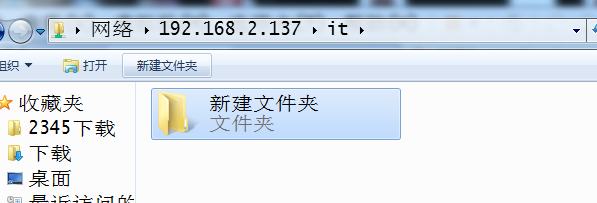
10:测试结果展示:
提示:断开共享盘连接的windows CMD命令:net use * /del /y



Centos 6 之samba 搭建的更多相关文章
- Centos 基础开发环境搭建之Maven私服nexus
hmaster 安装nexus及启动方式 /usr/local/nexus-2.6.3-01/bin ./nexus status Centos 基础开发环境搭建之Maven私服nexus . 软件 ...
- 如何在Fedora或CentOS上使用Samba共享
如今,无论在家里或者是办公场所,不同的电脑之间共享文件夹已不是什么新鲜事了.在这种趋势下,现代操作系统通过网络文件系统的方式使得电脑间数据的交换变得简单而透明.如果您工作的环境中既有微软的Window ...
- CentOS 5.5 Samba服务器安装总结
centos 5.5 samba服务器安装总结先来介绍一下基本的内容windows和linux共享主要利用samba服务器,所谓SMB就是指server message block 的缩写,它是Lin ...
- CentOS 6.2下搭建Web服务器
1Centos 6.2下搭建web服务器 如今,Linux在Web应用越来越广,许多企业都采用Linux来搭建Web服务器,这样即节省了购买正版软件的费用,而且还能够提高服务器的安全性. 之前我们介绍 ...
- 在CentOS上配置SAMBA共享目录(转载)
在CentOS上配置SAMBA共享目录 From: https://blog.csdn.net/qiumei1101381170/article/details/53265341 2016年11月21 ...
- CentOS 6.3下搭建Web服务器
准备前的工作: 1.修改selinux配置文件(/etc/sysconfig/selinux) 关闭防火墙 (1)把SELINUX=enforcing注释掉 (2)并添加SELINUX=disable ...
- CentOS 7设置Samba共享目录
1. 安装Samba服务 yum -y install samba # 查看yum源中Samba版本 yum list | grep samba # 查看samba的安装情况 rpm -qa | gr ...
- 手把手教你在CentOS 7.4下搭建Zabbix监控(转)
Linux系统版本:CentOS 7.4 1.安装前需要先关闭selinux和firewall. 1.1 [root@zabbix ~]# vi /etc/selinux/config 将SELINU ...
- centos set up samba
原文中文链接:https://wiki.centos.org/zh/HowTos/SetUpSamba 原文英文链接:https://wiki.centos.org/HowTos/SetUpSamba ...
随机推荐
- input、button、文字的对齐水平对齐
input.button.文字的对齐~! 1.input文本框下移的方法:padding-top ,可以解决文本框向下移. 2.input文本框和button对齐可以给他们外面加table (例如,谷 ...
- PAT (Basic Level) Practise:1016. 部分A+B
[题目链接] 正整数A的“DA(为1位整数)部分”定义为由A中所有DA组成的新整数PA.例如:给定A = 3862767,DA = 6,则A的“6部分”PA是66,因为A中有2个6. 现给定A.DA. ...
- svn Q&A
Q1:在svn commit的时候,会出现某某文件 is missing.这是因为此次提交时:远程repository中并没有该文件,而且本地repository也没有该文件. 具体原因: 1.可能因 ...
- POJ 2533 动态规划入门 (LIS)
Longest Ordered Subsequence Time Limit: 2000MS Memory Limit: 65536K Total Submissions: 42914 Accepte ...
- poj3461 字符串匹配 熟悉kmp算法第一题
题意: 计算一个字符串在另一个字符串中出现的次数. #include<cstdio> #include<cstring> #include<algorithm> ...
- php iquery
<?php/** * */function iQuery($sql) { $dbcon = mysqli_connect("localhost", "root&qu ...
- MFC ListContrl 的使用
m_ISESTList.SetExtendedStyle(m_ISESTList.GetExtendedStyle() | LVS_EX_FULLROWSELECT | LVS_EX_GRIDLINE ...
- elasticsearch的marvel
摘自: http://kibana.logstash.es/content/logstash/plugins/input/syslog.html 一:marvel介绍 marvel 是 Elastic ...
- asp.net使用My97 Date Picker时设置默认起始时间为n年之前的今天
可以使用My97 Date Picker组件来收集用户输入的日期值. 首先下载该组件:http://www.my97.net/dp/index.asp放到自己的项目中. 然后在项目里面引用js和css ...
- android数据存储之Sqlite(二)
SQLite学习笔记 前言:上一章我们介绍了sqlite的一些基本知识以及在dos命令下对sqlite进行的增删改查的操作,这一章我们将在android项目中实际来操作sqlite. 1. SQLit ...