
The StringFormat property
As we saw in the previous chapters, the way to manipulate the output of a binding before is shown is typically through the use of a converter. The cool thing about the converters is that they allow you to convert any data type into a completely different data type. However, for more simple usage scenarios, where you just want to change the way a certain value is shown and not necessarily convert it into a different type, the StringFormat property might very well be enough.
Using the StringFormat property of a binding, you lose some of the flexibility you get when using a converter, but in return, it's much simpler to use and doesn't involve the creation of a new class in a new file.
The StringFormat property does exactly what the name implies: It formats the output string, simply by calling the String.Format method. Sometimes an example says more than a thousand words, so before I hit that word count, let's jump straight into an example:
<Window x:Class="WpfTutorialSamples.DataBinding.StringFormatSample"

        xmlns="http://schemas.microsoft.com/winfx/2006/xaml/presentation"

        xmlns:x="http://schemas.microsoft.com/winfx/2006/xaml"

                xmlns:system="clr-namespace:System;assembly=mscorlib"

        Title="StringFormatSample" Height="150" Width="250"

                Name="wnd">

        <StackPanel Margin="10">

                <TextBlock Text="{Binding ElementName=wnd, Path=ActualWidth, StringFormat=Window width: {0:#,#.0}}" />

                <TextBlock Text="{Binding ElementName=wnd, Path=ActualHeight, StringFormat=Window height: {0:C}}" />

                <TextBlock Text="{Binding Source={x:Static system:DateTime.Now}, StringFormat=Date: {0:dddd, MMMM dd}}" />

                <TextBlock Text="{Binding Source={x:Static system:DateTime.Now}, StringFormat=Time: {0:HH:mm}}" />

        </StackPanel>

</Window>
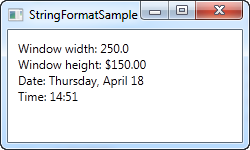
The first couple of TextBlock's gets their value by binding to the parent Window and getting its width and height. Through the StringFormat property, the values are formatted. For the width, we specify a custom formatting string and for the height, we ask it to use the currency format, just for fun. The value is saved as a double type, so we can use all the same format specifiers as if we had called double.ToString(). You can find a list of them here: http://msdn.microsoft.com/en-us/library/dwhawy9k.aspx
Also notice how I can include custom text in the StringFormat - this allows you to pre/post-fix the bound value with text as you please. When referencing the actual value inside the format string, we surround it by a set of curly braces, which includes two values: A reference to the value we want to format (value number 0, which is the first possible value) and the format string, separated by a colon.
For the last two values, we simply bind to the current date (DateTime.Now) and the output it first as a date, in a specific format, and then as the time (hours and minutes), again using our own, pre-defined format. You can read more about DateTime formatting here: http://msdn.microsoft.com/en-us/library/az4se3k1.aspx
Formatting without extra text
Please be aware that if you specify a format string that doesn't include any custom text, which all of the examples above does, then you need to add an extra set of curly braces, when defining it in XAML. The reason is that WPF may otherwise confuse the syntax with the one used for Markup Extensions. Here's an example:
<Window x:Class="WpfTutorialSamples.DataBinding.StringFormatSample"

        xmlns="http://schemas.microsoft.com/winfx/2006/xaml/presentation"

        xmlns:x="http://schemas.microsoft.com/winfx/2006/xaml"

                xmlns:system="clr-namespace:System;assembly=mscorlib"

        Title="StringFormatSample" Height="150" Width="250"

                Name="wnd">

        <WrapPanel Margin="10">

                <TextBlock Text="Width: " />

                <TextBlock Text="{Binding ElementName=wnd, Path=ActualWidth, StringFormat={}{0:#,#.0}}" />

        </WrapPanel>

</Window>
Using a specific Culture
If you need to output a bound value in accordance with a specific culture, that's no problem. The Binding will use the language specified for the parent element, or you can specify it directly for the binding, using the ConverterCulture property. Here's an example:
<Window x:Class="WpfTutorialSamples.DataBinding.StringFormatCultureSample"

        xmlns="http://schemas.microsoft.com/winfx/2006/xaml/presentation"

        xmlns:x="http://schemas.microsoft.com/winfx/2006/xaml"

                xmlns:system="clr-namespace:System;assembly=mscorlib"

        Title="StringFormatCultureSample" Height="120" Width="300">

        <StackPanel Margin="10">

                <TextBlock Text="{Binding Source={x:Static system:DateTime.Now}, ConverterCulture='de-DE', StringFormat=German date: {0:D}}" />

                <TextBlock Text="{Binding Source={x:Static system:DateTime.Now}, ConverterCulture='en-US', StringFormat=American date: {0:D}}" />

                <TextBlock Text="{Binding Source={x:Static system:DateTime.Now}, ConverterCulture='ja-JP', StringFormat=Japanese date: {0:D}}" />

        </StackPanel>

</Window>
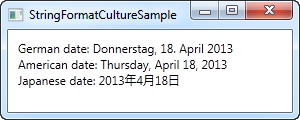
It's pretty simple: By combining the StringFormat property, which uses the D specifier (Long date pattern) and the ConverterCulture property, we can output the bound values in accordance with a specific culture. Pretty nifty!
<TextBlock Text="{Binding CelsiusTemp, StringFormat={}{0}°C}" />
The StringFormat property的更多相关文章
- 【WPF系列】Textbox
Style定义实例 给Textbox定义一个阴影效果. <Style x:Key="{x:Type TextBox}" TargetType="{x:Type Te ...
- 同时使用Binding&StringFormat 显示Text【项目】
Case ID (?unit) 红色的字根据一个后台boolean来做trigger,可以是Case or Open 蓝色的字binding到后台的一个string属性来切换任意的Unit单位 这样一 ...
- wpf Content数据绑定StringFormat起作用的原理和解决(转)
1.简单示例: <Window x:Class="WpfOne.Bind.Bind6" xmlns="http://schemas.microsoft.com/wi ...
- wpf数据绑定 - StringFormat的妙用
写在前面 WPF中常常有这样的情况:需要在UI上显示一些信息,比如显示一张图片的信息,信息结构是: 图片名:Xxx 图片尺寸:Xxx 而其中的 Xxx 通常通过数据绑定来获得, Xxx 前面的内容是需 ...
- wpf Content数据绑定StringFormat起作用的原理和解决
原文:wpf Content数据绑定StringFormat起作用的原理和解决 <Window x:Class="WpfOne.Bind.Bind6" xmlns=" ...
- How do you create a DynamicResourceBinding that supports Converters, StringFormat?
原文 How do you create a DynamicResourceBinding that supports Converters, StringFormat? 2 down vote ac ...
- 探究@property申明对象属性时copy与strong的区别
一.问题来源 一直没有搞清楚NSString.NSArray.NSDictionary--属性描述关键字copy和strong的区别,看别人的项目中属性定义有的用copy,有的用strong.自己在开 ...
- JavaScript特性(attribute)、属性(property)和样式(style)
最近在研读一本巨著<JavaScript忍者秘籍>,里面有一篇文章提到了这3个概念. 书中的源码可以在此下载.我将源码放到了线上,如果不想下载,可以直接访问在线网址,修改页面名就能访问到相 ...
- -Dmaven.multiModuleProjectDirectory system property is not set. Check $M2_HO 解决办法
最近在使用maven,项目测试的时候出现了这么一个错.-Dmaven.multiModuleProjectDirectory system property is not set. Check $M2 ...
随机推荐
- !带有指针的类和struct赋值的本质 - host to device
//这个变量必须在while循环外面 //原因是当将loadModels[modelNum].g_3DModel[0]赋值给新建类后 //里面的数值拷贝过去了,而里头的指针只给了地址 //所以如果这个 ...
- 在程序中使用geos.dll
1 在项目->property->configuration properties->c/c++->general->additional include directo ...
- LeetCode : 287. Find the Duplicate Number
aaarticlea/png;base64,iVBORw0KGgoAAAANSUhEUgAACRAAAAMMCAYAAAAhQhmZAAAMFGlDQ1BJQ0MgUHJvZmlsZQAASImVlw ...
- Jcapta
http://blog.csdn.net/shadowsick/article/details/8575471
- JAVA基础学习之XMLCDATA区、XML处理指令、XML约束概述、JavaBean、XML解析(8)
1.CDATA区在编写XML文件时,有些内容可能不想让解析引擎解析执行,而是当作原始内容处理.遇到此种情况,可以把这些内容放在CDATA区里,对于CDATA区域内的内容,XML解析程序不会处理,而是直 ...
- Acdream 1111:LSS(水题,字符串处理)
LSS Time Limit: 20000/10000 MS (Java/Others) Memory Limit: 128000/64000 KB (Java/Others) SubmitStati ...
- Go 中的反射要点
简介 反射是元数据编程的一种形式,指的是程序获得本身结构的一种能力.不同语言的反射模型实现不一样,本文中的反射,仅仅指的是Go语言中的反射模型. 类型以及接口 这个基本概念需要清晰,这里不详细展开. ...
- 验证备份前设置CONFIGURE CONTROLFILE AUTOBACKUP ON/OFF; 的区别
关于rman的,环境: oracle 10.2.0 rman nocatalog方式 1.首先设置 CONFIGURE CONTROLFILE AUTOBACKUP ON; 然后进行数据库全备份 RM ...
- windows64系统中mysql64位绿色安装
将下载压缩包解压到任意目录 配置安装文件: # For advice on how to change settings please see# http://dev.mysql.com/doc/re ...
- 编译原理实习(应用预测分析法LL(1)实现语法分析)
#include<iostream> #include<fstream> #include<iomanip> #include<cstdio> #inc ...