
误删ibdata1文件恢复方法
注意:以下演示过程前提为mysqld进程仍在运行中,否则无法使用下面演示过程进行恢复!
1.手工制造故障,删除ibdata1文件,注意不要重启mysql
shell > rm -rf ibdata1
2.登录mysql,进行如下操作
mysql > FLUSH TABLES WITH READ LOCK; #全局加读锁,阻塞Innodb继续写入数据
mysql > SHOW engine innodb STATUS; #查看innodb status中的LSN位置
#找到这2个关键值
Log sequence number 1626744
Last checkpoint at 1626744
1)如果相减为0,则表示写入到磁盘中
#如果不为0,可以加速写入
mysql > SET global innodb_max_dirty_pages_pct=0;
2)同时要保证
INSERT BUFFER AND ADAPTIVE HASH INDEX
-------------------------------------
Ibuf: size 1, free list len 0, seg size 2, 0 merges
insert buffer thread. ibuf的大小应该=1
3) purge thread,它應該purge了全部的transactions
------------
TRANSACTIONS
------------
Trx id counter 14085
Purge done for trx's n:o < 0 undo n:o < 0 state: running but idle
4)确保innodb不在进行写操作
SHOW engine innodb STATUS
--------
FILE I/O
--------
I/O thread 0 state: waiting for completed aio requests (insert buffer thread)
I/O thread 1 state: waiting for completed aio requests (log thread)
I/O thread 2 state: waiting for completed aio requests (read thread)
I/O thread 3 state: waiting for completed aio requests (read thread)
I/O thread 4 state: waiting for completed aio requests (read thread)
I/O thread 5 state: waiting for completed aio requests (read thread)
I/O thread 6 state: waiting for completed aio requests (write thread)
I/O thread 7 state: waiting for completed aio requests (write thread)
I/O thread 8 state: waiting for completed aio requests (write thread)
I/O thread 9 state: waiting for completed aio requests (write thread)
Pending normal aio reads: 0 [0, 0, 0, 0] , aio writes: 0 [0, 0, 0, 0] ,
ibuf aio reads: 0, log i/o's: 0, sync i/o's: 0
Pending flushes (fsync) log: 0; buffer pool: 0
172 OS file reads, 5 OS file writes, 5 OS fsyncs
0.00 reads/s, 0 avg bytes/read, 0.00 writes/s, 0.00 fsyncs/s
3. 确认无误之后,/proc/pid/fd中找出ibdata1文件,(这个pid是mysqld 的进程号,如下图:)
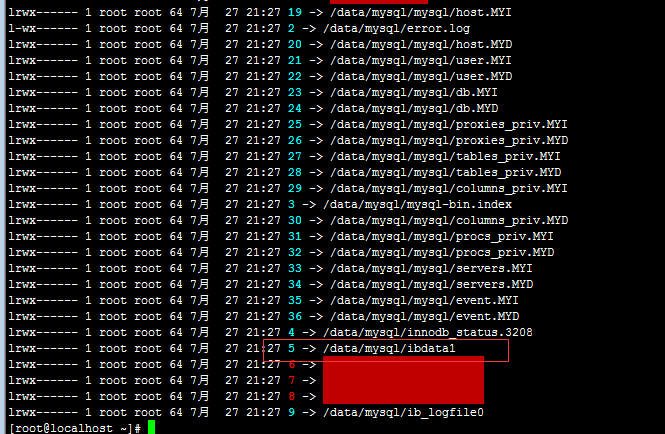
#将ibdata1对应的链接文件5拷贝过去改名
shell > cp /proc/6954/fd/5 /data/mysql3306/ibdata1
4. 更改权限
shell > chown -R mysql.mysql /data/mysql3306/ibdata1
5. 重启[已可以正常登陆]
shell > mysqladmin shutdown -S /tmp/mysql3306.sock
shell > /usr/local/mysql/bin/mysqld_safe --defaults-file=/etc/my.cnf start 3306
shell > mysql -uroot -S /tmp/mysql3306.sock
误删ibdata1文件恢复方法的更多相关文章
- linux下rm -r误删NTFS文件恢复方法
一时疏忽,手一抖,把整个挂载的F盘删了一半!顿时傻眼!! 被删的F盘是Windows下NTFS分区,在Ubuntu12.04中挂载了F盘,使用rm命令时粗心大意,误删了一半的数据. 血的教训告诉我们, ...
- Mysql误删表中数据与误删表的恢复方法
由于头两天面试时被问了这样一个问题,如果某同事误删了某个表,你该怎么恢复? 当时想了一下,因为博主没有遇到过这个问题,但是也多少了解一些,所以就回答通过mysql的binlog日志进行恢复. 面试官当 ...
- Ubuntu 16.04使用rm -rf误删文件恢复方法收集
说明:不一定有效,需要不断尝试 一.lsof 文件刚刚被删除,想要恢复,先尝试lsof. lsof |grep data.file1 cp /proc/xxx/xxx/xx /dir/data.fil ...
- 误删ext3的恢复方法
1.Ext3文件系统结构的简单介绍在Linux所 用的Ext3文件系统中,文件是以块为单位存储的,默认情况下每个块的大小是1K,不同的块以块号区分.每个文件还有一个节点,节点中包含有文件所有者, 读写 ...
- 云服务器 ECS Linux 误删除文件恢复方法介绍
云服务器 ECS Linux 下,rm -rf 意味着一旦删除的文件是无法挽回的.但如果在没有文件覆盖操作的前提下,可以先尝试相关方式进行文件恢复. 本文对此进行简要说明. https://help ...
- oracle数据库丢失数据文件、控制文件、重做日志文件、初始化文件恢复方法
rman target/ list backup; 查看是否已备份,如果没有,那就不知道了 模拟故障,删除/u01/app/oracle/oradata/ORCL文件夹下的所有文件 sqlplus ...
- SQL 恢复master数据库方法,没有log文件的数据库文件恢复方法
SQL Server恢复master数据库方法 第一步:复制model.mdf.mastlog.ldf.model.mdf.modellog.ldf.msdbdata.mdf.msdblog.ldf文 ...
- linux下误删数据文件恢复
linux下文件被删除能够用非常多工具进行恢复.比如undelete(适合ext2,ext3).giis(不能恢复安装giis之前的文件).ext3grep(仅限ext3).R-linux(支持ext ...
- mysql 数据库通过拷贝文件恢复方法
MyIASM可以直接拷贝过去,就可以完成备份的还原 搭建与原数据库相同的的数据库环境(mysql版本一致) 将data文件夹下的文件复制到搭建的新数据库data文件夹下 删除数据库下的.ibd(数据文 ...
随机推荐
- 从show slave status 中判断mysql同步状态
slave status 中检查同步状态: 1.sql线程和io线程显示yes Slave_IO_Running: Yes Slave_SQL_Running: Yes 2. Master_Log_F ...
- spring security 图解过滤器的使用
1. HttpSessionContextIntegrationFilter 位于过滤器顶端,第一个起作用的过滤器. 用途一,在执行其他过滤器之前,率先判断用户的session中是否已经存在一个Sec ...
- 演示一个OLS进行数据访问控制的示例
1.确认数据库版本 2.安装OLS组件 3.创建策略 4.创建分级和标签 5.创建测试用户并授权 6.更新标签 7.测试演示
- 讨论一下hibernate如何动态注册一个动态生成的实体类
如何动态生成实体类请参考这篇博文:http://www.cnblogs.com/anai/p/4269858.html 下面说说得到实体类后,如何能使用hibernate的接口来进行数据访问. 我们都 ...
- oracle空间管理
表空间:组织数据文件的一种途径, 是一个逻辑概念 包含有 表,字段,索引 一个数据库可以对应多个表空间 一个物理文件对应一个表空间 任何一个数据库创建的第一一个表空间是 system Tables ...
- IOS第八天(2:UITableViewController团购,点击底部,xib加载更多, 代理模式)
******* HMViewController.h #import "HMViewController.h" #import "HMTg.h" #import ...
- 【转】CSRF攻击的应对之道
CSRF 背景与介绍CSRF(Cross Site Request Forgery, 跨站域请求伪造)是一种网络的攻击方式,它在 2007 年曾被列为互联网 20 大安全隐患之一.其他安全隐患,比如 ...
- Color Space: HSI
HSI色彩空间是从人的视觉系统出发,用色调(Hue).色饱和度(Saturation或Chroma)和亮度 (Intensity或Brightness)来描述色彩.HSI色彩空间可以用一个圆锥空间模型 ...
- python logging 配置
python logging 配置 在python中,logging由logger,handler,filter,formater四个部分组成,logger是提供我们记录日志的方法:handler是让 ...
- Linked List Cycle II || LeetCode
/** * Definition for singly-linked list. * struct ListNode { * int val; * struct ListNode *next; * } ...