
yii和wp做博客
第一步,安装yii和wp:


第二步,创建protected/components/ExceptionHandler.php文件
<?php

class ExceptionHandler

{

    public function __construct()

    {

        define('YII_ENABLE_EXCEPTION_HANDLER',false);

        set_exception_handler(array($this,'handleException'));

    }

    public function handleException($exception)

    {

        // disable error capturing to avoid recursive errors

        restore_error_handler();

        restore_exception_handler();

        $event=new CExceptionEvent($this,$exception);

        if($exception instanceof CHttpException && $exception->statusCode == 404)

        {

            try

            {

                Yii::app()->runController("blog/index");

            }

            catch(Exception $e) {}

            // if we throw an exception in WordPress on a 404, we can use

            // our main error handler to handle the error

        }

        if(!$event->handled)

        {

            Yii::app()->handleException($exception);

        }

    }

}

?>
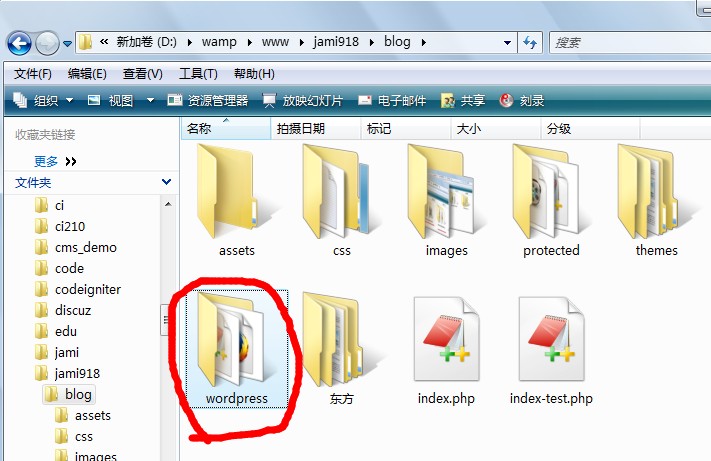
第三步,把wp的目录移到yii中。。修改 yii 的入口文件 /xxx/website/index.php
这一步使得 yii 程序启动时加载 wordpress 的程序
<?php

define('WP_USE_THEMES', true);
$wp_did_header = true;
require_once('wordpress/wp-load.php');

require_once(dirname(__FILE__) . '/protected/components/ExceptionHandler.php');
$router = new ExceptionHandler();

// change the following paths if necessary
$yii=dirname(__FILE__).'/../../framework/yii.php';
$config=dirname(__FILE__).'/protected/config/main.php';

// remove the following line when in production mode
// defined('YII_DEBUG') or define('YII_DEBUG',true);

require_once($yii);
Yii::createWebApplication($config)->run();
第四步,在 yii 中运行 wordpress:protected/controllers/SiteController.php
修改里面的 actionIndex函数为
$this->layout = false; // note that we disable the layout

try {

    //spl_autoload_unregister(array('YiiBase', 'autoload'));

    wp();

    require_once( ABSPATH . WPINC . '/template-loader.php' );

    //spl_autoload_register(array('YiiBase', 'autoload'));

    Yii::app()->end();

}

// if we threw an exception in a WordPress functions.php

// when we find a 404 header, we could use our main Yii

// error handler to handle the error, log as desired

// and then throw the exception on up the chain and

// let Yii handle things from here

// without the above, WordPress becomes our 404 error

// handler for the entire Yii app

catch (Exception $e) {

    throw $e;

}
好了,在浏览器中输入你的域名,一个整合在 yii 里的 wordpress 就呈现啦。
第五步,让 yii 的页面使用 wordpress 的主题:
如果希望你的网站统一用 wordpress 的主题,同时又想用 yii 来写页面,那么再做下面一个小修改就好了。
打开/protected/views/layouts/main.php 将里面的内容替换为
<?php get_header(); ?>

<div id="primary" class="site-content">

    <div id="content" role="main">

        <?php

             // echos Yii content

             echo $content;

        ?>

    </div>

</div>

<?php get_sidebar(); ?>

<?php get_footer(); ?>
OK,大功告成。当然如果你对 yii 熟悉,这些 controller、layout 什么都可以随便搞。
转自http://www.shannap.com/yii-integrate-wordpress.html
yii和wp做博客的更多相关文章
- 解决“用PicGo-2.3.0-beta5 + GitHub做博客图床,github仓库图片文件不显示”的问题记录(备忘)
解决"用PicGo-2.3.0-beta5 + GitHub做博客图床,github仓库图片文件不显示"的问题记录(备忘) 历时几个小时百度,终于靠自己理解解决了GitHub仓库图 ...
- 牛腩学ASP.NET CORE做博客(视频)
牛腩学习ASP.NET CORE做的项目,边学边做. 目录: 01-dotnetcore网站部署到centos7系统上(时长 2:03:16) 02-前期准备及项目搭建 (时长:0:23:35) 03 ...
- 分享我做Dotnet9博客网站时积累的一些资料
从2019年使用WordPress搭建Dotnet9网站,到现在手撸代码开发,介绍中间使用的一些资源,绝无保留,希望对大家有用. 1. 申请域名.搭建WordPress网站 时间点:2019年11月 ...
- yii2实战教程之新手入门指南-简单博客管理系统
作者:白狼 出处:http://www.manks.top/document/easy_blog_manage_system.html 本文版权归作者,欢迎转载,但未经作者同意必须保留此段声明,且在文 ...
- 【五】将博客从jekyll迁移到了hexo
本系列有五篇:分别是 [一]Ubuntu14.04+Jekyll+Github Pages搭建静态博客:主要是安装方面 [二]jekyll 的使用 :主要是jekyll的配置 [三]Markdo ...
- 2021年Wordpress博客搭建
2021年WordPress博客搭建教程 这是一篇关于2021最新版的WP个人博客搭建教程.整篇文章会事无巨细的一步步讲述搭建博客的每一步. 0.前言 随着互联网和移动互联网的飞速发展,博客这一功能恍 ...
- 基于hexo+github搭建一个独立博客
一直听说用hexo搭建一个拥有自己域名的博客是很酷炫的事情~,在这十一花上半个小时整个hexo博客岂不美哉. 使用Hexo吸引我的是,其简单优雅, 而且风格多变, 适合程序员搭建个人博客,而且支持多平 ...
- 前博客 http://bbs.landingbj.com/mytopic.jsp?action=mytopic&username=57071
在工作学习的过程中,遇到了亮眼的技术点,或者 学习的心得体会,总想要记录下来,或是方便自己,或是帮助如同自己现在这般的新人.前人种树,后人乘凉.享受了前人留下的阴凉,也会考虑自己给后来者种下几棵树苗. ...
- 个人博客实现Archives查询小记
这两天正在做博客,刚刚遇到一个问题,就是需要在主页实现文档分类功能,即通过日期将文章进行按日期进行分类. 比如这样的: 我个人的想法是,查询所有文章的日期,然后将日期进行格式化,只留下年份和月份,然后 ...
随机推荐
- xcode 插件
http://www.cocoachina.com/ios/20160122/15080.html https://github.com/rickytan/RTImageAssets http://m ...
- lua 使用
根据公司自身业务需要,总结常用到的lua语法 Lua中的string库 链接:http://www.jb51.net/article/57613.htm string.len(s) ...
- CSS3必须要知道的10个顶级命令
1.边框圆角(Border Radiuas) 这个是我们在平常很常用的吧,以前我在用div圆角的时候,特别特别的痛苦,不管是用CSS来画圆角,还是用图片来画圆角都不那么容易,但是现在好了,在CSS3中 ...
- C语言的源程序字符集与执行字符集
我们程序文件的字符集就是我们写出来的.c扩展名的文件的字符集,这里用的是系统默认的 ANSI 字符集,如下图: 上面的字符集我们不关心,我们关心的是 源程序的字符集 和程序的 执行字符集 ,源程序的字 ...
- iOS开发——高级篇——iOS 中的 NSTimer
以前的老代码在使用 NSTimer 时出现了内存泄露 NSTimer fire 我们先用 NSTimer 来做个简单的计时器,每隔5秒钟在控制台输出 Fire .比较想当然的做法是这样的: 1 2 3 ...
- BZOJ2780——[Spoj]8093 Sevenk Love Oimaster
0.题意:给定N个原始字符串S,M次查询某个特殊的字符串S'在多少个原始串中出现过. 1.分析:这个题我们第一感觉就是可以用后缀自动机来搞,然后我们发现不是本质不同的字串..求出现过的次数,也就是说多 ...
- hdu5412——CRB and Queries
1.题目大意:区间第k大,单点修改 2.随便搞搞就好了= =,树套树或主席树,我写的很丑 #include <cstdio> #include <cstdlib> #inclu ...
- Unity手游之路<十一>资源打包Assetbundle
http://blog.csdn.net/janeky/article/details/17652021 在手游的运营过程中,更新资源是比不可少的.资源管理第一步是资源打包.传统的打包可以将所有物件制 ...
- 剑指Offer 和为S的两个数字
题目描述 输入一个递增排序的数组和一个数字S,在数组中查找两个数,使得他们的和正好是S,如果有多对数字的和等于S,输出两个数的乘积最小的. 输出描述: 对应每个测试案例,输出两个数,小的先输出. 思路 ...
- Spring官网jar包下载方法
Spring官网改版后,很多项目的完整zip包下载链接已经隐掉了,虽然Spring旨在引导大家用更“高大上”的maven方式来管理所依赖的jar包,但是完全没想到中国的国情,在伟大的墙内,直接通过ma ...