
ICEE-Microchip-MPLAB X IDE-MCC Plugin + MCC Core + MHC(MCC Harmony Core) versions and compatibility
https://microchip.my.site.com/s/article/MPLAB-X-MCC-plugin--MCC-Core-and-MCC-Harmony-Core-versions-and-compatibility
Aug 17, 2023•Knowledge
rticle Number: 000014642
Title: MPLAB X MCC plugin, MCC Core and MCC Harmony Core versions and compatibility
Article URL: https://microchipsupport.force.com/s/article/MPLAB-X-MCC-plugin--MCC-Core-and-MCC-Harmony-Core-versions-and-compatibility
Question: What is the relation between the MCC (MPLAB Code Configurator) plugin, the MCC Core and MCC Harmony Core versions?
How to resolve potential incompatibilities?
Answer
MCC Plugin(MPLAB Code Configurator)
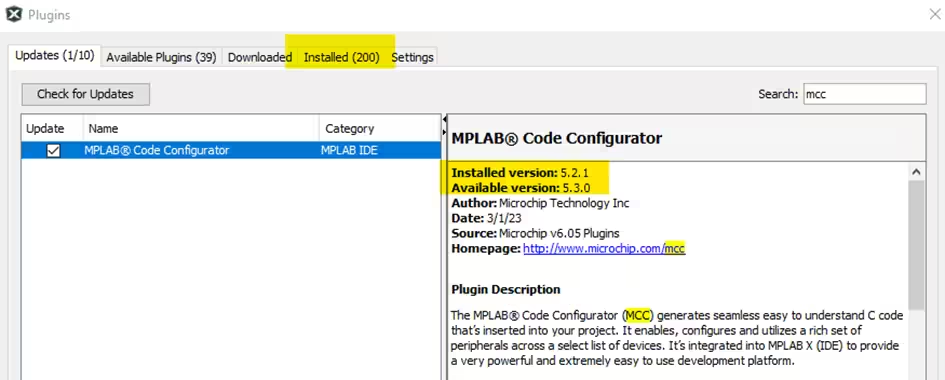
The MCC Plugin is preinstalled starting with MPLAB X v6.05.
Previously, it had to be manually installed from the Plugin repository. The version can be checked through command menu Tools -> Plugins -> Installed tab:
![]()
MCC Project Configuration
The MCC Core and Harmony Core versions are stored in the .mc3 file (MCC Project Configuration file):
To update MCC Core and Harmony Core versions, the** .mc3 file can be manually edited when the project is closed**.
Is recommended to backup the project before.
![]()
MCC Core
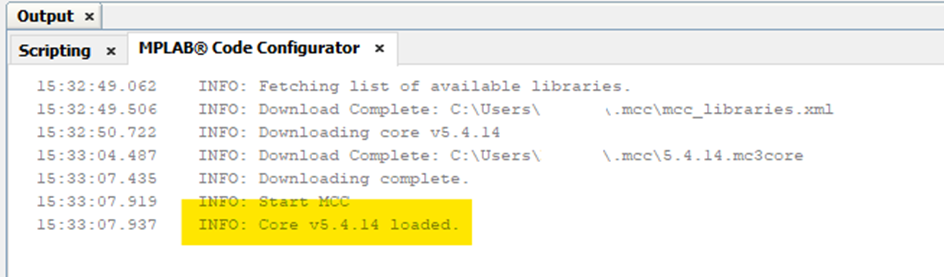
The MCC plugin is linked to the MCC Core version.
When starting MCC, the current MCC Core version is logged to the console.
The MCC Core is stored in ~/.mcc/cores folder.
![]()
Harmony Core
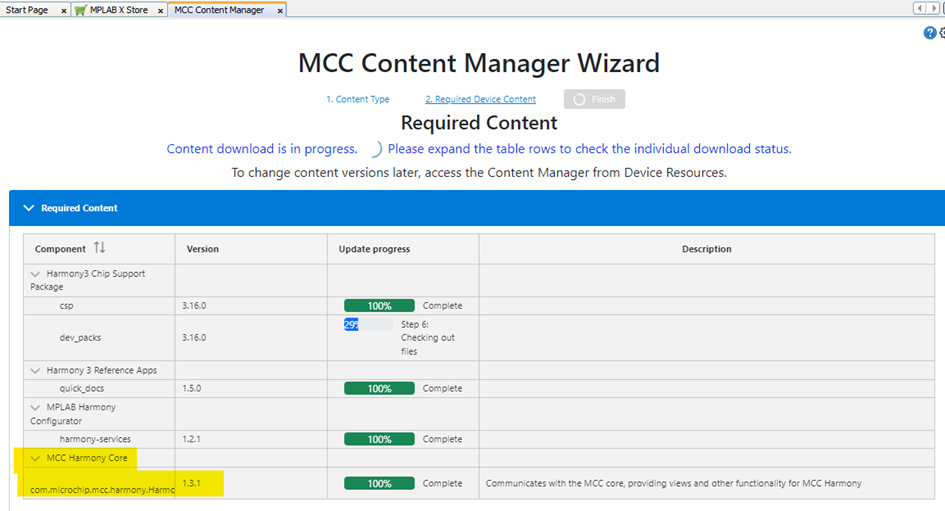
The Harmony Core links to the MCC Core and provides a GUI(Graphical User Interface) inside MPLAB X IDE.
It is downloaded to the ".mcc" directory (full path ~/.mcc) when the first 32bit MCC Harmony project is created.
![]()
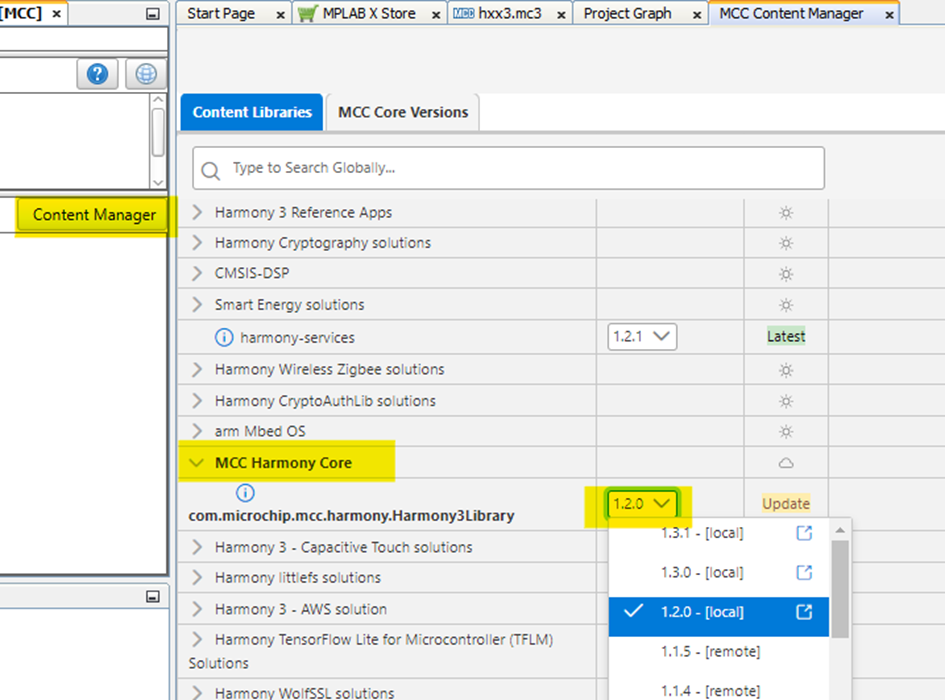
The Harmony Core requires a compatible MCC Core version.
The** compatible MCC Core version** is defined in the configuration file ~/.mcc/libraries/Harmony3Library_v1.x.x/.meta/main.json:The Harmony Core version can be switched from the Content Manager inside the project:
![]()

Potential issues
A common cause for issues when creating a New 32-bit MCC Harmony Project,
or to launch MCC in an existing 32-bit MCC Harmony project,
is an incompatible combination of the 3 parts (MCC Core, Harmony Core and MCC Project Configuration), either due to wrong settings, **missing updates **or through an incomplete file download. For example, when creating a New 32-bit MCC Harmony project with MCC plugin v5.2.1, MCC Core v5.4.14 and Harmony Core v1.3.1, the following error message will be shown: "Unable to load project: Incompatible with core: Harmony V3 v1.3.1".
Resetting a MPLAB X installation
- Sometimes fixing incompatibilities is difficult, and to start from scratch is a better and faster approach. Reinstalling MPLAB X will not be sufficient to achieve this.
- To completely reset a MPLAB X installation including cached settings and downloaded plugins, follow these steps:
- Close MPLAB X
- Delete MPLAB X v6.10 - User folder. The typical path can be checked at MPLAB X --> Help --> About for exact location.
- Delete MPLAB X v6.10 - Cache folder. The typical path can be checked at MPLAB X --> Help --> About for exact location).
- Delete the .mcc folder located in ~/.mcc
- Restart MPLAB X, do not import settings from an older installation
- Update all plugins to latest versions when prompted. This installs MCC v5.5.7, which is compatible with the Harmony Core version 1.3.2
- Set the path to a new/empty Harmony Framework folder in Tools --> Options --> Plugins
ICEE-Microchip-MPLAB X IDE-MCC Plugin + MCC Core + MHC(MCC Harmony Core) versions and compatibility的更多相关文章
- MPLAB X IDE V4.15 创建工程,编译,问题处理
初步接触,有错误的地方还请大神们务必提出来,防止误导他人 硬件环境:MCU--PIC18F67K22 仿真下载器--ICD 3 编译环境:MPLAB X IDE V4.15 中文版 工作需要接触到了P ...
- 解决vs2017调试出现脚本错误(/Community/Common7/IDE/PrivateAssemblies/plugin.vs.js) 方法
原文地址:http://bkcoding.cn/post_1204.html 新装的vs2017编译时出现当前页面脚本错误 url:/Community/Common7/IDE/PrivateAsse ...
- 【PIC单片机】MPLAB X IDE快速入门指南
引言:近期由于项目实践需要,开始动手学习相关硬件知识.从PIC单片机入手. 单片机学习核心要点:查数据手册 配置寄存器 一.基于MPLAB X IDE配置位设置 MPLAB X IDE和MPLAB I ...
- Mplab X IDE 安装DMCI
DMCI在Mplab 8中是默认安装的,在 Mplab X IDE中是作为插件,默认不安装. 找到 勾选前面的复选框,点击安装
- 基于MPLAB X IDE配置位设置讲解
http://blog.csdn.net/superanters/article/details/8541171 在讲基于MPLAB X IDE 配置位配置前我先讲讲如何配置配置位. 比如PICLF1 ...
- MPLAB X IDE调试仿真功能简单入门
仿真分为硬件仿真和软件仿真,这里的硬件仿真和软件仿真的区别,就不多说了,相信大家都听说过这两个概念. 我这里想给大家介绍的是“Set PC at Cursor”--“设置PC到光标处”这个功能,这个功 ...
- Microchip编译器产品线—MPLAB XC简介
以下为Microchip最新编译器产品线—MPLAB-XC简介 MPLAB-XC:适合所有PIC单片机和项目的编译器解决方案 Microchip最新编译器产品线—MPLAB-XC为项目开发的软件需求提 ...
- matlab中 mcc、mbuild和mex命令详解
先简单的说说mcc.mbuild和mex到底怎么回事: mcc将M文件转换成C/C++文件和相应的MEX包裹文件(需要Matlab编辑器),但在特定条件下可以自动调用mbuild或者mex mex将C ...
- matlab中 mcc/mbuild/mex 区别
mcc 的作用是将 .m文件编译为 c/c++动态链接库文件,使你可以在 c/c++程序中使用 matlab的一些函数功能.mcc 也可以将.m文件编译为exe可执行文件. mex 的作用是将 c/c ...
- [Wannafly挑战赛28][B msc和mcc][预处理+枚举]
链接:https://ac.nowcoder.com/acm/contest/217/B来源:牛客网 msc和mcc 题目描述 msc和mcc是一对好朋友,有一天他们得到了一个长度为n的字符串s. 这 ...
随机推荐
- 【Linux】Linux内核模块开发
Linux内核模块开发 零.关于 1.概述 最近在学习Linux相关的东西,学习了U-Boot的编译,Linux的编译,能够在开发板上运行自己编译的U-Boot和Linux了,那么接下来就是在自己编译 ...
- 勒索病毒分析-2024wdb-re2
检查相关信息 可以看到病毒存在VMProtect虚拟壳 简单脱壳 首先我在x64debug中运行一次,发现没有中断退出,证明大概率没有反调试,但是有crc检测,所以尽量不下int3断点(脱壳时). 一 ...
- 【记录】OJ|区间DP|石子合并(环形)
1. 题干 描述 在一个园形操场的四周摆放N堆石子,现要将石子有次序地合并成一堆.规定每次只能选相邻的2堆合并成新的一堆,并将新的一堆的石子数,记为该次合并的得分. 试设计出一个算法,计算出将N堆石子 ...
- 详解SLAM中的李群和李代数(中)
1 概述 在上一篇文章<详解SLAM中的李群和李代数(上)>中,我们已经通过对李群求导引出了李代数.在这篇文章中,我们就系统总结一下李代数的相关知识. 2 李代数 2.1 定义 李代数是一 ...
- c++并发编程实战-第2章 线程管控
线程的基本管控 每个应用程序都至少拥有一个线程,即运行main函数的线程,称为主线程,它由c++运行时系统启动.我们可以在软件运行中产生其他线程,它们以指定的函数作为入口函数.当main函数返回后,程 ...
- python ast模块使用
ast(Abstract Syntax Trees)是python中非常有用的一个模块,我们可以通过分析python的抽象语法树来对python的代码进行分析和修改. ast作用在python代码的语 ...
- 开启PyTorch的第一天
为积极响应导师的要求,我开启了我的深度学习之旅,成为炼丹大队的一员. 今天先是安装PyTorch,路子大家网上已经摸的很清了,我主要参考的是 https://blog.csdn.net/weixin_ ...
- codeup之统计同成绩学生人数
Description 读入N名学生的成绩,将获得某一给定分数的学生人数输出. Input 测试输入包含若干测试用例,每个测试用例的格式为 第1行:N 第2行:N名学生的成绩,相邻两数字用一个空格间隔 ...
- Mysql中长连接和短连接的区别
区别如下: 长连接:长连接是相对于短连接来说的.长连接指在一个连接上可以连续发送多个数据包,在连接保持期间,如果没有数据包发送,需要双方发链路检测包. mysql的长连接如果长期闲置,mysql会8小 ...
- 【鸿蒙生态学堂04】ArkUI开发基础(上)
课程介绍 本课程将介绍HarmonyOS的ArkUI框架,包括其基础语法和如何使用常用组件构建页面.ArkUI是HarmonyOS应用的UI开发框架,提供简洁的UI语法.丰富的组件和实时界面预览工具. ...