
OAuth2.0系列之密码模式实践教程(四)
@
OAuth2.0系列博客:
- OAuth2.0系列之基本概念和运作流程(一)
- OAuth2.0系列之授权码模式实践教程(二)
- OAuth2.0系列之简化模式实践教程(三)
- OAuth2.0系列之密码模式实践教程(四)
- OAuth2.0系列之客户端模式实践教程(五)
- OAuth2.0系列之集成JWT实现单点登录
1、密码模式简介
1.1 前言简介
在上一篇文章中我们学习了OAuth2的一些基本概念,对OAuth2有了基本的认识,接着学习OAuth2.0授权模式中的密码模式
ps:OAuth2.0的授权模式可以分为:
- 授权码模式(authorization code)
- 简化模式(implicit)
- 密码模式(resource owner password credentials)
- 客户端模式(client credentials)
密码模式(resource owner password credentials):密码模式中,用户向客户端提供自己的用户名和密码,这通常用在用户对客户端高度信任的情况
1.2 授权流程图
官网图片:
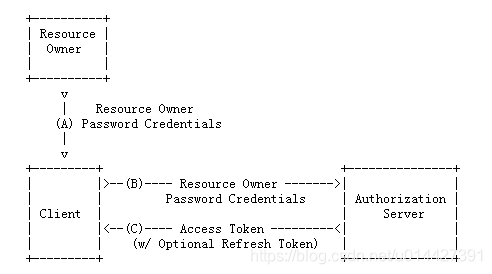
- (A)用户访问客户端,提供URI连接包含用户名和密码信息给授权服务器
- (B)授权服务器对客户端进行身份验证
- (C)授权通过,返回acceptToken给客户端
从调接口方面,简单来说:
- 第一步:直接传username,password获取token
- 第二步:拿到acceptToken之后,就可以直接访问资源
http://localhost:8084/api/userinfo?access_token=${accept_token}
2、例子实践
2.1 实验环境准备
- IntelliJ IDEA
- Maven3.+版本
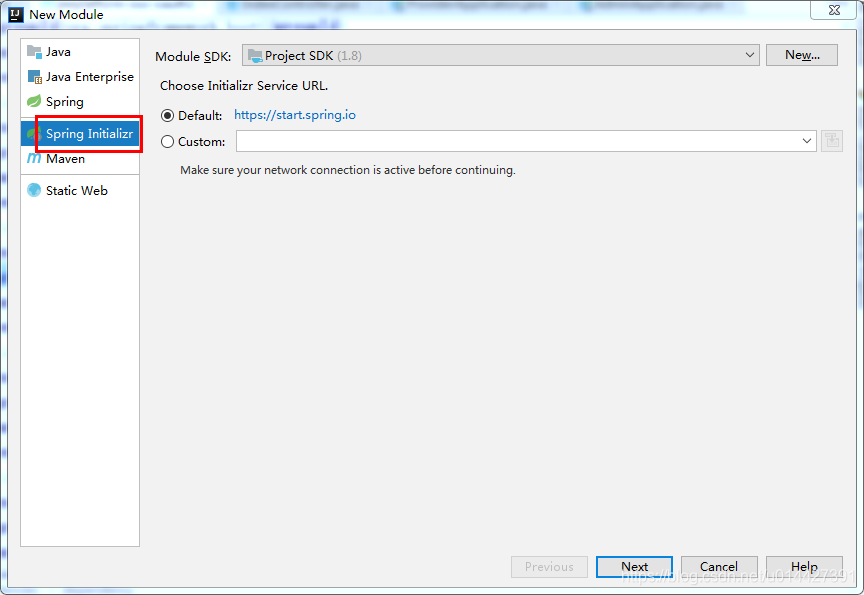
新建SpringBoot Initializer项目,可以命名password
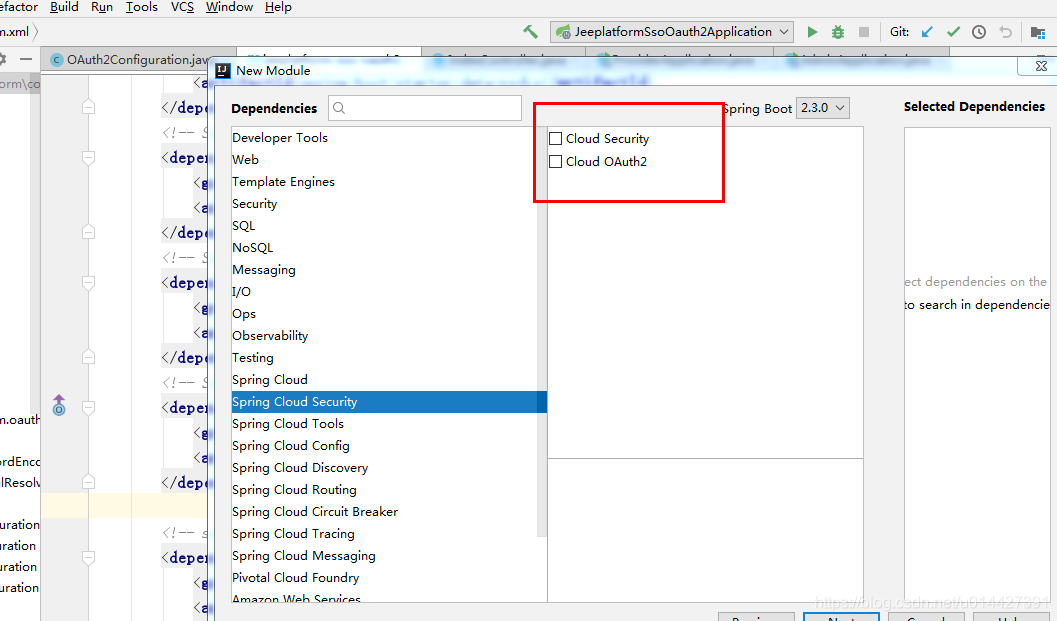
主要是想引入:
 <dependency>

            <groupId>org.springframework.boot</groupId>

            <artifactId>spring-boot-starter-web</artifactId>

        </dependency>

 <!-- Spring Cloud Oauth2-->

        <dependency>

            <groupId>org.springframework.cloud</groupId>

            <artifactId>spring-cloud-starter-oauth2</artifactId>

        </dependency>

        <!-- Spring Cloud Security-->

        <dependency>

            <groupId>org.springframework.cloud</groupId>

            <artifactId>spring-cloud-starter-security</artifactId>

        </dependency>
2.2 OAuth2.0角色
前面的学习,我们知道了OAuth2.0主要包括如下角色,下面通过代码例子加深对理论的理解
- 资源所有者(Resource Owner)
- 用户代理(User Agent)
- 客户端(Client)
- 授权服务器(Authorization Server)
- 资源服务器(Resource Server)
生产环境、资源服务器和授权服务器一般是分开的,不过学习的可以放在一起
定义资源服务器,用注解@EnableResourceServer;
定义授权服务器,用注解@EnableAuthorizationServer;
2.3 OAuth2.0配置类
package com.example.oauth2.password.config;

import org.springframework.beans.factory.annotation.Autowired;

import org.springframework.context.annotation.Bean;

import org.springframework.context.annotation.Configuration;

import org.springframework.security.authentication.AuthenticationManager;

import org.springframework.security.oauth2.config.annotation.configurers.ClientDetailsServiceConfigurer;

import org.springframework.security.oauth2.config.annotation.web.configuration.AuthorizationServerConfigurerAdapter;

import org.springframework.security.oauth2.config.annotation.web.configuration.EnableAuthorizationServer;

import org.springframework.security.oauth2.config.annotation.web.configurers.AuthorizationServerEndpointsConfigurer;

import org.springframework.security.oauth2.config.annotation.web.configurers.AuthorizationServerSecurityConfigurer;

import org.springframework.security.oauth2.provider.token.TokenStore;

import org.springframework.security.oauth2.provider.token.store.InMemoryTokenStore;

/**

 * <pre>

 *     OAuth2.0配置类

 * </pre>

 *

 * <pre>

 * @author mazq

 * 修改记录

 *    修改后版本:     修改人:  修改日期: 2020/06/11 11:00  修改内容:

 * </pre>

 */

@Configuration

//开启授权服务

@EnableAuthorizationServer

public class OAuth2Config extends AuthorizationServerConfigurerAdapter {

    @Autowired

    private AuthenticationManager authenticationManager;

    private static final String CLIENT_ID = "cms";

    private static final String SECRET_CHAR_SEQUENCE = "{noop}secret";

    private static final String SCOPE_READ = "read";

    private static final String SCOPE_WRITE = "write";

    private static final String TRUST = "trust";

    private static final String USER ="user";

    private static final String ALL = "all";

    private static final int ACCESS_TOKEN_VALIDITY_SECONDS = 2*60;

    private static final int FREFRESH_TOKEN_VALIDITY_SECONDS = 2*60;

    // 密码模式授权模式

    private static final String GRANT_TYPE_PASSWORD = "password";

    //授权码模式

    private static final String AUTHORIZATION_CODE = "authorization_code";

    //refresh token模式

    private static final String REFRESH_TOKEN = "refresh_token";

    //简化授权模式

    private static final String IMPLICIT = "implicit";

    //指定哪些资源是需要授权验证的

    private static final String RESOURCE_ID = "resource_id";

    @Override

    public void configure(ClientDetailsServiceConfigurer clients) throws Exception {

        clients

                // 使用内存存储

                .inMemory()

                //标记客户端id

                .withClient(CLIENT_ID)

                //客户端安全码

                .secret(SECRET_CHAR_SEQUENCE)

                //为true 直接自动授权成功返回code

                .autoApprove(true)

                .redirectUris("http://127.0.0.1:8084/cms/login") //重定向uri

                //允许授权范围

                .scopes(ALL)

                //token 时间秒

                .accessTokenValiditySeconds(ACCESS_TOKEN_VALIDITY_SECONDS)

                //刷新token 时间 秒

                .refreshTokenValiditySeconds(FREFRESH_TOKEN_VALIDITY_SECONDS)

                //允许授权类型

                .authorizedGrantTypes(GRANT_TYPE_PASSWORD );

    }

    @Override

    public void configure(AuthorizationServerEndpointsConfigurer endpoints) throws Exception {

        // 使用内存保存生成的token

        endpoints.authenticationManager(authenticationManager).tokenStore(memoryTokenStore());

    }

    /**

     * 认证服务器的安全配置

     *

     * @param security

     * @throws Exception

     */

    @Override

    public void configure(AuthorizationServerSecurityConfigurer security) throws Exception {

        security

                //.realm(RESOURCE_ID)

                // 开启/oauth/token_key验证端口认证权限访问

                .tokenKeyAccess("isAuthenticated()")

                //  开启/oauth/check_token验证端口认证权限访问

                .checkTokenAccess("isAuthenticated()")

                //允许表单认证

                .allowFormAuthenticationForClients();

    }

    @Bean

    public TokenStore memoryTokenStore() {

        // 最基本的InMemoryTokenStore生成token

        return new InMemoryTokenStore();

    }

}
2.4 Security配置类
为了测试,可以进行简单的SpringSecurity
package com.example.oauth2.password.config;

import org.springframework.context.annotation.Bean;

import org.springframework.context.annotation.Configuration;

import org.springframework.core.annotation.Order;

import org.springframework.security.authentication.AuthenticationManager;

import org.springframework.security.config.annotation.authentication.builders.AuthenticationManagerBuilder;

import org.springframework.security.config.annotation.web.builders.HttpSecurity;

import org.springframework.security.config.annotation.web.builders.WebSecurity;

import org.springframework.security.config.annotation.web.configuration.EnableWebSecurity;

import org.springframework.security.config.annotation.web.configuration.WebSecurityConfigurerAdapter;

/**

 * <pre>

 *  SpringSecurity配置类

 * </pre>

 *

 * <pre>

 * @author mazq

 * 修改记录

 *    修改后版本:     修改人:  修改日期: 2020/06/11 11:23  修改内容:

 * </pre>

 */

@Configuration

@EnableWebSecurity

@Order(1)

public class SecurityConfig extends WebSecurityConfigurerAdapter {

    @Bean

    @Override

    public AuthenticationManager authenticationManagerBean() throws Exception {

        return super.authenticationManagerBean();

    }

    @Override

    protected void configure(AuthenticationManagerBuilder auth) throws Exception {    //auth.inMemoryAuthentication()

        auth.inMemoryAuthentication()

                .withUser("nicky")

                .password("{noop}123")

                .roles("admin");

    }

    @Override

    public void configure(WebSecurity web) throws Exception {

        //解决静态资源被拦截的问题

        web.ignoring().antMatchers("/asserts/**");

        web.ignoring().antMatchers("/favicon.ico");

    }

    @Override

    protected void configure(HttpSecurity http) throws Exception {

        http   // 配置登录页并允许访问

                //.formLogin().permitAll()

                // 配置Basic登录

                //.and().httpBasic()

                // 配置登出页面

                .logout().logoutUrl("/logout").logoutSuccessUrl("/")

                // 配置允许访问的链接

                .and().authorizeRequests().antMatchers("/oauth/**", "/login/**", "/logout/**","/api/**").permitAll()

                // 其余所有请求全部需要鉴权认证

                .anyRequest().authenticated()

                // 关闭跨域保护;

                .and().csrf().disable();

    }

}
2.5 功能简单测试
接口测试,要用POST方式,在postman测试,response_type参数传password:
http://localhost:8888/oauth/token?password=123&grant_type=password&username=nicky&scope=all
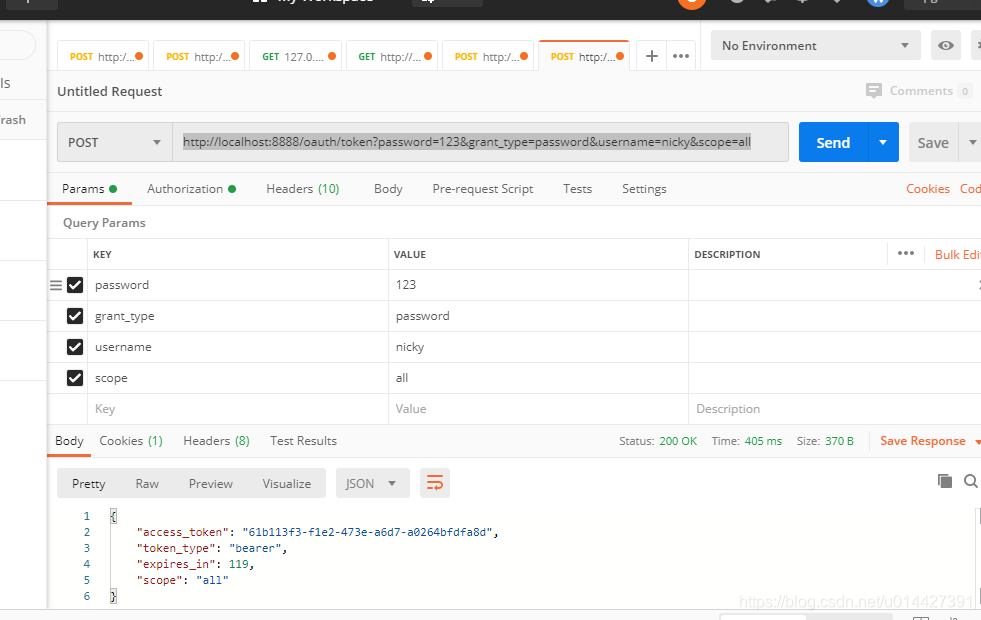
注意配置一下请求头的授权参数,username即client_id,password即client_secret
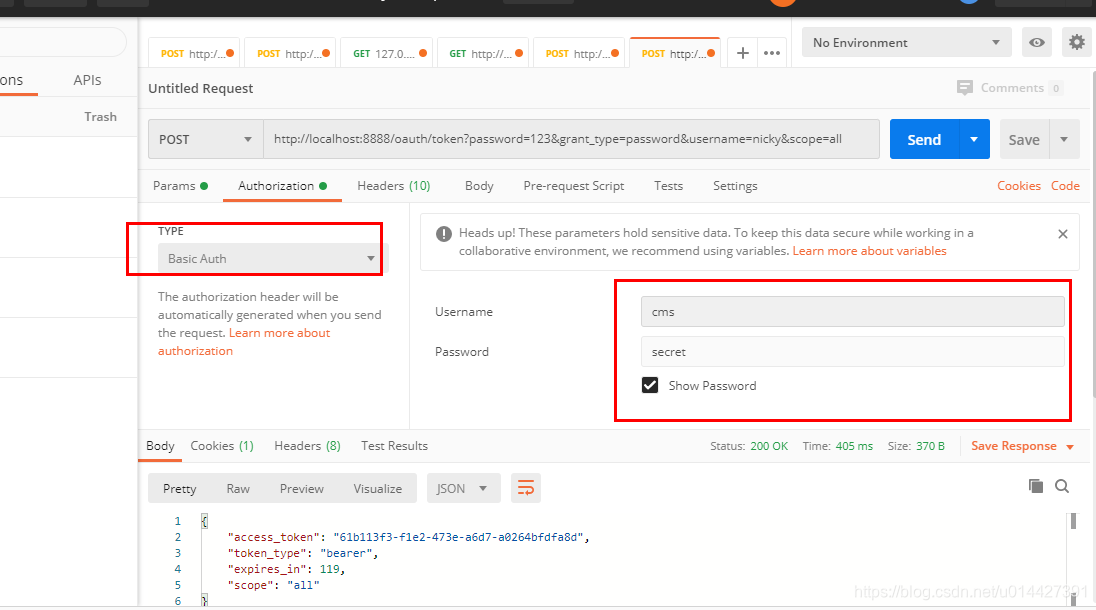
代码方式请求,可以进行如下封装,即进行base64加密
HttpHeaders headers = new HttpHeaders();

        byte[] key = (clientId+":"+clientSecret).getBytes();

        String authKey = new String(Base64.encodeBase64(key));

        LOG.info("Authorization:{}","Basic "+authKey);

        headers.add("Authorization","Basic "+authKey);
拿到token直接去调业务接口:
http://localhost:8888/api/userinfo?access_token=61b113f3-f1e2-473e-a6d7-a0264bfdfa8d
例子代码下载:code download
OAuth2.0系列之密码模式实践教程(四)的更多相关文章
- OAuth2.0系列之基本概念和运作流程(一)
@ 目录 一.OAuth2.0是什么? 1.1 OAuth2.0简介 1.2 OAuth2.0官方文档 二.OAuth2.0原理 2.1 OAuth2.0流程图 三. OAuth2.0的角色 四.OA ...
- SpringBoot系列之自定义starter实践教程
SpringBoot系列之自定义starter实践教程 Springboot是有提供了很多starter的,starter翻译过来可以理解为场景启动器,所谓场景启动器配置了自动配置等等对应业务模块的一 ...
- Oauth2.0认证---授权码模式
目录: 1.功能描述 2.客户端的授权模式 3.授权模式认证流程 4.代码实现 1.功能描述 OAuth在"客户端"与"服务提供商"之间,设置了一个授权层(au ...
- 被广泛使用的OAuth2.0的密码模式已经废了,放弃吧
最近一直有同学在问,OAuth2密码模式为啥Spring Security还没有实现,就连新的Spring Authorization Server也没有这个玩意儿. 其实这里可以告诉大家,OAuth ...
- OAuth2.0 四种授权模式
OAuth2.0简单笔记(四种授权模式) 金天:坚持写东西,不是一件容易的事,换句话说其实坚持本身都不是一件容易的事.如果学习有捷径,那就是不断实践,不断积累.写笔记,其实是给自己看的,是体现积累的一 ...
- Spring Boot Security Oauth2之客户端模式及密码模式实现
Spring Boot Security Oauth2之客户端模式及密码模式实现 示例主要内容 1.多认证模式(密码模式.客户端模式) 2.token存到redis支持 3.资源保护 4.密码模式用户 ...
- IdentityServer4实现Oauth2.0四种模式之隐藏模式
接上一篇:IdentityServer4实现OAuth2.0四种模式之密码模式,密码模式将用户的密码暴露给了客户端,这无疑是不安全的,隐藏模式可以解决这个问题,由用户自己在IdentityServ ...
- IdentityServer4系列 | 授权码模式
一.前言 在上一篇关于简化模式中,通过客户端以浏览器的形式请求IdentityServer服务获取访问令牌,从而请求获取受保护的资源,但由于token携带在url中,安全性方面不能保证.因此,我们可以 ...
- OAuth2.0 知多少
1. 引言 周末逛简书,看了一篇写的极好的文章,点击大红心点赞,就直接给我跳转到登录界面了,原来点赞是需要登录的. 可是没有我并没有简书账号,一直使用的QQ的集成登录.下面有一排社交登录按钮,我们可以 ...
- ASP.NET WebApi 基于OAuth2.0实现Token签名认证
一.课程介绍 明人不说暗话,跟着阿笨一起玩WebApi!开发提供数据的WebApi服务,最重要的是数据的安全性.那么对于我们来说,如何确保数据的安全将是我们需要思考的问题.为了保护我们的WebApi数 ...
随机推荐
- Vue3源码解析--收集的依赖是什么?怎么收集的?什么时候收集的?
从Vue开始较大范围在前端应用开始,关于Vue一些基础知识的讨论和面试问题就在开发圈子里基本上就跟前几年的股票和基金一样,楼下摆摊卖酱香饼的阿姨都能说上几句那种.找过前端开发工作或者正在找开发工作的前 ...
- AI对低代码技术的影响
一.开发效率革命的"双引擎" 在过去的数十年里,软件工程领域正在经历一场由低代码平台和人工智能技术共同驱动的效率革命.这两股技术浪潮虽源于不同的技术路径,却共同指向同一个战略目标: ...
- DevOps 需要处理的工作
本文纯属个人工作记录: 1.部署Linux服务器 2.安装Docker 3.在Docker中安装Gitlab和runner 4.设置Gitlab pipline,即CI/CD 5.可能需要Jenkin ...
- 洛谷 P5066 [Ynoi2014] 人人本着正义之名debug-log
序言 此日志分为四部分. 00:00是开始打代码的时间. 最开始打完代码(没有debug)大约用了两小时. part1-20210323 02:30 生成新节点时,没有给随机权值. 02:41 upd ...
- 「Log」NOIP 2023 游记
Day 0 打了大半天板子,然后开摆. 打块,快下班的时候玩了猜词游戏. 回家睡大觉. Day 1 早上起床状态良好,收拾收拾就出门了,跟爸妈吃了肯德基,然后坐车到三校区. 才看到 cc0000 之前 ...
- 2. LangChain4j-AIServices,原来调用AI这么简单?
1. 简介 上一章节我们讲了如何使用LangChain4J的底层组件来进行AI的交互,如 ChatLanguageModel.ChatMessage.ChatMemory 等. 在这个层面上工作非常灵 ...
- 安全感知平台SIP-部署简介
部署安装前前期调研: NDR:全流量高级威胁检测: NDR是一款专门围绕"高级威胁检测"为核心,主打全流量采集.快速检测.威胁定位.研判溯源.联动闭环一体化的专业流量检测系统:内置 ...
- SpringBoot项目,application.yml文件没有自动提示且没有绿叶
问题描述:通过IDEA的Maven直接创建SpringBoot项目,application.yml文件没有自动提示而且没有绿叶 问题原因:插件中,这玩意儿没被勾选 解决办法:勾选就好了
- .NET 10 引入 后量子密码学 (PQC)
.NET 10 预览版 5 悄悄引入了对基于新定稿行业标准的后量子加密(PQC)的支持,这标志着帮助开发人员保护应用程序免受未来量子驱动攻击的早期举措.后量子密码学 (PQC) 支持是一项坚定地展望未 ...
- 在Linux下使用wxWidgets进行跨平台GUI开发(三)
创建wxWidgets应用程序 在本文中,我们将了解创建wxWidgets应用程序所需的基础知识.首先创建一个简单的示例程序,展示如何显示图标:接着通过另一个示例演示事件的使用方法:最后探讨wxWid ...