
debian C++ OTL库 用 unixodbc 连接 mysql 小记
这个东东也是折腾了几天,网上很多文章可能已经过时,所以写下不同,以备后用.
参考网址:
http://blog.csdn.net/genganpeng/article/details/7402229
http://blog.csdn.net/liefdiy/article/details/5348583
http://blog.itpub.net/81/viewspace-710064/
http://www.software8.co/wzjs/czxt/4668.html
为什么要用 OTL去连接mysql.
OTL是一个纯C++的通用数据库连接模板库,可以支持各种当下流行的数据库,如Oracle,Sybase, MySQL, PostgreSQL, EnterpriseDB, SQLite, MS ACCESS, Firebird等等.它是一个跨平台类库,在MS Windows, Linux/Unix/Mac OS X 都可以使用。
可baidu C++ OTL深入了解.
环境
Linux
root@debian:~# uname -a
Linux debian 3.2.0-4-amd64 #1 SMP Debian 3.2.65-1 x86_64 GNU/Linux
mysql
root@debian:~# mysql --version
mysql Ver 14.14 Distrib 5.5.43, for debian-linux-gnu (x86_64) using readline 6.2
unixODBC
root@debian:~# isql --versoin
unixODBC 2.3.2
OTL版本
OTL 4.0.359
下载地址:http://otl.sourceforge.net/
程序安装
1,unixODBC
下载地址:
http://www.unixodbc.org/
1. copy the unixODBC-2.3.2.tar.gz file somewhere you can create files and directories
2. gunzip unixODBC*.tar.gz
3. tar xvf unixODBC*.tar
./configure

make

make install
就OK了
2,mysql
apt-get install mysql-server mysql-client
还需要安装 mysql的odbc驱动
下载地址:
http://mirrors.sohu.com/mysql/Connector-ODBC/5.3/
如果是新版本改下5.3这个版本号就ok.
我的linux 是x64所以下载
mysql-connector-odbc-5.3.2-linux-glibc2.5-x86-64bit.tar.gz
安装对应的数据库驱动。比如mysql 对应 libmyodbc。 安装完后查看下库包含的文件就可以找到对应的lib
--此次强烈建议用源码安装。ubuntu 安装很简单apt-get就好,rpm 包会有依赖问题,YUM 有些包会冲突。
tar zxvf mysql-connector-odbc-5.1.11-linux-el6-x86-64bit.tar.gz
cd mysql-connector-odbc-5.1.11-linux-el6-x86-64bit\lib
#复制到 /usr/local/lib
cp ./*.* /usr/local/lib
2.1 mysql 测试前的准备.
#使用mysql数据库

use mysql;

#查询

select host,user,password  from user;

#更新root密码

update user set password=PASSWORD('') where user='root' ;

#刷新

flush privileges;

#创建新用户,设置任何地方都可以访问.

#命令:CREATE USER 'username'@'host' IDENTIFIED BY 'password';

create user 'dbadmin'@'%' identified by 'aaaaaa';

#创建数据库 test1,设置utf8格式编码

Create DATABASE IF NOT EXISTS test1  default charset utf8 COLLATE utf8_general_ci;

#显示数据库

show databases;

#设置数据库test1的所有权限给 dbadmin用户 .

grant all on test1.* to 'dbadmin'@'%' ;

#刷新

flush privileges;
mysql配置文件my.cnf详解 :
http://blog.chinaunix.net/uid-20639775-id-154429.html
http://blog.sina.com.cn/s/blog_a8b2435901016f5f.html
mysql 更改数据库目录:
http://blog.chinaunix.net/uid-77311-id-3485225.html
mysql 更改数据编码:
http://www.pc6.com/infoview/Article_63586.html
http://blog.chinaunix.net/uid-223060-id-2127099.html
最后/etc/mysql/my.cnf 的内容为:
#

# The MySQL database server configuration file.

#

# You can copy this to one of:

# - "/etc/mysql/my.cnf" to set global options,

# - "~/.my.cnf" to set user-specific options.

#

# One can use all long options that the program supports.

# Run program with --help to get a list of available options and with

# --print-defaults to see which it would actually understand and use.

#

# For explanations see

# http://dev.mysql.com/doc/mysql/en/server-system-variables.html

# This will be passed to all mysql clients

# It has been reported that passwords should be enclosed with ticks/quotes

# escpecially if they contain "#" chars...

# Remember to edit /etc/mysql/debian.cnf when changing the socket location.

[client]

port        = 3306

socket        = /var/run/mysqld/mysqld.sock

#设置编译

default-character-set = utf8

# Here is entries for some specific programs

# The following values assume you have at least 32M ram

# This was formally known as [safe_mysqld]. Both versions are currently parsed.

[mysqld_safe]

socket        = /var/run/mysqld/mysqld.sock

nice        = 0

[mysqld]

#

# * Basic Settings

#

user        = mysql

pid-file    = /var/run/mysqld/mysqld.pid

socket        = /var/run/mysqld/mysqld.sock

port        = 3306

basedir        = /usr

#datadir        = /var/lib/mysql  #原数据库目录

datadir        = /xxx/x/xxx/mysql  #现数据库目录

tmpdir        = /tmp

lc-messages-dir    = /usr/share/mysql

#设置编译

default-storage-engine=INNODB

character-set-server=utf8

collation-server=utf8_general_ci

skip-external-locking

#

# Instead of skip-networking the default is now to listen only on

# localhost which is more compatible and is not less secure.

#bind-address        = 127.0.0.1

#

# * Fine Tuning

#

key_buffer        = 16M

max_allowed_packet    = 16M

thread_stack        = 192K

thread_cache_size       = 8

# This replaces the startup script and checks MyISAM tables if needed

# the first time they are touched

myisam-recover         = BACKUP

#max_connections        = 100

#table_cache            = 64

#thread_concurrency     = 10

#

# * Query Cache Configuration

#

query_cache_limit    = 1M

query_cache_size        = 16M

#

# * Logging and Replication

#

# Both location gets rotated by the cronjob.

# Be aware that this log type is a performance killer.

# As of 5.1 you can enable the log at runtime!

#general_log_file        = /var/log/mysql/mysql.log

#general_log             = 1

#

# Error logging goes to syslog due to /etc/mysql/conf.d/mysqld_safe_syslog.cnf.

#

# Here you can see queries with especially long duration

#log_slow_queries    = /var/log/mysql/mysql-slow.log

#long_query_time = 2

#log-queries-not-using-indexes

#

# The following can be used as easy to replay backup logs or for replication.

# note: if you are setting up a replication slave, see README.Debian about

#       other settings you may need to change.

#server-id        = 1

#log_bin            = /var/log/mysql/mysql-bin.log

expire_logs_days    = 10

max_binlog_size         = 100M

#binlog_do_db        = include_database_name

#binlog_ignore_db    = include_database_name

#

# * InnoDB

#

# InnoDB is enabled by default with a 10MB datafile in /var/lib/mysql/.

# Read the manual for more InnoDB related options. There are many!

#

# * Security Features

#

# Read the manual, too, if you want chroot!

# chroot = /var/lib/mysql/

#

# For generating SSL certificates I recommend the OpenSSL GUI "tinyca".

#

# ssl-ca=/etc/mysql/cacert.pem

# ssl-cert=/etc/mysql/server-cert.pem

# ssl-key=/etc/mysql/server-key.pem

[mysqldump]

quick

quote-names

max_allowed_packet    = 16M

[mysql]

#no-auto-rehash    # faster start of mysql but no tab completition

[isamchk]

key_buffer        = 16M

#

# * IMPORTANT: Additional settings that can override those from this file!

#   The files must end with '.cnf', otherwise they'll be ignored.

#

!includedir /etc/mysql/conf.d/
配置unixodbc
UNIXODBC 安装好后会有:
/etc/odbcinst.ini 和 /etc/odbc.ini ********但配置这两个文件不会生效,原因我暂时没有找到.请高手指点.
/usr/local/etc/odbcinst.ini 和 /usr/local/etc/odbc.ini 这两个配置文件才会生效.
/usr/local/etc/odbcinst.ini 配置:
#Section
[mysqlodbc]
#libmyodbc5w.so 和libmyodbc5a.so的区别
Driver=/usr/local/lib/libmyodbc5w.so
SETUP=/usr/local/lib/libmyodbc5w.so
UsageCount=1
关于 libmyodbc5w.so 和libmyodbc5a.so的区别 在
http://bugs.mysql.com/bug.php?id=69837
找到了相应的答案.
"
  The odbcinst.ini file shows the driver library name as libmyodbc5.so, which

    is not right for Connector/ODBC 5.2.5. It has to be either libmyodbc5w.so

    (Unicode version) or libmyodbc5a.so (ANSI version). So, which version of

    Connector/ODBC 5.2.5 you used? Was it Unicode (w) or ANSI (a)?
"
libmyodbc5w.so 是unicode 版本的.
libmyodbc5a.so 是ansi版本的.
/usr/local/etc/odbc.ini 配置:
#Section
[TEST]
#Driver=/usr/local/lib/libmyodbc5a.so
Description = The Database for mysql
Trace = On
TraceFile = stderr
#odbcinst.ini 中指定的Section
Driver = mysqlodbc
#数据库IP
SERVER = localhost
#用户名
USER = sa2
#密码
PASSWORD = 111111
#数据库端口
PORT = 3306
#要连接的数据库
DATABASE = test1
#虽然这儿指定 mysqld.sock位置,但后面还是会报错,下文有相应解决办法.
socket=/var/run/mysqld/mysqld.sock
#指定编码
charset = UTF8
option = 3
在配置文件里,DSN的名字即为Section的名字。在配置信息中,有一部分配置项是ODBC使用的,另一部分则由驱动程序处理。如果操作完全正确的话,现在ODBC已经成功了。可以试下isql命令操作刚配置的DSN。
可能会报错误:
Can't connect to local MySQL server through socket '/tmp/mysql.sock' (2)
通过查看
cat /etc/mysql/my.cnf 可以得知:
socket = /var/run/mysqld/mysqld.sock
最简单的办法建立软连接.
命令:ln -s /var/run/mysqld/mysqld.sock /tmp/mysql.sock
查看:
root@debian:/home/c2# ls -l /tmp

total 0

lrwxrwxrwx 1 root root 27 Jul 10 00:39 mysql.sock -> /var/run/mysqld/mysqld.sock
连接成功.
再运行 命令:
root@debian:~# isql TEST -v

+---------------------------------------+

| Connected!                            |

|                                       |

| sql-statement                         |

| help [tablename]                      |

| quit                                  |

|                                       |

+---------------------------------------+

SQL> select * from t1;

+-----------+----------------------------------------------------------------------------------------------------------------------------------------------------------------------------------------------------------------------------------------------------------------+----------------------------------------------------------------------------------------------------------------------------------------------------------------------------------------------------------------------------------------------------------------+

| Id        | name                                                                                                                                                                                                                                                           | name2                                                                                                                                                                                                                                                          |

+-----------+----------------------------------------------------------------------------------------------------------------------------------------------------------------------------------------------------------------------------------------------------------------+----------------------------------------------------------------------------------------------------------------------------------------------------------------------------------------------------------------------------------------------------------------+

| 1         | 杩姣                                                                                                                                                                                                                                                         | 灏3                                                                                                                                                                                                                                                           |

| 2         | rq                                                                                                                                                                                                                                                             | fasdf                                                                                                                                                                                                                                                          |

| 3         | 灏寮?                                                                                                                                                                                                                                                        | xiaoZ                                                                                                                                                                                                                                                          |

+-----------+----------------------------------------------------------------------------------------------------------------------------------------------------------------------------------------------------------------------------------------------------------------+----------------------------------------------------------------------------------------------------------------------------------------------------------------------------------------------------------------------------------------------------------------+

SQLRowCount returns 3

3 rows fetched

SQL>
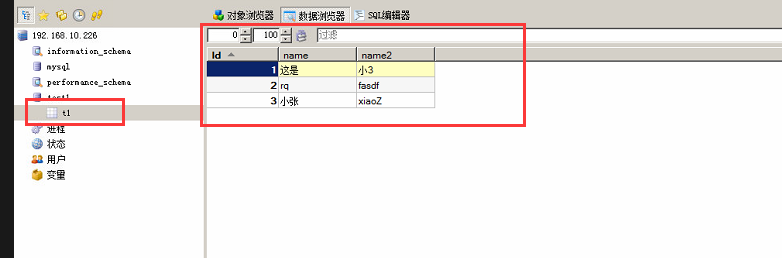
t1表的视图:
通过OTL连接mysql
目录内容如下:
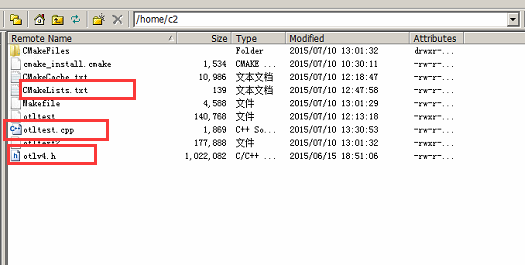
otltest.cpp内容如下:
#include <iostream>

using namespace std;

#include <stdio.h>

#include <string.h>

#include <stdlib.h>

#include <stdio.h>

// Thefollowing #define is required with MyODBC 5.1 and higher

//#define OTL_ODBC_SELECT_STM_EXECUTE_BEFORE_DESCRIBE

#define OTL_ODBC // CompileOTL 4.0/ODBC

#define OTL_ODBC_UNIX // uncomment this line if UnixODBC is used

//#define OTL_UNICODE // Compile OTL with Unicode    --->屏蔽 使用时中文显示乱码

#include "otlv4.h" // include the OTL 4.0 header file

otl_connect db; // connect object

void select()

{

    try{

        otl_stream ostream1(500, // buffer size

            "select * from t1 ",

            // SELECT statement

            db // connect object

            );

        // create select stream

        int id;

        unsigned char user[255];

        unsigned  char name[255];

        while(!ostream1.eof())

        { // while not end-of-data

            //ostream1>>id>>user>>name;

            ostream1>>id;

            ostream1>>user;

            ostream1>>name;

            cout<<"id="<<id<<endl;

            cout<<"user="<<user<<endl;

            cout<<"name="<<name<<endl;

        }

    }

    catch(otl_exception& p)

    { // intercept OTL exceptions

        cout<<"otl_exception:"<<endl;

        cerr<<p.msg<<endl; // print out error message

        cerr<<p.stm_text<<endl; // print out SQL that caused the error

        cerr<<p.var_info<<endl; // print out the variable that caused the error

    }

}

int main()

{

    cout<<"hello"<<endl;

    otl_connect::otl_initialize(); // initialize the database API environment

    try{

        db.rlogon("sa2/111111@TEST"); // connect to the database 这儿是  用户名/密码@section名 (/usr/local/etc/odbc.ini  的section名)

        select(); // select records from table

    }

    catch(otl_exception& p){ // intercept OTL exceptions

        cerr<<p.msg<<endl; // print out error message

        cerr<<p.stm_text<<endl; // print out SQL that caused the error

        cerr<<p.var_info<<endl; // print out the variable that caused the error

    }

    db.logoff(); // disconnect from the database

    return 0;

}
CMakeLists.txt 内容:
cmake_minimum_required (VERSION 2.6)

project (otltest2)

add_executable(otltest2 otltest.cpp)

target_link_libraries(otltest2 libmyodbc5a.so)   --->
一定要添加 libmyodbc5a.so 否则会出现 SQLFreeHandle 之类的错误
root@debian:/home/c2# make

-- Configuring done

-- Generating done

-- Build files have been written to: /home/c2

Scanning dependencies of target otltest2

[100%] Building CXX object CMakeFiles/otltest2.dir/otltest.cpp.o

Linking CXX executable otltest2

CMakeFiles/otltest2.dir/otltest.cpp.o: In function `otl_conn::~otl_conn()':

otltest.cpp:(.text._ZN8otl_connD2Ev[_ZN8otl_connD5Ev]+0x63): undefined reference to `SQLFreeHandle'

otltest.cpp:(.text._ZN8otl_connD2Ev[_ZN8otl_connD5Ev]+0x9b): undefined reference to `SQLFreeHandle'

CMakeFiles/otltest2.dir/otltest.cpp.o: In function `otl_conn::rlogon(char const*, int)':

otltest.cpp:(.text._ZN8otl_conn6rlogonEPKci[_ZN8otl_conn6rlogonEPKci]+0x532): undefined reference to `SQLAllocHandle'

otltest.cpp:(.text._ZN8otl_conn6rlogonEPKci[_ZN8otl_conn6rlogonEPKci]+0x588): undefined reference to `SQLSetEnvAttr'

otltest.cpp:(.text._ZN8otl_conn6rlogonEPKci[_ZN8otl_conn6rlogonEPKci]+0x5df): undefined reference to `SQLAllocHandle'

otltest.cpp:(.text._ZN8otl_conn6rlogonEPKci[_ZN8otl_conn6rlogonEPKci]+0x64c): undefined reference to `SQLSetConnectAttr'

otltest.cpp:(.text._ZN8otl_conn6rlogonEPKci[_ZN8otl_conn6rlogonEPKci]+0x67d): undefined reference to `SQLSetConnectAttr'

otltest.cpp:(.text._ZN8otl_conn6rlogonEPKci[_ZN8otl_conn6rlogonEPKci]+0x6eb): undefined reference to `SQLSetConnectAttr'

otltest.cpp:(.text._ZN8otl_conn6rlogonEPKci[_ZN8otl_conn6rlogonEPKci]+0x765): undefined reference to `SQLConnect'

otltest.cpp:(.text._ZN8otl_conn6rlogonEPKci[_ZN8otl_conn6rlogonEPKci]+0x85e): undefined reference to `SQLDriverConnect'

CMakeFiles/otltest2.dir/otltest.cpp.o: In function `otl_conn::logoff()':

otltest.cpp:(.text._ZN8otl_conn6logoffEv[_ZN8otl_conn6logoffEv]+0x57): undefined reference to `SQLDisconnect'

CMakeFiles/otltest2.dir/otltest.cpp.o: In function `otl_conn::error(otl_exc&)':

otltest.cpp:(.text._ZN8otl_conn5errorER7otl_exc[_ZN8otl_conn5errorER7otl_exc]+0x67): undefined reference to `SQLGetDiagRec'

CMakeFiles/otltest2.dir/otltest.cpp.o: In function `otl_conn::commit()':

otltest.cpp:(.text._ZN8otl_conn6commitEv[_ZN8otl_conn6commitEv]+0x22): undefined reference to `SQLEndTran'

CMakeFiles/otltest2.dir/otltest.cpp.o: In function `otl_cur::open(otl_conn&)':

otltest.cpp:(.text._ZN7otl_cur4openER8otl_conn[_ZN7otl_cur4openER8otl_conn]+0x4b): undefined reference to `SQLAllocHandle'

otltest.cpp:(.text._ZN7otl_cur4openER8otl_conn[_ZN7otl_cur4openER8otl_conn]+0xa7): undefined reference to `SQLSetStmtAttr'

otltest.cpp:(.text._ZN7otl_cur4openER8otl_conn[_ZN7otl_cur4openER8otl_conn]+0x100): undefined reference to `SQLSetStmtAttr'

CMakeFiles/otltest2.dir/otltest.cpp.o: In function `otl_cur::close(char)':

otltest.cpp:(.text._ZN7otl_cur5closeEc[_ZN7otl_cur5closeEc]+0x2d): undefined reference to `SQLFreeHandle'

CMakeFiles/otltest2.dir/otltest.cpp.o: In function `otl_cur::sql_row_count(long*)':

otltest.cpp:(.text._ZN7otl_cur13sql_row_countEPl[_ZN7otl_cur13sql_row_countEPl]+0x23): undefined reference to `SQLRowCount'

CMakeFiles/otltest2.dir/otltest.cpp.o: In function `otl_cur::parse(char*)':

otltest.cpp:(.text._ZN7otl_cur5parseEPc[_ZN7otl_cur5parseEPc]+0x498): undefined reference to `SQLTables'

otltest.cpp:(.text._ZN7otl_cur5parseEPc[_ZN7otl_cur5parseEPc]+0x520): undefined reference to `SQLStatistics'

otltest.cpp:(.text._ZN7otl_cur5parseEPc[_ZN7otl_cur5parseEPc]+0x566): undefined reference to `SQLGetTypeInfo'

otltest.cpp:(.text._ZN7otl_cur5parseEPc[_ZN7otl_cur5parseEPc]+0x604): undefined reference to `SQLColumns'

otltest.cpp:(.text._ZN7otl_cur5parseEPc[_ZN7otl_cur5parseEPc]+0x67c): undefined reference to `SQLProcedures'

otltest.cpp:(.text._ZN7otl_cur5parseEPc[_ZN7otl_cur5parseEPc]+0x71a): undefined reference to `SQLColumnPrivileges'

otltest.cpp:(.text._ZN7otl_cur5parseEPc[_ZN7otl_cur5parseEPc]+0x792): undefined reference to `SQLTablePrivileges'

otltest.cpp:(.text._ZN7otl_cur5parseEPc[_ZN7otl_cur5parseEPc]+0x80a): undefined reference to `SQLPrimaryKeys'

otltest.cpp:(.text._ZN7otl_cur5parseEPc[_ZN7otl_cur5parseEPc]+0x8a8): undefined reference to `SQLProcedureColumns'

otltest.cpp:(.text._ZN7otl_cur5parseEPc[_ZN7otl_cur5parseEPc]+0x97e): undefined reference to `SQLForeignKeys'

otltest.cpp:(.text._ZN7otl_cur5parseEPc[_ZN7otl_cur5parseEPc]+0xa18): undefined reference to `SQLExecDirect'

otltest.cpp:(.text._ZN7otl_cur5parseEPc[_ZN7otl_cur5parseEPc]+0xc53): undefined reference to `SQLPrepare'

CMakeFiles/otltest2.dir/otltest.cpp.o: In function `otl_cur::exec(int, int, unsigned char)':

otltest.cpp:(.text._ZN7otl_cur4execEiih[_ZN7otl_cur4execEiih]+0x79): undefined reference to `SQLSetStmtAttr'

otltest.cpp:(.text._ZN7otl_cur4execEiih[_ZN7otl_cur4execEiih]+0xe1): undefined reference to `SQLExecute'

CMakeFiles/otltest2.dir/otltest.cpp.o: In function `otl_cur::bind(char const*, otl_var&, int, int, int, int, int, int)':

otltest.cpp:(.text._ZN7otl_cur4bindEPKcR7otl_variiiiii[_ZN7otl_cur4bindEPKcR7otl_variiiiii]+0x16b): undefined reference to `SQLBindParameter'

otltest.cpp:(.text._ZN7otl_cur4bindEPKcR7otl_variiiiii[_ZN7otl_cur4bindEPKcR7otl_variiiiii]+0x233): undefined reference to `SQLBindParameter'

CMakeFiles/otltest2.dir/otltest.cpp.o: In function `otl_cur::bind(int, otl_var&, int, int, int)':

otltest.cpp:(.text._ZN7otl_cur4bindEiR7otl_variii[_ZN7otl_cur4bindEiR7otl_variii]+0xe5): undefined reference to `SQLBindCol'

CMakeFiles/otltest2.dir/otltest.cpp.o: In function `otl_cur::describe_column(otl_column_desc&, int, int&)':

otltest.cpp:(.text._ZN7otl_cur15describe_columnER15otl_column_desciRi[_ZN7otl_cur15describe_columnER15otl_column_desciRi]+0x49): undefined reference to `SQLNumResultCols'

otltest.cpp:(.text._ZN7otl_cur15describe_columnER15otl_column_desciRi[_ZN7otl_cur15describe_columnER15otl_column_desciRi]+0xf1): undefined reference to `SQLDescribeCol'

CMakeFiles/otltest2.dir/otltest.cpp.o: In function `otl_cur::error(otl_exc&)':

otltest.cpp:(.text._ZN7otl_cur5errorER7otl_exc[_ZN7otl_cur5errorER7otl_exc]+0x67): undefined reference to `SQLGetDiagRec'

CMakeFiles/otltest2.dir/otltest.cpp.o: In function `otl_sel::close_select(otl_cur&)':

otltest.cpp:(.text._ZN7otl_sel12close_selectER7otl_cur[_ZN7otl_sel12close_selectER7otl_cur]+0x33): undefined reference to `SQLFreeStmt'

CMakeFiles/otltest2.dir/otltest.cpp.o: In function `otl_sel::first(otl_cur&, int&, int&, int&, int&, int)':

otltest.cpp:(.text._ZN7otl_sel5firstER7otl_curRiS2_S2_S2_i[_ZN7otl_sel5firstER7otl_curRiS2_S2_S2_i]+0x52): undefined reference to `SQLSetStmtAttr'

otltest.cpp:(.text._ZN7otl_sel5firstER7otl_curRiS2_S2_S2_i[_ZN7otl_sel5firstER7otl_curRiS2_S2_S2_i]+0xb5): undefined reference to `SQLSetStmtAttr'

otltest.cpp:(.text._ZN7otl_sel5firstER7otl_curRiS2_S2_S2_i[_ZN7otl_sel5firstER7otl_curRiS2_S2_S2_i]+0x111): undefined reference to `SQLExecute'

otltest.cpp:(.text._ZN7otl_sel5firstER7otl_curRiS2_S2_S2_i[_ZN7otl_sel5firstER7otl_curRiS2_S2_S2_i]+0x16c): undefined reference to `SQLFetchScroll'

otltest.cpp:(.text._ZN7otl_sel5firstER7otl_curRiS2_S2_S2_i[_ZN7otl_sel5firstER7otl_curRiS2_S2_S2_i]+0x20e): undefined reference to `SQLFreeStmt'

CMakeFiles/otltest2.dir/otltest.cpp.o: In function `otl_sel::next(otl_cur&, int&, int&, int&, int&, int)':

otltest.cpp:(.text._ZN7otl_sel4nextER7otl_curRiS2_S2_S2_i[_ZN7otl_sel4nextER7otl_curRiS2_S2_S2_i]+0x86): undefined reference to `SQLFreeStmt'

otltest.cpp:(.text._ZN7otl_sel4nextER7otl_curRiS2_S2_S2_i[_ZN7otl_sel4nextER7otl_curRiS2_S2_S2_i]+0xca): undefined reference to `SQLFetchScroll'

otltest.cpp:(.text._ZN7otl_sel4nextER7otl_curRiS2_S2_S2_i[_ZN7otl_sel4nextER7otl_curRiS2_S2_S2_i]+0x161): undefined reference to `SQLFreeStmt'

collect2: error: ld returned 1 exit status

make[2]: *** [otltest2] Error 1

make[1]: *** [CMakeFiles/otltest2.dir/all] Error 2

make: *** [all] Error 2

root@debian:/home/c2#
当
  target_link_libraries(otltest2 libmyodbc5a.so)
  程序生成.
root@debian:/home/c2# make clean

root@debian:/home/c2# cmake .

-- Configuring done

-- Generating done

-- Build files have been written to: /home/c2

root@debian:/home/c2# make

-- Configuring done

-- Generating done

-- Build files have been written to: /home/c2

[100%] Building CXX object CMakeFiles/otltest2.dir/otltest.cpp.o

Linking CXX executable otltest2

[100%] Built target otltest2

root@debian:/home/c2#
前面说过
libmyodbc5w.so 是unicode 版本的.
libmyodbc5a.so 是ansi版本的.
当
target_link_libraries(otltest2 libmyodbc5w.so) 时 出错,
otl_conn::rlogon(char const*, int) 说明 unicode 版本不能使用.
unicode 应该是 otl_conn::rlogon(wchar const*, int)
otl.h 中有个 OTL_UNICODE_EXCEPTION_AND_RLOGON 这个宏 ,有时间的朋友可以研究下说下方式.3Q.
root@debian:/home/c2# make

-- Configuring done

-- Generating done

-- Build files have been written to: /home/c2

[100%] Building CXX object CMakeFiles/otltest2.dir/otltest.cpp.o

Linking CXX executable otltest2

CMakeFiles/otltest2.dir/otltest.cpp.o: In function `otl_conn::rlogon(char const*, int)':

otltest.cpp:(.text._ZN8otl_conn6rlogonEPKci[_ZN8otl_conn6rlogonEPKci]+0x64c): undefined reference to `SQLSetConnectAttr'

otltest.cpp:(.text._ZN8otl_conn6rlogonEPKci[_ZN8otl_conn6rlogonEPKci]+0x67d): undefined reference to `SQLSetConnectAttr'

otltest.cpp:(.text._ZN8otl_conn6rlogonEPKci[_ZN8otl_conn6rlogonEPKci]+0x6eb): undefined reference to `SQLSetConnectAttr'

otltest.cpp:(.text._ZN8otl_conn6rlogonEPKci[_ZN8otl_conn6rlogonEPKci]+0x765): undefined reference to `SQLConnect'

otltest.cpp:(.text._ZN8otl_conn6rlogonEPKci[_ZN8otl_conn6rlogonEPKci]+0x85e): undefined reference to `SQLDriverConnect'

CMakeFiles/otltest2.dir/otltest.cpp.o: In function `otl_conn::error(otl_exc&)':

otltest.cpp:(.text._ZN8otl_conn5errorER7otl_exc[_ZN8otl_conn5errorER7otl_exc]+0x67): undefined reference to `SQLGetDiagRec'

CMakeFiles/otltest2.dir/otltest.cpp.o: In function `otl_cur::open(otl_conn&)':

otltest.cpp:(.text._ZN7otl_cur4openER8otl_conn[_ZN7otl_cur4openER8otl_conn]+0xa7): undefined reference to `SQLSetStmtAttr'

otltest.cpp:(.text._ZN7otl_cur4openER8otl_conn[_ZN7otl_cur4openER8otl_conn]+0x100): undefined reference to `SQLSetStmtAttr'

CMakeFiles/otltest2.dir/otltest.cpp.o: In function `otl_cur::parse(char*)':

otltest.cpp:(.text._ZN7otl_cur5parseEPc[_ZN7otl_cur5parseEPc]+0x498): undefined reference to `SQLTables'

otltest.cpp:(.text._ZN7otl_cur5parseEPc[_ZN7otl_cur5parseEPc]+0x520): undefined reference to `SQLStatistics'

otltest.cpp:(.text._ZN7otl_cur5parseEPc[_ZN7otl_cur5parseEPc]+0x566): undefined reference to `SQLGetTypeInfo'

otltest.cpp:(.text._ZN7otl_cur5parseEPc[_ZN7otl_cur5parseEPc]+0x604): undefined reference to `SQLColumns'

otltest.cpp:(.text._ZN7otl_cur5parseEPc[_ZN7otl_cur5parseEPc]+0x67c): undefined reference to `SQLProcedures'

otltest.cpp:(.text._ZN7otl_cur5parseEPc[_ZN7otl_cur5parseEPc]+0x71a): undefined reference to `SQLColumnPrivileges'

otltest.cpp:(.text._ZN7otl_cur5parseEPc[_ZN7otl_cur5parseEPc]+0x792): undefined reference to `SQLTablePrivileges'

otltest.cpp:(.text._ZN7otl_cur5parseEPc[_ZN7otl_cur5parseEPc]+0x80a): undefined reference to `SQLPrimaryKeys'

otltest.cpp:(.text._ZN7otl_cur5parseEPc[_ZN7otl_cur5parseEPc]+0x8a8): undefined reference to `SQLProcedureColumns'

otltest.cpp:(.text._ZN7otl_cur5parseEPc[_ZN7otl_cur5parseEPc]+0x97e): undefined reference to `SQLForeignKeys'

otltest.cpp:(.text._ZN7otl_cur5parseEPc[_ZN7otl_cur5parseEPc]+0xa18): undefined reference to `SQLExecDirect'

otltest.cpp:(.text._ZN7otl_cur5parseEPc[_ZN7otl_cur5parseEPc]+0xc53): undefined reference to `SQLPrepare'

CMakeFiles/otltest2.dir/otltest.cpp.o: In function `otl_cur::exec(int, int, unsigned char)':

otltest.cpp:(.text._ZN7otl_cur4execEiih[_ZN7otl_cur4execEiih]+0x79): undefined reference to `SQLSetStmtAttr'

CMakeFiles/otltest2.dir/otltest.cpp.o: In function `otl_cur::describe_column(otl_column_desc&, int, int&)':

otltest.cpp:(.text._ZN7otl_cur15describe_columnER15otl_column_desciRi[_ZN7otl_cur15describe_columnER15otl_column_desciRi]+0xf1): undefined reference to `SQLDescribeCol'

CMakeFiles/otltest2.dir/otltest.cpp.o: In function `otl_cur::error(otl_exc&)':

otltest.cpp:(.text._ZN7otl_cur5errorER7otl_exc[_ZN7otl_cur5errorER7otl_exc]+0x67): undefined reference to `SQLGetDiagRec'

CMakeFiles/otltest2.dir/otltest.cpp.o: In function `otl_sel::first(otl_cur&, int&, int&, int&, int&, int)':

otltest.cpp:(.text._ZN7otl_sel5firstER7otl_curRiS2_S2_S2_i[_ZN7otl_sel5firstER7otl_curRiS2_S2_S2_i]+0x52): undefined reference to `SQLSetStmtAttr'

otltest.cpp:(.text._ZN7otl_sel5firstER7otl_curRiS2_S2_S2_i[_ZN7otl_sel5firstER7otl_curRiS2_S2_S2_i]+0xb5): undefined reference to `SQLSetStmtAttr'

collect2: error: ld returned 1 exit status

make[2]: *** [otltest2] Error 1

make[1]: *** [CMakeFiles/otltest2.dir/all] Error 2

make: *** [all] Error 2

root@debian:/home/c2#
但 unixodbc 的ini 配置 文件
/usr/local/etc/odbcinst.ini 配置:
[mysqlodbc]      #Section

Driver=/usr/local/lib/libmyodbc5w.so      #libmyodbc5w.so 和libmyodbc5a.so的区别

SETUP=/usr/local/lib/libmyodbc5w.so

UsageCount=1
  这儿配置 libmyodbc5w.so 和libmyodbc5a.so 都能正常访问.

  运行 otltest2
root@debian:/home/c2# ./otltest2
hello
id=1
user=杩姣
name=灏3
id=2
user=rq
name=fasdf
id=3
user=灏寮?
name=xiaoZ
root@debian:/home/c2#
linux 下不能显示中文.
另一个程序可以在网页中显示:
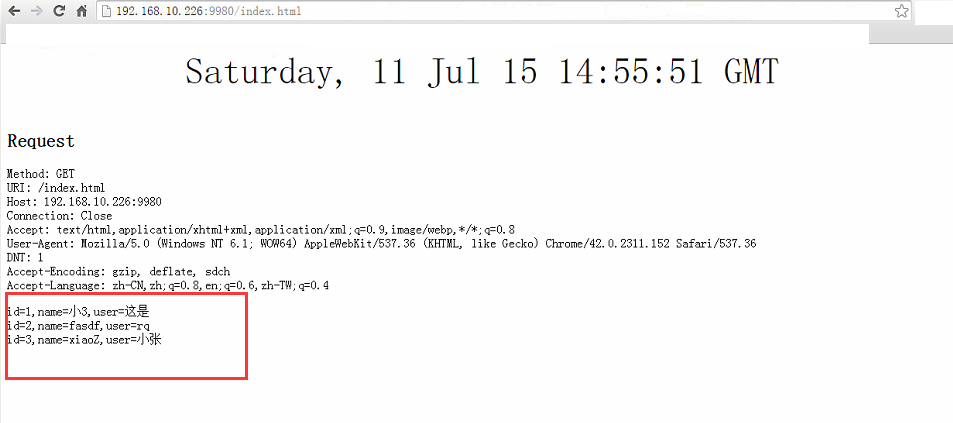
至此 在debian x64环境下通过C++ 的OTL库去访问mysql已经完成.
debian C++ OTL库 用 unixodbc 连接 mysql 小记的更多相关文章
- JAVA-数据库之JDBC连接MySQL数据库
相关资料:<21天学通Java Web开发> JDBC连接MySQL数据库1.如果需要通过JDBC来连接MySQL数据库,还必须先在MySQL数据库服务器中创建数据库和表. Connect ...
- Python 使用PyMySql 库 连接MySql数据库时 查询中文遇到的乱码问题(实测可行) python 连接 MySql 中文乱码 pymysql库
最近所写的代码中需要用到python去连接MySql数据库,因为是用PyQt5来构建的GUI,原本打算使用PyQt5中的数据库连接方法,后来虽然能够正确连接上发现还是不能提交修改内容,最后在qq交流群 ...
- 使用第三方库连接MySql数据库:PyMysql库和Pandas库
使用PyMysql库和Pandas库链接Mysql 1 系统环境 系统版本:Win10 64位 Mysql版本: 8.0.15 MySQL Community Server - GPL pymysql ...
- Robotframework使用自写库连接mysql数据库
Robotframework使用自写库连接mysql数据库 新建库文件mysqltest.py 代码如下: # -*- coding: utf-8 -*- import MySQLdbimport o ...
- 没有ORM库的时候,通过PDO连接MySQL的方法
$pdo = new PDO("mysql:host=localhost;dbname=eq","root","root"); $pdo-& ...
- 【Python + Mysql】之用pymysql库连接Mysql数据库并进行增删改查操作
用pip下载pymysql并引用 具体请参考文章: <Python之MySQL数据库增删改查操作> <python3.6 使用 pymysql 连接 Mysql 数据库及 简单的增删 ...
- otl库(以前不知道有这个库,并且还可以在Unix下使用)
OTL介绍:OTL 是 Oracle, Odbc and DB2-CLI Template Library 的缩写,是一个C++编译中操控关系数据库的模板库,它目前几乎支持所有的当前各种主流数据库,例 ...
- Ruby 连接MySQL数据库
使用Ruby连接数据库的过程还真的是坎坷,于是写点文字记录一下. 简介 Ruby简介 RubyGems简介 包管理之道 比较著名的包管理举例 细说gem 常用的命令 准备 驱动下载 dbi mysql ...
- [Oracle, MySQL] Oracle通过dblink连接MySQL
http://blog.csdn.net/dbanote/article/details/10488581 版权声明:本文为博主原创文章,未经博主允许不得转载. 业务上有这么一个需求,需要把Oracl ...
随机推荐
- IBatis 2.x 和 MyBatis 3.0.x 的区别(从 iBatis 到 MyBatis)
从 iBatis 到 MyBatis,你准备好了吗? 对于从事 Java EE 的开发人员来说,iBatis 是一个再熟悉不过的持久层框架了,在 Hibernate.JPA 这样的一站式对象 / 关系 ...
- 自动化运维工具Ansible详细部署 (转载)
自动化运维工具Ansible详细部署 标签:ansible 原创作品,允许转载,转载时请务必以超链接形式标明文章 原始出处 .作者信息和本声明.否则将追究法律责任.http://sofar.blog. ...
- [Search Engine] 搜索引擎技术之查询处理
我们之前从开发者的角度谈了一些有关搜索引擎的技术,其实对于用户来说,我们不需要知道网络爬虫到底是怎样爬取网页的,也不需要知道倒排索引是什么,我们只需要输入我们的查询词query,然后能够得到我们想要的 ...
- Mac Pro 资源管理器 Double Commander“个性化设置” 备份
操作系统自带的资源管理器,总是有些别扭的地方,在 Windows 系统下,我一般用 Total Commander(破解版)来作为替代品.现在换为 Mac 系统,自带的 Finer 也不怎么好用,连最 ...
- Github.com上有哪些比较有趣的PHP项目?
链接就不贴了,可以在github上进行搜索.这里就不列举 symfony.laravel 这些大家都知道的项目了.只列举比较有意思的. swoole, C扩展实现的PHP异步并行网络通信框架,可以重新 ...
- Add Two Numbers LeetCode Java
You are given two linked lists representing two non-negative numbers. The digits are stored in rever ...
- Apache 启动.htaccess 的操作方法
配置apache主配置文件(httpd.conf) 1.查找“#LoadModule rewrite_module modules/mod_rewrite.so” 去掉前面的#号 2.把AllowOv ...
- composer 安装提示 PHP Warning: readfile(): SSL operation failed with code 1
这是php设置openssl 没有指定cacert.pem (证书) 第一步:下载 cacert.pem 文件下载地址 https://curl.haxx.se/docs/caextract.html ...
- PE440
一些证明,推荐复制入atom观看 首先我们考虑这个T(n)是什么,我们可以列出递归式: (definition:T) T(0) = 1 T(1) = 10 T(n) = 10*T(n-1) + T(n ...
- js 时间构造函数
js 时间构造函数,js中没有类似ToString("yyyy-mm-dd HH:mm:ss") 的方法,但是可以用下面的方式来初始化 var cdate = new Date(& ...