
【坦克大战】Unity3D多人在线游戏(泰课的坦克大战--旋转的螺丝钉)
【坦克大战】Unity3D多人在线游戏
http://www.taikr.com/my/course/937
1.NetworkManager的介绍:

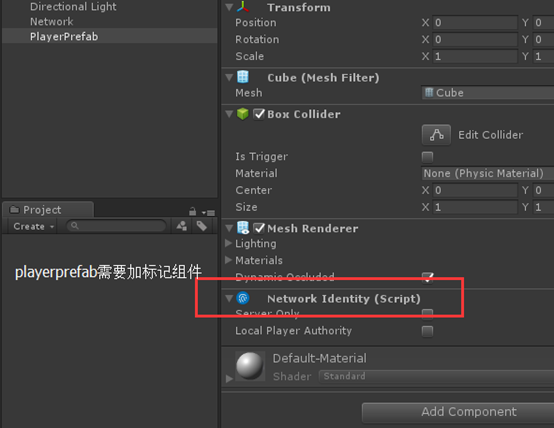
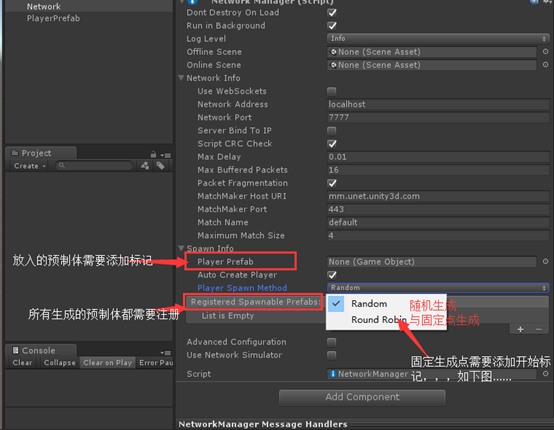
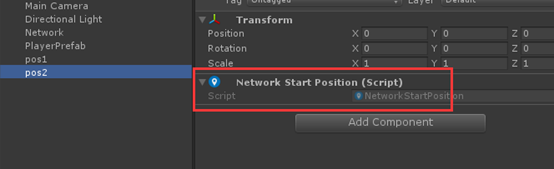
说明:选择固定生成时会自动寻找有StartPosition组件的位置
2.NetWorkDiscovery组件的介绍:
使用在局域网中的一个组件,在英特网上不能使用
官方文档:



说明:NetWorkDiscovery与Network managerHUD相似:
Network managerHUD介绍:就是显示Network manager的,如下图:
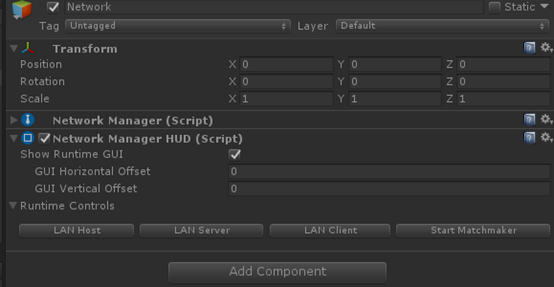
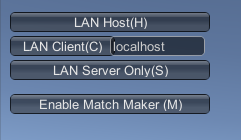
3.框架部分,开始界面的5个按钮
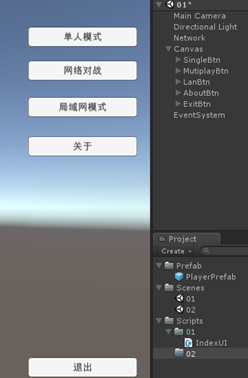
IndexUI
using System.Collections;
using System.Collections.Generic;
using UnityEngine;
public class IndexUI : MonoBehaviour {
public void SingleBtn()
{
}
public void MutiplayBtn()
{
}
public void LanBtn()
{
}
}
4.LanGame局域网对战功能的实现

放在NetWorkManagerCustom中的代码:
public static void LanGame()
{
//转换一下再调用
singleton.StartCoroutine((singleton as NetWorkManagerCustom).DiscoveryNetWork());
}
public IEnumerator DiscoveryNetWork()
{
//取得Discovery组件
NetworkDiscoverCustom discovery = GetComponent<NetworkDiscoverCustom>();
discovery.Initialize();//组件初始化
discovery.StartAsClient();//扫描局域网的服务器
yield return new WaitForSeconds(2);
//没有找到局域网中的服务器的话就建立服务器
if (discovery.running)
{
discovery.StopBroadcast();//停掉广播包
yield return new WaitForSeconds(0.5f);
discovery.StartAsServer();//作为服务器发射广播包
StartHost();//作为服务器和客户端同时启动
//StartClient();//作为客户端启动
//StartServer();//只作为服务器启动
}
}
放在NetworkDiscoverCustom中的代码:
using System.Collections;
using System.Collections.Generic;
using UnityEngine;
using UnityEngine.Networking;
public class NetworkDiscoverCustom : NetworkDiscovery {
public override void OnReceivedBroadcast(string fromAddress,string data)
{
StopBroadcast();
NetWorkManagerCustom.singleton.networkAddress = fromAddress;
NetWorkManagerCustom.singleton.StartClient();
}
}
5.NetGame,英特网的在线对战:

public static void NetGame()
{
singleton.StartMatchMaker();//表示启用Unet网络对战功能
singleton.matchMaker.ListMatches(0, 20, "", false, 0, 0, singleton.OnMatchList);
//第1个参数:startpagenumber:表示第几页的list
//第2个参数:表示每一页有多少个
//第3个参数:表示需要找到的房间名称
//第4个参数:表示是否返回带有密钥的房间
//第5个参数:表示的是竞赛方面的设置
//第6个参数:表示的是一个域,只能从这个域上面返回房间
//第7个参数:是一个回调的函数
}
public override void OnMatchList(bool success, string extendedInfo, List<MatchInfoSnapshot> matchList)
{
if (!success) return;
if (matchList != null)
{
List<MatchInfoSnapshot> availableMatches = new List<MatchInfoSnapshot>();
foreach (MatchInfoSnapshot match in matchList)
{
if (match.currentSize < match.maxSize)
{
availableMatches.Add(match); //保存房间玩家没有满的情况
}
}
//列表的数量是否为0,为0创建服务器,不为0的话就加入服务器
if (availableMatches.Count == 0)
{
//创建服务器
CreateMatch();
}
else
{
//加入服务器
matchMaker.JoinMatch(availableMatches[Random.Range(0, availableMatches.Count - 1)].networkId, "", "", "", 0, 0, OnMatchJoined);
}
}
}
void CreateMatch() //告诉Unet创建网络服务器
{
matchMaker.CreateMatch("", matchSize, true, "", "", "", 0, 0, OnMatchCreate);
//第1个参数:房间名称
//第2个参数:房间可玩家数
//第3个参数:
//第4个参数:口令
//第5个参数:Client Ip地址(公网)
//第6个参数:私网地址
}
public override void OnMatchCreate(bool success, string extendedInfo, MatchInfo matchInfo)
{
if (!success) return;
StartHost(matchInfo);//利用Unet返回的matchinfo创建服务器
}
public override void OnMatchJoined(bool success, string extendedInfo, MatchInfo matchInfo)
{
if (!success)
{
int currentScene = SceneManager.GetActiveScene().buildIndex;
SceneManager.LoadScene(currentScene);
return;
}
StartClient(matchInfo); //利用Unet传回的matchinfo启动客户端
}
6.单人模式:
public static void SimpleGame()
{
singleton.StartHost(singleton.connectionConfig, 1);
}
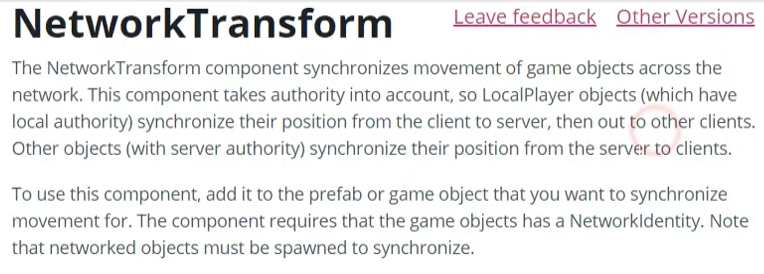
7.NetWorkTransform

8、角色的移动
using System.Collections;
using System.Collections.Generic;
using UnityEngine;
using UnityEngine.Networking;
public class Player : NetworkBehaviour {
private Rigidbody rb;
public float MoveSpeed = 8f;
void Awake () {
rb = transform.GetComponent<Rigidbody>();
}
void FixedUpdate () {
if (!isLocalPlayer) return;//保证只对本地角色进行控制
Vector2 moveDir;
if (Input.GetAxisRaw("Horizontal") == 0 && Input.GetAxisRaw("Vertical") == 0)
{
moveDir.x = 0;
moveDir.y = 0;
}
else
{
//可以移动
moveDir.x = Input.GetAxis("Horizontal");
moveDir.y = Input.GetAxis("Vertical");
Move(moveDir);
}
}
private void Move(Vector2 direction=default(Vector2))
{
if (direction != Vector2.zero)
{
//转方向
transform.rotation = Quaternion.LookRotation(new Vector3(direction.x, 0, direction.y));
//计算前方的点
Vector3 movementDir = transform.forward * MoveSpeed * Time.deltaTime;
//移动到这个点
rb.MovePosition(rb.position + movementDir);
}
}
}
9.摄像机跟随
using System.Collections;
using System.Collections.Generic;
using UnityEngine;
public class CameraFollow : MonoBehaviour {
public Transform target;
public float distance = 10f;
public float height = 5f;
void Update()
{
if (!target) return;
Quaternion currentRotation = Quaternion.Euler(0, transform.eulerAngles.y, 0);
Vector3 pos = target.position;//target的坐标
pos -= currentRotation * Vector3.forward * Mathf.Abs(distance);//距离
pos.y = target.position.y + Mathf.Abs(height);//高度
transform.position = pos;
transform.LookAt(target);
//下面这一句其实要不要无所谓,只是为了精确
transform.position = target.position - (transform.forward * Mathf.Abs(distance));
}
}
在player中重写生成本地物体时调用的方法,把坦克设置为摄像机的target
//把摄像机的target用代码设置为坦克的--这里挺重要的,在OnStartLocalPlayer()方法里面写
public override void OnStartLocalPlayer()
{
Camera.main.GetComponent<CameraFollow>().target = transform;
}
10.炮台的转动及炮台转动的同步

[HideInInspector] //在面板上隐藏公有值
[SyncVar(hook = "OnTurretRotation")]//turretRotation同步到所有客户端,并调用OnTurretRotation()方法
public int turretRotation;
l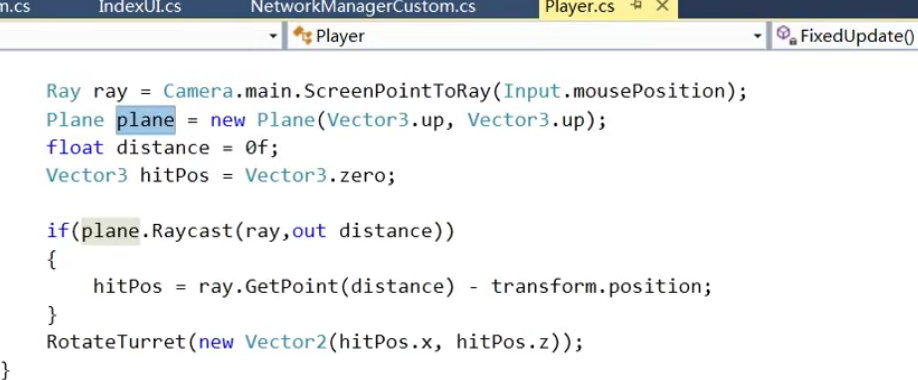
//把输入的屏幕坐标转为ray射线
Ray ray = Camera.main.ScreenPointToRay(Input.mousePosition);
Plane plane = new Plane(Vector3.up, Vector3.up);//虚构的平面
float distance = 0f;//屏幕宽度
Vector3 hitPos = Vector3.zero;//设置打击点,取默认值
if(plane.Raycast(ray,out distance))
{
hitPos = ray.GetPoint(distance) - transform.position;
}
RotateTurret(new Vector2(hitPos.x, hitPos.z));

/// <summary>
/// 炮台旋转
/// </summary>
/// <param name="direction"></param>
void RotateTurret(Vector2 direction = default(Vector2))
{
if (direction == Vector2.zero) return;
int newRotation = (int)(Quaternion.LookRotation(new Vector3(direction.x, 0, direction.y)).eulerAngles.y);
turret.rotation = Quaternion.Euler(0, newRotation, 0);
turretRotation = newRotation;
}
[Command]
void CmdRotateTurret(int value)
{
turretRotation = value;//调用服务器这个值得改变
}
void OnTurretRotation(int value)
{
if (isLocalPlayer) return;
turretRotation = value;
turret.rotation = Quaternion.Euler(0, turretRotation, 0);//进行旋转
}
11.鼠标右键转向
【坦克大战】Unity3D多人在线游戏(泰课的坦克大战--旋转的螺丝钉)的更多相关文章
- Unity3d多人在线教程
[转载]Unity3d多人在线教程 (2013-02-25 16:02:49) 转载▼ 标签: 转载 原文地址:Unity3d多人在线教程作者:lsy0031 Unity 多个玩家开发教程 Uni ...
- 一个3D的多人在线游戏, 服务端 + 客户端 【转】
最近学院组织了一个实训,要求是利用Socket通信和D3D的知识, 写一个多人在线的游戏, 服务端是在linux下, 客户是在Windows下: 写这个的目的是想让大家给我找错, 欢迎大家的意见.我的 ...
- 试玩 GOWOG ,初探 OpenAI(使用 NeuroEvolution 神经进化)与 Golang 多人在线游戏开发
GOWOG: 原项目:https://github.com/giongto35/gowog 我调整过的:https://github.com/Kirk-Wang/gowog GOWOG 是一款迷你的, ...
- GJM :多人在线游戏的设计思路
感谢您的阅读.喜欢的.有用的就请大哥大嫂们高抬贵手"推荐一下"吧!你的精神支持是博主强大的写作动力以及转载收藏动力.欢迎转载! 版权声明:本文原创发表于 [请点击连接前往] ,未经 ...
- 负载均衡--大型在线系统实现的关键(上篇)(再谈QQ游戏百万人在线的技术实现)
http://blog.csdn.net/sodme/article/details/393165 —————————————————————————————————————————————— 本文作 ...
- Golang+Protobuf+PixieJS 开发 Web 多人在线射击游戏(原创翻译)
简介 Superstellar 是一款开源的多人 Web 太空游戏,非常适合入门 Golang 游戏服务器开发. 规则很简单:摧毁移动的物体,不要被其他玩家和小行星杀死.你拥有两种资源 - 生命值(h ...
- cocos2d-x游戏开发系列教程-坦克大战游戏之虚拟手柄控制坦克移动
上篇显示了控制手柄,但是还不能用来控制坦克, 这篇将会讲手柄和坦克的移动结合起来. 1.先在CityScene场景中实现场景的虚函数virtual void onEnter(); onEnter在进入 ...
- cocos2d-x游戏开发系列教程-坦克大战游戏之敌方坦克AI的编写
在上篇我们完成了子弹和地图碰撞的检测,在这篇我们将完成敌方坦克AI的编写. 具体思路是屏幕中保持有四个敌方坦克,然后坦克随机方向运动,并且子弹消失后1秒发射一次 1.我们新建一个敌方坦克的AI类来控制 ...
- [Unity3D入门]分享一个自制的入门级游戏项目"坦克狙击手"
[Unity3D入门]分享一个自制的入门级游戏项目"坦克狙击手" 我在学Unity3D,TankSniper(坦克狙击手)这个项目是用来练手的.游戏玩法来自这里(http://ww ...
随机推荐
- (三)设置mysql允许外部IP连接的解决方法及遇到的坑说明
用命令查询端口情况:netstat -an | grep LISTEN 发现mysql用到3306这个端口,只能被127.0.0.1访问(0.0.0.0的就是每个IP都有的服务,写明哪个IP的就是绑定 ...
- 第五课 Css3旋转放大属性,正六边形的绘制
---恢复内容开始--- 一.效果 二.知识点 1.background-color: rgba(0,0,0,.4); (红色.绿色.蓝色.透明度(0-1)) 2.position: absolu ...
- vue 中promise 异步请求数据
export function getTypes(type) { return listDictItems({ code: type }).then((res) => { if (res.cod ...
- 林业有害生物监测系统(重庆宇创GIS)
本文由重庆宇创GIS团队原创,转载请注明来源http://www.cnblogs.com/ycdigit/p/8916073.html 一.概述 林业有害生物监测信息平台(森林病虫害监测预警系统) ...
- (详细)华为畅享7 SLA-AL00的usb调试模式在哪里打开的流程
就在我们使用Pc链上安卓手机的时候,如果手机没有开启usb开发者调试模式,Pc则不能够成功检测到我们的手机,有时我们使用的一些功能比较好的的应用软件如之前我们使用的一个应用软件引号精灵,老版本就需要打 ...
- ionic3 Toast组件
html页面 <button ion-button color="dark" class="button-block" (click)="sho ...
- 算法:数组中和为s的两个数字
@问题 :题目描述输入一个递增排序的数组和一个数字S,在数组中查找两个数,使得他们如果有多对数字的和等于S,输出两个数的乘积最小的. 输出描述:对应每个测试案例,输出两个数,小的先输出.@思路: 两个 ...
- 从0开始的Python学习003序列
sequence 序列 序列是一组有顺序数据的集合.不知道怎么说明更贴切,因为python的创建变量是不用定义类型,所以在序列中(因为有序我先把它看作是一个有序数组)的元素也不会被类型限制. 序列可以 ...
- MongoDB的导入与导出
一.导入与导出可以操作本地的mongodb也可以是远程的mongodb,通用选项: -h host 主机 --port port 端口 -u username 用户名 -p password 密码 如 ...
- Ubuntu 安装 Docker CE(社区版)
参考自 https://yeasy.gitbooks.io/docker_practice/install/ubuntu.html#ubuntu-1604- docker-io 是以前早期的版本,版本 ...