
【坦克大战】Unity3D多人在线游戏(泰课的坦克大战--旋转的螺丝钉)
【坦克大战】Unity3D多人在线游戏
http://www.taikr.com/my/course/937
1.NetworkManager的介绍:

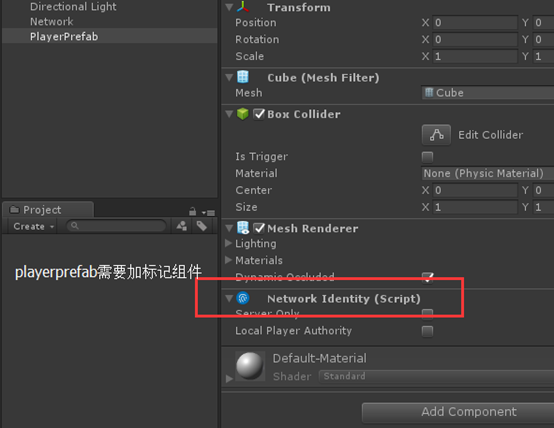
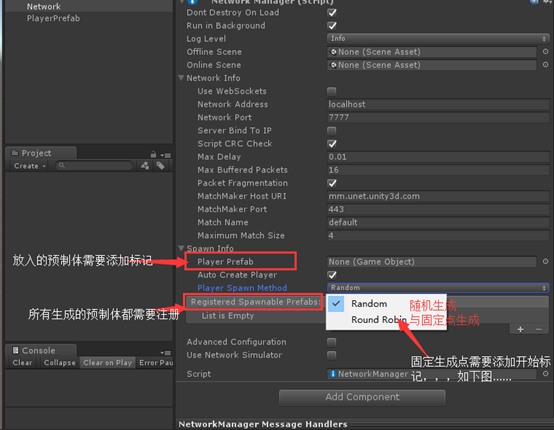
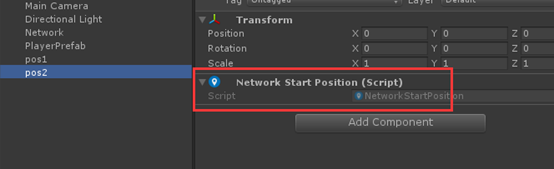
说明:选择固定生成时会自动寻找有StartPosition组件的位置
2.NetWorkDiscovery组件的介绍:
使用在局域网中的一个组件,在英特网上不能使用
官方文档:




说明:NetWorkDiscovery与Network managerHUD相似:
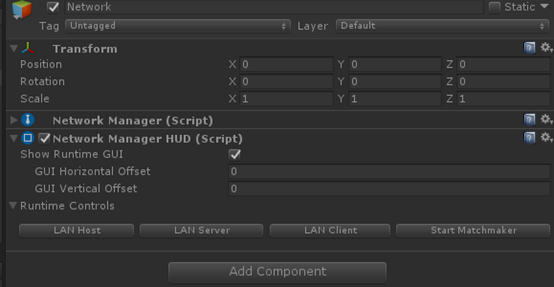
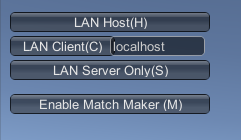
Network managerHUD介绍:就是显示Network manager的,如下图:
3.框架部分,开始界面的5个按钮
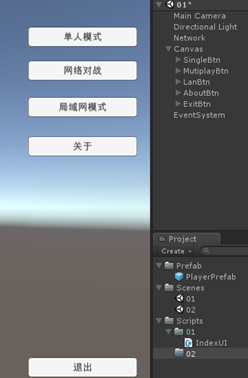
IndexUI
using System.Collections;
using System.Collections.Generic;
using UnityEngine;
public class IndexUI : MonoBehaviour {
public void SingleBtn()
{
}
public void MutiplayBtn()
{
}
public void LanBtn()
{
}
}
4.LanGame局域网对战功能的实现

放在NetWorkManagerCustom中的代码:
public static void LanGame()
{
//转换一下再调用
singleton.StartCoroutine((singleton as NetWorkManagerCustom).DiscoveryNetWork());
}
public IEnumerator DiscoveryNetWork()
{
//取得Discovery组件
NetworkDiscoverCustom discovery = GetComponent<NetworkDiscoverCustom>();
discovery.Initialize();//组件初始化
discovery.StartAsClient();//扫描局域网的服务器
yield return new WaitForSeconds(2);
//没有找到局域网中的服务器的话就建立服务器
if (discovery.running)
{
discovery.StopBroadcast();//停掉广播包
yield return new WaitForSeconds(0.5f);
discovery.StartAsServer();//作为服务器发射广播包
StartHost();//作为服务器和客户端同时启动
//StartClient();//作为客户端启动
//StartServer();//只作为服务器启动
}
}
放在NetworkDiscoverCustom中的代码:
using System.Collections;
using System.Collections.Generic;
using UnityEngine;
using UnityEngine.Networking;
public class NetworkDiscoverCustom : NetworkDiscovery {
public override void OnReceivedBroadcast(string fromAddress,string data)
{
StopBroadcast();
NetWorkManagerCustom.singleton.networkAddress = fromAddress;
NetWorkManagerCustom.singleton.StartClient();
}
}
5.NetGame,英特网的在线对战:

public static void NetGame()
{
singleton.StartMatchMaker();//表示启用Unet网络对战功能
singleton.matchMaker.ListMatches(0, 20, "", false, 0, 0, singleton.OnMatchList);
//第1个参数:startpagenumber:表示第几页的list
//第2个参数:表示每一页有多少个
//第3个参数:表示需要找到的房间名称
//第4个参数:表示是否返回带有密钥的房间
//第5个参数:表示的是竞赛方面的设置
//第6个参数:表示的是一个域,只能从这个域上面返回房间
//第7个参数:是一个回调的函数
}
public override void OnMatchList(bool success, string extendedInfo, List<MatchInfoSnapshot> matchList)
{
if (!success) return;
if (matchList != null)
{
List<MatchInfoSnapshot> availableMatches = new List<MatchInfoSnapshot>();
foreach (MatchInfoSnapshot match in matchList)
{
if (match.currentSize < match.maxSize)
{
availableMatches.Add(match); //保存房间玩家没有满的情况
}
}
//列表的数量是否为0,为0创建服务器,不为0的话就加入服务器
if (availableMatches.Count == 0)
{
//创建服务器
CreateMatch();
}
else
{
//加入服务器
matchMaker.JoinMatch(availableMatches[Random.Range(0, availableMatches.Count - 1)].networkId, "", "", "", 0, 0, OnMatchJoined);
}
}
}
void CreateMatch() //告诉Unet创建网络服务器
{
matchMaker.CreateMatch("", matchSize, true, "", "", "", 0, 0, OnMatchCreate);
//第1个参数:房间名称
//第2个参数:房间可玩家数
//第3个参数:
//第4个参数:口令
//第5个参数:Client Ip地址(公网)
//第6个参数:私网地址
}
public override void OnMatchCreate(bool success, string extendedInfo, MatchInfo matchInfo)
{
if (!success) return;
StartHost(matchInfo);//利用Unet返回的matchinfo创建服务器
}
public override void OnMatchJoined(bool success, string extendedInfo, MatchInfo matchInfo)
{
if (!success)
{
int currentScene = SceneManager.GetActiveScene().buildIndex;
SceneManager.LoadScene(currentScene);
return;
}
StartClient(matchInfo); //利用Unet传回的matchinfo启动客户端
}
6.单人模式:
public static void SimpleGame()
{
singleton.StartHost(singleton.connectionConfig, 1);
}
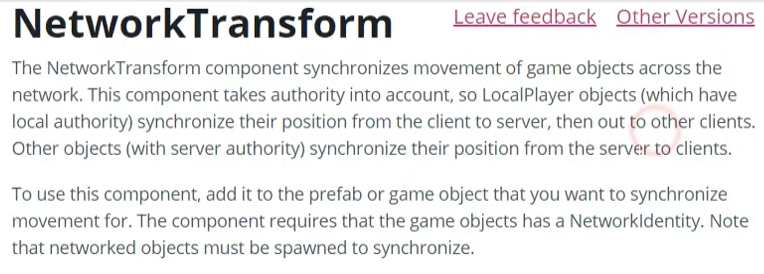
7.NetWorkTransform

8、角色的移动
using System.Collections;
using System.Collections.Generic;
using UnityEngine;
using UnityEngine.Networking;
public class Player : NetworkBehaviour {
private Rigidbody rb;
public float MoveSpeed = 8f;
void Awake () {
rb = transform.GetComponent<Rigidbody>();
}
void FixedUpdate () {
if (!isLocalPlayer) return;//保证只对本地角色进行控制
Vector2 moveDir;
if (Input.GetAxisRaw("Horizontal") == 0 && Input.GetAxisRaw("Vertical") == 0)
{
moveDir.x = 0;
moveDir.y = 0;
}
else
{
//可以移动
moveDir.x = Input.GetAxis("Horizontal");
moveDir.y = Input.GetAxis("Vertical");
Move(moveDir);
}
}
private void Move(Vector2 direction=default(Vector2))
{
if (direction != Vector2.zero)
{
//转方向
transform.rotation = Quaternion.LookRotation(new Vector3(direction.x, 0, direction.y));
//计算前方的点
Vector3 movementDir = transform.forward * MoveSpeed * Time.deltaTime;
//移动到这个点
rb.MovePosition(rb.position + movementDir);
}
}
}
9.摄像机跟随
using System.Collections;
using System.Collections.Generic;
using UnityEngine;
public class CameraFollow : MonoBehaviour {
public Transform target;
public float distance = 10f;
public float height = 5f;
void Update()
{
if (!target) return;
Quaternion currentRotation = Quaternion.Euler(0, transform.eulerAngles.y, 0);
Vector3 pos = target.position;//target的坐标
pos -= currentRotation * Vector3.forward * Mathf.Abs(distance);//距离
pos.y = target.position.y + Mathf.Abs(height);//高度
transform.position = pos;
transform.LookAt(target);
//下面这一句其实要不要无所谓,只是为了精确
transform.position = target.position - (transform.forward * Mathf.Abs(distance));
}
}
在player中重写生成本地物体时调用的方法,把坦克设置为摄像机的target
//把摄像机的target用代码设置为坦克的--这里挺重要的,在OnStartLocalPlayer()方法里面写
public override void OnStartLocalPlayer()
{
Camera.main.GetComponent<CameraFollow>().target = transform;
}
10.炮台的转动及炮台转动的同步

[HideInInspector] //在面板上隐藏公有值
[SyncVar(hook = "OnTurretRotation")]//turretRotation同步到所有客户端,并调用OnTurretRotation()方法
public int turretRotation;
l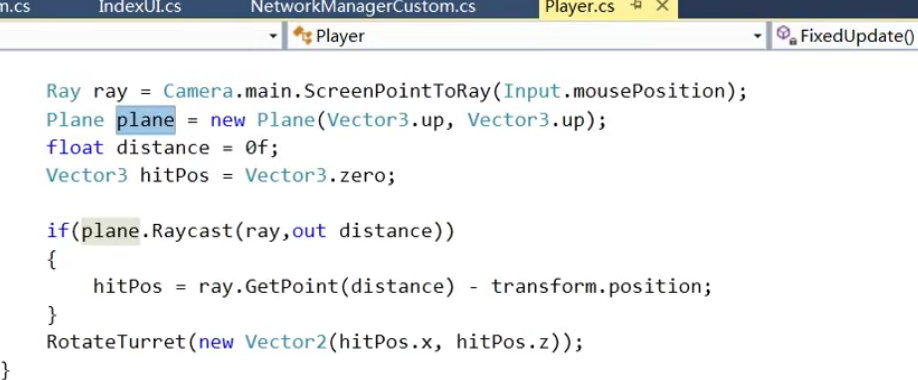
//把输入的屏幕坐标转为ray射线
Ray ray = Camera.main.ScreenPointToRay(Input.mousePosition);
Plane plane = new Plane(Vector3.up, Vector3.up);//虚构的平面
float distance = 0f;//屏幕宽度
Vector3 hitPos = Vector3.zero;//设置打击点,取默认值
if(plane.Raycast(ray,out distance))
{
hitPos = ray.GetPoint(distance) - transform.position;
}
RotateTurret(new Vector2(hitPos.x, hitPos.z));

/// <summary>
/// 炮台旋转
/// </summary>
/// <param name="direction"></param>
void RotateTurret(Vector2 direction = default(Vector2))
{
if (direction == Vector2.zero) return;
int newRotation = (int)(Quaternion.LookRotation(new Vector3(direction.x, 0, direction.y)).eulerAngles.y);
turret.rotation = Quaternion.Euler(0, newRotation, 0);
turretRotation = newRotation;
}
[Command]
void CmdRotateTurret(int value)
{
turretRotation = value;//调用服务器这个值得改变
}
void OnTurretRotation(int value)
{
if (isLocalPlayer) return;
turretRotation = value;
turret.rotation = Quaternion.Euler(0, turretRotation, 0);//进行旋转
}
11.鼠标右键转向
【坦克大战】Unity3D多人在线游戏(泰课的坦克大战--旋转的螺丝钉)的更多相关文章
- Unity3d多人在线教程
[转载]Unity3d多人在线教程 (2013-02-25 16:02:49) 转载▼ 标签: 转载 原文地址:Unity3d多人在线教程作者:lsy0031 Unity 多个玩家开发教程 Uni ...
- 一个3D的多人在线游戏, 服务端 + 客户端 【转】
最近学院组织了一个实训,要求是利用Socket通信和D3D的知识, 写一个多人在线的游戏, 服务端是在linux下, 客户是在Windows下: 写这个的目的是想让大家给我找错, 欢迎大家的意见.我的 ...
- 试玩 GOWOG ,初探 OpenAI(使用 NeuroEvolution 神经进化)与 Golang 多人在线游戏开发
GOWOG: 原项目:https://github.com/giongto35/gowog 我调整过的:https://github.com/Kirk-Wang/gowog GOWOG 是一款迷你的, ...
- GJM :多人在线游戏的设计思路
感谢您的阅读.喜欢的.有用的就请大哥大嫂们高抬贵手"推荐一下"吧!你的精神支持是博主强大的写作动力以及转载收藏动力.欢迎转载! 版权声明:本文原创发表于 [请点击连接前往] ,未经 ...
- 负载均衡--大型在线系统实现的关键(上篇)(再谈QQ游戏百万人在线的技术实现)
http://blog.csdn.net/sodme/article/details/393165 —————————————————————————————————————————————— 本文作 ...
- Golang+Protobuf+PixieJS 开发 Web 多人在线射击游戏(原创翻译)
简介 Superstellar 是一款开源的多人 Web 太空游戏,非常适合入门 Golang 游戏服务器开发. 规则很简单:摧毁移动的物体,不要被其他玩家和小行星杀死.你拥有两种资源 - 生命值(h ...
- cocos2d-x游戏开发系列教程-坦克大战游戏之虚拟手柄控制坦克移动
上篇显示了控制手柄,但是还不能用来控制坦克, 这篇将会讲手柄和坦克的移动结合起来. 1.先在CityScene场景中实现场景的虚函数virtual void onEnter(); onEnter在进入 ...
- cocos2d-x游戏开发系列教程-坦克大战游戏之敌方坦克AI的编写
在上篇我们完成了子弹和地图碰撞的检测,在这篇我们将完成敌方坦克AI的编写. 具体思路是屏幕中保持有四个敌方坦克,然后坦克随机方向运动,并且子弹消失后1秒发射一次 1.我们新建一个敌方坦克的AI类来控制 ...
- [Unity3D入门]分享一个自制的入门级游戏项目"坦克狙击手"
[Unity3D入门]分享一个自制的入门级游戏项目"坦克狙击手" 我在学Unity3D,TankSniper(坦克狙击手)这个项目是用来练手的.游戏玩法来自这里(http://ww ...
随机推荐
- js 浏览器兼容css中webkit、Moz、O、ms...写法封装(es6语法)
/** *浏览器兼容写法封装 */ let elementStyle = document.createElement('div').style let vendor = (() => { le ...
- Vue利用canvas实现移动端手写板
<template> <div class="hello"> <!--touchstart,touchmove,touchend,touchcance ...
- 树上倍增求LCA及例题
先瞎扯几句 树上倍增的经典应用是求两个节点的LCA 当然它的作用不仅限于求LCA,还可以维护节点的很多信息 求LCA的方法除了倍增之外,还有树链剖分.离线tarjan ,这两种日后再讲(众人:其实是你 ...
- 少侠学代码系列(一)->JS起源
少侠:喂,有人吗?赶紧出来接客了,有没有人啊 帅气的我:来了来了,少侠有何吩咐? 少侠:把你们店里的秘籍呈上来我要学JS 帅气的我:少侠,别这样,我们秘籍是不外传的,祖上传下来的规矩,传人妖不传男女. ...
- MyCat | 分库分表实践
引言 先给大家介绍2个概念:数据的切分(Sharding)根据其切分规则的类型,可以分为两种切分模式. 切分模式 一种是按照不同的表(或者Schema)来切分到不同的数据库(主机)之上,这种切可以称之 ...
- iOS-----------计算两个时间的时间差
UIButton * nameButton = [UIButton buttonWithType:UIButtonTypeCustom]; nameButton.frame = CGRectMake( ...
- Sublime Text 3 常用插件 —— SFTP
在 Win 下常用 Xftp 软件来和远程服务传递文件,但是要是在项目开发的时候频繁的将远程文件拖到本地编辑然后再传回远程服务器,那真是麻烦无比,但是Sublime中SFTP插件,它让这世界美好了许多 ...
- Truffle 4.0、Geth 1.7.2、TestRPC在私有链上搭建智能合约
目录 目录 1.什么是 Truffle? 2.适合 Truffle 开发的客户端 3.Truffle的源代码地址 4.如何安装? 4.1.安装 Go-Ethereum 1.7.2 4.2.安装 Tru ...
- 关于MongoDB时间格式转换和时间段聚合统计的用法总结
一 . 背景需求 在日常的业务需求中,我们往往会根据时间段来统计数据.例如,统计每小时的下单量:每天的库存变化,这类信息数据对运营管理很重要. 这类数据统计依赖于各个时间维度,年月日.时分秒都有可能. ...
- c/c++ 网络编程 bind函数
网络编程 bind函数 bind的作用是确定端口号. 正常处理都是先bind,然后listen 如果不bind,直接listen,会是什么结果? 内核会自动随机分配一个端口号 例子: #include ...