
Aras简单报表
1.编辑Report对象类的窗体Report_Tab_Report,将xsl_stylesheet放到窗体上
2.新建报表
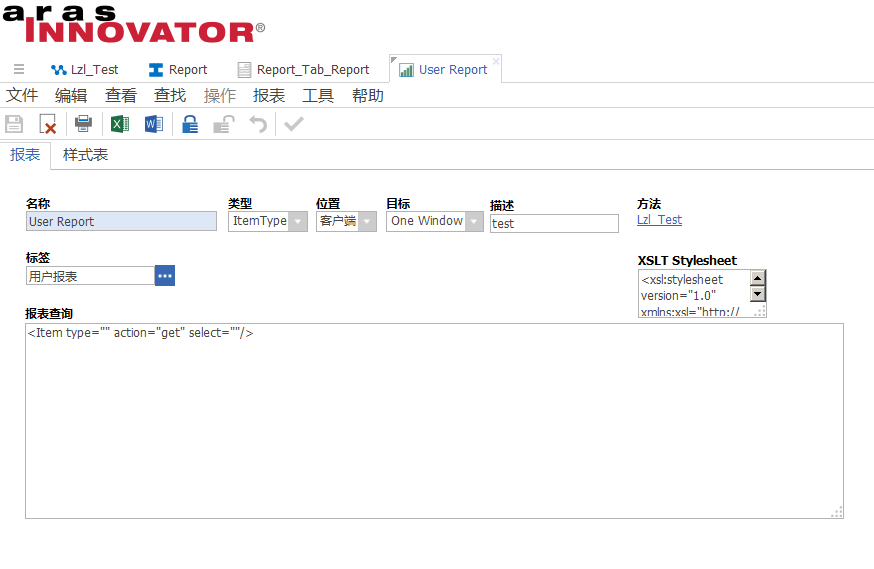
3.将编辑好的XSLT复制到xsl_stylesheet中。
<xsl:stylesheet version="1.0" xmlns:xsl="http://www.w3.org/1999/XSL/Transform" xmlns:msxsl="urn:schemas-microsoft-com:xslt" xmlns:user="urn:user-scripts" xmlns:aras="http://www.aras-corp.com">

 <xsl:output method="html" omit-xml-declaration="yes" standalone="yes" indent="yes"></xsl:output>

 <xsl:template match="/">

  <html>

   <head></head>

   <style type="text/css" userData="Global">

    .cellSolid {border-top:1px #000000 solid;border-right:1px #000000 solid;border-bottom:1px #000000 solid;border-left:1px #000000 solid;}

    .cellSolidTopRight {border-top:1px #000000 solid;border-right:1px #000000 solid;}

    .cellSolidTopLeft {border-top:1px #000000 solid;border-left:1px #000000 solid;}

    .cellSolidRightBottom {border-right:1px #000000 solid;border-bottom:1px #000000 solid;}

    .cellSolidBottomLeft {border-bottom:1px #000000 solid;border-left:1px #000000 solid;}

    .cellSolidTop {border-top:1px #000000 solid;}

    .cellSolidRight {border-right:1px #000000 solid;}

    .cellSolidBottom {border-bottom:1px #000000 solid;}

    .cellSolidLeft {border-left:1px #000000 solid;}

    .cellDashed {border-top:1px #666666 dashed;border-right:1px #666666 dashed;border-bottom:1px #666666 dashed;border-left:1px #666666 dashed;}

    .cellDashedTopRight {border-top:1px #666666 dashed;border-right:1px #666666 dashed;}

    .cellDashedTopLeft {border-top:1px #666666 dashed;border-left:1px #666666 dashed;}

    .cellDashedBottomRight {border-bottom:1px #666666 dashed;border-right:1px #666666 dashed;}

    .cellDashedBottomLeft {border-bottom:1px #666666 dashed;border-left:1px #666666 dashed;}

    .cellDashedTop {border-top:1px #666666 dashed;}

    .cellDashedRight {border-right:1px #666666 dashed;}

    .cellDashedBottom {border-bottom:1px #666666 dashed;}

    .cellDashedLeft {border-left:1px #666666 dashed;}

    .cellHeader {background-color:#CCCCCC;border-top:1px #000000 solid;border-right:1px #000000 solid;border-bottom:1px #000000 solid;padding:2px;text-align:center;text-transform:capitalize;text-align:center;font-family:helvetica;font-weight:bold;font-size:8pt;}

</style>

   <script>onload = function() {window.resizeTo(900,650);}

</script>

   <body topmargin="50" leftmargin="50">

    <table border="0" cellspacing="0" cellpadding="0" width="875">

     <tr>

      <td width="75"/>

      <td width="200"/>

      <td width="50"/>

      <td width="125"/>

      <td width="125"/>

      <td width="125"/>

      <td width="75"/>

      <td width="100"/>

     </tr>

     <tr valign="top">

      <td align="left" uniqueID="ms__id77" colspan="9">

       <img src="../imagesLegacy/Logos/aras_logo.gif" height="80"></img>

      </td>

     </tr>

     <tr valign="bottom">

      <td colspan="6" style="font-family:helvetica;font-size:15pt;color:#DA1943;padding:2px;" align="left" uniqueID="ms__id79">User Report</td>

      <td colspan="2" style="font-family:helvetica;font-size:10pt;padding:2px;" align="right" uniqueID="ms__id80">Generated on:

     <!--  <script>

      function m00(r, n){

        r += "";

        if (!n) n = 2;

        while(r.length < n){

            r = "0" + r;} return r;

        }

        var dt = new Date();

        var a = top.opener.top.aras;

        if (a){

            var s = m00(dt.getUTCFullYear(),4)+"-"+m00((dt.getUTCMonth()+1))+"-"+m00(dt.getUTCDate())+"T"+m00(dt.getUTCHours())+":"+m00(dt.getUTCMinutes())+":"+m00(dt.getUTCSeconds()); s = a.IomInnovator.GetI18NSessionContext().ConvertUtcDateTimeToNeutral(s, "yyyy-MM-ddTHH:mm:ss"); s = a.convertFromNeutral(s, "date", "short_date"); document.write(s);

        }

        </script> -->

        </td>

     </tr>

        <tr valign="top">

         <td class="cellHeader" uniqueID="ms__id81" align="left" colspan="" rowspan="" height="" width="" style="border-left:1px #666666 solid;">Name</td>

         <td class="cellHeader" uniqueID="ms__id82">Login Name</td>

         <td class="cellHeader" uniqueID="ms__id84">Date Reported</td>

         <td class="cellHeader" uniqueID="ms__id84">Reported By</td>

         <td class="cellHeader" uniqueID="ms__id85">Status</td>

        </tr>

        <xsl:for-each select="//Item">

         <xsl:sort select="name" order="ascending" case-order="upper-first" data-type="text"></xsl:sort>

         <tr valign="center">

          <td style="font-family:helvetica;font-size:8pt;font-weight:bold;border-left:1px #666666 solid;padding:2px;" class="cellSolidRightBottom" align="left" uniqueID="ms__id90" colspan="" rowspan="" height="" width="">

           <xsl:value-of select="first_name"></xsl:value-of>

           <xsl:if test="first_name='' or not(first_name)">

            <xsl:text> </xsl:text>

           </xsl:if>

          </td>

          <td style="font-family:helvetica;font-size:8pt;padding:2px;" class="cellSolidRightBottom" align="left" uniqueID="ms__id91">

           <xsl:value-of select="login_name"></xsl:value-of>

           <xsl:if test="login_name='' or not(login_name)">

            <xsl:text> </xsl:text>

           </xsl:if>

          </td>

          <td style="font-family:helvetica;font-size:8pt;padding:2px;" class="cellSolidRightBottom" align="left" uniqueID="ms__id93">

           <xsl:value-of select="created_on"></xsl:value-of>

           <xsl:if test="created_on='' or not(created_on)">

            <xsl:text> </xsl:text>

           </xsl:if>

          </td>

          <td style="font-family:helvetica;font-size:8pt;padding:2px;" class="cellSolidRightBottom" align="left" uniqueID="ms__id92">

           <xsl:value-of select="created_by_id/@keyed_name"></xsl:value-of>

           <xsl:if test="created_by_id/@keyed_name='' or not(created_by_id/@keyed_name)">

            <xsl:text> </xsl:text>

           </xsl:if>

          </td>

          <td style="font-family:helvetica;font-size:8pt;padding:2px;" class="cellSolidRightBottom" align="left" uniqueID="ms__id94">

           <xsl:value-of select="state"></xsl:value-of>

           <xsl:if test="state='' or not(state)">

            <xsl:text> </xsl:text>

           </xsl:if>

          </td>

         </tr>

        </xsl:for-each>

    </table>

   </body>

  </html>

 </xsl:template>

</xsl:stylesheet>
4.新增Method.放到第2步的报表中
var innovator = new Innovator();

var queryItem = innovator.newItem("User","get");

var prs = queryItem.apply();

var report = innovator.getItemByKeyedName("Report","User Report");

var style = report.getProperty("xsl_stylesheet");

var html = prs.applyStylesheet(style,"text");

return html;
5.将新增好的报表挂到User对象类的报表页签下面。
最终效果如图

Aras简单报表的更多相关文章
- 用stimulsoft Reports报表工具制作简单报表的过程
这是在数据库sql server中People表的数据
- FastReport.Net使用:[3]简单报表一
如何设置报表栏 1.右键报表栏相关模块进行删除. 2.使用菜单栏中的报表菜单进行添加/删除相应的栏目,选中栏目的背景会变得高亮. 3.使用报表栏编辑器. 可通过点击报表栏顶部的“设置报表栏”或者菜单栏 ...
- [deviceone开发]-echart的简单报表示例
一.简介 echart是一个常用的基于h5的报表库.这个例子简单展示了实现折线图,柱状图,圆环图和圆饼图的使用. 并实现和do的非html部分的数据交互. 二.效果图 三.相关下载 https://g ...
- Java开源报表Jasper入门(2) -- 使用JasperSoft Studio创建一个简单报表
在接下来的教程中,我们将实现一个简单的JasperReports示例,展现其基本的开发.使用流程.文章很长,不过是以图片居多,文字并不多. 实例中使用最新的Jasper Studio5.2进行报表设计 ...
- SAP 用事务码SQVI 做简单报表 .
集团计划总监要去德国参展,要一份离当前日期最近的出口欧美国家产品单价. 需要从A903,MARA,KONP,MATK 这4张表里取数. 1)Tcode:SQVI进入,如图 2) 在快速浏览处输入名称: ...
- Echarts 简单报表系列四:雷达图
代码如下: <!DOCTYPE html> <html lang="en"> <head> <meta charset="UTF ...
- Echarts 简单报表系列三:饼状图
代码如下: <!DOCTYPE html> <html lang="en"> <head> <meta charset="UTF ...
- Echarts 简单报表系列二:折线图
<!DOCTYPE html> <html lang="en"> <head> <meta charset="UTF-8&quo ...
- Echarts 简单报表系列一:柱状图
见代码: <!DOCTYPE html> <html lang="en"> <head> <meta charset="UTF- ...
随机推荐
- websocket简单实现在线聊天
WebSocket简介与消息推送 B/S架构的系统多使用HTTP协议,HTTP协议的特点: 1 无状态协议2 用于通过 Internet 发送请求消息和响应消息3 使用端口接收和发送消息,默认为80端 ...
- python接口自动化-post请求2
一.headers 1.以禅道登录为例,模拟登陆,这里需添加请求头headers,可以用fiddler抓包 2.将请求头写成字典格式 h = { "Connection": &qu ...
- python已经感觉到放弃接近的day08
居然能超过一个星期,我甚至都有点佩服我自己了,今天有两个新的知识点,一个简单一个难,先从简单的开始入手吧,进制,进制分为4种,2进制,8进制,10进制,16进制,一般最常用的就是10进制了,计算机用的 ...
- 什么是 CI/CD?
什么是 CI/CD? 在软件开发中经常会提到持续集成Continuous Integration(CI)和持续交付Continuous Delivery(CD)这几个术语.但它们真正的意思是什么呢? ...
- 微信授权登录mock(在没有真实微信账号的情况下测试大量微信账户授权登录的情况)
场景介绍 对于构建在微信公众号的系统,帐号体系往往使用微信授权登录(如各类微信商城应用系统). 这样操作不仅可以实现静默注册,对用户几乎是无感的,同时也达到了区分用户,获取用户基本信息(头像,昵称等) ...
- Mysql外键约束--转载
链接:http://www.cnblogs.com/xuanan/p/7240923.html#undefined 一.外键约束 1.什么是外键? 外键指的是其他表中的主键,当做该表的外键. 2.创建 ...
- 【c语言】分配内存与释放内存
提示:现在内存区定出一片相当大的连续空间(如1000字节).然后开辟与释放都在此空间进行.假设指针变量p原已指向未用空间的开头,调用alloc(n)后,开辟了n个字节可供程序适使用.现在需要使 p的值 ...
- Java Web的简单项目部署
目录 项目介绍 安装并配置jdk和tomcat 安装并配置mysql 使用Eclipse导出war包 部署war包到服务器 导出项目的数据库 将项目的数据库导入服务器的数据库中 修改配置 重启Tomc ...
- wince可用的7-zip
7-zip下载 7-zip
- Python IDLE 代码高亮主题
Python IDLE 代码高亮主题 使用方法: 打开C盘我的 C:\Documents and Settings\你的用户名.idlerc文件夹 里面会有一个 config-highlight.cf ...