
selenium截图
文件结构
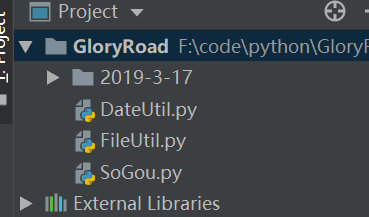
1.DateUtil.py
# cncoding = utf-8

import time

from datetime import datetime

'''

本文件主要用于获取当前的日期以及时间,

用于生成不能存截图文件目录名

'''

def currentDate():

    date = time.localtime()

    # 构造今天的日期字符串

    today = str(date.tm_year)+'-'+str(date.tm_mon)+'-'+str(date.tm_mday)

    return today

def currentTime():

    timeStr = datetime.now()

    # 构造当前时间字符串

    now = timeStr.strftime('%H-%M-%S')

    return now

if __name__ == "__main__":

    print(currentDate())

    print(currentTime())
2.FileUtil.py
# cncoding = utf-8

from DateUtil import currentTime,currentDate

import os

'''

本文件主要用于创建目录,用于存放异常截图,

创建目录的方法提供大家参考

'''

def createDir():

    # 获取当前文件所在目录的绝对路径

    currentPath = os.path.dirname(os.path.abspath(__file__))

    # 获取今天的日期字符串

    today = currentDate()

    # 构造以今天日期命名的目录的绝对路径

    dateDir = os.path.join(currentPath,today)

    if not os.path.exists(dateDir):

        # 如果以今天日期命名的目录不存在则创建

        os.mkdir(dateDir)

        # 获取当前的时间字符串

        now = currentTime()

        # 构造以当前时间命名的目录的绝对路径

        timeDir = os.path.join(dateDir,now)

        print(timeDir)

        if not os.path.exists(timeDir):

            # 如果已当前时间命名的目录不存在则创建

            os.mkdir(timeDir)

        return timeDir

    else:

        os.path.join(currentPath, today)

        now = currentTime()

        # 构造以当前时间命名的目录的绝对路径

        timeDir = os.path.join(dateDir, now)

        # print(timeDir)

        if not os.path.exists(timeDir):

            # 如果已当前时间命名的目录不存在则创建

            os.mkdir(timeDir)

        return timeDir

if __name__ == "__main__":

    createDir()
3.SoGou.py
# cncoding = utf-8

from selenium import webdriver

import unittest,time,os

from FileUtil import createDir

import traceback

'''

创建存在异常截图的目录,并得到本次实例中存放图片目录的绝对路径,

并且作为全局变量,以供本次所有测试用例调用

'''

picDir = createDir()

def takeScreenshot(driver,savePaht,picName):

    # 封装截图方法

    # 构造屏幕截图路径及图片名

    # 因为windows默认编码是GBK,而传入的图片名为utf8编码

    # 所以这里需要进行转码,以便让图片名中的中文字符能正常显示

    print(savePaht,str(picName))

    picPath = os.path.join(savePaht, str(picName).encode('gbk').decode('utf-8').\

                           strip()+ ".png")

    try:

        # 调用webDriver提供的get_screenshot_sa_file()方法,

        # 将截图的截图图片保存为本地文件

        driver.get_screenshot_as_file(picPath)

    except Exception as e:

        print(traceback,e)

class TestFailCaptureScreen(unittest.TestCase):

    def setUp(self):

        self.driver = webdriver.Chrome()

    def tearDown(self):

        self.driver.quit()

    def testSoGoouSearch(self):

        url = "http://www.baidu.com"

        self.driver.get(url)

        try:

            self.driver.find_element_by_id("kw").\

                send_keys(u'光荣之路自动化测试')

            self.driver.find_element_by_id('su').click()

            time.sleep(3)

            # 断言页面的代码中是否存在"实在认为"这4个关键字

            # 因为页面中没有这四个字,所以会触发except语句的执行,并触发截图操作

            self.assertTrue(u'事在人为' in self.driver.page_source,\

                            "事在在人为关键字在页面源码中未找到")

        except AssertionError as e:

            takeScreenshot(self.driver,picDir,e)

        except Exception as e:

            print(traceback.print_exc())

            takeScreenshot(self.driver,picDir,e)

if __name__ == "__main__":

    unittest.main()
selenium截图的更多相关文章
- Java&Selenium截图方法封装
Java&Selenium截图方法封装 package util; import org.apache.commons.io.FileUtils; import org.openqa.sele ...
- selenium截图对比校验方法
/**对比图片进行校验是否成功**/package com.allin.pc;import java.awt.image.BufferedImage;import java.awt.image.Dat ...
- selenium 截图加上时间戳
思路: 1 新建screenshot文件夹,不存在则创建该目录 2 在screenshot文件夹下新建当日日期文件夹,比如20190110:不存在则创建该目录 3 截图保存到当日文件夹,且截图文 ...
- selenium 截图 添加时间戳
在自动化程序中运行的代码报错信息或者是相关日志有可能并无法直观的判断出错信息.因此截图是避免不了的.为了避免因为重复运行或者是图片名称相同导致截图被覆盖. 建议在截图时使用时间戳,保证截图图片名称的唯 ...
- selenium - 截图下载图片
from selenium import webdriver from selenium.webdriver import ChromeOptions from time import sleep f ...
- selenium截图功能
selenium自动化测试完后需要查看值观的结果,或者查操作过程中是否正确,此时需要使用自带的截图功能. 示例1: from time import sleep from selenium impor ...
- 关于selenium截图
没时间深入研究源代码,凭调试解决了非浏览器级别的滚动条截图. 首先,定位到带有滚动条的元素,通过xpath. 其次,获取scrollheight和clientheight. 第三,循环截图,循环截图的 ...
- c#使用selenium截图,操作dom元素
using System; //添加selenium的引用 using OpenQA.Selenium.PhantomJS; using OpenQA.Selenium.Chrome; using O ...
- selenium 截图
http://blog.csdn.net/u010953692/article/details/78320025 # coding:utf-8 # coding:cp936 from selenium ...
随机推荐
- macbook 入门
前面的话 第一次使用 Mac 之前,需要改变一些原有思维,不应该使用 Windows 的思维习惯去使用 Mac,Mac 会节省系统维护.清理杀毒.升级驱动等操作的时间,让我们可以专注做真正重要的事情, ...
- Tutorial: Create a Windows Machine Learning UWP application (C#)
In this tutorial, we'll build a simple Universal Windows Platform application that uses a trained ma ...
- 小米Play获取ROOT权限的经验
小米Play通过什么方式开通了Root权限?大家知道,android机器有Root权限,一旦手机开通了root相关权限,就能够实现更多的功能,举个栗子大家企业的营销部门,使用一些营销应用都需要在Roo ...
- asp.net动态为网页添加关键词的代码
如下资料是关于asp.net动态为网页添加关键词的代码,希望能对小伙伴们有较大用.HtmlMeta keywords = new HtmlMeta();keywords.Name = "ke ...
- 「洛谷5300」「GXOI/GZOI2019」与或和【单调栈+二进制转化】
题目链接 [洛谷传送门] 题解 按位处理. 把每一位对应的图都处理出来 然后单调栈处理一下就好了. \(and\)操作处理全\(1\). \(or\)操作处理全\(0\). 代码 #include & ...
- 【linux】工作中linux系统常用命令操作整理
1.Linux如何查看端口 使用lsof(list open files)命令,lsof -i:端口号 用于查看某一端口的占用情况,比如查看8000端口使用情况,lsof -i:8000. 或者使用n ...
- P4178 Tree(点分治)
题面要求小于等于K的路径数目,我么很自然的想到点分治(不会的就戳我) 这道题的统计答案与模板题不一样的地方是由等于K到小于等于K 那么我们可以把每一个子节点到当前根(重心)的距离排序,然后用类似双指针 ...
- JS绑定带参数的事件总要执行一次方法,如何避免?
类似这样:function aa(vote){alert(vote);}$(".btnn").bind("click",aa(1)});没有点击就开始执行了.怎 ...
- django 4.get接口开发
根据上一篇文章,有post,那么就有get请求,其余部分不变,就是把post换成get就可以. #views.py from django.http.response import HttpRespo ...
- pandas技巧两则——列内元素统计和列内元素排序
更新:后来忽然发现有个cumcount()函数,支持正排倒排,所以以下说的那些基本都没啥用了. 最近做比赛线上无甚进展,所以先小小地总结遇到的一些困难和解决的方法,以防之后忘记.毕竟总是忙着大步赶路的 ...