
Appium 测试微信小程序 Webview
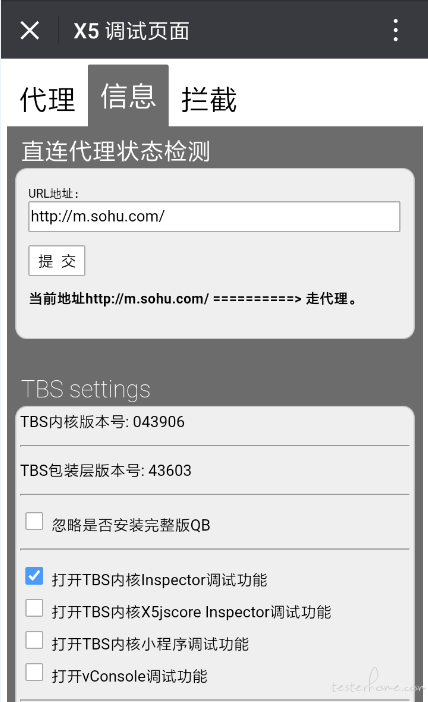
通过微信打开debugx5.qq.com,或者直接扫下面二维码

勾选【打开TBS内核Inspector调试功能】
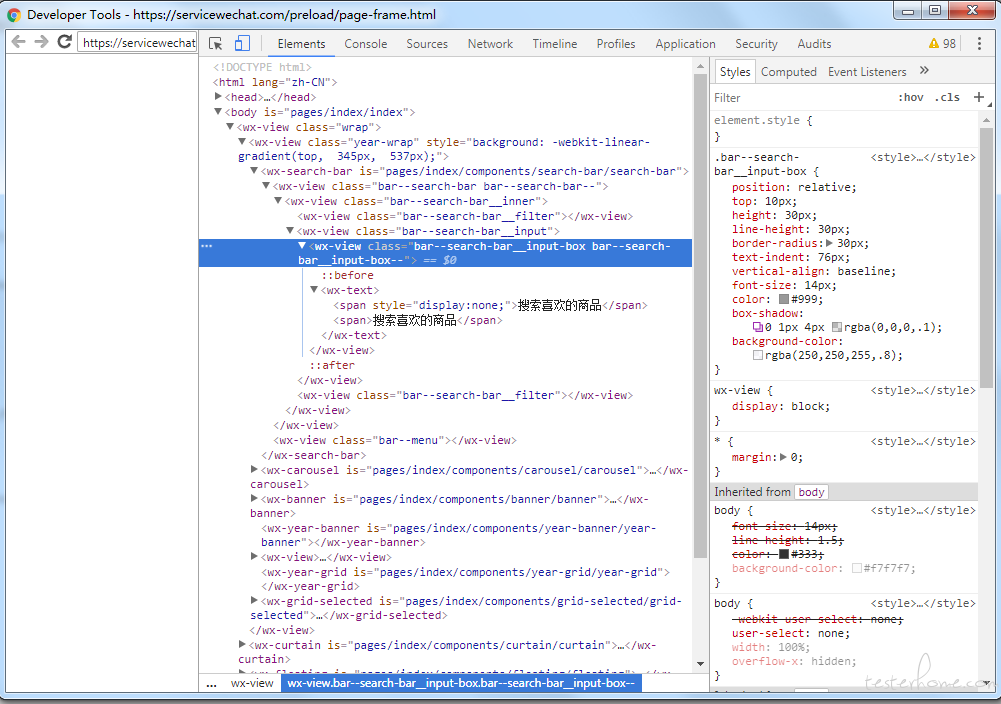
Chrome查看页面元素
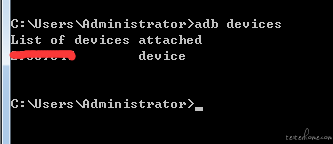
手机连接电脑,查看是否连接成功。如下展示设备号则为连接成功
进入任意小程序,以【X东】为例,在Chrome浏览器访问chrome://inspect/#devices
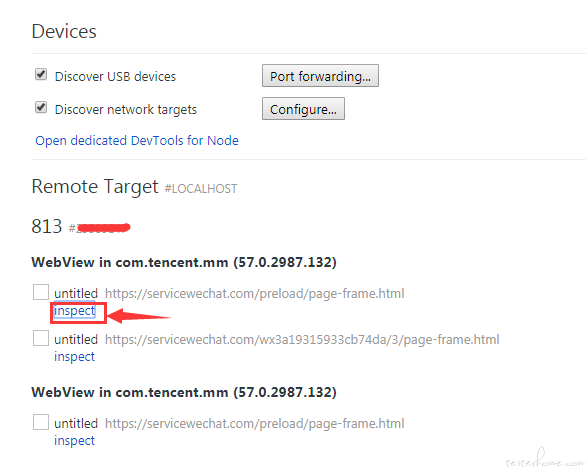
点击inspact,即可查看页面元素
小程序的进程
微信有很多的进程,每一个小程序都运行在不同的进程中。
进入【X东】后,看下当前运行在哪个进程中
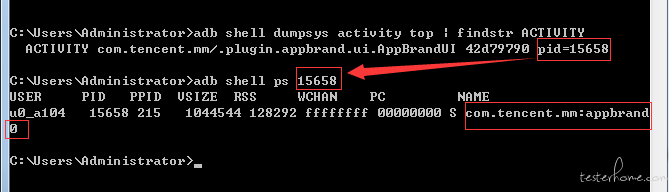
我们可以看到,当前的小程序运行在com.tencent.mm:appbrand0中,记住这个进程,记住啦
Appium编写测试用例
最关键的一点,需要添加androidProcess这一项,也就是我们上面的com.tencent.mm:appbrand0
我用python写一个简单的demo
desired_caps = {
            'platformName': 'Android',
            'fastReset': 'false',
            'deviceName': 'XXXXXX',
            'appPackage': 'com.tencent.mm',
            'appActivity': '.ui.LauncherUI',
            'fullReset': 'false',
            'unicodeKeyboard': 'True',
            'resetKeyboard': 'True',
            'chromeOptions': {
                'androidProcess': 'com.tencent.mm:appbrand0'
                }
            }
driver = webdriver.Remote('http://localhost:4723/wd/hub', desired_caps)
driver.find_element_by_name("发现").click()
driver.find_element_by_name("小程序").click()
driver.find_element_by_name("X东购物").click()
driver.switch_to.context('WEBVIEW_com.tencent.mm:appbrand0')
time.sleep(5)
print(driver.page_source)
切换Webview失败
我遇到过一种切换Webview失败的情况,下面贴上appium的报错日志。
> info: Chromedriver: Changed state to 'stopped'
> error: Chromedriver: Chromedriver exited unexpectedly with code null, signal SIGTERM
> warn: Chromedriver for context WEBVIEW_com.tencent.mm:appbrand1 stopped unexpectedly
> warn: Chromedriver quit unexpectedly, but it wasn't the active context, ignoring
> error: Chromedriver: Error: A new session could not be created. (Original error: session not created exception
> from unknown error: Runtime.executionContextCreated has invalid 'context': {"auxData":{"frameId":"32496.2","isDefault":true},"id":2,"name":"","origin":"https://servicewechat.com"}
>   (Session info: chrome=57.0.2987.132)
>   (Driver info: chromedriver=2.18.343845 (73dd713ba7fbfb73cbb514e62641d8c96a94682a),platform=Windows NT 6.1 SP1 x86_64))
>     at JWProxy.command$ (lib/proxy.js:133:15)
>     at tryCatch (D:\Appium\node_modules\appium\node_modules\appium-chromedriver\node_modules\appium-jsonwp-proxy\node_modules\babel-runtime\regenerator\runtime.js:67:40)
>     at GeneratorFunctionPrototype.invoke [as _invoke] (D:\Appium\node_modules\appium\node_modules\appium-chromedriver\node_modules\appium-jsonwp-proxy\node_modules\babel-runtime\regenerator\runtime.js:315:22)
>     at GeneratorFunctionPrototype.prototype.(anonymous function) [as next] (D:\Appium\node_modules\appium\node_modules\appium-chromedriver\node_modules\appium-jsonwp-proxy\node_modules\babel-runtime\regenerator\runtime.js:100:21)
>     at GeneratorFunctionPrototype.invoke (D:\Appium\node_modules\appium\node_modules\appium-chromedriver\node_modules\appium-jsonwp-proxy\node_modules\babel-runtime\regenerator\runtime.js:136:37)
>     at bound (domain.js:284:14)
>     at GeneratorFunctionPrototype.runBound (domain.js:297:12)
>     at run (D:\Appium\node_modules\appium\node_modules\appium-chromedriver\node_modules\appium-jsonwp-proxy\node_modules\babel-runtime\node_modules\core-js\library\modules\es6.promise.js:89:39)
>     at D:\Appium\node_modules\appium\node_modules\appium-chromedriver\node_modules\appium-jsonwp-proxy\node_modules\babel-runtime\node_modules\core-js\library\modules\es6.promise.js:100:28
>     at flush (D:\Appium\node_modules\appium\node_modules\appium-chromedriver\node_modules\appium-jsonwp-proxy\node_modules\babel-runtime\node_modules\core-js\library\modules\$.microtask.js:17:13)
>     at process._tickDomainCallback (node.js:381:11)
>  { [Error: A new session could not be created. (Original error: session not created exception
> from unknown error: Runtime.executionContextCreated has invalid 'context': {"auxData":{"frameId":"32496.2","isDefault":true},"id":2,"name":"","origin":"https://servicewechat.com"}
>   (Session info: chrome=57.0.2987.132)
>   (Driver info: chromedriver=2.18.343845 (73dd713ba7fbfb73cbb514e62641d8c96a94682a),platform=Windows NT 6.1 SP1 x86_64))]
>   status: 33,
>   value: { message: 'session not created exception\nfrom unknown error: Runtime.executionContextCreated has invalid \'context\': {"auxData":{"frameId":"32496.2","isDefault":true},"id":2,"name":"","origin":"https://servicewechat.com"}\n  (Session info: chrome=57.0.2987.132)\n  (Driver info: chromedriver=2.18.343845 (73dd713ba7fbfb73cbb514e62641d8c96a94682a),platform=Windows NT 6.1 SP1 x86_64)' },
注意最后那一段的chrome和chromedriver的版本

查看对应表可知,两者版本不对应,需要替换chromedriver
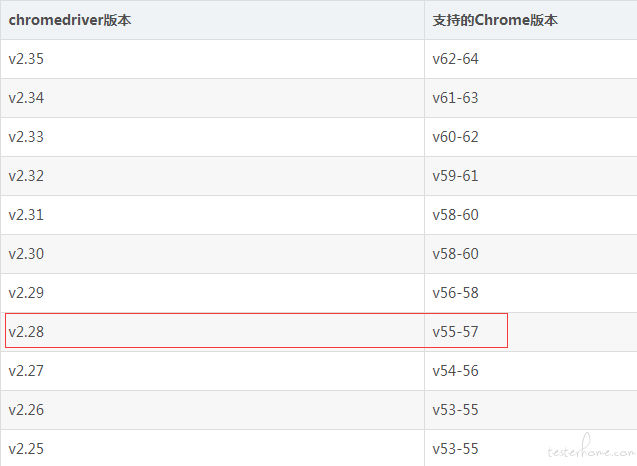
将Appium的chromedriver替换为相应版本后,即可成功切换。
Appium 测试微信小程序 Webview的更多相关文章
- 使用 Appium 测试微信小程序 Webview
打开调试功能 通过微信打开debugx5.qq.com,或者直接扫下面二维码 勾选[打开TBS内核Inspector调试功能] Chrome查看页面元素 手机连接电脑,查看是否连接成功.如下展 ...
- 使用Appium 测试微信小程序和微信公众号方法
由于腾讯系QQ.微信等都是基于腾讯自研X5内核,不是google原生webview,需要打开TBS内核Inspector调试功能才能用Chrome浏览器查看页面元素,并实现Appium自动化测试微信小 ...
- Appium之测试微信小程序
坚持原创输出,点击蓝字关注我吧 作者:清菡 博客:Oschina.云+社区.知乎等各大平台都有. 目录 一.往期回顾 二.测试微信小程序 1.准备工作 2.操作步骤 3.注意 4.强制设置安卓的进程 ...
- appium+python 微信小程序的自动化
sudo kill -9 $(lsof -i:8889 -t) mitmweb -p 8889 -s addons.py mitmdump -q -p 8889 -s addons.py http: ...
- 微信小程序web-view实例
微信小程序web-view实例 index.js //index.js //获取应用实例 const app = getApp() Page({ /** * 页面的初始数据 */ data: { }, ...
- 微信小程序web-view之wx.miniProgram.redirectTo
17年微信小程序官方提供了web-view组件. 官方描述:web-view组件是一个可以用来承载网页的容器,会自动铺满整个小程序页面.个人类型与海外类型的小程序暂不支持使用. 这段时间研究了一下小程 ...
- 微信小程序web-view的简单思考和实践
微信小程序的组件web-view推出有一段时间了,这个组件的推出可以说是微信小程序开发的一个重要事件,让微信小程序不会只束缚在微信圈子里了,打开了一个口子,这个口子或许还比较小,但未来有无限可能. 简 ...
- 微信小程序 web-view 的 url 带参问题
在微信小程序开发过程中,会需要跳转到外部链接,微信提供了 <web-view>组件供我们使用. 为减少重复代码,一般会将这个功能单独抽取为一个页面供大家使用: <template&g ...
- 微信小程序web-view(webview) 嵌套H5页面 唤起微信支付的实现方案
场景:小程序页面有一个web-view组件,组件嵌套的H5页面,要唤起微信支付. 先讲一下我的项目,首先我是自己开发的一个H5触屏版的商城系统,里面含有购物车,订单支付等功能.然后刚开始,我们公众号里 ...
随机推荐
- 《AutoCAD Civil 3D .NET二次开发》勘误2
4.6.3节中代码: 原代码: 06 pdo.Keywords.Add("Pi", "Pi", "派<Pi>"); 07 pdo ...
- SQL SERVER2000将多行查询结果拼接到一行数据及函数的创建
处理前的查询结果如上图: 通过借助SQL变量的定义 ) DECLARE @Num int SET @Scope='' ), ' ' GROUP BY ContractID 实现了一下效果: //创建拼 ...
- icns图标的制作
1. 准备一张无损的png图片(1024x1024) 2. 新建一个文件夹 必须要以iconset为后缀 $ mkdir hgl_pngpic.iconset 3. 使用sips 命令剪切10个不一样 ...
- 「NOI2013」小 Q 的修炼 解题报告
「NOI2013」小 Q 的修炼 第一次完整的做出一个提答,花了半个晚上+一个上午+半个下午 总体来说太慢了 对于此题,我认为的难点是观察数据并猜测性质和读入操作 我隔一会就思考这个sb字符串读起来怎 ...
- 树莓派中QT实现PWM
树莓派中QT实现PWM 在QT中实现 PWM 使用的驱动为 wiringPi 之前的博客中已经介绍了 wiringPi , BOARD 管脚, BCM 之间的关系 这次, 就介绍在 wiringPi ...
- redis cluster简介和配置(3)
前面我介绍了 redis sentinel,既然有了sentinel,为什么还要一个cluster呢?因为随着业务量的增加,不可避免要对redis进行扩容,扩容方式一般由2种:1. 垂直扩容 2. 水 ...
- NPOI 图片在单元格等比缩放且居中显示
NPOI导出的图片默认是在单元格左上方,这使得图片在单元格显示得很难看.居中,且等比缩放,才是图片在单元格上的完美展示. /// <summary> /// 图片在单元格等比缩放居中显示 ...
- 新系统添加sshkey/pexpect基本使用
Ansible密码认证 //配置Inventory [db] 10.10.10.12 10.10.10.162 [db:vars] #给db组下的主机设置变量 ansible_ssh_user=&qu ...
- Docker安装步骤
在学习springcloud的消息总线时,需要安装rabbitmq,因为rabbitmq是用erlang开发的,所以安装rabbitmq又需要先安装erlang,总之安装过程中遇到各种坑,然而最终还是 ...
- 深入理解Java设计模式之观察者模式
前言 观察者,即时observer,总结来说就是一个当一个被观察的对象的状态发生变化时,会通知相应的观察者对象. 观察者模式定义了四种角色:抽象主题.具体主题.抽象观察者.具体观察者 1.抽象主题 ...