
Appium 测试微信小程序 Webview
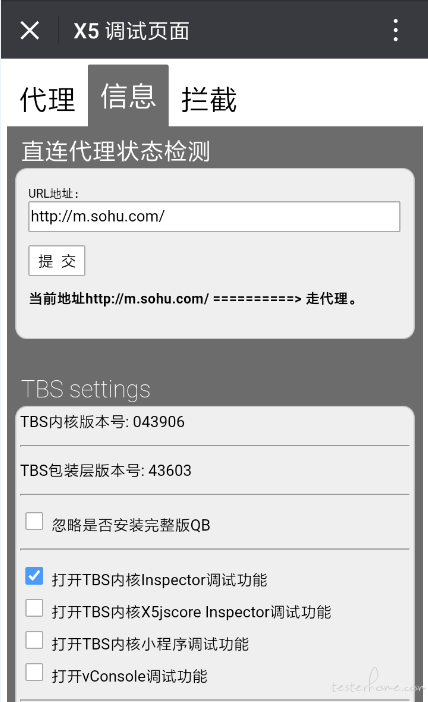
通过微信打开debugx5.qq.com,或者直接扫下面二维码

勾选【打开TBS内核Inspector调试功能】
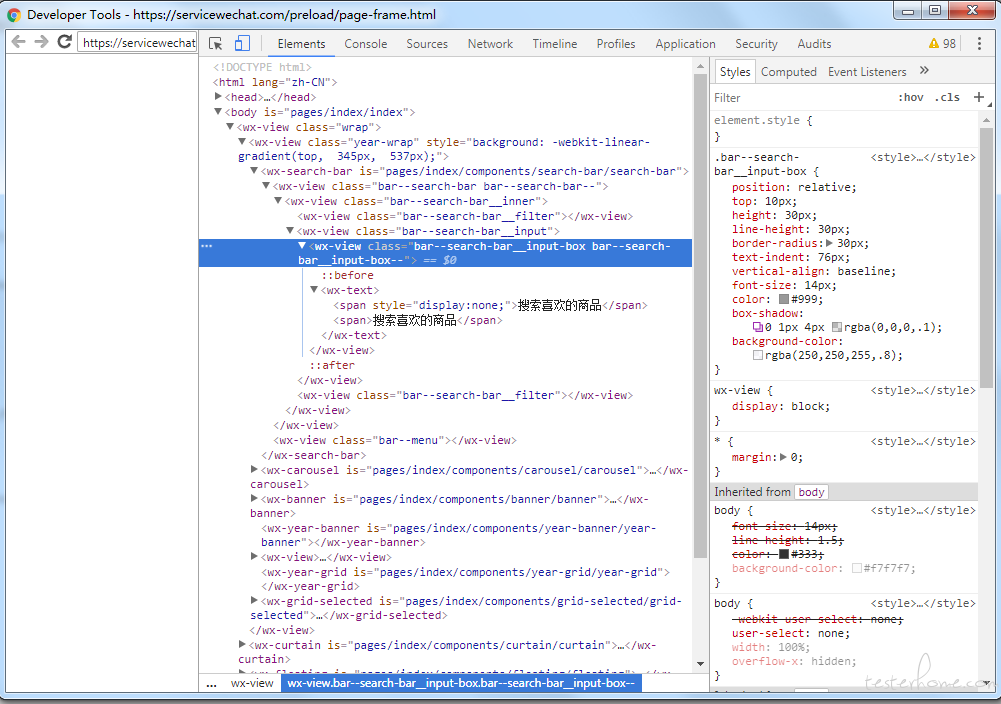
Chrome查看页面元素
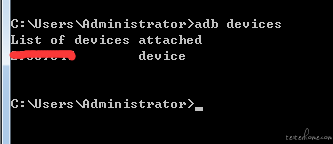
手机连接电脑,查看是否连接成功。如下展示设备号则为连接成功
进入任意小程序,以【X东】为例,在Chrome浏览器访问chrome://inspect/#devices
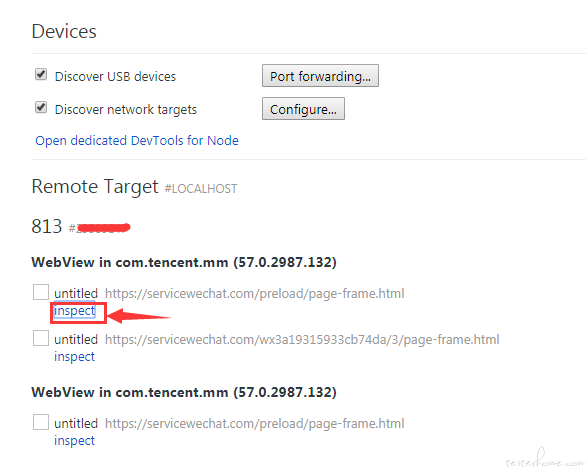
点击inspact,即可查看页面元素
小程序的进程
微信有很多的进程,每一个小程序都运行在不同的进程中。
进入【X东】后,看下当前运行在哪个进程中
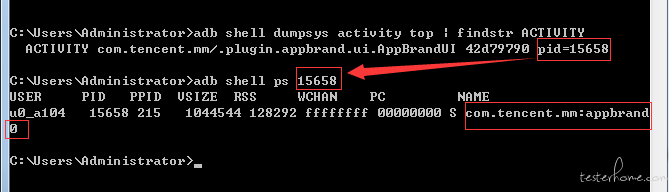
我们可以看到,当前的小程序运行在com.tencent.mm:appbrand0中,记住这个进程,记住啦
Appium编写测试用例
最关键的一点,需要添加androidProcess这一项,也就是我们上面的com.tencent.mm:appbrand0
我用python写一个简单的demo
desired_caps = {
            'platformName': 'Android',
            'fastReset': 'false',
            'deviceName': 'XXXXXX',
            'appPackage': 'com.tencent.mm',
            'appActivity': '.ui.LauncherUI',
            'fullReset': 'false',
            'unicodeKeyboard': 'True',
            'resetKeyboard': 'True',
            'chromeOptions': {
                'androidProcess': 'com.tencent.mm:appbrand0'
                }
            }
driver = webdriver.Remote('http://localhost:4723/wd/hub', desired_caps)
driver.find_element_by_name("发现").click()
driver.find_element_by_name("小程序").click()
driver.find_element_by_name("X东购物").click()
driver.switch_to.context('WEBVIEW_com.tencent.mm:appbrand0')
time.sleep(5)
print(driver.page_source)
切换Webview失败
我遇到过一种切换Webview失败的情况,下面贴上appium的报错日志。
> info: Chromedriver: Changed state to 'stopped'
> error: Chromedriver: Chromedriver exited unexpectedly with code null, signal SIGTERM
> warn: Chromedriver for context WEBVIEW_com.tencent.mm:appbrand1 stopped unexpectedly
> warn: Chromedriver quit unexpectedly, but it wasn't the active context, ignoring
> error: Chromedriver: Error: A new session could not be created. (Original error: session not created exception
> from unknown error: Runtime.executionContextCreated has invalid 'context': {"auxData":{"frameId":"32496.2","isDefault":true},"id":2,"name":"","origin":"https://servicewechat.com"}
>   (Session info: chrome=57.0.2987.132)
>   (Driver info: chromedriver=2.18.343845 (73dd713ba7fbfb73cbb514e62641d8c96a94682a),platform=Windows NT 6.1 SP1 x86_64))
>     at JWProxy.command$ (lib/proxy.js:133:15)
>     at tryCatch (D:\Appium\node_modules\appium\node_modules\appium-chromedriver\node_modules\appium-jsonwp-proxy\node_modules\babel-runtime\regenerator\runtime.js:67:40)
>     at GeneratorFunctionPrototype.invoke [as _invoke] (D:\Appium\node_modules\appium\node_modules\appium-chromedriver\node_modules\appium-jsonwp-proxy\node_modules\babel-runtime\regenerator\runtime.js:315:22)
>     at GeneratorFunctionPrototype.prototype.(anonymous function) [as next] (D:\Appium\node_modules\appium\node_modules\appium-chromedriver\node_modules\appium-jsonwp-proxy\node_modules\babel-runtime\regenerator\runtime.js:100:21)
>     at GeneratorFunctionPrototype.invoke (D:\Appium\node_modules\appium\node_modules\appium-chromedriver\node_modules\appium-jsonwp-proxy\node_modules\babel-runtime\regenerator\runtime.js:136:37)
>     at bound (domain.js:284:14)
>     at GeneratorFunctionPrototype.runBound (domain.js:297:12)
>     at run (D:\Appium\node_modules\appium\node_modules\appium-chromedriver\node_modules\appium-jsonwp-proxy\node_modules\babel-runtime\node_modules\core-js\library\modules\es6.promise.js:89:39)
>     at D:\Appium\node_modules\appium\node_modules\appium-chromedriver\node_modules\appium-jsonwp-proxy\node_modules\babel-runtime\node_modules\core-js\library\modules\es6.promise.js:100:28
>     at flush (D:\Appium\node_modules\appium\node_modules\appium-chromedriver\node_modules\appium-jsonwp-proxy\node_modules\babel-runtime\node_modules\core-js\library\modules\$.microtask.js:17:13)
>     at process._tickDomainCallback (node.js:381:11)
>  { [Error: A new session could not be created. (Original error: session not created exception
> from unknown error: Runtime.executionContextCreated has invalid 'context': {"auxData":{"frameId":"32496.2","isDefault":true},"id":2,"name":"","origin":"https://servicewechat.com"}
>   (Session info: chrome=57.0.2987.132)
>   (Driver info: chromedriver=2.18.343845 (73dd713ba7fbfb73cbb514e62641d8c96a94682a),platform=Windows NT 6.1 SP1 x86_64))]
>   status: 33,
>   value: { message: 'session not created exception\nfrom unknown error: Runtime.executionContextCreated has invalid \'context\': {"auxData":{"frameId":"32496.2","isDefault":true},"id":2,"name":"","origin":"https://servicewechat.com"}\n  (Session info: chrome=57.0.2987.132)\n  (Driver info: chromedriver=2.18.343845 (73dd713ba7fbfb73cbb514e62641d8c96a94682a),platform=Windows NT 6.1 SP1 x86_64)' },
注意最后那一段的chrome和chromedriver的版本

查看对应表可知,两者版本不对应,需要替换chromedriver
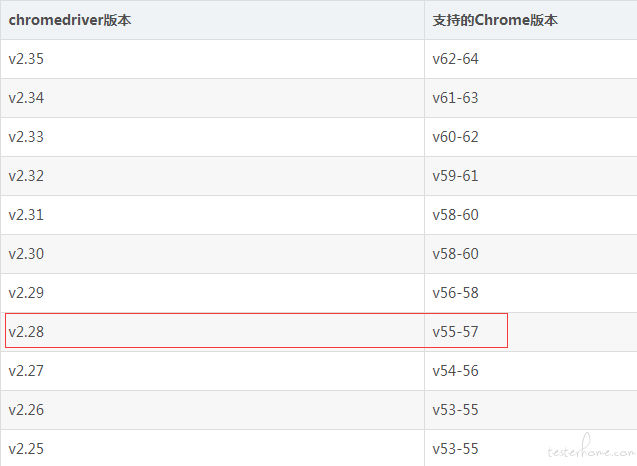
将Appium的chromedriver替换为相应版本后,即可成功切换。
Appium 测试微信小程序 Webview的更多相关文章
- 使用 Appium 测试微信小程序 Webview
打开调试功能 通过微信打开debugx5.qq.com,或者直接扫下面二维码 勾选[打开TBS内核Inspector调试功能] Chrome查看页面元素 手机连接电脑,查看是否连接成功.如下展 ...
- 使用Appium 测试微信小程序和微信公众号方法
由于腾讯系QQ.微信等都是基于腾讯自研X5内核,不是google原生webview,需要打开TBS内核Inspector调试功能才能用Chrome浏览器查看页面元素,并实现Appium自动化测试微信小 ...
- Appium之测试微信小程序
坚持原创输出,点击蓝字关注我吧 作者:清菡 博客:Oschina.云+社区.知乎等各大平台都有. 目录 一.往期回顾 二.测试微信小程序 1.准备工作 2.操作步骤 3.注意 4.强制设置安卓的进程 ...
- appium+python 微信小程序的自动化
sudo kill -9 $(lsof -i:8889 -t) mitmweb -p 8889 -s addons.py mitmdump -q -p 8889 -s addons.py http: ...
- 微信小程序web-view实例
微信小程序web-view实例 index.js //index.js //获取应用实例 const app = getApp() Page({ /** * 页面的初始数据 */ data: { }, ...
- 微信小程序web-view之wx.miniProgram.redirectTo
17年微信小程序官方提供了web-view组件. 官方描述:web-view组件是一个可以用来承载网页的容器,会自动铺满整个小程序页面.个人类型与海外类型的小程序暂不支持使用. 这段时间研究了一下小程 ...
- 微信小程序web-view的简单思考和实践
微信小程序的组件web-view推出有一段时间了,这个组件的推出可以说是微信小程序开发的一个重要事件,让微信小程序不会只束缚在微信圈子里了,打开了一个口子,这个口子或许还比较小,但未来有无限可能. 简 ...
- 微信小程序 web-view 的 url 带参问题
在微信小程序开发过程中,会需要跳转到外部链接,微信提供了 <web-view>组件供我们使用. 为减少重复代码,一般会将这个功能单独抽取为一个页面供大家使用: <template&g ...
- 微信小程序web-view(webview) 嵌套H5页面 唤起微信支付的实现方案
场景:小程序页面有一个web-view组件,组件嵌套的H5页面,要唤起微信支付. 先讲一下我的项目,首先我是自己开发的一个H5触屏版的商城系统,里面含有购物车,订单支付等功能.然后刚开始,我们公众号里 ...
随机推荐
- Mac OSX下安装dlib (Python)
1.在安装Dlib库之前需要安装的库:opencv,numpy 2.安装Xquartz2.7.11 Xquartz是执行Unix程序的图形窗口环境,为了兼容Unix和Linux下移植过来的程序就需要安 ...
- Flexbox(弹性盒模型)完全指南
Flexbox(弹性盒模型)布局完全指南 Github:sueRimn 来源:A guide to Flexbox 这个指南讲诉了flexbox的所有内容,重点介绍了父元素(flex容器)和子元素(f ...
- Number和toString中的坑
在之前的一篇文章 JavaScript中的大数相加 中,在做大数相加时, 突然想到 数字.toString方法 会报错,但是作为函数参数传进来,直接调用 toString 方法却不会报错 上网搜了看看 ...
- va_start
#include <stdarg.h> void va_start(va_list ap, last); type va_arg(va_list ap, type); void va_en ...
- jstl标签库需要两个包jstl.jar和standard.jar
要使用jstl的标签库,将文件复制到WEB-INF/lib目录下,需要在jsp源文件的首部加入如下声明语句(一般放在page语句之后) 核心(core) <%@ taglib uri=&qu ...
- 解决input框自动填充为黄色的问题
题原因:input 框会自动填充一个颜色 如图所示 解决方法 :通过动画去延迟背景颜色的显示 代码如下 input:-webkit-autofill, textarea:-webkit-auto ...
- (二叉树 BFS) leetcode993. Cousins in Binary Tree
In a binary tree, the root node is at depth 0, and children of each depth knode are at depth k+1. Tw ...
- windows环境下安装composer,然后使用composer安装Laravel
Composer 不是一个包管理器,它仅仅是一个依赖管理工具,它允许你申明项目所依赖的代码库,并在你的项目中安装这些代码库.它涉及 “packages” 和 “libraries”,但它在每个项目的基 ...
- Android studio Error: Modules no specified解决和真机调试
如何配置SDK百度一大堆: 前言:Android Studio很完善,如果SDK配置好,理论上就是 创建项目->创建个APP(名字自己随便起)->打开手机开发者模式运行即可:如果出了问题, ...
- CSS3总结一:border(边框)
Border-CSS1的属性 Border-CSS1:border Border-CSS1:border-style Border-CSS1:border-width Border-CSS1:bord ...