
Moving Average
移动平均算法Demo
#!/usr/bin/python2.7

# Fetch data from BD and analyse.

import json

import urllib

import traceback

import numpy as np

# import pandas as pd

import matplotlib.pyplot as plt

#from scipy import stats

def fetch_raw_data(url):

    try:

        response = urllib.urlopen(url).read().decode('utf-8')

        return json.loads(response)

    except Exception, e:

        err = traceback.format_exc()

        print("fetch_raw_data err: {}".format(err))

# 移动平均算法

def moving_average(f_t):

    if type(f_t) is not np.ndarray:

        raise TypeError\

            ('Expected one dimensional numpy array.')

    if f_t.shape[1] != 1:

        raise IndexError\

            ('Expected one dimensional numpy array, %d dimensions given.' % (f_t.shape[1]))

    f_t = f_t.flatten()

    window = 5

    mode = 'same'

    g_t = np.ones(int(window))/float(window)

    # Deal with boundaries with atleast lag/2 day window

    # ma = np.convolve(f_t,g_t,mode)

    # ma = np.convolve(f_t,g_t,mode)[window-1:-window+1]

    ma = np.convolve(f_t,g_t)[window-1:-window+1]

    return ma

def raw_data():

    start_ts = 1533204000

    stop_ts = 1533222000

    url = 'http://8.8.8.8/path/data?begin_time={}&end_time={}&type=asia'

    url = url.format(start_ts,stop_ts)

    result = fetch_raw_data(url)

    # downloadspeed_lst = result['result']['downloadspeed']

    downloadspeed_lst = result['result']['totaluploadspeed']

    downloadspeed_lst = [ [ele,] for ele in downloadspeed_lst ]

    return downloadspeed_lst

def run(downloadspeed_lst):

    downloadspeed_ndarray = np.array(downloadspeed_lst)

    ma = moving_average(downloadspeed_ndarray)

    return ma

data = raw_data()

ma = run(data)

t = np.arange(4, len(data))

plt.plot(t, data[4:], lw=1.0)

plt.plot(t, ma, lw=1.0)

plt.show()
执行结果:
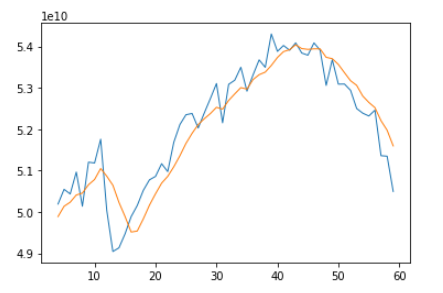
蓝色是原始数据,棕色是经过移动平均算法弱化后的数据。
2018-08-07 补充
import numpy as np

from matplotlib import pyplot as plt

def moving_average(array, window=3):

    N = window

    n=np.ones(N)

    weights=n/N

    sma=np.convolve(weights,array)[N-1:-N+1]

    t=np.arange(N-1,len(array))

    plt.plot(t,array[N-1:],lw=1)

    plt.plot(t,sma,lw=2)

    plt.show()

    return sma
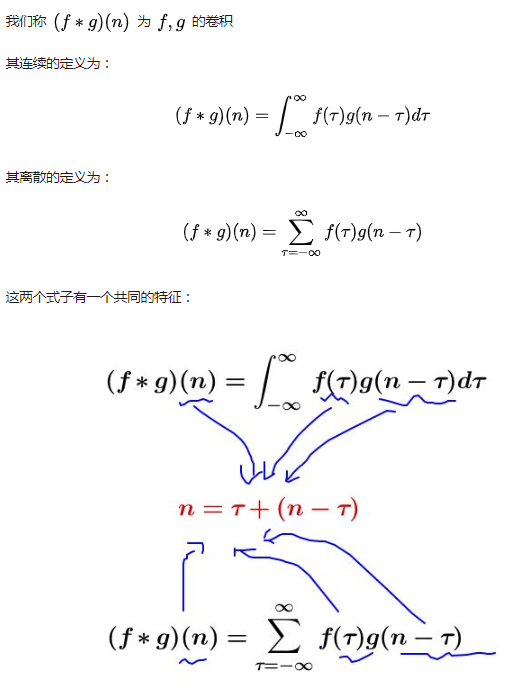
卷积运算
numpy.convolve(weights,array)[N-1:-N+1]

weight = [a,b,c]

array = [i,j,k,m,n]

Result:

[ai, bi+aj, ci+bj+ak, cj+bk+am, ck+bm+an, cm+bn, cn][N-1:-N+1]
参考:https://www.cnblogs.com/21207-iHome/p/6231607.html
参考:https://docs.scipy.org/doc/numpy/reference/generated/numpy.convolve.html
Moving Average的更多相关文章
- [LeetCode] Moving Average from Data Stream 从数据流中移动平均值
Given a stream of integers and a window size, calculate the moving average of all integers in the sl ...
- Moving Average from Data Stream
Given a stream of integers and a window size, calculate the moving average of all integers in the sl ...
- LeetCode Moving Average from Data Stream
原题链接在这里:https://leetcode.com/problems/moving-average-from-data-stream/ 题目: Given a stream of integer ...
- EMA计算的C#实现(c# Exponential Moving Average (EMA) indicator )
原来国外有个源码(TechnicalAnalysisEngine src 1.25)内部对EMA的计算是: var copyInputValues = input.ToList(); for (int ...
- LeetCode 346. Moving Average from Data Stream (数据流动中的移动平均值)$
Given a stream of integers and a window size, calculate the moving average of all integers in the sl ...
- 理解滑动平均(exponential moving average)
1. 用滑动平均估计局部均值 滑动平均(exponential moving average),或者叫做指数加权平均(exponentially weighted moving average),可以 ...
- [Swift]LeetCode346. 从数据流中移动平均值 $ Moving Average from Data Stream
Given a stream of integers and a window size, calculate the moving average of all integers in the sl ...
- tensorflow中moving average的用法
一般在保存模型参数的时候,都会保存一份moving average,是取了不同迭代次数模型的移动平均,移动平均后的模型往往在性能上会比最后一次迭代保存的模型要好一些. tensorflow-model ...
- Moving Average from Data Stream LT346
Given a stream of integers and a window size, calculate the moving average of all integers in the sl ...
- [leetcode]346. Moving Average from Data Stream滑动窗口平均值
Given a stream of integers and a window size, calculate the moving average of all integers in the sl ...
随机推荐
- 英语口语练习系列-C22-吃东西
基础词汇 1. bill [bɪl] n. 账单:钞票:法案:鸟嘴 Bill (人名)比尔 pay the bill 付账单 telephone bill 话费单 electricity bill 电 ...
- Redis学习笔记(1)——Redis简介
一.Redis是什么? Remote Dictionary Server(Redis) 是一个开源的使用ANSI C语言编写.遵守BSD协议.支持网络.可基于内存亦可持久化的日志型.Key-Value ...
- Hive:ORC File Format存储格式详解
一.定义 ORC File,它的全名是Optimized Row Columnar (ORC) file,其实就是对RCFile做了一些优化. 据官方文档介绍,这种文件格式可以提供一种高效的方法来存储 ...
- 如何给python程序加密
在实际的工作中,有时候我们需要部署自己的Python应用,但这时候我们并不希望别人能够看到自己的Python源程序.因此,我们需要为自己的源代码进行加密,Python已经为我们提供了这样一套工作机制. ...
- android glide图片加载框架
项目地址: https://github.com/bumptech/glide Glide作为安卓开发常用的图片加载库,有许多实用而且强大的功能,那么,今天就来总结一番,这次把比较常见的都写出来,但并 ...
- 授权普通非DBA用户可以有权限查看执行计划的方法
drop table PLAN_TABLE; 删除原plan表 执行ORACLE自带的创建脚本 @?/rdbms/admin/utlxplan.sql 创建同义词 create or re ...
- 监控glusterfs
监控集群状态 [4ajr@elk1 scripts]$ cat glusterfs_peer_status.sh #!/bin/bash peer_status=`sudo gluster peer ...
- UNICODE与ASCII
1.ASCII的特点 ASCII 是用来表示英文字符的一种编码规范.每个ASCII字符占用1 个字节,因此,ASCII 编码可以表示的最大字符数是255(00H—FFH).这对于英文而言,是没有问题的 ...
- 在OSGI容器Equinox中嵌入HttpServer
原文地址:https://liugang594.iteye.com/blog/1328050 简单介绍一下如何在一个osgi的bundle中内嵌使用http服务 一.基础 首先看看在OSGI中怎么启动 ...
- python 通过 http、dns、icmp判断网络状态
#http使用requests发包bs4解析,dns.icmp 使用scapy发包import time import threading import requests,bs4 from scapy ...