
SpringMVC集成rabbitmq:优化秒杀下单环节
前言
上一篇在springboot中基于自动配置集成了rabbitmq。那么回到最初的话题中就是想在秒杀下单环节增加排队机制,从而达到限流的目的。
优化秒杀下单流程
之前是在控制器里拿到客户端请求后直接入库、减库存。如果碰到羊毛党其实这套机制是不行的。并发量高的时候,库存数量也会不准确。那么引入rabbitmq则在下单时让用户信息产生一条消息入队。然后消费者处理下单(是否重复下单、下单失败、库存不够)。客户端接受到请求已入队列(response引入state处理交互)后发起ajax轮询请求,处理成功则跳转下单成功页或者结束本次交互。
1、下单(秒杀接口)
@RequestMapping(value="/{seckillId}/{md5}/execute",method = RequestMethod.POST,produces = {"application/json;charset=UTF-8"})

    @ResponseBody

    public SeckillResult<SeckillExecution> execute(@PathVariable("seckillId")Long seckillId,

                                                   @PathVariable("md5")String md5,

                                                   @CookieValue(value="phone",required=false)Long phone){

        if(phone==null){

            return new SeckillResult<SeckillExecution>(false,"手机号未注册");

        }

        SeckillResult<SeckillExecution> result=null;

        try{

            SeckillExecution execution=seckillService.executeSeckill(seckillId,phone,md5);

            result=new SeckillResult<SeckillExecution>(true,execution);

        }catch(RepeatKillException e){

            SeckillExecution execution=new SeckillExecution(seckillId,-1,"重复秒杀");

            result=new SeckillResult<SeckillExecution>(true,execution);

        }catch(SeckillCloseException e){

            SeckillExecution execution=new SeckillExecution(seckillId,0,"秒杀结束");

            result=new SeckillResult<SeckillExecution>(true,execution);

        }catch (Exception e){

            SeckillExecution execution=new SeckillExecution(seckillId,-2,"系统异常");

            result=new SeckillResult<SeckillExecution>(true,execution);

        }

        return result;

    }
2、下单业务方法(Service) 这里就要引入排队
 @Override

    public SeckillExecution executeSeckill(long seckillId, long phone, String md5)

            throws SeckillException,RepeatKillException,SeckillCloseException {

        if (md5 == null || !md5.equals(getMd5(seckillId))) {

            throw new SeckillException("非法请求");

        }

        Date now = new Date();

        try {

            int insertCount = successKillDao.insertSuccessKilled(seckillId, phone);

            if (insertCount <= 0) {

                throw new RepeatKillException("重复秒杀");

            } else {

                //请求入队

                MiaoshaUser miaoshaUser=new MiaoshaUser();

                miaoshaUser.setPhone(phone);

                MiaoshaMessage miaoshaMessage=new MiaoshaMessage();

                miaoshaMessage.setSeckillId(seckillId);

                miaoshaMessage.setMiaoshaUser(miaoshaUser);

                String miaosha=JSON.toJSONString(miaoshaMessage);

                amqpTemplate.convertAndSend(miaosha);

                return new SeckillExecution(seckillId,0,"请求入队");

                /***

                 * 直接入库操作

                int updateCount = seckillDao.reduceNumber(seckillId, now);

                if (updateCount <= 0) {

                    throw new SeckillCloseException("秒杀已关闭");

                } else {

                    //秒杀成功,可以把秒杀详情和商品详情实体返回

                    SuccessKilled successKilled = successKillDao.queryByIdWithSeckill(seckillId, phone);

                    return new SeckillExecution(seckillId, 1, "秒杀成功", successKilled);

                }

                 ***/

            }

        } catch (SeckillCloseException e) {

            throw e;

        } catch (RepeatKillException e1) {

            throw e1;

        } catch (SeckillException e2) {

            logger.error(e2.getMessage(), e2);

            throw new SeckillException("Unkonwn error:" + e2.getMessage());

        }

    }
3、下单结果接口
@RequestMapping(value="/{seckillId}/{md5}/result",method = RequestMethod.GET,produces = {"application/json;charset=UTF-8"})

    @ResponseBody

    public SeckillResult<SeckillExecution> result(@PathVariable("seckillId")Long seckillId,

                                                  @PathVariable("md5")String md5,

                                                  @CookieValue(value="phone",required=false)Long phone){

        SuccessKilled successKilled = seckillService.queryByIdWithSeckill(seckillId, phone);

        SeckillExecution execution=null;

        if(successKilled.getSeckillId()>0){

            execution=new SeckillExecution(seckillId, 1, "下单成功", successKilled);

        }else{

            execution=new SeckillExecution(seckillId, -2, "下单失败", successKilled);

        }

        return new SeckillResult<SeckillExecution>(true,execution);

    }
4、消费者(下单处理)
/**

 * 秒杀请求消费

 **/

public class AmqpConsumer implements MessageListener {

    @Autowired

    SeckillDao seckillDao;

    @Autowired

    SuccessKillDao successKillDao;

    @Override

    public void onMessage(Message message) {

        Date now = new Date();

        MiaoshaMessage miaosha = JSON.parseObject(message.getBody(), MiaoshaMessage.class);

        Long seckillId = miaosha.getSeckillId();

        int updateCount = seckillDao.reduceNumber(seckillId, now);

        if (updateCount <= 0) {

            System.out.println("秒杀下单失败");

        } else {

            System.out.println("秒杀下单成功");

        }

    }

}
5、springmvc集成消息队列配置文件
<?xml version="1.0" encoding="UTF-8"?>

<beans xmlns="http://www.springframework.org/schema/beans"

       xmlns:xsi="http://www.w3.org/2001/XMLSchema-instance"

       xmlns:rabbit="http://www.springframework.org/schema/rabbit"

       xsi:schemaLocation="http://www.springframework.org/schema/beans

       http://www.springframework.org/schema/beans/spring-beans.xsd

       http://www.springframework.org/schema/rabbit http://www.springframework.org/schema/rabbit/spring-rabbit.xsd">

    <!--spring集成rabbitmq-->

    <rabbit:connection-factory id="connectionFactory"

                               host="192.168.80.128"

                               port="5672"

                               username="admin"

                               password="admin"

                               channel-cache-size="5"

                               virtual-host="/" />

    <rabbit:admin connection-factory="connectionFactory"/>

    <!--声明队列-->

    <rabbit:queue durable="true" auto-delete="false" exclusive="false" name="miaosha.queue"/>

    <!--交换器和队列绑定-->

    <rabbit:direct-exchange name="miaosha.exchange">

        <rabbit:bindings>

            <rabbit:binding queue="miaosha.queue" key="miaosha.tag.key"/>

        </rabbit:bindings>

    </rabbit:direct-exchange>

    <!--spring rabbitmqTemplate声明-->

    <rabbit:template id="rabbitTemplate"

                     exchange="miaosha.exchange"

                     routing-key="miaosha.tag.key"

                     connection-factory="connectionFactory" />

    <!--消息监听-->

    <bean id="miaoshaConsumer" class="com.seckill.mq.AmqpConsumer"/>

    <rabbit:listener-container connection-factory="connectionFactory" acknowledge="auto">

        <rabbit:listener ref="miaoshaConsumer" queues="miaosha.queue"/>

    </rabbit:listener-container>

</beans>
6、客户端秒杀下单、等待下单结果
 /**秒杀结果**/

    miaosha:function(seckillId,md5,node){

        $.get('/seckill/'+seckillId+'/'+md5+'/result',{},function(result){

            if(result && result["success"]){

                var oData=result["data"];

                if(oData["state"]===1){

                    node.html("<span class='label label-success'>下单成功</span>");

                    clearInterval(miaoshaTimer);

                }else{

                    console.log("还在排队种...");

                }

            }

        })

    },

    /**执行秒杀**/

    seckill:function(seckillId,node){

        //获取秒杀地址、控制node节点显示,执行秒杀

        node.hide().html("<button id='killBtn' class='btn btn-primary btn-lg'>开始秒杀</button>")

        $.get('/seckill/'+seckillId+'/exposer',{},function(result){

            if(result && result["success"]){

                //在回调函数中执行秒杀操作

                var exposer=result["data"];

                if(exposer["exposed"]){

                    //秒杀已开始

                    var md5=exposer["md5"];

                    var killUrl='/seckill/'+seckillId+'/'+md5+'/execute';

                    console.log(killUrl);

                    $("#killBtn").one('click',function(){

                        //1、禁用秒杀按钮

                        $(this).addClass('disabled');

                        //2、执行秒杀操作

                        $.post(killUrl,{},function(result){

                            if(result && result["success"]){

                                var killResult=result["data"];

                                var state=killResult["state"];

                                var stateInfo=killResult["stateInfo"];

                                node.html("<span class='label label-success'>"+stateInfo+"</span>");

                                if(state===0){

                                    //已入队,客户端开始轮询

                                    miaoshaTimer=setInterval(function(){

                                       seckill.miaosha(seckillId,md5,node);

                                    },3000);

                                }

                            }

                        })

                    });

                    node.show();

                }else{

                    //秒杀未开始, 防止浏览器和服务器出现时间差,再次执行倒数计时

                    var now = exposer['now'];

                    var start = exposer['start'];

                    var end = exposer['end'];

                    seckill.countdown(seckillId, now, start, end);

                }

            }else{

                console.log('result:'+result); //没有拿到秒杀地址

            }

        })

    }
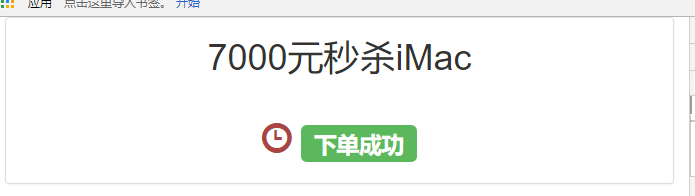
好了,贴了这么多代码,没有示意图怎么能行?


总结
秒杀下单增加排队机制来说对于完整的秒杀系统来说只是其中很少的一部分,这里也只是学习rabbitmq的一个过程。对于秒杀系统来说流量主要是查询多下单少。还需要引入redis,把库存量、商品信息能在秒杀开始前预处理。
参考资料
https://blog.csdn.net/sunweiguo1/article/details/80470792
SpringMVC集成rabbitmq:优化秒杀下单环节的更多相关文章
- 集成RabbitMQ做秒杀
由于秒杀的并发量太大,所以仅仅使用缓存是不够的,还需要用到RabbitMQ. 这里推荐一款用于分库分表的中间件:mycat 解决超卖的问题(看第五章节): 秒杀接口优化: 实操: 然后把下载好的文件上 ...
- SpringMVC集成rabbitMQ
Maven引入相关jar <dependency> <groupId>com.rabbitmq</groupId> <artifactId>amqp-c ...
- SpringBoot集成rabbitmq(一)
前言 Rabbitmq是一个开源的消息代理软件,是AMQP协议的实现.核心作用就是创建消息队列,异步发送和接收消息.通常用来在高并发中处理削峰填谷.延迟处理.解耦系统之间的强耦合.处理秒杀订单. 入 ...
- spring集成rabbitMq(非springboot)
首先 , pom文件需要加入spring集成rabbitMq的依赖: <dependency> <groupId>org.springframework.amqp</gr ...
- rabbitMQ第五篇:Spring集成RabbitMQ
前面几篇讲解了如何使用rabbitMq,这一篇主要讲解spring集成rabbitmq. 首先引入配置文件org.springframework.amqp,如下 <dependency> ...
- EhCache WebCache 与 SpringMVC集成时 CacheManager冲突的问题
转自:点击打开链接 http://www.cnblogs.com/daxin/p/3560989.html EhCache WebCache 与 SpringMVC集成时 CacheManager冲突 ...
- spring+springMVC集成(annotation方式)
spring+springMVC集成(annotation方式) SpringMVC+Spring4.0+Hibernate 简单的整合 MyBatis3整合Spring3.SpringMVC3
- SpringMVC 集成velocity
前言 没有美工的时代自然少不了对应的模板视图开发,jsp时代我们用起来也很爽,物极必反,项目大了,数据模型复杂了jsp则无法胜任. 开发环境 idea2016.jdk1.8.tomcat8.0.35 ...
- RabbitMQ第四篇:Spring集成RabbitMQ
前面几篇讲解了如何使用rabbitMq,这一篇主要讲解spring集成rabbitmq. 首先引入配置文件org.springframework.amqp,如下 <dependency> ...
随机推荐
- QT—QTextEdit控件显示日志
功能:利用QTextEdit开发一个日志显示窗口.没有太多操作,需要实现的是日志自动向上滚动,总体的日志量可以控制在x行(比如300行)以内:其他的应用功能我后面继续添加 #include <Q ...
- Web开发者の实用代码账簿
介里就都是恶魔菌整理的我平时会用的代码啦-现在在这里总结规划一下,希望能对你以及其他阅读这篇文章的小可耐们有帮助喵!欢迎订阅我的博客来get恶魔菌记事簿的新动态鸭! ↓ ↓ ↓ 以下就是内容啦~记得看 ...
- Flutter 获取服务器数据
文档 文档版本有些老 使用 dio 来获取数据 demo import 'dart:io'; import 'dart:convert'; import 'package:flutter/materi ...
- SQA计划和验收测试规程设计
一.SQA(软件质量保证)的定义 软件质量保证(SQA-Software Quality Assurance)是建立一套有计划,有系统的方法,来向管理层保证拟定出的标准.步骤.实践和方法能够正确地被所 ...
- 精选 TOP45 值得学习的Python项目
精选 TOP45 值得学习的Python项目 [导读]热门资源博客 Mybridge AI 比较了 18000 个关于 Python 的项目,并从中精选出 45 个最具竞争力的项目.我们进行了翻译,在 ...
- Web前端-Vue.js必备框架(四)
Web前端-Vue.js必备框架(四) 计算属性: <div id="aaa"> {{ message.split('').reverse().join('') }} ...
- [Swift]LeetCode809. 情感丰富的文字 | Expressive Words
Sometimes people repeat letters to represent extra feeling, such as "hello" -> "he ...
- C语言——Win10系统下安装VC6.0教程
学习一门语言最重要的一步是搭建环境,许多人搭建在搭建环境上撞墙了,就有些放弃的心理了:俗话说,工欲善其事,必先利其器:所以接下来我们进行学习C的第一步搭建环境; 第一步:先解压我们下载好的VC6.0软 ...
- three.js全景漫游实践
Hello 小伙伴们,如果觉得本文还不错,记得给个 star , 小伙伴们的 star 是我持续更新的动力!GitHub 地址 简介 全景图分两种 由六张正方形图片组成的SkyBox 一整张的宽高比为 ...
- Prometheus使用入门
Monitoring with Prometheus读书笔记 原书见: https://www.safaribooksonline.com/library/view/monitoring-with-p ...