
springboot+cloud 学习(五)统一配置中心 spring cloud config + cloud bus + WebHooks +RibbitMQ
前言
微服务要实现集中管理微服务配置、不同环境不同配置、运行期间也可动态调整、配置修改后可以自动更新的需求,Spring Cloud Config同时满足了以上要求。Spring Cloud Config 分为Config Server和Config Client两部分,是一个可以横向扩展,集中式的配置服务器。spring boot config支持三种存储方式:本地资源、SVN、GIT。
这里只介绍GIT的方式。
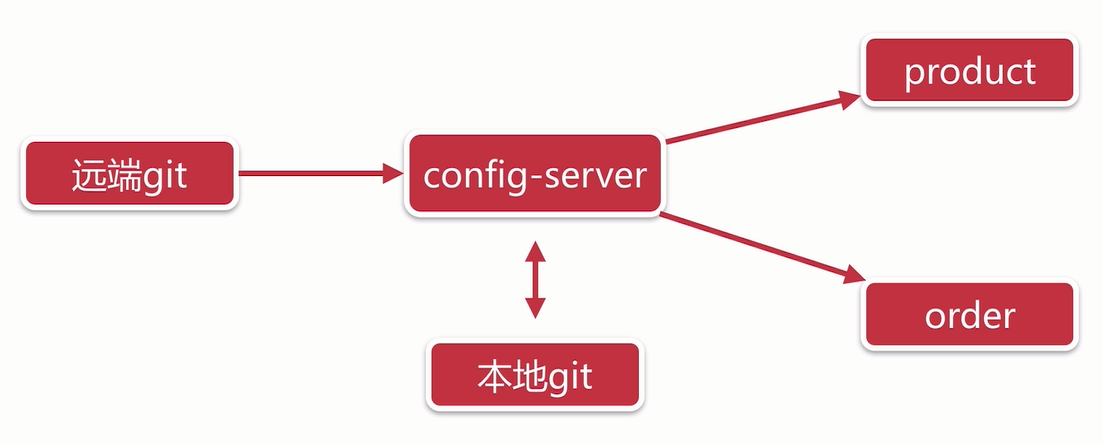
Spring Cloud Config 原理图如图所示:
一、新建一个maven项目:config-server
pom.xml如下:
<project xmlns="http://maven.apache.org/POM/4.0.0"

    xmlns:xsi="http://www.w3.org/2001/XMLSchema-instance"

    xsi:schemaLocation="http://maven.apache.org/POM/4.0.0 http://maven.apache.org/xsd/maven-4.0.0.xsd">

    <modelVersion>4.0.</modelVersion>

    <groupId>com.skyworth.tvmanage</groupId>

    <artifactId>config-server</artifactId>

    <version>0.0.-SNAPSHOT</version>

    <!-- 必须要引入 springboot parent ,帮我们实现了很多jar包的依赖管理 -->

    <parent>

        <groupId>org.springframework.boot</groupId>

        <artifactId>spring-boot-starter-parent</artifactId>

        <version>2.0..RELEASE</version>

        <relativePath /> <!-- lookup parent from repository -->

    </parent>

    <dependencyManagement>

        <dependencies>

            <!-- https://mvnrepository.com/artifact/org.springframework.cloud/spring-cloud-dependencies -->

            <dependency>

                <groupId>org.springframework.cloud</groupId>

                <artifactId>spring-cloud-dependencies</artifactId>

                <version>Finchley.RELEASE</version>

                <type>pom</type>

                <scope>import</scope>

            </dependency>

        </dependencies>

    </dependencyManagement>

    <!-- 版本集中配置 -->

    <properties>

        <project.build.sourceEncoding>UTF-</project.build.sourceEncoding>

        <project.reporting.outputEncoding>UTF-</project.reporting.outputEncoding>

    </properties>

    <dependencies>

        <!-- springboot 自动集成了mvc,直接引用web组件即可 -->

        <dependency>

            <groupId>org.springframework.boot</groupId>

            <artifactId>spring-boot-starter-web</artifactId>

        </dependency>

        <dependency>

            <groupId>org.springframework.boot</groupId>

            <artifactId>spring-boot-starter-test</artifactId>

            <scope>test</scope>

        </dependency>

        <!-- eureka client -->

        <dependency>

            <groupId>org.springframework.cloud</groupId>

            <artifactId>spring-cloud-starter-netflix-eureka-client</artifactId>

        </dependency>

        <!-- config server -->

        <dependency>

            <groupId>org.springframework.cloud</groupId>

            <artifactId>spring-cloud-config-server</artifactId>

        </dependency>

        <!-- bus ribbitmq-->

        <dependency>

            <groupId>org.springframework.cloud</groupId>

            <artifactId>spring-cloud-starter-bus-amqp</artifactId>

        </dependency>

        <dependency>

            <groupId>org.springframework.cloud</groupId>

            <artifactId>spring-cloud-config-monitor</artifactId>

        </dependency>

    </dependencies>

</project>
application.yml :
server:

  port:

spring:

  application:

    name: config-server

  cloud:

    config:

      server:

        git:

          #服务的git仓库地址

          uri: https://gitee.com/willpan_z/tvmanage

          #用户名和密码

          username: ****

          password: ****

          #本地git配置路径

          basedir: F:\eclipse-workspace\config

      #分支

      label: tvmanage-config

eureka:

  instance:

    hostname: config-server

    prefer-ip-address: true

  client:

    serviceUrl:

      defaultZone: http://skyworth:skyworth1@eureka-server:8761/eureka/,http://skyworth:skyworth2@eureka-server2:8762/eureka/,http://skyworth:skyworth3@eureka-server3:8763/eureka/

#暴露bus-refresh接口用于更新git上的配置

management:

  endpoints:

    web:

      exposure:

        include: bus-refresh
include: bus-refresh 表示暴露 endpoints 的 /actuator/bus-refresh接口 出去,默认是“health”,“info”

在启动类Application上开启配置中心的注解:@EnableConfigServer:
@SpringBootApplication

@EnableDiscoveryClient

@EnableConfigServer

public class Application {

    public static void main(String[] args) {

        SpringApplication.run(Application.class, args);

    }

}
启动服务,先模拟测试一下,在git上直接新建一个common.yml,输入http://localhost:8888/tvmanage-config/common-a.yml,
访问成功(注:tvmanage-config为码云上分支的名称,如果没有放在分支下,去掉即可)
配置服务中心可以从远程程序获取配置信息,http请求地址和资源文件映射如下:,可参考
· /{application}/{profile}[/{label}]
· /{application}-{profile}.yml
· /{label}/{application}-{profile}.yml
· /{application}-{profile}.properties
· /{label}/{application}-{profile}.properties
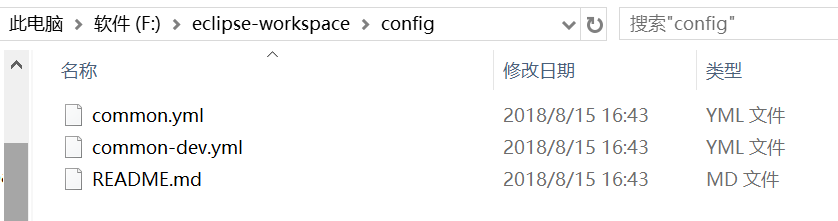
另外从config-server的控制台可以看出,当yml文件从远端git下载后,会在本地也备份一份,当然这个本地路径是可以配置的,
配置命令:spring.cloud.config.server.git.basedir: F:\eclipse-workspace\config

config client 端配置
pom.xml依赖:
<!-- eureka -->

        <dependency>

            <groupId>org.springframework.cloud</groupId>

            <artifactId>spring-cloud-starter-netflix-eureka-client</artifactId>

        </dependency>

        <!-- config -->

        <dependency>

            <groupId>org.springframework.cloud</groupId>

            <artifactId>spring-cloud-config-client</artifactId>

        </dependency>

        <!-- bus ribbitmq-->

        <dependency>

            <groupId>org.springframework.cloud</groupId>

            <artifactId>spring-cloud-starter-bus-amqp</artifactId>

        </dependency>

        <!-- actuator -->

        <dependency>

            <groupId>org.springframework.boot</groupId>

            <artifactId>spring-boot-starter-actuator</artifactId>

        </dependency>

    </dependencies>
在resources目录下新建文件bootstrap.yml(这里有个坑是,eureka的注册不能写在远端,因为要先在eureka注册后,才能通过eureka服务去找远端yml)内容:
#前缀路径

#server:

#  servlet:

#    context-path: /tvmanage # 访问地址:http://localhost:8090/tvmanage/

server:

  port:

spring:

  application:

    name: management-equip

  cloud:

    config:

      discovery:

        enabled: true

        service-id: CONFIG-SERVER

      #对应的配置服务中的应用名称

      name: common

      #对应config server中配置文件的{label 分支}

      label: tvmanage-config

      #对应config server中配置文件的{profile 环境}

      profile: dev

#服务注册

eureka:

  instance:

    hostname: equip

    prefer-ip-address: true

  client:

    serviceUrl:

      defaultZone: http://skyworth:skyworth1@eureka-server:8761/eureka/,http://skyworth:skyworth2@eureka-server2:8762/eureka/,http://skyworth:skyworth3@eureka-server3:8763/eureka/
启动类没有特别需要加的东西。
测试
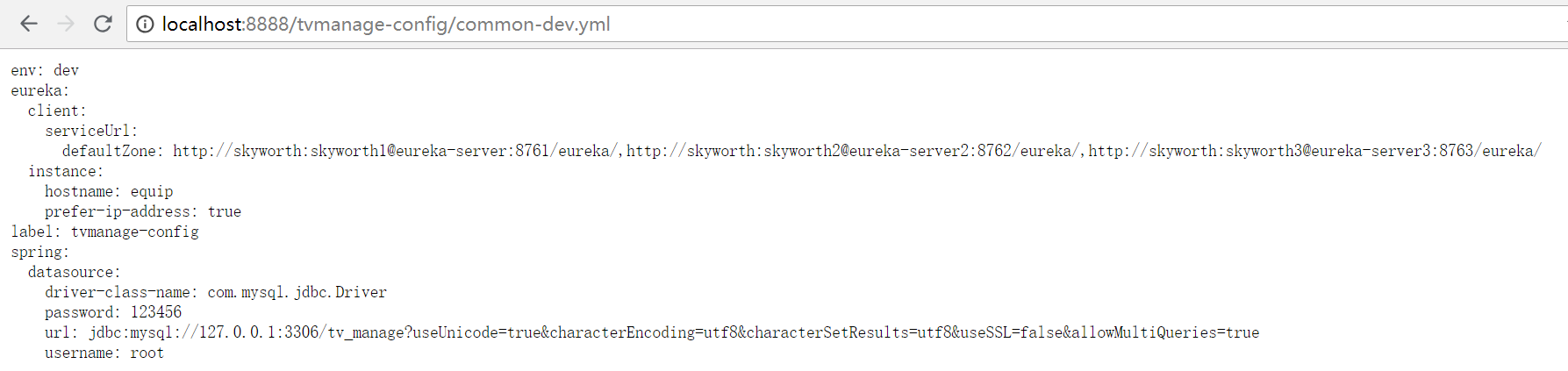
依次启动eureka-server,config-server,equip-server,打开浏览器访问:http://localhost:8888/tvmanage-config/common-dev.yml,返回内容:
配置中心的自动刷新(spring cloud bus + RibbitMQ + WebHooks)
先说说更新原理:

GIT上的webhook更新调用config server的/monitor(spring-cloud-config-monitor)触发RefreshRemoteApplicationEvent事件,
然后spring cloud bus的StreamListener监听RemoteApplicationEvent,通过mq发布到每个config client,
然后client接收RemoteApplicationEvent事件来实现refresh。
注:这里简单说一下spring cloud bus 和spring cloud stream ,2者都是用来消息代理的,bus主要利用广播机制实现自动刷新配置,stream主要用于服务间的消息调用。
其实,bus也是基于stream的,它使用了一部分stream的功能。
spring cloud bus实现自动刷新配置的方式有2种:
1. 第一种,bus 的refresh操作发生在client端,然后client端通知消息总线bus这个更新信息,bus再通知其他client端更新
2. 第二种,bus的refresh操作发生在config server端,config server通知bus,再通知其他client端去更新
这里我们使用第二种方式,原理图如下:

这里的远端GIT使用的是Gitee(码云),其 WebHooks 配置方法(本地测试的话,还需要一个内网穿透,这里使用的是natapp,就不多说了):
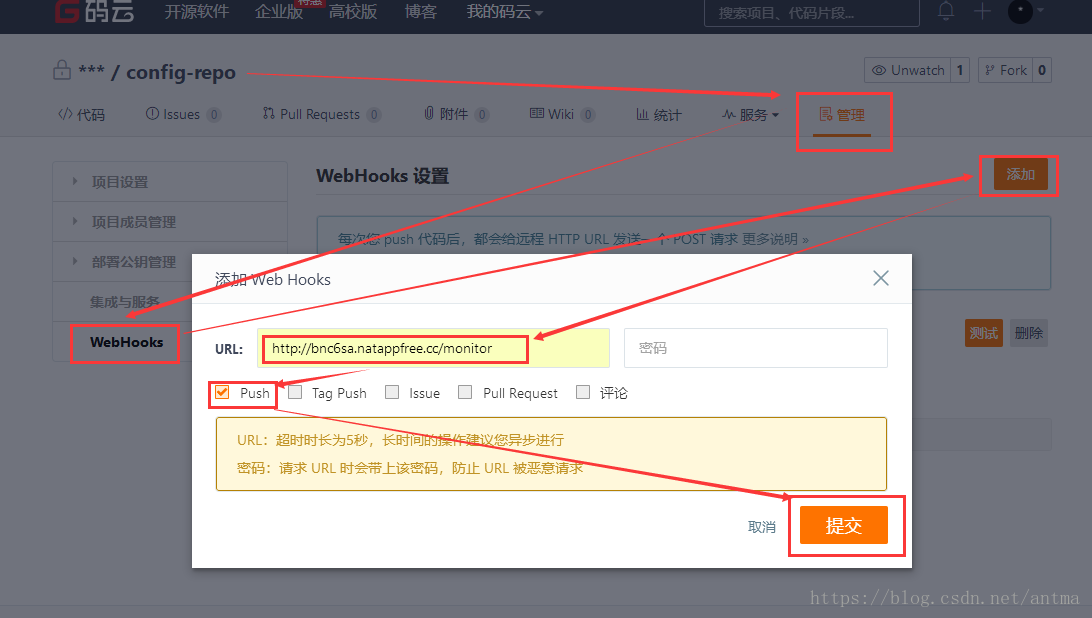

这里设置好了,启动相关服务(eureka server,config server),点击测试一下。
当启动好config server后,我们打开RibbitMQ:http://localhost:15672 可以看到cloud bus 自动生成了一个队列,点击测试后会有一个消息过来。
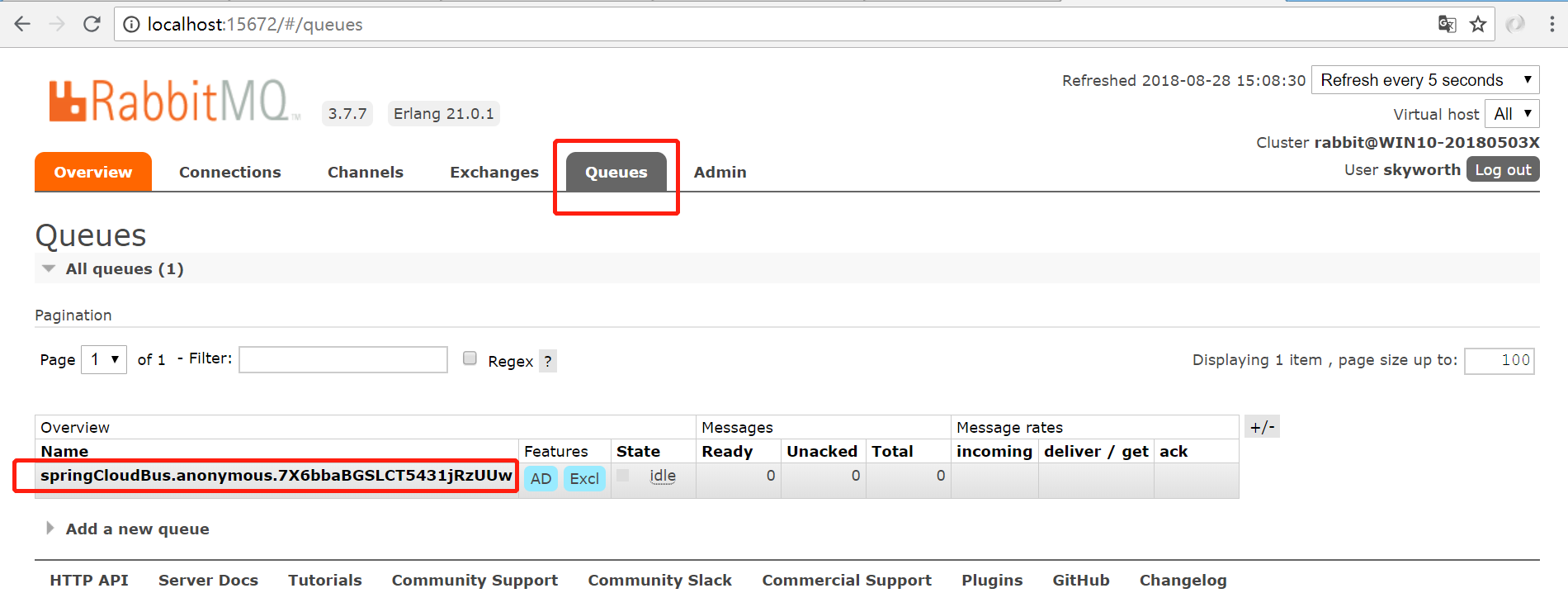
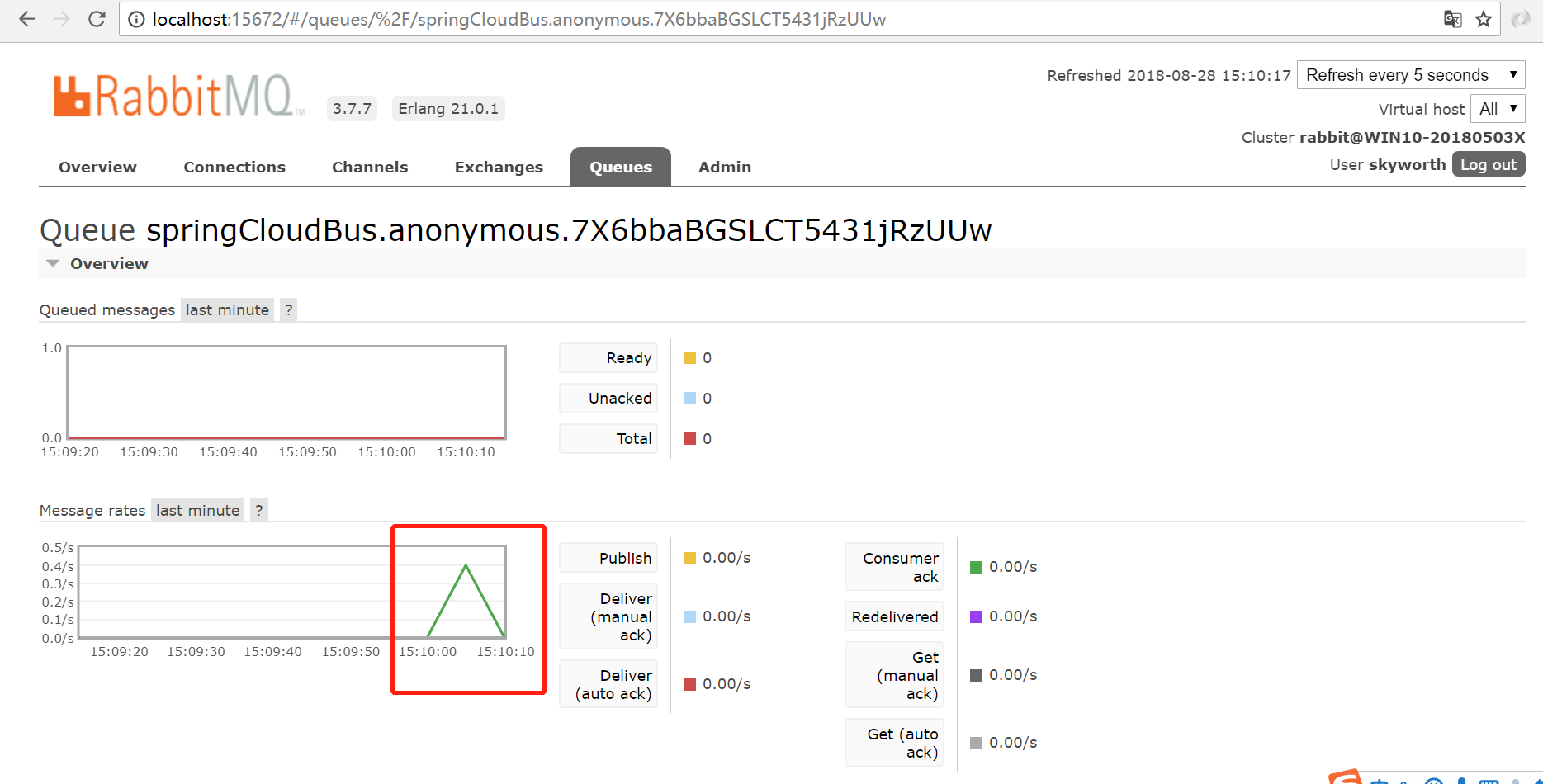
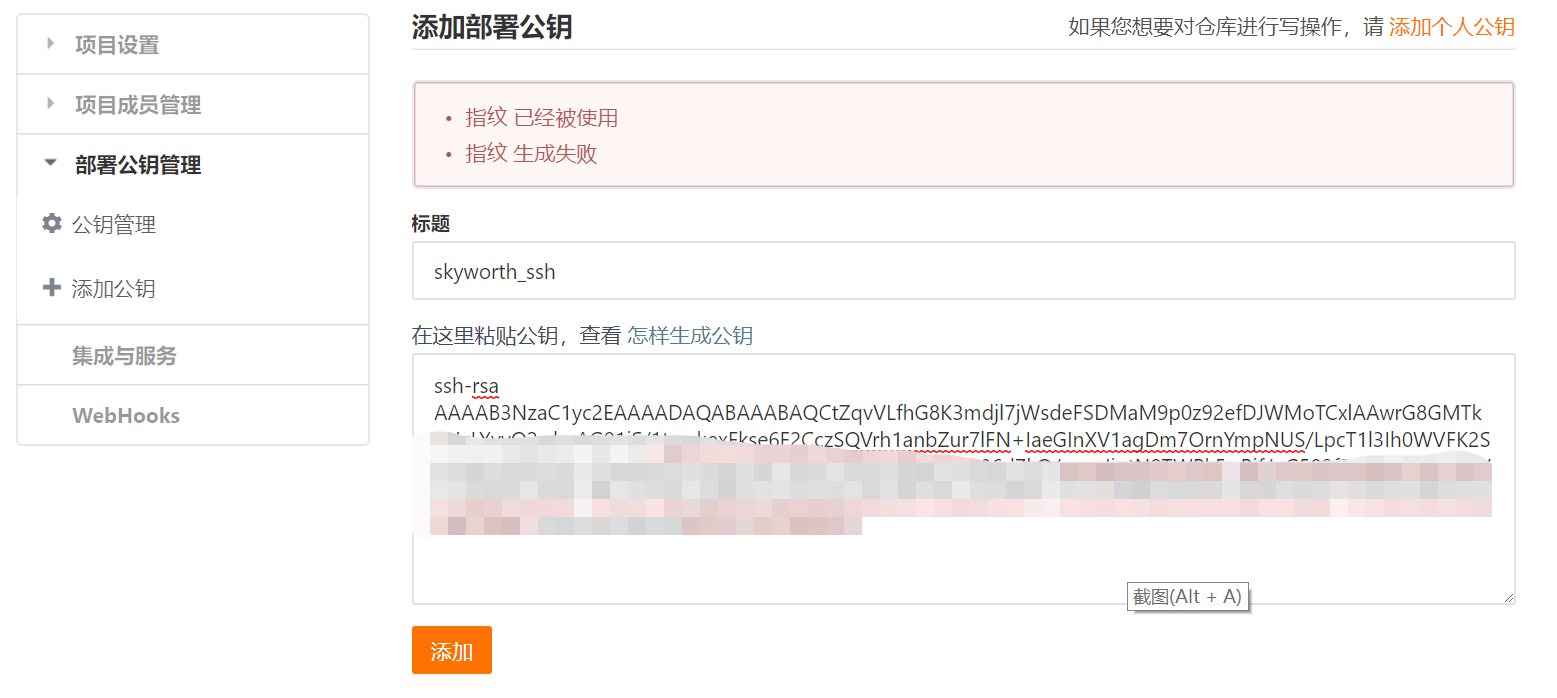
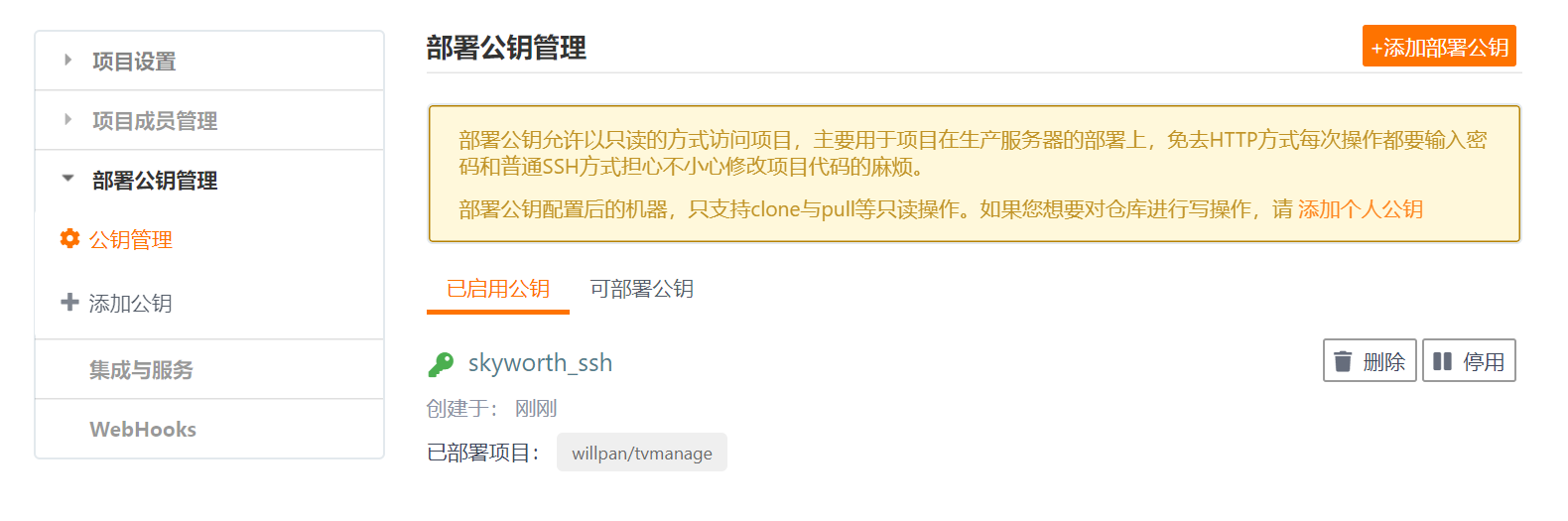
一般为了安全,在git传输文件的时候都会进行ssh加密传输,这里简单说一下公匙的应用。
首先使用git bush 生成公匙,输入 ssh -keygen
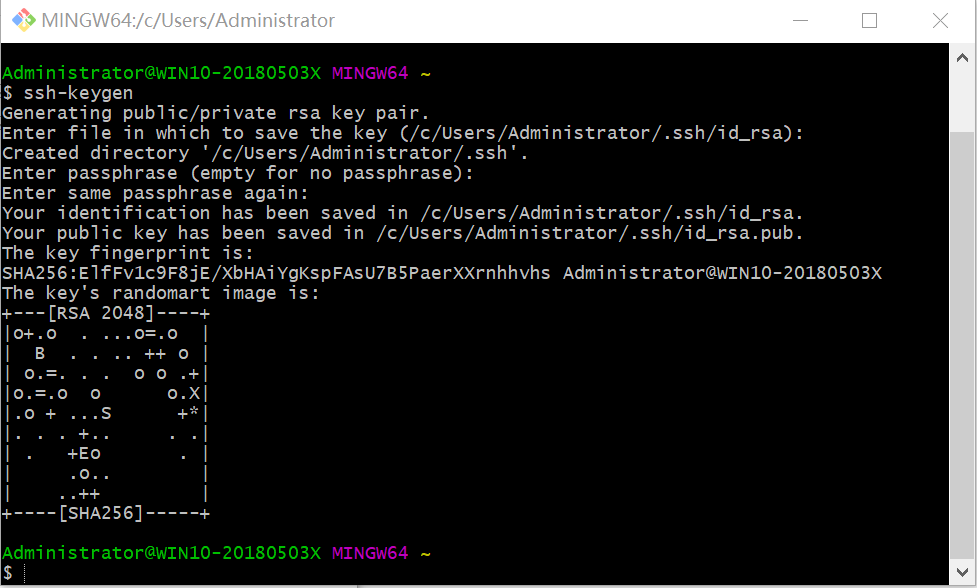
然后根据信息找到公匙生成的位置,打开id_rsa.pub,复制其中的内容
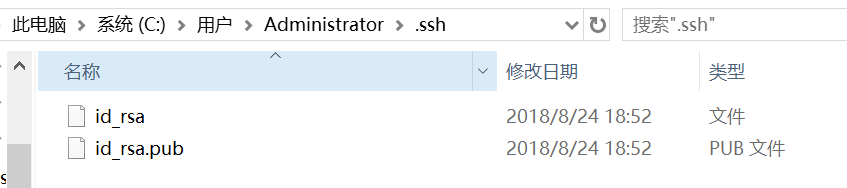
最后在Gitee上找到公匙的管理,添加复制进去就OK了
config client 测试自动刷新配置
在配置文件yml中增加一个自定义属性:
girl:

  age:

  name: lili
然后在config client 的controller中或者启动类中获取这个自定义属性(注意增加@RefreshScope 局部刷新注解):
@RestController

@RequestMapping("/tvmanage/equip")

@RefreshScope

public class EquipController {

    @Value("${girl.age}")

    private String girl_age;

    @RequestMapping("hi")

    public String hi(){

        return "hello ,"+ girl_age;

    }

}
然后,我们把yml中 age改为21,客户端直接访问hi()方法,http://localhost:8081/tvmanage/equip/hi ,自动刷新成功

springboot+cloud 学习(五)统一配置中心 spring cloud config + cloud bus + WebHooks +RibbitMQ的更多相关文章
- 「 从0到1学习微服务SpringCloud 」06 统一配置中心Spring Cloud Config
系列文章(更新ing): 「 从0到1学习微服务SpringCloud 」01 一起来学呀! 「 从0到1学习微服务SpringCloud 」02 Eureka服务注册与发现 「 从0到1学习微服务S ...
- 【Spring Cloud学习之五】配置中心
环境 eclipse 4.7 jdk 1.8 Spring Boot 1.5.2 Spring Cloud 1.2 一.什么是配置中心在分布式系统中,由于服务数量巨多,为了方便服务配置文件统一管理,实 ...
- Spring Cloud实战之初级入门(五)— 配置中心服务化与配置实时刷新
目录 1.环境介绍 2.配置中心服务化 2.1 改造mirco-service-spring-config 2.2 改造mirco-service-provider.mirco-service-con ...
- springcloud-spring cloud config统一配置中心
统一配置中心 为什么需要统一配置中心? 统一配置中心顾名思义,就是将配置统一管理,配置统一管理的好处是在日后大规模集群部署服务应用时相同的服务配置一致,日后再修改配置只需要统一修改全部同步,不需要一个 ...
- Spring Cloud Config(一):聊聊分布式配置中心 Spring Cloud Config
目录 Spring Cloud Config(一):聊聊分布式配置中心 Spring Cloud Config Spring Cloud Config(二):基于Git搭建配置中心 Spring Cl ...
- Spring Cloud 入门教程 - 搭建配置中心服务
简介 Spring Cloud 提供了一个部署微服务的平台,包括了微服务中常见的组件:配置中心服务, API网关,断路器,服务注册与发现,分布式追溯,OAuth2,消费者驱动合约等.我们不必先知道每个 ...
- 第六篇: 分布式配置中心(Spring Cloud Config)
一.简介 在分布式系统中,由于服务数量巨多,为了方便服务配置文件统一管理,实时更新,所以需要分布式配置中心组件. 在Spring Cloud中,有分布式配置中心组件spring cloud confi ...
- 一起来学Spring Cloud | 第七章:分布式配置中心(Spring Cloud Config)
上一章节,我们讲解了服务网关zuul,本章节我们从git和本地两种存储配置信息的方式来讲解springcloud的分布式配置中心-Spring Cloud Config. 一.Spring Cloud ...
- spring boot / cloud (十五) 分布式调度中心进阶
spring boot / cloud (十五) 分布式调度中心进阶 在<spring boot / cloud (十) 使用quartz搭建调度中心>这篇文章中介绍了如何在spring ...
随机推荐
- wait event & wake up
在linux驱动中一个常用的场景, 驱动需要等待中断的响应, 才得以执行后续的代码,达到一个原子操作的目的 /* 静态申请队列 */ static DECLARE_WAIT_QUEUE_HEAD(s_ ...
- React组件和生命周期简介
React 简介----React 是 Facebook 出品的一套颠覆式的前端开发类库.为什么说它是颠覆式的呢? 内存维护虚拟 DOM 对于传统的 DOM 维护,我们的步骤可能是:1.初始化 ...
- 20175324 2018-2019-2 《Java程序设计》第5周学习总结
20175324 2018-2019-2 <Java程序设计>第5周学习总结 教材学习内容总结 抽象类和具体类的区别在于抽象类中有抽象方法而具体类中没有.且抽象类不能实例化. 接口:如果一 ...
- 反调试——jmp到那个地址
目录 1.前言 2.原理讲解 3.代码实现 前言 这节的反调试是通过构造代码来干扰正常的分析.反调试参考CrypMic勒索病毒 原理讲解 在逆向分析汇编代码时,一般都是通过汇编指令call或jmp跳到 ...
- cmd 创建用户,并授权管理员权限就可以远程登陆了
创建账号 net user 用户名 密码 /add //注意空格 授权管理员权限 net localgroup Administrators 用户名 /add // ...
- linux 使用sh@d0ws0cks server
[root@linux-node1 ~]# cat /etc/shadowsocks.json { "server":"x.x.x.x", , "lo ...
- C语言常用的编程规范
1排版 1-1相对独立的程序块之间.变量说明之后必须加空行. 示例:如下例子不符合规范. if (!valid_ni(ni)) { ... // program code } repssn_ind = ...
- TensorFlow.org教程笔记(一)Tensorflow初上手
本文同时也发布在自建博客地址. 本文翻译自www.tensorflow.org的英文教程. 本文档介绍了TensorFlow编程环境,并向您展示了如何使用Tensorflow解决鸢尾花分类问题. 先决 ...
- [SQL]LeetCode183. 从不订购的客户 | Customers Who Never Order
Suppose that a website contains two tables, the Customers table and the Orders table. Write a SQL qu ...
- [Swift]LeetCode314. 二叉树的竖直遍历 $ Binary Tree Vertical Order Traversal
Given a binary tree, return the vertical order traversal of its nodes' values. (ie, from top to bott ...