
SpringBoot整合多数据源实现
项目架构
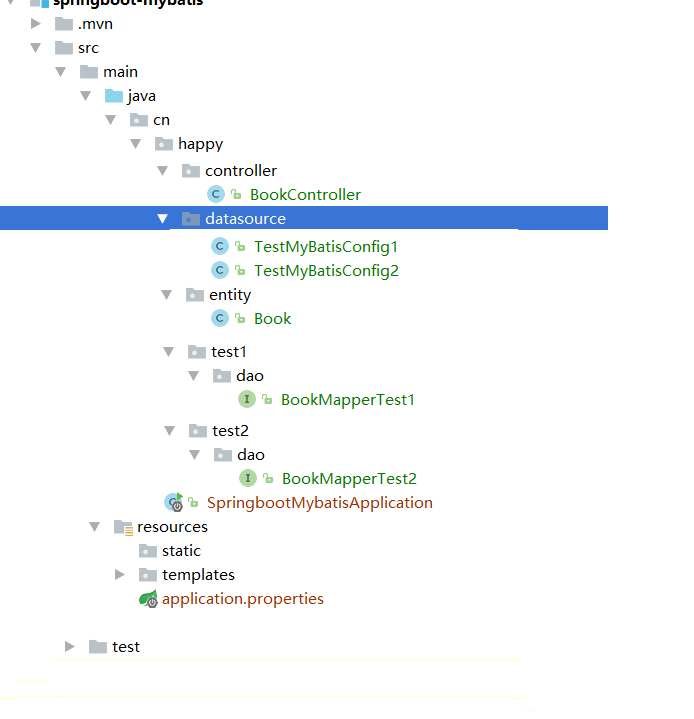
1.导入相关依赖
 <dependency>

             <groupId>org.springframework.boot</groupId>

             <artifactId>spring-boot-starter-web</artifactId>

         </dependency>

         <dependency>

             <groupId>org.springframework.boot</groupId>

             <artifactId>spring-boot-starter-test</artifactId>

             <scope>test</scope>

         </dependency>

         <!--freemarker支持-->

         <dependency>

             <groupId>org.springframework.boot</groupId>

             <artifactId>spring-boot-starter-freemarker</artifactId>

         </dependency>

         <!-- mysql驱动 -->

         <dependency>

             <groupId>mysql</groupId>

             <artifactId>mysql-connector-java</artifactId>

         </dependency>

         <!--整合mybatis-->

         <dependency>

             <groupId>org.mybatis.spring.boot</groupId>

             <artifactId>mybatis-spring-boot-starter</artifactId>

             <version>1.1.1</version>

         </dependency>
2.application.properties
 ## test1 数据源配置

 #spring.datasource.test1.driverClassName=com.mysql.jdbc.Driver

 #spring.datasource.test1.jdbc-url=jdbc:mysql://localhost:3306/test1?useUnicode=true&characterEncoding=utf8

 #spring.datasource.test1.username=root

 #spring.datasource.test1.password=123

 ## test2 数据源配置

 #spring.datasource.test2.driverClassName=com.mysql.jdbc.Driver

 #spring.datasource.test2.jdbc-url=jdbc:mysql://localhost:3306/test2?useUnicode=true&characterEncoding=utf8

 #spring.datasource.test2.username=root

 #spring.datasource.test2.password=123
3.创建datasource包 下TestMyBatisConfig1
 @Configuration

 @MapperScan(basePackages = "cn.happy.test1", sqlSessionFactoryRef =  "test1SqlSessionFactory")

 public class DataSource1Config {

         @Bean(name = "test1DataSource")

         @ConfigurationProperties(prefix = "spring.datasource.test1")

         @Primary

         public DataSource testDataSource() {

             return DataSourceBuilder.create().build();

         }

         @Bean(name = "test1SqlSessionFactory")

         @Primary

         public SqlSessionFactory testSqlSessionFactory(@Qualifier("test1DataSource") DataSource dataSource) throws Exception {

             SqlSessionFactoryBean bean = new SqlSessionFactoryBean();

             bean.setDataSource(dataSource);

             //读取mybatis小配置文件

            // bean.setMapperLocations(new PathMatchingResourcePatternResolver().getResources("classpath:mybatis/mapper/test1/*.xml"));

             return bean.getObject();

         }

         @Bean(name = "test1TransactionManager")

         @Primary

         public DataSourceTransactionManager testTransactionManager(@Qualifier("test1DataSource") DataSource dataSource) {

             return new DataSourceTransactionManager(dataSource);

         }

         @Bean(name = "test1SqlSessionTemplate")

         @Primary

         public SqlSessionTemplate testSqlSessionTemplate(@Qualifier("test1SqlSessionFactory") SqlSessionFactory sqlSessionFactory) throws Exception {

             return new SqlSessionTemplate(sqlSessionFactory);

         }

 }
@Primary注解标识默认使用的数据源
如果不加启动会报如下错误:意思是有两个数据源 不知需要使用哪个数据源

3.创建datasource包 下TestMyBatisConfig2
 @Configuration

 @MapperScan(basePackages = "cn.happy.test2", sqlSessionFactoryRef =  "test2SqlSessionFactory")

 public class DataSource2Config {

         @Bean(name = "test2DataSource")

         @ConfigurationProperties(prefix = "spring.datasource.test2")

         public DataSource testDataSource() {

             return DataSourceBuilder.create().build();

         }

         @Bean(name = "test2SqlSessionFactory")

         public SqlSessionFactory testSqlSessionFactory(@Qualifier("test2DataSource") DataSource dataSource) throws Exception {

             SqlSessionFactoryBean bean = new SqlSessionFactoryBean();

             bean.setDataSource(dataSource);

             //读取mybatis小配置文件

            // bean.setMapperLocations(new PathMatchingResourcePatternResolver().getResources("classpath:mybatis/mapper/test2/*.xml"));

             return bean.getObject();

         }

         @Bean(name = "test2TransactionManager")

         public DataSourceTransactionManager testTransactionManager(@Qualifier("test2DataSource") DataSource dataSource) {

             return new DataSourceTransactionManager(dataSource);

         }

         @Bean(name = "test2SqlSessionTemplate")

         public SqlSessionTemplate testSqlSessionTemplate(@Qualifier("test2SqlSessionFactory") SqlSessionFactory sqlSessionFactory) throws Exception {

             return new SqlSessionTemplate(sqlSessionFactory);

         }

     }
4.entity层
 /**

  * author:  刘涛

  *

  * @create 2018-04-04 11:18

  */

 public class Book {

     private Integer bookid;

     private String bookname;

     private Integer bookprice;

 get  set省略。。

 }
5.test1下的dao中BookMapperTest1
 public interface BookMapperTest1 {

     @Select("select * from book where bookname=#{bookname}")

     public Book findByName(@Param("bookname") String bookname);

     @Insert("insert into book(bookname,bookprice) values (#{bookname},#{bookprice})")

     public int insertBook(@Param("bookname") String bookname, @Param("bookprice") Double bookprice);

     @Select("select * from book")

     public Book findBook(@Param("Book") Book book);

 }
6.test2下的dao中BookMapperTest2
 public interface BookMapperTest2 {

     @Select("select * from book where bookname=#{bookname}")

     public Book findByName(@Param("bookname") String bookname);

     @Insert("insert into book(bookname,bookprice) values (#{bookname},#{bookprice})")

     public int insertBook(@Param("bookname") String bookname, @Param("bookprice") Double bookprice);

 }
7.controller层
@RestController

public class BookController {

    @Autowired

    private BookMapperTest1 bookMapperTest1;

    @Autowired

    private BookMapperTest2 bookMapperTest2;

    @RequestMapping("insert001")

    public String insert001(String bookname,Double bookprice){

        bookMapperTest1.insertBook(bookname,bookprice);

        return "success";

    }

    @RequestMapping("insert002")

    public String insert002(String bookname,Double bookprice){

        bookMapperTest2.insertBook(bookname,bookprice);

        return "success";

    }

}
8.启动项目
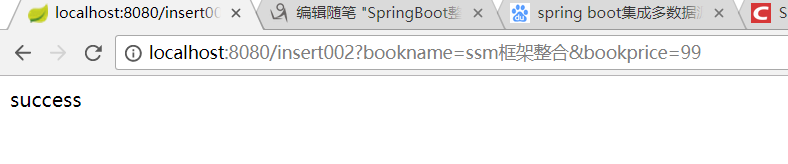
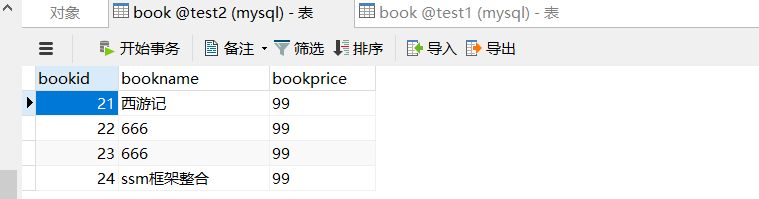
test1数据库

test2数据库
SpringBoot整合多数据源实现的更多相关文章
- springBoot整合多数据源
springBoot整合相关 1:springBoot整合多数据源: 应用场景: 项目需要同时连接两个不同的数据库A, B,并且它们都为主从架构,一台写库,多台读库. 工具/版本: jdk1. ...
- springboot整合多数据源解决分布式事务
一.前言 springboot整合多数据源解决分布式事务. 1.多数据源采用分包策略 2.全局分布式事务管理:jta-atomikos. ...
- springboot整合多数据源及事物
有两种方式:一种是分包的方式.一种是加注解的方式(@DataSource(ref="")). 分包方式:项目结构图如下: 分为com.itmayiedu.test01.com.it ...
- SpringBoot整合Druid数据源
关于SpringBoot数据源请参考我上一篇文章:https://www.cnblogs.com/yueshutong/p/9409295.html 一:Druid介绍 1. Druid是什么? Dr ...
- SpringBoot整合Mybatis【非注解版】
接上文:SpringBoot整合Mybatis[注解版] 一.项目创建 新建一个工程 选择Spring Initializr,配置JDK版本 输入项目名 选择构建web项目所需的state ...
- SpringBoot整合Mybatis之项目结构、数据源
已经有好些日子没有总结了,不是变懒了,而是我一直在奋力学习springboot的路上,现在也算是完成了第一阶段的学习,今天给各位总结总结. 之前在网上找过不少关于springboot的教程,都是一些比 ...
- SpringBoot整合阿里Druid数据源及Spring-Data-Jpa
SpringBoot整合阿里Druid数据源及Spring-Data-Jpa https://mp.weixin.qq.com/s?__biz=MzU0MDEwMjgwNA==&mid=224 ...
- SpringBoot系列七:SpringBoot 整合 MyBatis(配置 druid 数据源、配置 MyBatis、事务控制、druid 监控)
1.概念:SpringBoot 整合 MyBatis 2.背景 SpringBoot 得到最终效果是一个简化到极致的 WEB 开发,但是只要牵扯到 WEB 开发,就绝对不可能缺少数据层操作,所有的开发 ...
- SpringBoot整合Mybatis多数据源 (AOP+注解)
SpringBoot整合Mybatis多数据源 (AOP+注解) 1.pom.xml文件(开发用的JDK 10) <?xml version="1.0" encoding=& ...
随机推荐
- Window7 定制 Explore中的右键菜单
win+R 命令 运行 regedit ,打开注册表 在 HKEY_CLASSES_ROOT\*\shell\VisualCode下创建针对文件的新增命令 command 在HKEY_CLASSE ...
- 线段树——习题、lazy解析
习题: C. Cloud Computing lazy操作解析:
- Git首次配置
用户身份配置 安装好Git后的第一步是设置用户名和电子邮件地址.这一步是很重要的,因为以后这将作为你每一次提交的个人信息,写入所创建的提交中,不可更改. git config --global use ...
- go [第一篇]初识
[第一篇] 简介 Go 是一个开源的编程语言,它能让构造简单.可靠且高效的软件变得容易. Go是从2007年末由Robert Griesemer, Rob Pike, Ken Thompson主持开发 ...
- [笔记]猿计划(WEB安全工程师养成之路系列教程):03HTML基础标签
1.<!DOCTYPE>声明 <!DOCTYPE> 不是 HTML 标签.它为浏览器提供一项信息(声明),即 HTML 是用什么版本编写的. 2.HTML不区分大小写 3.标签 ...
- zabbix3.2利用自动发现功能对fastcgi模式的php状态进行集中监控
zabbix3.2利用自动发现功能对fastcgi模式的php状态进行集中监控 前端nginx虚拟主机引用后端多个php接口,为了方便监控,将后端服务器集中配置在nginx中,具体配置如下: [roo ...
- HTML基本语法
一.什么是HTML? HTML不是编程语言,是用来描述网页文档(页面结构)的一种标记语言: HTML指超文本标记语言(Hyper Text Markup Language),之所以称为超文本标记语言, ...
- tcp与ip协议的区别
TCP/IP(TransmissionControlProtocol/InternetProtocol的简写,中文译名为传输控制协议/互联网络协议). 简单地说,就是由底层的IP协议和TCP协议组成的 ...
- Java_面向对象
目录 一.封装 二.继承 三.多态 四.重载与重写 五.接口与抽象类 六.继承与组合 七.初始化块 面向对象的三大特征:封装.继承.多态. 一.封装 是指将对象的状态信息都隐藏在对象内部,不允许外部程 ...
- SpringMVC:处理静态资源
方法1.采用<mvc:default-servlet-handler/> 若将 DispatcherServlet 请求映射配置为 /,则 Spring MVC 将捕获WEB 容器的所有请 ...