
读取Excel文件存储在实体类中
1.Maven文件
<!--读取Excel的架包-->

        <dependency>

            <groupId>org.apache.poi</groupId>

            <artifactId>poi</artifactId>

            <version>3.15</version>

        </dependency>

        <!-- https://mvnrepository.com/artifact/org.apache.poi/poi-ooxml -->

        <dependency>

            <groupId>org.apache.poi</groupId>

            <artifactId>poi-ooxml</artifactId>

            <version>3.15</version>

        </dependency>

        <!-- https://mvnrepository.com/artifact/org.apache.poi/poi-examples -->

        <dependency>

            <groupId>org.apache.poi</groupId>

            <artifactId>poi-examples</artifactId>

            <version>3.15</version>

        </dependency>

        <!-- https://mvnrepository.com/artifact/org.apache.poi/poi-excelant -->

        <dependency>

            <groupId>org.apache.poi</groupId>

            <artifactId>poi-excelant</artifactId>

            <version>3.15</version>

        </dependency>

        <!-- https://mvnrepository.com/artifact/org.apache.poi/poi-ooxml-schemas -->

        <dependency>

            <groupId>org.apache.poi</groupId>

            <artifactId>poi-ooxml-schemas</artifactId>

            <version>3.15</version>

        </dependency>
2.实体类对象
 package com.mz.monotoring.Domain;

 /**

  * @author sjl

  * @date 2019-03-28 10:09

  */

 public class User {

     private String name;

     private String sex;

     private String age;

     private String money;

     public String getName() {

         return name;

     }

     public void setName(String name) {

         this.name = name;

     }

     public String getSex() {

         return sex;

     }

     public void setSex(String sex) {

         this.sex = sex;

     }

     public String getAge() {

         return age;

     }

     public void setAge(String age) {

         this.age = age;

     }

     public String getMoney() {

         return money;

     }

     public void setMoney(String money) {

         this.money = money;

     }

 }
3.Controller层接收Base64位的Excel文件(Postman测试界面)

4.Controller层
 package com.mz.monotoring.Controller;

 import com.mz.monotoring.Domain.User;

 import com.mz.monotoring.Util.Base64File;

 import com.mz.monotoring.Util.ReadExcelUtils;

 import org.springframework.mock.web.MockMultipartFile;

 import org.springframework.stereotype.Controller;

 import org.springframework.web.bind.annotation.RequestBody;

 import org.springframework.web.bind.annotation.RequestMapping;

 import org.springframework.web.bind.annotation.ResponseBody;

 import org.springframework.web.multipart.MultipartFile;

 import java.io.File;

 import java.io.FileInputStream;

 import java.io.IOException;

 import java.util.List;

 import java.util.Map;

 import java.util.UUID;

 /**

  * @author sjl

  * @date 2019-03-26 13:56

  */

 @Controller

 public class ExcelController {

     @RequestMapping("excel")

     @ResponseBody

     public List<User> excel(@RequestBody Map map) {

         List<User> excelInfo = null;

         //读取到的Excel保存的位置

         //linux保存路径

         //String path1 = "/usr/local/tomcatusps/apache-tomcat-8.5.15/Root/excel/";

         try {

             //Window保存路径

             String path1 = "F:\\excel";

             File files = new File(path1);

             files.mkdir();

             String[] w1 = map.get("key").toString().split(",");

             String s1 = new StringBuilder().append(UUID.randomUUID().toString()).append(".").append("xlsx").toString();

             String s = new StringBuilder().append(path1).append("\\").append(s1).toString();

             Base64File.decoderBase64File(w1[1], path1 + "\\" + s1);

             ReadExcelUtils excelUtils = new ReadExcelUtils();

             File newFile = new File(s);

             FileInputStream input = new FileInputStream(newFile);

             MultipartFile multipartFile = new MockMultipartFile("excelUtils", newFile.getName(), "text/plain", input);

             excelInfo = excelUtils.getExcelInfo(multipartFile);

         } catch (IOException e) {

             e.printStackTrace();

         }

         return excelInfo;

     }

 }
5.Base64File将读取到的base64位字符串转化为文件存储至本地
 package com.mz.monotoring.Util;

 import sun.misc.BASE64Decoder;

 import java.io.FileOutputStream;

 import java.io.IOException;

 public class Base64File {

     /**

      * 将base64字符解码保存文件

      *

      * @param base64Code

      * @param targetPath

      * @throws Exception

      */

     public static void decoderBase64File(String base64Code, String targetPath) {

         byte[] buffer;

         FileOutputStream out = null;

         try {

             buffer = new BASE64Decoder().decodeBuffer(base64Code);

             out = new FileOutputStream(targetPath);

             out.write(buffer);

         } catch (IOException e) {

             e.printStackTrace();

         } finally {

             try {

                 if (out != null) {

                     out.close();

                 }

             } catch (IOException e) {

                 e.printStackTrace();

             }

         }

     }

 }
6.读取文件 判断是什么版本Excel并且循环读取每层数据存储实体类中
 package com.mz.monotoring.Util;

 import com.mz.monotoring.Domain.User;

 import org.apache.poi.hssf.usermodel.HSSFCell;

 import org.apache.poi.hssf.usermodel.HSSFWorkbook;

 import org.apache.poi.ss.usermodel.Cell;

 import org.apache.poi.ss.usermodel.Row;

 import org.apache.poi.ss.usermodel.Sheet;

 import org.apache.poi.ss.usermodel.Workbook;

 import org.apache.poi.xssf.usermodel.XSSFWorkbook;

 import org.springframework.web.multipart.MultipartFile;

 import java.io.IOException;

 import java.io.InputStream;

 import java.util.*;

 /**

  * @author sjl

  * @date 2019-03-27 11:11

  */

 public class ReadExcelUtils {

     // 总行数

     private int totalRows = 0;

     // 总条数

     private int totalCells = 0;

     // 错误信息接收器

     private String errorMsg;

     //构造方法

     public ReadExcelUtils() {

     }

     public int getTotalRows() {

         return totalRows;

     }

     public int getTotalCells() {

         return totalCells;

     }

     public String getErrorMsg() {

         return errorMsg;

     }

     public List<User> getExcelInfo(MultipartFile mFile) {

         //获取文件名

         String fileName = mFile.getOriginalFilename();

         try {

             //验证文件名是否合格

             if (!validateExcel(fileName)) {

                 return null;

             }

             //根据文件名判断文件是2003版本还是2007版本

             boolean isExcel2003 = true;

             if (isExcel2007(fileName)) {

                 isExcel2003 = false;

             }

             return createExcel(mFile.getInputStream(), isExcel2003);

         } catch (IOException e) {

             e.printStackTrace();

         }

         return null;

     }

     /**

      * 根据excel里面的内容读取客户信息

      *

      * @param is          输入流

      * @param isExcel2003 excel是2003还是2007版本

      * @return

      * @throws IOException

      */

     private List<User> createExcel(InputStream is, boolean isExcel2003) {

         try {

             Workbook wb = null;

             //当excel是2003时,创建excel2003

             if (isExcel2003) {

                 wb = new HSSFWorkbook(is);

             } else {

                 wb = new XSSFWorkbook(is);

             }

             //读取Excel里面的信息

             return readExcelValue(wb);

         } catch (IOException e) {

             e.printStackTrace();

         }

         return null;

     }

     private List<User> readExcelValue(Workbook wb) {

         //得到都一个shell

         Sheet sheet = wb.getSheetAt(0);

         //得到Excel的行数

         this.totalRows = sheet.getPhysicalNumberOfRows();

         //得到Excel的列数(前提是有行数)

         if (totalRows >= 1 && sheet.getRow(0) != null) {

             this.totalCells = sheet.getRow(0).getPhysicalNumberOfCells();

         }

         List<User> userList = new ArrayList<>();

         //循环Excel行数

         for (int r = 0; r < totalRows; r++) {

             Row row = sheet.getRow(r);

             if (row == null) {

                 continue;

             }

             //循环Excel的列

             Map<String, Object> map = new HashMap<>(16);

             if (isRowEmpty(row) == false) {

                 User user = new User();

                 for (int c = 0; c < this.totalCells; c++) {

                     Cell cell = row.getCell(c);

                     if (cell != null) {

                         if (c == 0) {

                             //判断其中是否包含空格

                             if (cell.getCellType() == HSSFCell.CELL_TYPE_NUMERIC) {

                                 String name = String.valueOf(cell.getNumericCellValue());

                                 user.setName(name.substring(0, name.length() - 2 > 0 ? name.length() - 2 : 1));

                             } else if (cell.getStringCellValue() != null) {

                                 //导入姓名

                                 user.setName(cell.getStringCellValue());

                             } else {

                                 user.setName("");

                             }

                         } else if (c == 1) {

                             if (cell.getCellType() == HSSFCell.CELL_TYPE_NUMERIC) {

                                 String sex = String.valueOf(cell.getNumericCellValue());

                                 user.setSex(sex.substring(0, sex.length() - 2 > 0 ? sex.length() - 2 : 1));

                             } else if (cell.getStringCellValue() != null) {

                                 //性别

                                 user.setSex(cell.getStringCellValue());

                             } else {

                                 user.setSex("");

                             }

                         } else if (c == 2) {

                             if (cell.getCellType() == HSSFCell.CELL_TYPE_NUMERIC) {

                                 String age = String.valueOf(cell.getNumericCellValue());

                                 user.setAge(age.substring(0, age.length() - 2 > 0 ? age.length() - 2 : 1));

                             } else if (cell.getStringCellValue() != null) {

                                 //年龄

                                 user.setAge(cell.getStringCellValue());

                             } else {

                                 user.setAge("");

                             }

                         } else if (c == 3) {

                             if (cell.getCellType() == HSSFCell.CELL_TYPE_NUMERIC) {

                                 String money = String.valueOf(cell.getNumericCellValue());

                                 user.setMoney(money.substring(0, money.length() - 2 > 0 ? money.length() - 2 : 1));

                             } else if (cell.getStringCellValue() != null) {

                                 //工资

                                 user.setMoney(cell.getStringCellValue());

                             } else {

                                 user.setMoney("");

                             }

                         }

                     }

                 }

                 //将读取到的数据添加到list集合中

                 userList.add(user);

             }

         }

         return userList;

     }

     /**

      * 判断EXCEL是否为空

      *

      * @param row

      * @return

      */

     private boolean isRowEmpty(Row row) {

         for (int c = row.getFirstCellNum(); c < row.getLastCellNum(); c++) {

             Cell cell = row.getCell(c);

             if (cell != null && cell.getCellType() != Cell.CELL_TYPE_BLANK) {

                 return false;

             }

         }

         return false;

     }

     /**

      * 验证EXCEL文件

      *

      * @param fileName

      * @return

      */

     private boolean validateExcel(String fileName) {

         if (fileName == null || !(isExcel2003(fileName) || isExcel2007(fileName))) {

             errorMsg = "文件不是excel格式";

             return false;

         }

         return true;

     }

     /**

      * 是否是2007的excel,返回true是2007

      *

      * @param fileName

      * @return

      */

     private boolean isExcel2007(String fileName) {

         return fileName.matches("^.+\\.(?i)(xlsx)$");

     }

     /**

      * 是否是2003的excel,返回true是2003

      *

      * @param fileName

      * @return

      */

     private boolean isExcel2003(String fileName) {

         return fileName.matches("^.+\\.(?i)(xls)$");

     }

 }
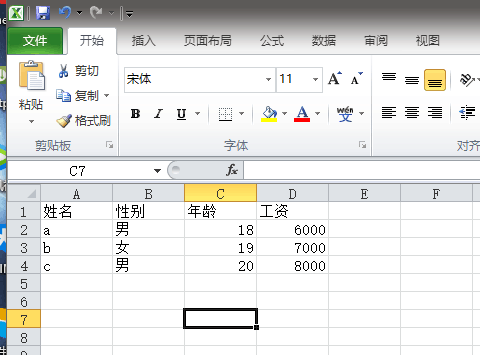
7.读取的Excel文件内容截图
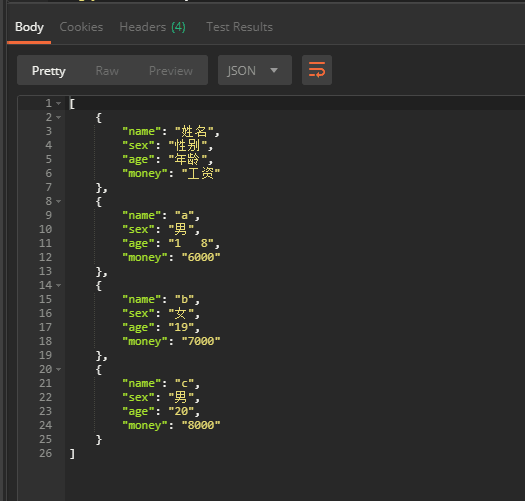
8.Postman测试返回的List<User>数据
读取Excel文件存储在实体类中的更多相关文章
- .Net Core NPOI读取Excel 并转为数据实体类
创建应用程序 这里直接创建Console程序 引用NPOI的NuGet包 PM> Install-Package NPOI -Version 2.5.1 直接Nuget包管理器添加 导入Exce ...
- Java实现POI读取Excel文件,兼容后缀名xls和xlsx
1.引入所需的jar包: maven管理项目的话直接添加以下坐标即可: <!-- https://mvnrepository.com/artifact/org.apache.poi/poi -- ...
- 读取Excel文件中的单元格的内容和颜色
怎样读取Excel文件中的单元格的内容和颜色 先创建一个Excel文件,在A1和A2中随意输入内容,设置A1的字体颜色为红色,A2的背景为黄色.需要 using Excel = Microsoft.O ...
- 如何在C#中打开和读取EXCEL文件
这篇文章向您展示如何在C#Windows Forms Application中使用ExcelDataReader,ExcelDataReader.DataSet打开和读取Excel文件.创建一个新的W ...
- 用python的pandas读取excel文件中的数据
一.读取Excel文件 使用pandas的read_excel()方法,可通过文件路径直接读取.注意到,在一个excel文件中有多个sheet,因此,对excel文件的读取实际上是读取指定文件.并 ...
- java 读取Excel文件并数据持久化方法Demo
import java.io.IOException; import java.io.InputStream; import java.util.ArrayList; import java.util ...
- 读取Excel文件的两种方法
第一种方法:传统方法,采用OleDB读取EXCEL文件, 优点:写法简单,缺点:服务器必须安有此组件才能用,不推荐使用 private DataSet GetConnect_DataSet2(stri ...
- 项目一:第四天 1、快递员的条件分页查询-noSession,条件查询 2、快递员删除(逻辑删除) 3、基于Apache POI实现批量导入区域数据 a)Jquery OCUpload上传文件插件使用 b)Apache POI读取excel文件数据
1. 快递员的条件分页查询-noSession,条件查询 2. 快递员删除(逻辑删除) 3. 基于Apache POI实现批量导入区域数据 a) Jquery OCUpload上传文件插件使用 b) ...
- 基于Java+Selenium的WebUI自动化测试框架(十一)-----读取Excel文件(POI)(1)
上一篇说了利用JXL的jar包来读取Excel的代码.在Java中,还可以用另外一种jar包来读取Excel的内容,那就是Apache的POI. 这里和之前一样,需要导入POI的jar包,建议导入这三 ...
随机推荐
- Tomcat使用shutdown.bat关闭会将其他Tomcat关掉的问题
Tomcat使用shutdown.bat关闭会将其他Tomcat关掉的问题 shutdown.bat文件有一句if not "%CATALINA_HOME%" == "& ...
- Oracle XDB组件重建说明
Oracle XDB 组件重建 说明一. XDB 组件说明1.1 官网说明:XDB 全称XML DB,官网的说明如下:http://docs.oracle.com/cd/E11882_01/appde ...
- 详解MariaDB数据库的外键约束
1.什么是外键约束 外键约束(foreign key)就是表与表之间的某种约定的关系,由于这种关系的存在,我们能够让表与表之间的数据,更加的完整,关连性更强. 关于数据表的完整性和关连性,可以举个例子 ...
- Zygote及System进程启动
1. init 根据init.rc 运行 app_process, 并携带‘--zygote' 和 ’--startSystemServer' 参数. 2. AndroidRuntime.cpp: ...
- Cannot resolve class or package 'mysql’
一:当使用Spring Boot 2.0 整合MySQL的时候配置可能会出现这个故障 目前开始选用新的名称:com.mysql.cj.jdbc.Driver 二:其次,爆红产生错误分析 其实这个问题是 ...
- 如何在MySQL中设置主从复制
mysql主从同步定义 主从同步机制 配置主从同步 配置主服务器 配置从服务器 使用主从同步来备份 使用mysqldump来备份 备份原始文件 主从同步的小技巧 排错 Slave_IO_Running ...
- C++ STL容器总结
1. STL 容器 1. 按种类划分 顺序容器( sequence containers):是一种各元素之间有顺序关系的线性表,是一种线性结构的可序群集.顺序性容器中的每个元素均有固定的位 ...
- 1到n的最小步数
1到n的最小步数 Time Limit: 1 Sec Memory Limit: 128 MB 给你一个数n,让你求从1到n的最小步数是多少. 对于当前的数x有三种操作: 1: x+1 2: x ...
- RN和IOS原生端交互
1.RCTBridgeModule #import <Foundation/Foundation.h> #import "RCTBridgeModule.h" #imp ...
- EJS 入门学习
EJS(Embedded JavaScript templates)是一个简单高效的模板语言,通过数据和模板,可以生成HTML标记文本.可以说EJS是一个JavaScript库,EJS可以同时运行在客 ...