
springboot springmvc拦截器 拦截POST、PUT、DELETE请求参数和响应数据,并记录操作日志
1.操作日志实体类
@Document(collection = "operation_log")

@Getter

@Setter

@ToString

public class OperationLog extends BaseEntityWithId {

  private String userId; // 操作人

  private String resource; // 操作的资源

  private String requestMethod; // 请求方式

  private String beanName; // 操作的类

  private String methodName; // 操作的模块

  private String requestParams; // 请求的参数

  private String responseData; // 返回数据

}
2.拦截器
package com.vian.admin.config;

import com.alibaba.fastjson.JSON;

import com.vian.admin.entity.OperationLog;

import com.vian.admin.event.OperationLogEvent;

import com.vian.core.configuration.event.EventPublisher;

import com.vian.microservice.security.SecurityUtils;

import lombok.extern.slf4j.Slf4j;

import org.aspectj.lang.JoinPoint;

import org.aspectj.lang.annotation.AfterReturning;

import org.aspectj.lang.annotation.Aspect;

import org.aspectj.lang.annotation.Before;

import org.aspectj.lang.annotation.Pointcut;

import org.springframework.beans.factory.annotation.Autowired;

import org.springframework.stereotype.Component;

import org.springframework.web.context.request.RequestContextHolder;

import org.springframework.web.context.request.ServletRequestAttributes;

import javax.servlet.http.HttpServletRequest;

@Aspect

@Component

@Slf4j

public class RequestLogAspect {

  @Autowired private EventPublisher eventPublisher;

  private ThreadLocal<OperationLog> logThreadLocal = new ThreadLocal<>();

  //拦截web下所有方法

  @Pointcut("execution(* com.vian.admin.web..*.*(..))")

  public void pointcut() {

    log.info("拦截请求start");

  }

  @Before("pointcut()")

  public void doBefore(JoinPoint joinPoint) {

    ServletRequestAttributes attributes =

        (ServletRequestAttributes) RequestContextHolder.getRequestAttributes();

    HttpServletRequest request = attributes.getRequest();

    String beanName = joinPoint.getSignature().getDeclaringTypeName();

    String methodName = joinPoint.getSignature().getName();

    String uri = request.getRequestURI();

    String userId = SecurityUtils.getCurrentUserId();

    //get方法不记录日志

    if ("GET".equals(request.getMethod())) {

      return;

    }

    //请求参数

    Object[] paramsArray = joinPoint.getArgs();

    log.info(

        "请求日志拦截:userId={}, uri={}, method={}, request={}",

        userId,

        uri,

        request.getMethod(),

        paramsArray);

    // 组装日志数据

    OperationLog optLog = new OperationLog();

    optLog.setUserId(userId);

    optLog.setResource(uri);

    optLog.setRequestMethod(request.getMethod());

    optLog.setBeanName(beanName);

    optLog.setMethodName(methodName);

    optLog.setRequestParams(argsArrayToString(paramsArray));

    logThreadLocal.set(optLog);

  }

  @AfterReturning(returning = "result", pointcut = "pointcut()")

  public void doAfterReturning(Object result) {

    try {

      // 处理完请求,从线程变量中获取日志数据,并记录到db

      OperationLog optLog = logThreadLocal.get();

      if (null != optLog) {

        optLog.setResponseData(JSON.toJSONString(result));

        eventPublisher.publish(new OperationLogEvent(this, optLog));

      }

    } catch (Exception e) {

      log.error("***操作请求日志记录失败doAfterReturning()***", e);

    } finally {

      // 清除threadlocal

      logThreadLocal.remove();

    }

  }

  /**

   * 请求参数拼装

   *

   * @param paramsArray

   * @return

   */

  private String argsArrayToString(Object[] paramsArray) {

    String params = "";

    if (paramsArray != null && paramsArray.length > 0) {

      for (int i = 0; i < paramsArray.length; i++) {

        Object jsonObj = JSON.toJSON(paramsArray[i]);

        params += jsonObj.toString() + " ";

      }

    }

    return params.trim();

  }

}
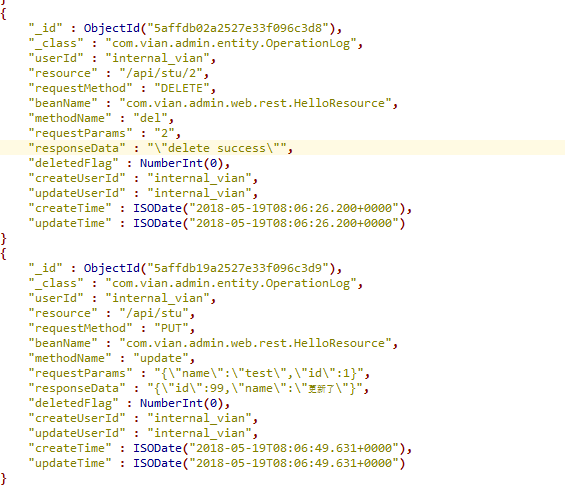
测试结果:
springboot springmvc拦截器 拦截POST、PUT、DELETE请求参数和响应数据,并记录操作日志的更多相关文章
- 防止SpringMVC拦截器拦截js等静态资源文件
SpringMVC提供<mvc:resources>来设置静态资源,但是增加该设置如果采用通配符的方式增加拦截器的话仍然会被拦截器拦截,可采用如下方案进行解决: 方案一.拦截器中增加针对静 ...
- Springboot前后端分离中,后端拦截器拦截后,前端没有对应的返回码可以判断
项目登录流程如下 用户进入前端登录界面,输入账号密码等,输入完成之后前端发送请求到后端(拦截器不会拦截登录请求),后端验证账号密码等成功之后生成Token并存储到数据库,数据库中包含该Token过期时 ...
- Springboot通过拦截器拦截请求信息收集到日志
1.需求 最近在工作中遇到的一个需求,将请求中的客户端类型.操作系统类型.ip.port.请求方式.URI以及请求参数值收集到日志中,网上找资料说用拦截器拦截所有请求然后收集信息,于是就开始了操作: ...
- Struts2 拦截器—拦截action
对于拦截器的基本使用这里我就懒得打字了,我这里就讲下如何用 Struts2 拦截器 拦截action.这是我个人的想法,如果有什么不对的,或者你们有什么更好的方法.请多多留言! 拦截器的默认拦截的方法 ...
- java端拦截器判断客户的的请求是否是ajax请求
java端拦截器判断客户的的请求是否是ajax请求 发表于 2014-08-22 23:38:08 普通请求与ajax请求的报文头不一样,通过如下 String requestType = reque ...
- SpringMVC请求参数和响应结果全局加密和解密
前提 前段时间在做一个对外的网关项目,涉及到加密和解密模块,这里详细分析解决方案和适用的场景.为了模拟真实的交互场景,先定制一下整个交互流程.第三方传输(包括请求和响应)数据报文包括三个部分: 1.t ...
- 使用SpringBoot AOP 记录操作日志、异常日志
平时我们在做项目时经常需要对一些重要功能操作记录日志,方便以后跟踪是谁在操作此功能:我们在操作某些功能时也有可能会发生异常,但是每次发生异常要定位原因我们都要到服务器去查询日志才能找到,而且也不能对发 ...
- 扩展SpringMVC以支持绑定JSON格式的请求参数
此方案是把请求参数(JSON字符串)绑定到java对象,,@RequestBody是绑定内容体到java对象的. 问题描述: <span style="font-size: x-sma ...
- 在JSP中常见问题,防止SpringMVC拦截器拦截js等静态资源文件的解决方案
方案一.拦截器中增加针对静态资源不进行过滤(涉及spring-mvc.xml) <mvc:resources location="/" mapping="/**/* ...
随机推荐
- 获取OlapConnection连接
目录: 1.获取org.olap4j.OlapConnection对象 2.获取mondrian.olap.Connection对象 一.org.olap4j.OlapConnection对象 说明: ...
- windows server 2016 x64用MecaCli工具检查raid5磁盘状态
下载并安装lsi MegaRAID raid卡 管理工具 下载网址:http://www.avagotech.com/support/download-search 在搜索框里搜索"mega ...
- memcached 学习
memcached 是什么 特点 协议简单 基于 libevent 的事件处理 内置内存存储方式 memcached 不互相通信的分布式 启动 安装 依赖 libevent 安装命令 下载地址在这个网 ...
- 浏览器仿EXCEL表格插件 版本更新 - 智表ZCELL产品V1.3.2更新
智表(zcell)是一款浏览器仿excel表格jquery插件.智表可以为你提供excel般的智能体验,支持双击编辑.设置公式.设置显示小数精度.下拉框.自定义单元格.复制粘贴.不连续选定.合并单元格 ...
- Flink应用案例:How Trackunit leverages Flink to process real-time data from industrial IoT devices
January 22, 2019Use Cases, Apache Flink Lasse Nedergaard Recently there has been significant dis ...
- Loj #3089. 「BJOI2019」奥术神杖
Loj #3089. 「BJOI2019」奥术神杖 题目描述 Bezorath 大陆抵抗地灾军团入侵的战争进入了僵持的阶段,世世代代生活在 Bezorath 这片大陆的精灵们开始寻找远古时代诸神遗留的 ...
- ZooKeeper 之快速入门
-----------------破镜重圆,坚持不懈! 1. 概述 Zookeeper是Hadoop的一个子项目,它是分布式系统中的协调系统,可提供的服务主要有:配置服务.名字服务.分布式同步.组服务 ...
- 使用jsp,tag提取字符串中的单词
JSP中调用Tag在表单中输入字符串,提取其中的单词 参考代码:giveString.jsp <%@ page contentType="text/html; charset=GB23 ...
- Linux操作系统文件查找
++++++++++++++++++++++++++++++++++++++++++++++++标题:Linux操作系统的文件或命令查找内容:命令查找(which和whereis).文件查找(loca ...
- 时间插件datepicker(jQuery-UI,bootstrap)和jquery-steps的冲突解决。。。
日期插件初始化: $('.prelease_time').flatpickr(); let contentSteps = $("#content_form").steps({ h ...