
SpringBoot HATEOAS用法简介
REST风格简介
介绍HATEOAS之前先简单介绍一下REST,REST 是 Representational state transfer 的缩写,翻译过来的意思是表达性状态转换。REST是一种架构的风格
Richardson Maturity Model
Richardson 提出了REST一种 成熟度模型,我们称之为Richardson Maturity Model,这种模式将REST按照成熟度划分为4个等级
- Level0:使用HTTP作为WEB服务的传输方式,以REST样式公开SOAP Web服务
- Level1:使用适当的URI(使用名词)公开资源,这种方式提出了资源的概念
- Level2:资源使用正确的URI + HTTP方法,比如更新用户就用put方式,查询用get方式
- Level3:使用HATEOAS(作为应用程序状态引擎的超媒体),在资源的表达中包含了链接信息,客户端可以在链接信息中发现可以执行的操作
HATEOAS是什么?
HATEOAS代表“超媒体是应用程序状态的引擎”
从前言我们已经可以清楚知道,使用HATEOAS约束是REST风格中成熟度最高的,也是官方推荐的一种方式,没使用HATEOAS的项目,服务端和客户端是耦合的,客户端只能通过相关文档来知道服务端做了什么修改,使用HATEOAS约束的REST服务,服务端修改接口信息后,客户端可以通过服务器提供的资源的表达来智能地发现可以执行的操作,客户端不需要做啥修改,因为资源信息是会动态改变的
在Spring的官网,已经有提供这个项目的相关文档,链接:https://spring.io/projects/spring-hateoas
SpringBoot HATEOAS
SpringBoot中也有集成HATEOAS,本博客介绍一下如何使用
工具准备:
- JDK8.0
- Maven 3.0+构建工具
- Eclipse或者IntelliJ IDEA
- git&gitlab
Maven相关配置
在pom.xml加上hateoas配置
<dependency>

	<groupId>org.springframework.boot</groupId>

	<artifactId>spring-boot-starter-hateoas</artifactId>

</dependency>
因为是要写个web简单curd例子,其它需要的也加上
<dependency>

			<groupId>org.springframework.boot</groupId>

			<artifactId>spring-boot-starter-data-jpa</artifactId>

		</dependency>

		<dependency>

			<groupId>org.springframework.boot</groupId>

			<artifactId>spring-boot-starter-hateoas</artifactId>

		</dependency>

		<dependency>

			<groupId>org.springframework.boot</groupId>

			<artifactId>spring-boot-starter-web</artifactId>

		</dependency>

		<dependency>

			<groupId>com.alibaba</groupId>

			<artifactId>druid</artifactId>

			<version>1.0.25</version>

		</dependency>

		<dependency>

			<groupId>mysql</groupId>

			<artifactId>mysql-connector-java</artifactId>

			<version>5.1.40</version>

		</dependency>

		<dependency>

			<groupId>org.springframework.boot</groupId>

			<artifactId>spring-boot-starter-test</artifactId>

			<scope>test</scope>

			<exclusions>

				<exclusion>

					<groupId>org.junit.vintage</groupId>

					<artifactId>junit-vintage-engine</artifactId>

				</exclusion>

			</exclusions>

		</dependency>
实体类实现ResourceSupport
Model类实现hateoas提供的ResourceSuppor
import com.fasterxml.jackson.annotation.JsonCreator;

import com.fasterxml.jackson.annotation.JsonProperty;

import org.springframework.hateoas.ResourceSupport;

import javax.persistence.*;

import java.io.Serializable;

@Entity

@Table(name="sys_user")

public class SysUserInfo extends ResourceSupport implements Serializable{

    @Id

    @GeneratedValue

    private Long userId;

    @Column(unique=true,length=20,nullable=false)

    private String username;

    @Column(length=2,nullable=true)

    private String sex;

    @Column(length=10,nullable=true)

    private String password;

    public SysUserInfo(){

    }

    @JsonCreator

    public SysUserInfo(@JsonProperty("userId")Long userId,@JsonProperty("username")String username,

                       @JsonProperty("sex")String sex,@JsonProperty("password")String password){

        this.userId = userId;

        this.username = username;

        this.sex = sex;

        this.password = password;

    }

}

....
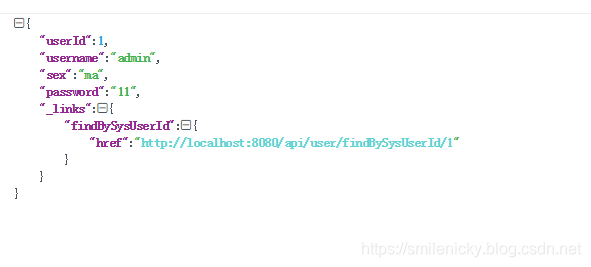
接口调用,基于HATEOAS模式
@GetMapping("/findBySysUserId/{userId}")

    public SysUserInfo findBySysUserId(@PathVariable("userId") long userId) {

        if (LOG.isInfoEnabled()) {

            LOG.info("请求参数userId : {}" , userId);

        }

        Optional<SysUserInfo> sysUserInfo = Optional.ofNullable(sysUserRepository.findByUserId(userId));

        if (!sysUserInfo.isPresent()) {

            throw new NotFoundException("查询不到用户信息! userId:"+userId);

        }

        //Resource<SysUserInfo> resource = new Resource<SysUserInfo>(sysUserInfo.get());

        ControllerLinkBuilder linkBuilder = linkTo(methodOn(this.getClass()).findBySysUserId(userId));

        sysUserInfo.get().add(linkBuilder.withRel("findBySysUserId"));

        return sysUserInfo.get();

    }
实例代码:github链接下载
SpringBoot HATEOAS用法简介的更多相关文章
- SpringBoot系列之@Conditional注解用法简介
SpringBoot系列之@Conditional注解用法简介 引用Spring官方文档的说法介绍一下@Conditional注解:Spring5.0.15版本@Conditional注解官方文档 @ ...
- SpringBoot系列之@PropertySource用法简介
SpringBoot系列之@PropertySource用法简介 继上篇博客:SpringBoot系列之@Value和@ConfigurationProperties用法对比之后,本博客继续介绍一下@ ...
- SpringBoot系列之外部配置用法简介
SpringBoot系列之外部配置用法简介 引用Springboot官方文档的说法,官方文档总共列举了如下用法: 1.Devtools global settings properties on yo ...
- SpringBoot常用配置简介
SpringBoot常用配置简介 1. SpringBoot中几个常用的配置的简单介绍 一个简单的Spring.factories # Bootstrap components org.springf ...
- IOS NSInvocation用法简介
IOS NSInvocation用法简介 2012-10-25 19:59 来源:博客园 作者:csj007523 字号:T|T [摘要]在 iOS中可以直接调用某个对象的消息方式有两种,其中一种就是 ...
- JodaTime用法简介
JodaTime用法简介 Java的Date和Calendar用起来简直就是灾难,跟C#的DateTime差距太明显了,幸好有JodaTime 本文简单罗列JodaTime的用法 package co ...
- Apache自带压力测试工具ab用法简介
ab命令原理 ab命令会创建很多的并发访问线程,模拟多个访问者同时对某一URL进行访问.它的测试目标是基于URL的,因此,既可以用来测试Apache的负载压力,也可以测试nginx.lighthttp ...
- Postman用法简介
转自:http://blog.csdn.net/flowerspring/article/details/52774399 Postman用法简介 转载 2016年10月10日 09:04:10 10 ...
- MSSQL Sql加密函数 hashbytes 用法简介
转自:http://www.maomao365.com/?p=4732 一.mssql sql hashbytes 函数简介 hashbytes函数功能为:返回一个字符,通过 MD2.MD4.MD5. ...
随机推荐
- Java面向对象程序设计第5章1-9
1.面向对象的主要特征是什么? 三大特征是:封装.继承和多态. 封装:是指将某事物的属性和行为包装到对象中,这个对象只对外公布需要公开的属性和行为,而这个公布也是可以有选择性的公布给其它对象. 继承: ...
- 【转】在Linux下搭建Git服务器
在 Linux 下搭建 Git 服务器 环境: 服务器 CentOS6.6 + git(version 1.7.1)客户端 Windows10 + git(version 2.8.4.windows. ...
- mysql备份脚本并保留7天
脚本需求: 每天备份mysql数据库,保留7天的脚本. 存放在/opt/dbbak目录中. 脚本名称为database_xxxx-xx-xx.sql 脚本内容: #!/bin/bash export ...
- Postman 之 HTTP Multipart/form-data 调试
无论是前端,还是后端开发,HTTP 接口的使用率实在是太高了.开发好了特定的 HTTP 接口,没有一个好的测试工具,怎么可以呢? 而 Postman 就是一款好用的爱不释手的测试工具,谁用谁说爽. 接 ...
- Github 入门1 (下载git , 连接本地库与github仓库)
/* 本篇建立在以注册GitHub账号的前提下*/ (1) 下载 git https://www.git-scm.com // win10 可以直接红色箭头标识的 Download 2.22.0 ...
- alpha测试和beta测试的区别
alpha测试版,有点相当于内部测试,一般开发人员在场 ,是由用户做测试,但开发人员在场,一般是请用户到开发现场去测试 beta测试版,完全交给用户,由用户做测试,返回测试报告,相当于发行前的一 ...
- Kotlin学习系列(二)
IF表达式 if在kotlin可以当做表达式使用跟java的三元操作符类似: var max = if( a > b ) a else b if分支可以使用代码块,最后一个表达式是返回值: va ...
- mybatis-dynamic-query 3.0 更新
项目地址: mybatis-dynamic-query 前言 在 2.0 完成对 tk.mapper 集成,为何 mybatis-dynamic-query 选择 tk.mapper 集成, 再 3. ...
- win10下,打开oracle时出现 oracle initialization or shutdown in process 错误 的解决办法
解决方法: 1)在dos窗口下输入:sqlplus /nolog 2)SQL>connect sys/sys as sysdba 提示:已连接. 3)SQL>shutdown normal ...
- 基 B/S 平台的机房监控云平台-U位篇
前言 机柜 U 位管理是一项突破性创新技术--继承了 RFID 标签(电子标签)的优点的同时,完全解决了 RFID 技术(非接触式的自动识别技术)在机房 U 位资产监控场应用景中的四大缺陷,采用工业互 ...