
Flume框架的学习使用
Flume框架的学习使用
Flume简介
- Flume提供一个分布式的,可靠的,对大数据量的日志进行高效收集、聚集、移动的服务。
- Flume基于流失架构,容错性强,也很灵活简单
- Flume,kafka用来实时进行数据收集,Spark,Storm用来实时处理数据,impala用来实时查询数据。
Flume角色
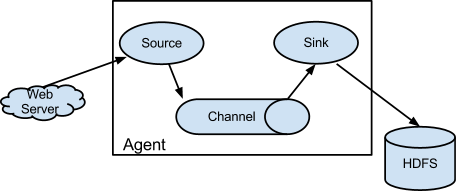
Source
用于采集数据,Source是产生数据流的地方,同时Source会将产生的数据流传输到Channel。
Channel
用于桥接Source和Sink,类似于一个队列。
Sink
从Channel中收集数据,将数据写到目标源(可以是下一个Source,也可以是HDFS或者HBASE)
Event
传输单元,Flume数据传输的基本单元,以事件的形式从源头传递到目的地。
Flume传输过程
Source监控某个文件或者数据流,数据源产生新的数据,拿到该数据之后,将数据封装到一个event中,并put到Channel后commit提交,channel队列先进先出,sink去channel队列中拉去数据,然后写出到下个源。
Flume部署及使用
文件配置
上传压缩包,解压,配置文件:flume-env.sh
export JAVA_HOME=/home/admin/modules/jdk1.8.0_121
案例
监控端口数据
目标:Flume 监控一端 Console,另一端 Console 发送消息,使被监控端实时显示。
- 安装 telnet (为了从某个端口中输出数据)
$ sudo rpm -ivh xinetd-2.3.14-40.el6.x86_64.rpm

$ sudo rpm -ivh telnet-0.17-48.el6.x86_64.rpm

$ sudo rpm -ivh telnet-server-0.17-48.el6.x86_64.rpm
创建 Flume Agent 配置文件 flume-telnet.conf(详细配置见官网)
# Name the components on this agent

a1.sources = r1

a1.sinks = k1

a1.channels = c1

# Describe/configure the source

a1.sources.r1.type = netcat

a1.sources.r1.bind = localhost

a1.sources.r1.port = 44444

# Describe the sink

a1.sinks.k1.type = logger

# Use a channel which buffers events in memory

a1.channels.c1.type = memory

a1.channels.c1.capacity = 1000

a1.channels.c1.transactionCapacity = 100

# Bind the source and sink to the channel

a1.sources.r1.channels = c1

a1.sinks.k1.channel = c1
判断 44444 端口是否被占用
$ netstat -tunlp | grep 44444
先开启 flume 先听端口
$ bin/flume-ng agent --conf conf/ --name a1 --conf-file job/flume-telnet.conf

-Dflume.root.logger==INFO,console
使用 telnet 工具向本机的 44444
$ telnet localhost 44444
实时读取本地文件到HDFS
目标:实时监控 hive 日志,并上传到 HDFS 中
由于flume需要操作Hadoop的API,需要拷贝jar包到Flume的lib目录下:
$ cp share/hadoop/common/lib/hadoop-auth-2.5.0-cdh5.3.6.jar ./lib/

$ cp share/hadoop/common/lib/commons-configuration-1.6.jar ./lib/

$ cp share/hadoop/mapreduce1/lib/hadoop-hdfs-2.5.0-cdh5.3.6.jar ./lib/

$ cp share/hadoop/common/hadoop-common-2.5.0-cdh5.3.6.jar ./lib/

$ cp ./share/hadoop/hdfs/lib/htrace-core-3.1.0-incubating.jar ./lib/

$ cp ./share/hadoop/hdfs/lib/commons-io-2.4.jar ./lib/

最后两个 jar 为 1.99 版本 flume 必须引用的 jar
创建 flume-hdfs.conf
# Name the components on this agent

a2.sources = r2

a2.sinks = k2

a2.channels = c2

# Describe/configure the source

a2.sources.r2.type = exec

a2.sources.r2.command = tail -F /home/admin/modules/apache-hive-1.2.2-bin/hive.log

a2.sources.r2.shell = /bin/bash -c

# Describe the sink

a2.sinks.k2.type = hdfs

a2.sinks.k2.hdfs.path = hdfs://linux01:8020/flume/%Y%m%d/%H

#上传文件的前缀

a2.sinks.k2.hdfs.filePrefix = logs-

#是否按照时间滚动文件夹

a2.sinks.k2.hdfs.round = true

#多少时间单位创建一个新的文件夹

a2.sinks.k2.hdfs.roundValue = 1

#重新定义时间单位

a2.sinks.k2.hdfs.roundUnit = hour

#是否使用本地时间戳

a2.sinks.k2.hdfs.useLocalTimeStamp = true

#积攒多少个 Event 才 flush 到 HDFS 一次

a2.sinks.k2.hdfs.batchSize = 1000

#设置文件类型,可支持压缩

a2.sinks.k2.hdfs.fileType = DataStream

#多久生成一个新的文件

a2.sinks.k2.hdfs.rollInterval = 600

#设置每个文件的滚动大小

a2.sinks.k2.hdfs.rollSize = 134217700

#文件的滚动与 Event 数量无关

a2.sinks.k2.hdfs.rollCount = 0

#最小冗余数

a2.sinks.k2.hdfs.minBlockReplicas = 1

# Use a channel which buffers events in memory

a2.channels.c2.type = memory

a2.channels.c2.capacity = 1000

a2.channels.c2.transactionCapacity = 100

# Bind the source and sink to the channel

a2.sources.r2.channels = c2

a2.sinks.k2.channel = c2
执行监控配置
$ bin/flume-ng agent --conf conf/ --name a2 --conf-file job/flume-hdfs.conf
实时读取目录文件到HDFS
目 标:使用 flume 监听整个目录的文件
创建配置文件 flume-dir.conf
a3.sources = r3

a3.sinks = k3

a3.channels = c3

# Describe/configure the source

a3.sources.r3.type = spooldir

a3.sources.r3.spoolDir = /home/admin/modules/apache-flume-1.7.0-bin/upload

a3.sources.r3.fileSuffix = .COMPLETED

a3.sources.r3.fileHeader = true

#忽略所有以.tmp 结尾的文件,不上传

a3.sources.r3.ignorePattern = ([^ ]*\.tmp)

# Describe the sink

a3.sinks.k3.type = hdfs

a3.sinks.k3.hdfs.path = hdfs://linux01:8020/flume/upload/%Y%m%d/%H

#上传文件的前缀

a3.sinks.k3.hdfs.filePrefix = upload-

#是否按照时间滚动文件夹

a3.sinks.k3.hdfs.round = true

#多少时间单位创建一个新的文件夹

a3.sinks.k3.hdfs.roundValue = 1

#重新定义时间单位

a3.sinks.k3.hdfs.roundUnit = hour

#是否使用本地时间戳

a3.sinks.k3.hdfs.useLocalTimeStamp = true

#积攒多少个 Event 才 flush 到 HDFS 一次

a3.sinks.k3.hdfs.batchSize = 100

#设置文件类型,可支持压缩

a3.sinks.k3.hdfs.fileType = DataStream

#多久生成一个新的文件

a3.sinks.k3.hdfs.rollInterval = 600

#设置每个文件的滚动大小大概是 128M

a3.sinks.k3.hdfs.rollSize = 134217700

#文件的滚动与 Event 数量无关

a3.sinks.k3.hdfs.rollCount = 0

#最小冗余数

a3.sinks.k3.hdfs.minBlockReplicas = 1

# Use a channel which buffers events in memory

a3.channels.c3.type = memory

a3.channels.c3.capacity = 1000

a3.channels.c3.transactionCapacity = 100

# Bind the source and sink to the channel

a3.sources.r3.channels = c3

a3.sinks.k3.channel = c3
执行测试:执行如下脚本后,请向 upload 文件夹中添加文件试试
$ bin/flume-ng agent --conf conf/ --name a3 --conf-file job/flume-dir.conf
注意:在使用 Spooling Directory Source 时
- 不要在监控目录中创建并持续修改文件
- 上传完成的文件会以.COMPLETED 结尾
- 被监控文件夹每 600 毫秒扫描一次文件变动
Flume与Flume之间数据传递:单Flume多Channel、Sink
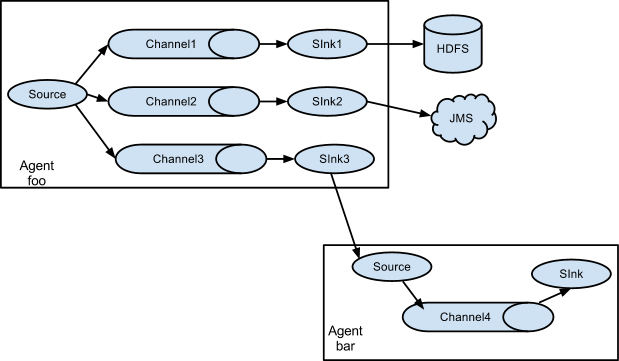
目标:使用 flume-1 监控文件变动,flume-1 将变动内容传递给 flume-2,flume-2 负责存储到HDFS。同时 flume-1 将变动内容传递给 flume-3,flume-3 负责输出到local filesystem。
- 创建 flume-1.conf,用于监控 hive.log 文件的变动,同时产生两个 channel 和两个 sink 分
别输送给 flume-2 和 flume3:
# Name the components on this agent

a1.sources = r1

a1.sinks = k1 k2

a1.channels = c1 c2

# 将数据流复制给多个 channel

a1.sources.r1.selector.type = replicating

# Describe/configure the source

a1.sources.r1.type = exec

a1.sources.r1.command = tail -F /home/admin/modules/apache-hive-1.2.2-bin/hive.log

a1.sources.r1.shell = /bin/bash -c

# Describe the sink

a1.sinks.k1.type = avro

a1.sinks.k1.hostname = linux01

a1.sinks.k1.port = 4141

a1.sinks.k2.type = avro

a1.sinks.k2.hostname = linux01

a1.sinks.k2.port = 4142

# Describe the channel

a1.channels.c1.type = memory

a1.channels.c1.capacity = 1000

a1.channels.c1.transactionCapacity = 100

a1.channels.c2.type = memory

a1.channels.c2.capacity = 1000

a1.channels.c2.transactionCapacity = 100

# Bind the source and sink to the channel

a1.sources.r1.channels = c1 c2

a1.sinks.k1.channel = c1

a1.sinks.k2.channel = c2
- 创建 flume-2.conf,用于接收 flume-1 的 event,同时产生 1 个 channel 和 1 个 sink,将数
据输送给 hdfs:
# Name the components on this agent

a2.sources = r1

a2.sinks = k1

a2.channels = c1

# Describe/configure the source

a2.sources.r1.type = avro

a2.sources.r1.bind = linux01

a2.sources.r1.port = 4141

# Describe the sink

a2.sinks.k1.type = hdfs

a2.sinks.k1.hdfs.path = hdfs://linux01:8020/flume2/%Y%m%d/%H

#上传文件的前缀

a2.sinks.k1.hdfs.filePrefix = flume2-

#是否按照时间滚动文件夹

a2.sinks.k1.hdfs.round = true

#多少时间单位创建一个新的文件夹

a2.sinks.k1.hdfs.roundValue = 1

#重新定义时间单位

a2.sinks.k1.hdfs.roundUnit = hour

#是否使用本地时间戳

a2.sinks.k1.hdfs.useLocalTimeStamp = true

#积攒多少个 Event 才 flush 到 HDFS 一次

a2.sinks.k1.hdfs.batchSize = 100

#设置文件类型,可支持压缩

a2.sinks.k1.hdfs.fileType = DataStream

#多久生成一个新的文件

a2.sinks.k1.hdfs.rollInterval = 600

#设置每个文件的滚动大小大概是 128M

a2.sinks.k1.hdfs.rollSize = 134217700

#文件的滚动与 Event 数量无关

a2.sinks.k1.hdfs.rollCount = 0

#最小冗余数

a2.sinks.k1.hdfs.minBlockReplicas = 1

# Describe the channel

a2.channels.c1.type = memory

a2.channels.c1.capacity = 1000

a2.channels.c1.transactionCapacity = 100

# Bind the source and sink to the channel

a2.sources.r1.channels = c1

a2.sinks.k1.channel = c1
创建 flume-3.conf,用于接收 flume-1 的 event,同时产生 1 个 channel 和 1 个 sink,将数
据输送给本地目录:
# Name the components on this agent

a3.sources = r1

a3.sinks = k1

a3.channels = c1

# Describe/configure the source

a3.sources.r1.type = avro

a3.sources.r1.bind = linux01

a3.sources.r1.port = 4142

# Describe the sink

a3.sinks.k1.type = file_roll

a3.sinks.k1.sink.directory = /home/admin/Desktop/flume3

# Describe the channel

a3.channels.c1.type = memory

a3.channels.c1.capacity = 1000

a3.channels.c1.transactionCapacity = 100

# Bind the source and sink to the channel

a3.sources.r1.channels = c1

a3.sinks.k1.channel = c1

输出的本地目录必须是已经存在的目录,如果该目录不存在,并不会创建新的目录。
执行测试:分别开启对应 flume-job(依次启动 flume-3,flume-2,flume-1),同时产生
文件变动并观察结果:
$ bin/flume-ng agent --conf conf/ --name a3 --conf-file job/group-job1/flume-3.conf

$ bin/flume-ng agent --conf conf/ --name a2 --conf-file job/group-job1/flume-2.conf

$ bin/flume-ng agent --conf conf/ --name a1 --conf-file job/group-job1/flume-1.conf
Flume与Flume之间数据传递:多Flume汇总数据到单Flume
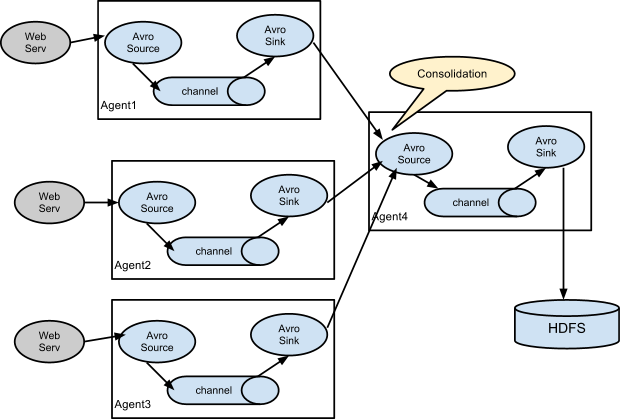
目标:flume-1 监控文件 hive.log,flume-2 监控某一个端口的数据流,flume-1 与 flume-2 将
数据发送给 flume-3,flume3 将最终数据写入到 HDFS。
创建 flume-1.conf,用于监控 hive.log 文件,同时 sink 数据到 flume-3:
# Name the components on this agent

a1.sources = r1

a1.sinks = k1

a1.channels = c1

# Describe/configure the source

a1.sources.r1.type = exec

a1.sources.r1.command = tail -F /home/admin/modules/apache-hive-1.2.2-bin/hive.log

a1.sources.r1.shell = /bin/bash -c

# Describe the sink

a1.sinks.k1.type = avro

a1.sinks.k1.hostname = linux01

a1.sinks.k1.port = 4141

# Describe the channel

a1.channels.c1.type = memory

a1.channels.c1.capacity = 1000

a1.channels.c1.transactionCapacity = 100

# Bind the source and sink to the channel

a1.sources.r1.channels = c1

a1.sinks.k1.channel = c1
创建 flume-2.conf,用于监控端口 44444 数据流,同时 sink 数据到 flume-3
# Name the components on this agent

a2.sources = r1

a2.sinks = k1

a2.channels = c1

# Describe/configure the source

a2.sources.r1.type = netcat

a2.sources.r1.bind = linux01

a2.sources.r1.port = 44444

# Describe the sink

a2.sinks.k1.type = avro

a2.sinks.k1.hostname = linux01

a2.sinks.k1.port = 4141

# Use a channel which buffers events in memory

a2.channels.c1.type = memory

a2.channels.c1.capacity = 1000

a2.channels.c1.transactionCapacity = 100

# Bind the source and sink to the channel

a2.sources.r1.channels = c1

a2.sinks.k1.channel = c1
创建 flume-3.conf,用于接收 flume-1 与 flume-2 发送过来的数据流,最终合并后 sink 到HDFS:
# Name the components on this agent

a3.sources = r1

a3.sinks = k1

a3.channels = c1

# Describe/configure the source

a3.sources.r1.type = avro

a3.sources.r1.bind = linux01

a3.sources.r1.port = 4141

# Describe the sink

a3.sinks.k1.type = hdfs

a3.sinks.k1.hdfs.path = hdfs://linux01:8020/flume3/%Y%m%d/%H

#上传文件的前缀

a3.sinks.k1.hdfs.filePrefix = flume3-

#是否按照时间滚动文件夹

a3.sinks.k1.hdfs.round = true

#多少时间单位创建一个新的文件夹

a3.sinks.k1.hdfs.roundValue = 1

#重新定义时间单位

a3.sinks.k1.hdfs.roundUnit = hour

#是否使用本地时间戳

a3.sinks.k1.hdfs.useLocalTimeStamp = true

#积攒多少个 Event 才 flush 到 HDFS 一次

a3.sinks.k1.hdfs.batchSize = 100

#设置文件类型,可支持压缩

a3.sinks.k1.hdfs.fileType = DataStream

#多久生成一个新的文件

a3.sinks.k1.hdfs.rollInterval = 600

#设置每个文件的滚动大小大概是 128M

a3.sinks.k1.hdfs.rollSize = 134217700

#文件的滚动与 Event 数量无关

a3.sinks.k1.hdfs.rollCount = 0

#最小冗余数

a3.sinks.k1.hdfs.minBlockReplicas = 1

# Describe the channel

a3.channels.c1.type = memory

a3.channels.c1.capacity = 1000

a3.channels.c1.transactionCapacity = 100

# Bind the source and sink to the channel

a3.sources.r1.channels = c1

a3.sinks.k1.channel = c1
执行测试:分别开启对应 flume-job(依次启动 flume-3,flume-2,flume-1),同时产生文件变动并观察结果
$ bin/flume-ng agent --conf conf/ --name a3 --conf-file job/group-job2/flume-3.conf

$ bin/flume-ng agent --conf conf/ --name a2 --conf-file job/group-job2/flume-2.conf

$ bin/flume-ng agent --conf conf/ --name a1 --conf-file job/group-job2/flume-1.conf
测试时记得启动 hive 产生一些日志,同时使用 telnet 向 44444 端口发送内容,
$ bin/hive

$ telnet linux01 44444
Flume监控Ganglia
Ganglia的安装部署
安装 httpd 服务与 php
# yum -y install httpd php
安装其他依赖
# yum -y install rrdtool perl-rrdtool rrdtool-devel

# yum -y install apr-devel
安装 ganglia
# rpm -Uvh http://dl.fedoraproject.org/pub/epel/6/x86_64/epel-release-6-8.noarch.rpm

# yum -y install ganglia-gmetad

# yum -y install ganglia-web

# yum install -y ganglia-gmond
修改配置文件 ganglia.conf :
# vi /etc/httpd/conf.d/ganglia.conf

修改为:

#

# Ganglia monitoring system php web frontend

#

Alias /ganglia /usr/share/ganglia

<Location /ganglia>

Order deny,allow

Deny from all

Allow from all

# Allow from 127.0.0.1

# Allow from ::1

# Allow from .example.com

</Location>
文件 gmetad.conf :
# vi /etc/ganglia/gmetad.conf

修改为: :

data_source "linux" 192.168.216.20
文件 gmond.conf :
# vi /etc/ganglia/gmond.conf

修改为:

cluster {

name = "linux"

owner = "unspecified"

latlong = "unspecified"

url = "unspecified"

}

udp_send_channel {

#bind_hostname = yes # Highly recommended, soon to be default.

# This option tells gmond to use a source address

# that resolves to the machine's hostname. Without

# this, the metrics may appear to come from any

# interface and the DNS names associated with

# those IPs will be used to create the RRDs.

# mcast_join = 239.2.11.71

host = 192.168.216.20

port = 8649

ttl = 1

}

udp_recv_channel {

# mcast_join = 239.2.11.71

port = 8649

bind = 192.168.216.20

retry_bind = true

# Size of the UDP buffer. If you are handling lots of metrics you really

# should bump it up to e.g. 10MB or even higher.

# buffer = 10485760

}
文件 config :
# vi /etc/selinux/config

修改为:

# This file controls the state of SELinux on the system.

# SELINUX= can take one of these three values:

# enforcing - SELinux security policy is enforced.

# permissive - SELinux prints warnings instead of enforcing.

# disabled - No SELinux policy is loaded.

SELINUX=disabled

# SELINUXTYPE= can take one of these two values:

# targeted - Targeted processes are protected,

# mls - Multi Level Security protection.

SELINUXTYPE=targeted
selinux 本次生效关闭必须重启,如果此时不想重启,可以临时生效之:
$ sudo setenforce 0
启动 ganglia
$ sudo service httpd start

$ sudo service gmetad start

$ sudo service gmond start
打开网页浏览 ganglia
http://192.168.216.20/ganglia
如果完成以上操作依然出现权限不足错误,请修改/var/lib/ganglia 目录的权限
$ sudo chmod -R 777 /var/lib/ganglia
操作Flume测试监控
修改 flume-env.sh 配置:
JAVA_OPTS="-Dflume.monitoring.type=ganglia

-Dflume.monitoring.hosts=192.168.216.20:8649

-Xms100m

-Xmx200m"
启动 flume 任务
$ bin/flume-ng agent \

--conf conf/ \

--name a1 \

--conf-file job/group-job0/flume-telnet.conf \

-Dflume.root.logger==INFO,console \

-Dflume.monitoring.type=ganglia \

-Dflume.monitoring.hosts=192.168.216.20:8649
发送数据观察 ganglia 监测图
$ telnet localhost 44444
| 字段(图表名称) | 字段含义 |
|---|---|
| EventPutAttemptCount | source 尝试写入 channel 的事件总数量 |
| EventPutSuccessCount | 成功写入 channel 且提交的事件总数量 |
| EventTakeAttemptCount | sink 尝试从 channel 拉取事件的总数量。这不意味着每次事件都被返回,因为 sink 拉取的时候 channel 可能没有任何数据。 |
| EventTakeSuccessCount | sink 成功读取的事件的总数量 |
| StartTime | channel 启动的时间(毫秒) |
| StopTime | channel 停止的时间(毫秒) |
| ChannelSize | 目前 channel 中事件的总数量 |
| ChannelFillPercentage | channel 占用百分比 |
| ChannelCapacity | channel 的容量 |
本博客仅为博主学习总结,感谢各大网络平台的资料。蟹蟹!!
Flume框架的学习使用的更多相关文章
- (转) 基于Theano的深度学习(Deep Learning)框架Keras学习随笔-01-FAQ
特别棒的一篇文章,仍不住转一下,留着以后需要时阅读 基于Theano的深度学习(Deep Learning)框架Keras学习随笔-01-FAQ
- jfinal框架教程-学习笔记
jfinal框架教程-学习笔记 JFinal 是基于 Java 语言的极速 WEB + ORM 开发框架,其核心设计目标是开发迅速.代码量少.学习简单.功能强大.轻量级.易扩展.Restfu ...
- 【STM32H7教程】第12章 STM32H7的HAL库框架设计学习
完整教程下载地址:http://forum.armfly.com/forum.php?mod=viewthread&tid=86980 第12章 STM32H7的HAL库框架设计学 ...
- 一个入门rpc框架的学习
一个入门rpc框架的学习 参考 huangyong-rpc 轻量级分布式RPC框架 该程序是一个短连接的rpc实现 简介 RPC,即 Remote Procedure Call(远程过程调用),说得通 ...
- Java框架spring 学习笔记(十八):事务管理(xml配置文件管理)
在Java框架spring 学习笔记(十八):事务操作中,有一个问题: package cn.service; import cn.dao.OrderDao; public class OrderSe ...
- 微服务框架surging学习之路——序列化 (转载https://www.cnblogs.com/alangur/p/10407727.html)
微服务框架surging学习之路——序列化 1.对微服务的理解 之前看到在群里的朋友门都在讨论微服务,看到他们的讨论,我也有了一些自己的理解,所谓微服务就是系统里的每个服务都 可以自由组合.自由组 ...
- JAVA框架之Hibernate框架的学习步骤
首先介绍一下Java三大框架的关系 以CRM项目即客户关系管理项目示例 hibernate框架的学习路线: 1.学习框架入门,自己搭建框架,完成增删改查的操作 2.学习一级缓存,事物管理和基本查询 3 ...
- 一个浏览器Fuzzing框架的学习
一个浏览器Fuzzing框架的学习 关于框架 之前是LCatro师傅在小密圈分享的他写的这个Fuzzing框架(不过我以前翻github时好像就看到过),但是之前一直没啥时间搞这方面,这两天研究学习了 ...
- 截图:【炼数成金】深度学习框架Tensorflow学习与应用
创建图.启动图 Shift+Tab Tab 变量介绍: F etch Feed 简单的模型构造 :线性回归 MNIST数据集 Softmax函数 非线性回归神经网络 MINIST数据集分类器简单版 ...
随机推荐
- Q_DECLARE_METATYPE(继承QObject的类都已经自动注册),注册后的类型可以作为QVariant的自定义类型
简介 这个宏用来注册一个类(含默认构造.默认析构.拷贝构造函数)为QMetaType类型 ,注册后的类型可以作为QVariant的自定义类型. 这个宏应该放在类或者结构体外面的下面,也可以放在一个非公 ...
- MinGW 编译 libsndfile-1.0.25(只要有 MSYS,./configure make make install 就行了)
最近做的一个项目需要读写 wav 文件.在网上找到 libsndfile 刚好满足我的需要.但是编译的时候遇到了点小麻烦,这里记录一下编译的过程,免得下次再编译时忘记了. 因为是在编译完成若干天后写的 ...
- C#调用Delphi Dll返回字符串的示例(使用Move才能拷贝字符串)
//----------------------Delphi------------------- procedure GetSqlData(ASource: PChar; ADest: PChar; ...
- python分布式编程(转)
本文代码转载廖雪峰老师的python3教程 分布式编程的难点在于: 1.服务器之间的通信,主节点如何了解从节点的执行进度,并在从节点之间进行负载均衡和任务调度: 2.如何让多个服务器上的进程访问同一资 ...
- Kong:Nginx支持的API Gateway管理解决方案
Kong的主要功能 Kong可灵活扩展:只要增添更多的服务器实例,它就能横向扩展,毫无问题,那样你可以支持更多流量,同时确保网络延迟很短. Kong可在任何地方运行:它可以部署在单个或多个数据中心环境 ...
- win10 下的YOLOv3 训练 wider_face 数据集检测人脸
1.数据集下载 (1)wider_face 数据集网址为 http://shuoyang1213.me/WIDERFACE/index.html 下载以上几项文件(这里推荐 google Drive ...
- spring 5.x 系列第22篇 —— spring 定时任务 (代码配置方式)
源码Gitub地址:https://github.com/heibaiying/spring-samples-for-all 一.说明 1.1 项目结构说明 关于任务的调度配置定义在ServletCo ...
- 【Linux杂记】Linux配置静态IP地址,修改主机名、host
博主使用的系统是:乌班图16.04 1.设置静态IP方法如下: #sudo vim /etc/network/interfaces #修改如下部分: auto eth0//ipconfig命令查看网卡 ...
- (数据科学学习手札62)详解seaborn中的kdeplot、rugplot、distplot与jointplot
一.简介 seaborn是Python中基于matplotlib的具有更多可视化功能和更优美绘图风格的绘图模块,当我们想要探索单个或一对数据分布上的特征时,可以使用到seaborn中内置的若干函数对数 ...
- 恢复云数据库MySQL的备份文件到自建数据库遇到的报错
报错信息 : 恢复云数据库MySQL的备份文件到自建数据库,自建数据库版本5.6.36. 按照阿里云文档操作,启动数据库报错 -- :: [ERROR] /application/mysql/bin/ ...