
python自动化测试之DDT数据驱动
时隔已久,再次冒烟,自动化测试工作仍在继续,自动化测试中的数据驱动技术尤为重要,不然咋去实现数据分离呢,对吧,这里就简单介绍下与传统unittest自动化测试框架匹配的DDT数据驱动技术。
话不多说,先撸一波源码,其实整体代码并不多
# -*- coding: utf-8 -*-

# This file is a part of DDT (https://github.com/txels/ddt)

# Copyright 2012-2015 Carles Barrobés and DDT contributors

# For the exact contribution history, see the git revision log.

# DDT is licensed under the MIT License, included in

# https://github.com/txels/ddt/blob/master/LICENSE.md

import inspect

import json

import os

import re

import codecs

from functools import wraps

try:

    import yaml

except ImportError:  # pragma: no cover

    _have_yaml = False

else:

    _have_yaml = True

__version__ = '1.2.1'

# These attributes will not conflict with any real python attribute

# They are added to the decorated test method and processed later

# by the `ddt` class decorator.

DATA_ATTR = '%values'      # store the data the test must run with

FILE_ATTR = '%file_path'   # store the path to JSON file

UNPACK_ATTR = '%unpack'    # remember that we have to unpack values

index_len = 5              # default max length of case index

try:

    trivial_types = (type(None), bool, int, float, basestring)

except NameError:

    trivial_types = (type(None), bool, int, float, str)

def is_trivial(value):

    if isinstance(value, trivial_types):

        return True

    elif isinstance(value, (list, tuple)):

        return all(map(is_trivial, value))

    return False

def unpack(func):

    """

    Method decorator to add unpack feature.

    """

    setattr(func, UNPACK_ATTR, True)

    return func

def data(*values):

    """

    Method decorator to add to your test methods.

    Should be added to methods of instances of ``unittest.TestCase``.

    """

    global index_len

    index_len = len(str(len(values)))

    return idata(values)

def idata(iterable):

    """

    Method decorator to add to your test methods.

    Should be added to methods of instances of ``unittest.TestCase``.

    """

    def wrapper(func):

        setattr(func, DATA_ATTR, iterable)

        return func

    return wrapper

def file_data(value):

    """

    Method decorator to add to your test methods.

    Should be added to methods of instances of ``unittest.TestCase``.

    ``value`` should be a path relative to the directory of the file

    containing the decorated ``unittest.TestCase``. The file

    should contain JSON encoded data, that can either be a list or a

    dict.

    In case of a list, each value in the list will correspond to one

    test case, and the value will be concatenated to the test method

    name.

    In case of a dict, keys will be used as suffixes to the name of the

    test case, and values will be fed as test data.

    """

    def wrapper(func):

        setattr(func, FILE_ATTR, value)

        return func

    return wrapper

def mk_test_name(name, value, index=0):

    """

    Generate a new name for a test case.

    It will take the original test name and append an ordinal index and a

    string representation of the value, and convert the result into a valid

    python identifier by replacing extraneous characters with ``_``.

    We avoid doing str(value) if dealing with non-trivial values.

    The problem is possible different names with different runs, e.g.

    different order of dictionary keys (see PYTHONHASHSEED) or dealing

    with mock objects.

    Trivial scalar values are passed as is.

    A "trivial" value is a plain scalar, or a tuple or list consisting

    only of trivial values.

    """

    # Add zeros before index to keep order

    index = "{0:0{1}}".format(index + 1, index_len)

    if not is_trivial(value):

        return "{0}_{1}".format(name, index)

    try:

        value = str(value)

    except UnicodeEncodeError:

        # fallback for python2

        value = value.encode('ascii', 'backslashreplace')

    test_name = "{0}_{1}_{2}".format(name, index, value)

    return re.sub(r'\W|^(?=\d)', '_', test_name)

def feed_data(func, new_name, test_data_docstring, *args, **kwargs):

    """

    This internal method decorator feeds the test data item to the test.

    """

    @wraps(func)

    def wrapper(self):

        return func(self, *args, **kwargs)

    wrapper.__name__ = new_name

    wrapper.__wrapped__ = func

    # set docstring if exists

    if test_data_docstring is not None:

        wrapper.__doc__ = test_data_docstring

    else:

        # Try to call format on the docstring

        if func.__doc__:

            try:

                wrapper.__doc__ = func.__doc__.format(*args, **kwargs)

            except (IndexError, KeyError):

                # Maybe the user has added some of the formating strings

                # unintentionally in the docstring. Do not raise an exception

                # as it could be that user is not aware of the

                # formating feature.

                pass

    return wrapper

def add_test(cls, test_name, test_docstring, func, *args, **kwargs):

    """

    Add a test case to this class.

    The test will be based on an existing function but will give it a new

    name.

    """

    setattr(cls, test_name, feed_data(func, test_name, test_docstring,

            *args, **kwargs))

def process_file_data(cls, name, func, file_attr):

    """

    Process the parameter in the `file_data` decorator.

    """

    cls_path = os.path.abspath(inspect.getsourcefile(cls))

    data_file_path = os.path.join(os.path.dirname(cls_path), file_attr)

    def create_error_func(message):  # pylint: disable-msg=W0613

        def func(*args):

            raise ValueError(message % file_attr)

        return func

    # If file does not exist, provide an error function instead

    if not os.path.exists(data_file_path):

        test_name = mk_test_name(name, "error")

        test_docstring = """Error!"""

        add_test(cls, test_name, test_docstring,

                 create_error_func("%s does not exist"), None)

        return

    _is_yaml_file = data_file_path.endswith((".yml", ".yaml"))

    # Don't have YAML but want to use YAML file.

    if _is_yaml_file and not _have_yaml:

        test_name = mk_test_name(name, "error")

        test_docstring = """Error!"""

        add_test(

            cls,

            test_name,

            test_docstring,

            create_error_func("%s is a YAML file, please install PyYAML"),

            None

        )

        return

    with codecs.open(data_file_path, 'r', 'utf-8') as f:

        # Load the data from YAML or JSON

        if _is_yaml_file:

            data = yaml.safe_load(f)

        else:

            data = json.load(f)

    _add_tests_from_data(cls, name, func, data)

def _add_tests_from_data(cls, name, func, data):

    """

    Add tests from data loaded from the data file into the class

    """

    for i, elem in enumerate(data):

        if isinstance(data, dict):

            key, value = elem, data[elem]

            test_name = mk_test_name(name, key, i)

        elif isinstance(data, list):

            value = elem

            test_name = mk_test_name(name, value, i)

        if isinstance(value, dict):

            add_test(cls, test_name, test_name, func, **value)

        else:

            add_test(cls, test_name, test_name, func, value)

def _is_primitive(obj):

    """Finds out if the obj is a "primitive". It is somewhat hacky but it works.

    """

    return not hasattr(obj, '__dict__')

def _get_test_data_docstring(func, value):

    """Returns a docstring based on the following resolution strategy:

    1. Passed value is not a "primitive" and has a docstring, then use it.

    2. In all other cases return None, i.e the test name is used.

    """

    if not _is_primitive(value) and value.__doc__:

        return value.__doc__

    else:

        return None

def ddt(cls):

    """

    Class decorator for subclasses of ``unittest.TestCase``.

    Apply this decorator to the test case class, and then

    decorate test methods with ``@data``.

    For each method decorated with ``@data``, this will effectively create as

    many methods as data items are passed as parameters to ``@data``.

    The names of the test methods follow the pattern

    ``original_test_name_{ordinal}_{data}``. ``ordinal`` is the position of the

    data argument, starting with 1.

    For data we use a string representation of the data value converted into a

    valid python identifier.  If ``data.__name__`` exists, we use that instead.

    For each method decorated with ``@file_data('test_data.json')``, the

    decorator will try to load the test_data.json file located relative

    to the python file containing the method that is decorated. It will,

    for each ``test_name`` key create as many methods in the list of values

    from the ``data`` key.

    """

    for name, func in list(cls.__dict__.items()):

        if hasattr(func, DATA_ATTR):

            for i, v in enumerate(getattr(func, DATA_ATTR)):

                test_name = mk_test_name(name, getattr(v, "__name__", v), i)

                test_data_docstring = _get_test_data_docstring(func, v)

                if hasattr(func, UNPACK_ATTR):

                    if isinstance(v, tuple) or isinstance(v, list):

                        add_test(

                            cls,

                            test_name,

                            test_data_docstring,

                            func,

                            *v

                        )

                    else:

                        # unpack dictionary

                        add_test(

                            cls,

                            test_name,

                            test_data_docstring,

                            func,

                            **v

                        )

                else:

                    add_test(cls, test_name, test_data_docstring, func, v)

            delattr(cls, name)

        elif hasattr(func, FILE_ATTR):

            file_attr = getattr(func, FILE_ATTR)

            process_file_data(cls, name, func, file_attr)

            delattr(cls, name)

    return cls
ddt源码
通过源码的说明,基本可以了解个大概了,其核心用法就是利用装饰器来实现功能的复用及扩展延续,以此来实现数据驱动,现在简单介绍下其主要函数的基本使用场景。
1. @ddt(cls),其服务于unittest类装饰器,主要功能是判断该类中是否具有相应ddt装饰的方法,如有则利用自省机制,实现测试用例命名mk_test_name、数据回填_add_tests_from_data并通过add_test添加至unittest的容器TestSuite中去,然后执行得到testResult,流程非常清晰。
def ddt(cls):

    for name, func in list(cls.__dict__.items()):

        if hasattr(func, DATA_ATTR):

            for i, v in enumerate(getattr(func, DATA_ATTR)):

                test_name = mk_test_name(name, getattr(v, "__name__", v), i)

                test_data_docstring = _get_test_data_docstring(func, v)

                if hasattr(func, UNPACK_ATTR):

                    if isinstance(v, tuple) or isinstance(v, list):

                        add_test(

                            cls,

                            test_name,

                            test_data_docstring,

                            func,

                            *v

                        )

                    else:

                        # unpack dictionary

                        add_test(

                            cls,

                            test_name,

                            test_data_docstring,

                            func,

                            **v

                        )

                else:

                    add_test(cls, test_name, test_data_docstring, func, v)

            delattr(cls, name)

        elif hasattr(func, FILE_ATTR):

            file_attr = getattr(func, FILE_ATTR)

            process_file_data(cls, name, func, file_attr)

            delattr(cls, name)

    return cls
2. @file_data(PATH),其主要是通过process_file_data方法实现数据解析,这里通过_add_tests_from_data实现测试数据回填,通过源码可以得知目前文件只支持Yaml和JSON数据文件,想扩展其它文件比如xml等直接改源码就行
def process_file_data(cls, name, func, file_attr):

    """

    Process the parameter in the `file_data` decorator.

    """

    cls_path = os.path.abspath(inspect.getsourcefile(cls))

    data_file_path = os.path.join(os.path.dirname(cls_path), file_attr)

    def create_error_func(message):  # pylint: disable-msg=W0613

        def func(*args):

            raise ValueError(message % file_attr)

        return func

    # If file does not exist, provide an error function instead

    if not os.path.exists(data_file_path):

        test_name = mk_test_name(name, "error")

        test_docstring = """Error!"""

        add_test(cls, test_name, test_docstring,

                 create_error_func("%s does not exist"), None)

        return

    _is_yaml_file = data_file_path.endswith((".yml", ".yaml"))

    # Don't have YAML but want to use YAML file.

    if _is_yaml_file and not _have_yaml:

        test_name = mk_test_name(name, "error")

        test_docstring = """Error!"""

        add_test(

            cls,

            test_name,

            test_docstring,

            create_error_func("%s is a YAML file, please install PyYAML"),

            None

        )

        return

    with codecs.open(data_file_path, 'r', 'utf-8') as f:

        # Load the data from YAML or JSON

        if _is_yaml_file:

            data = yaml.safe_load(f)

        else:

            data = json.load(f)

    _add_tests_from_data(cls, name, func, data)
3. @date(*value),简单粗暴的直观实现数据驱动,直接将可迭代对象传参,进行数据传递,数据之间用逗号“,”隔离,代表一组数据,此时如果实现unpack,则更加细化的实现数据驱动,切记每组数据对应相应的形参。
def unpack(func):

    """

    Method decorator to add unpack feature.

    """

    setattr(func, UNPACK_ATTR, True)

    return func

def data(*values):

    """

    Method decorator to add to your test methods.

    Should be added to methods of instances of ``unittest.TestCase``.

    """

    global index_len

    index_len = len(str(len(values)))

    return idata(values)

def idata(iterable):

    """

    Method decorator to add to your test methods.

    Should be added to methods of instances of ``unittest.TestCase``.

    """

    def wrapper(func):

        setattr(func, DATA_ATTR, iterable)

        return func

    return wrapper
4. 实例
# -*- coding: utf-8 -*-

__author__ = '暮辞'

import time,random

from ddt import ddt, data, file_data, unpack

import unittest

import json

from HTMLTestRunner import HTMLTestRunner

@ddt

class Demo(unittest.TestCase):

    @file_data("./migrations/test.json")

    def test_hello(self, a, **b):

        '''

        测试hello

       '''

        print a

        print b

        #print "hello", a, type(a)

        if isinstance(a, list):

            self.assertTrue(True, "")

        else:

            self.assertTrue(True, "")

    @data([1, 2, 3, 4])

    def test_world(self, *b):

        '''

        测试world

       '''

        print b

        self.assertTrue(True)

    @data({"test1":[1, 2], "test2":[3, 4]}, {"test1":[1, 2],"test2":[3, 4]})

    @unpack

    def test_unpack(self, **a):

        '''

        测试unpack

       '''

        print a

        self.assertTrue(True)

if __name__ == "__main__":

    suit = unittest.TestSuite()

    test = unittest.TestLoader().loadTestsFromTestCase(Demo)

    suit.addTests(test)

    #suit.addTests(test)

    with open("./migrations/Demo.html", "w") as f:

        result = HTMLTestRunner(stream=f, description=u"Demo测试报告", title=u"Demo测试报告")

        result.run(suit)
测试结果:
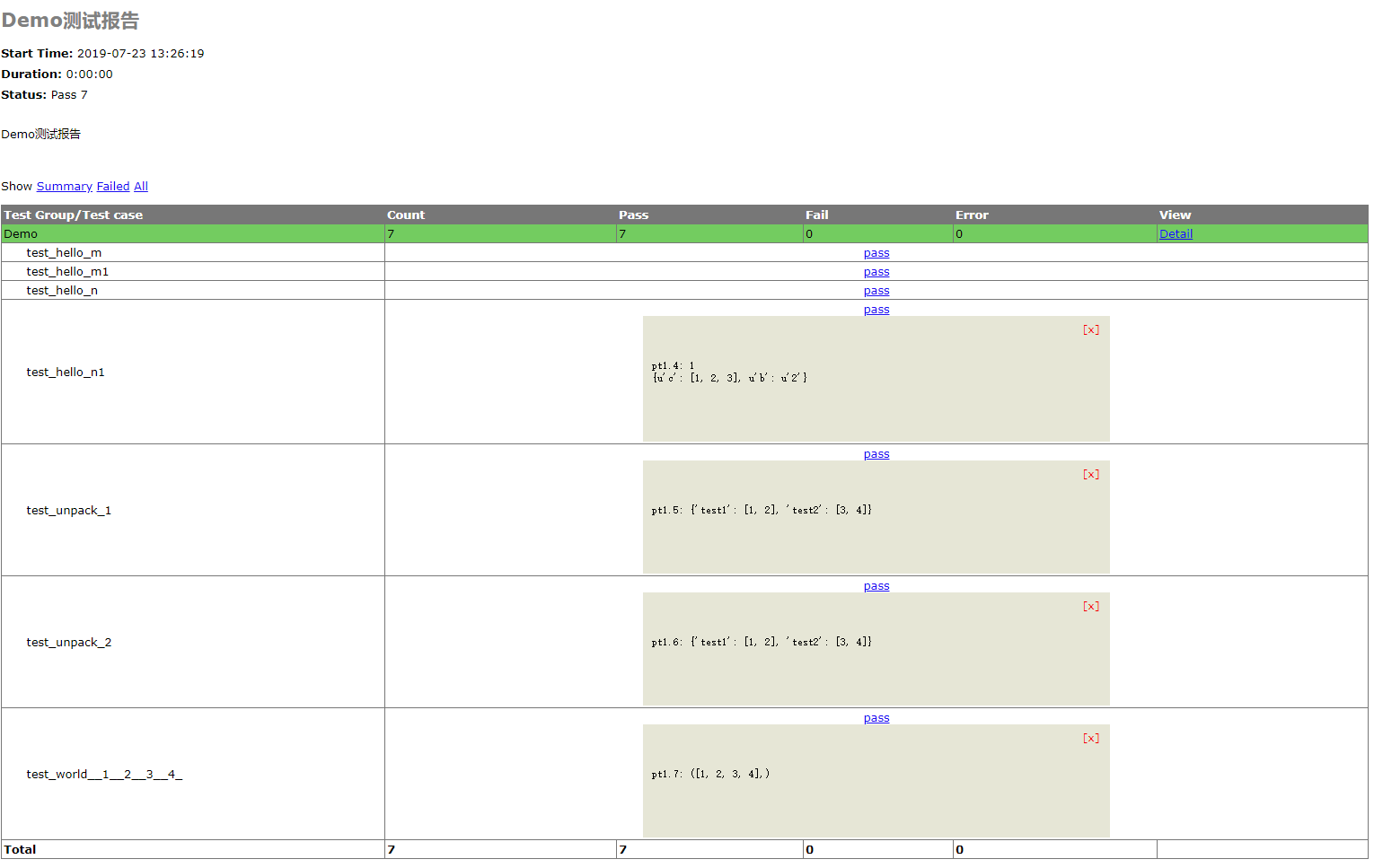
至此关于ddt的数据驱动暂时告一段落了,后面还会介绍基于excel、sql等相关的数据驱动内容,并进行对比总结,拭目以待~
python自动化测试之DDT数据驱动的更多相关文章
- 【Python + Selenium3】自动化测试之DDT数据驱动并生成测试报告以及用yagmail邮件发送文件
我的文件路径 一.DDT代码: import unittest from time import sleep from selenium import webdriver from ddt impor ...
- python自动化测试之连接几组测试包实例
python自动化测试之连接几组测试包实例 本文实例讲述了python自动化测试之连接几组测试包的方法,分享给大家供大家参考.具体方法如下: 具体代码如下: class RomanNumera ...
- 【python接口自动化】- DDT数据驱动测试
简单介绍 DDT(Date Driver Test),所谓数据驱动测试,简单来说就是由数据的改变从而驱动自动化测试的执行,最终引起测试结果的改变.通过使用数据驱动测试的方法,可以在需要验证多组数据 ...
- python自动化测试之异常及日志
为了保持自动化测试用例的健壮性,异常的捕获及处理,日志的记录对掌握自动化测试执行情况尤为重要,这里便详细的介绍下在自动化测试中使用到的异常及日志,并介绍其详细的用法. 一.日志 打印日志是很多程序的重 ...
- python Unittest+excel+ddt数据驱动测试
#!user/bin/env python # coding=utf- # @Author : Dang # @Time : // : # @Email : @qq.com # @File : # @ ...
- (转)python自动化测试之异常及日志
为了保持自动化测试用例的健壮性,异常的捕获及处理,日志的记录对掌握自动化测试执行情况尤为重要,这里便详细的介绍下在自动化测试中使用到的异常及日志,并介绍其详细的用法. 一.日志 打印日志是很多程序的重 ...
- python自动化测试之生成BeautifulReport可视化测试报告
用python写自动化测试时,unittest框架与BeautifulReport结合能够生成完美的可视化测试报告 [第一步]:准备好BeautifulReport,git地址: https://gi ...
- Python自动化测试之selenium从入门到精通
1. 安装selenium 首先确保python安装成功,输入python -V 在windows下使用pip安装selenium,详情如图所示: 在ubuntu下使用pip install sele ...
- python自动化测试之appium环境安装
1.安装client pip install Appium-Python-Clinet 若有两个版本的python则使用(python3 -m pip install Appium-Python-C ...
随机推荐
- 在 Visual Studio中 将 Objective-C 编译为 C++
快速使用Romanysoft LAB的技术实现 HTML 开发Mac OS App,并销售到苹果应用商店中. <HTML开发Mac OS App 视频教程> 土豆网同步更新:http: ...
- Qt静态编译时使用OpenSSL有三种方式(不使用,动态使用,静态使用,默认是动态使用)
When compiling Qt you can choose one of these options based on the configure command line: no OpenSS ...
- Delphi结束进程模块
function KillTask(ExeFileName: string): integer; const PROCESS_TERMINATE = $0001; var ContinueLoop: ...
- SQL基础复习1
一.概述 SQL语言组成:DDL,DCL,DML 二.数据定义 1.模式定义(Schema) Schema这个东西一直感觉不大明白,一直以为就是对表的字段定义则被称为Schema,在复习数据库理论中才 ...
- [转]深入了解iPad上的MouseEvent
iPad上没有鼠标,所以手指在触发触摸事件(TouchEvent)的时候,系统也会产生出模拟的鼠标事件(MouseEvent). 这对于普通网页的浏览需求而言,基本可以做到与PC端浏览器无明 ...
- NSCache缓存怎么来的
什么是NSCache NSCache主要用来存储临时数据(键值对),当内存资源不够时,系统会自动释放部分数据.它有三个特点: • NSCache为了保持不占用过多的系统内存,它有多种自动回收内存策略: ...
- Hive的一些学习内容
Hive相关 什么是metastore? metadata是元数据,包含数据库.表.字段.分区等信息.作用:客户端连接MetaStore服务,metastore再去连接MySQL数据库存储元数据,有了 ...
- spring cloud 系列第5篇 —— hystrix+turbine 服务的熔断与监控 (F版本)
源码Gitub地址:https://github.com/heibaiying/spring-samples-for-all 一.hystrix 简介 1.1 熔断器 在分布式系统中,由于服务之间相互 ...
- BootStrap4.0Demo+轮播素材记录
整理一些关于前端的东西: BootStrap4.0Demo: 官方DEMO:http://code.z01.com/v4/components/carousel.html 下午翻了点不错的轮播素材: ...
- mysql产生死锁
select * from information_schema.innodb_trx; kill 对应线程ID show PROCESSLIST;