
【数字图像分析】基于Python实现 Canny Edge Detection(Canny 边缘检测算法)
Canny 边缘检测算法
Steps:
- 高斯滤波平滑
- 计算梯度大小和方向
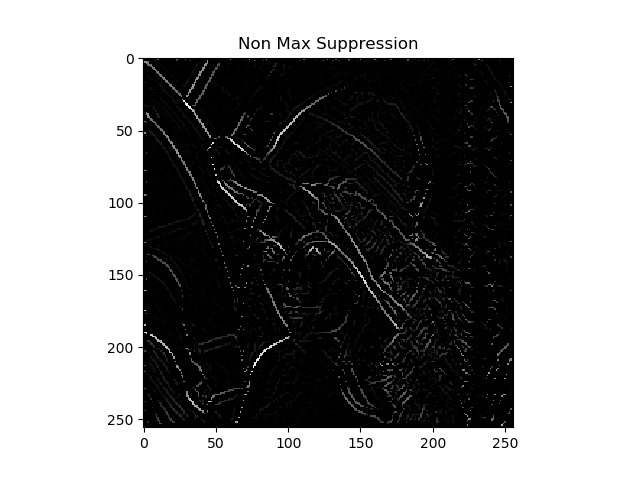
- 非极大值抑制
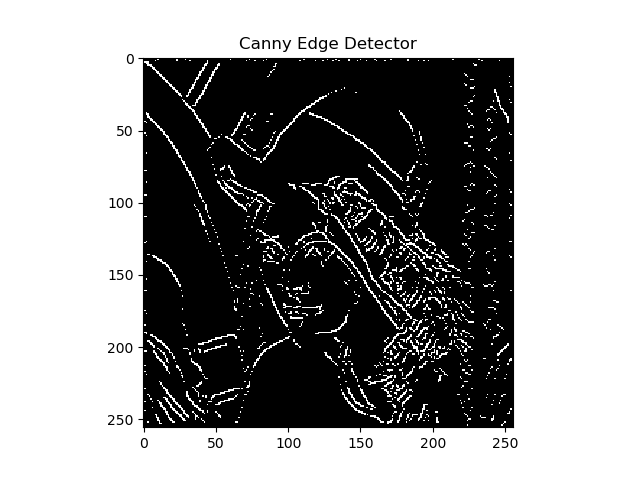
- 双阈值检测和连接
代码结构:
Canny Edge Detection

|	Gaussian_Smoothing

|		|	convolution.py

|		|	|	convolution()

|		|	gaussion_smoothing.py

|		|	|	dnorm()

|		|	|	gaussian_kernel()

|		|	|	gaussian_blur()

|	Sobel_Filter

|		|	sobel.py

|		|	|	sobel_edge_detection()

|	Canny.py

|		|	non_max_suppression()

|		|	threshold()

|		|	hysteresis()

|		|	main()
代码解读:
1. 高斯滤波平滑
创建一个高斯核(kernel_size=5):
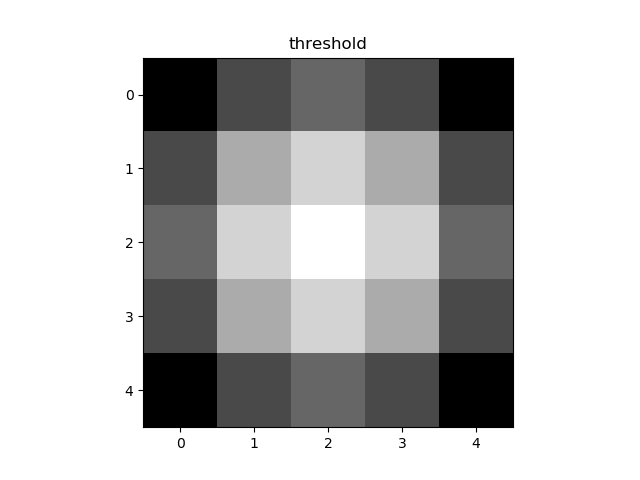
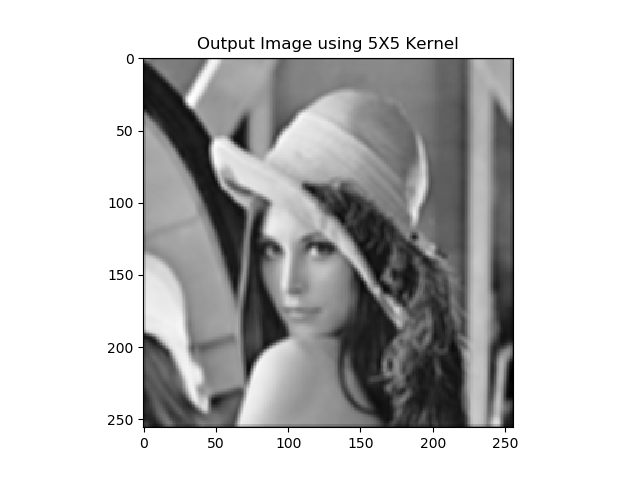
执行卷积和平均操作(以下均以 lenna 图为例)
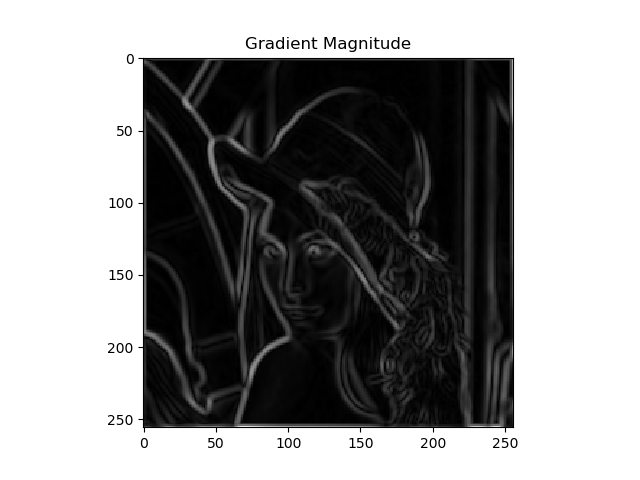
2. 计算梯度大小和方向
水平方向和竖直方向
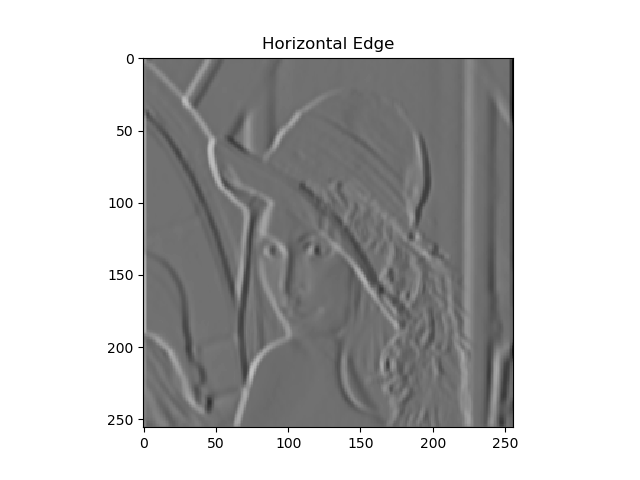
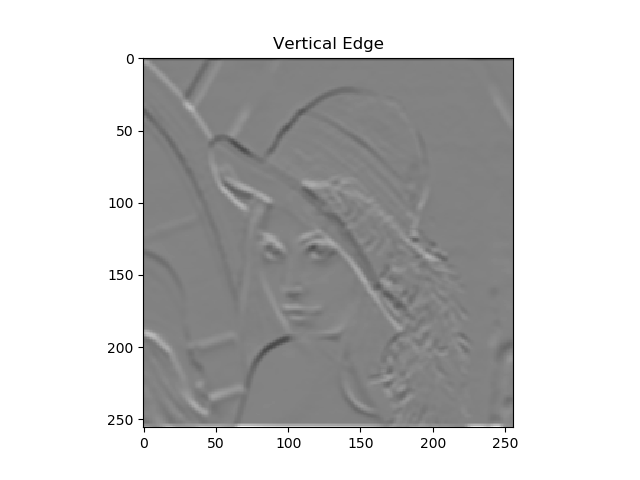
梯度图:
3. 非极大值抑制
4. 双阈值检测和连接
以下是代码:
import numpy as np

import cv2

import argparse

from Computer_Vision.Canny_Edge_Detection.sobel import sobel_edge_detection

from Computer_Vision.Canny_Edge_Detection.gaussian_smoothing import gaussian_blur

import matplotlib.pyplot as plt

def non_max_suppression(gradient_magnitude, gradient_direction, verbose):

    image_row, image_col = gradient_magnitude.shape

    output = np.zeros(gradient_magnitude.shape)

    PI = 180

    for row in range(1, image_row - 1):

        for col in range(1, image_col - 1):

            direction = gradient_direction[row, col]

            if (0 <= direction < PI / 8) or (15 * PI / 8 <= direction <= 2 * PI):

                before_pixel = gradient_magnitude[row, col - 1]

                after_pixel = gradient_magnitude[row, col + 1]

            elif (PI / 8 <= direction < 3 * PI / 8) or (9 * PI / 8 <= direction < 11 * PI / 8):

                before_pixel = gradient_magnitude[row + 1, col - 1]

                after_pixel = gradient_magnitude[row - 1, col + 1]

            elif (3 * PI / 8 <= direction < 5 * PI / 8) or (11 * PI / 8 <= direction < 13 * PI / 8):

                before_pixel = gradient_magnitude[row - 1, col]

                after_pixel = gradient_magnitude[row + 1, col]

            else:

                before_pixel = gradient_magnitude[row - 1, col - 1]

                after_pixel = gradient_magnitude[row + 1, col + 1]

            if gradient_magnitude[row, col] >= before_pixel and gradient_magnitude[row, col] >= after_pixel:

                output[row, col] = gradient_magnitude[row, col]

    if verbose:

        plt.imshow(output, cmap='gray')

        plt.title("Non Max Suppression")

        plt.show()

    return output

def threshold(image, low, high, weak, verbose=False):

    output = np.zeros(image.shape)

    strong = 255

    strong_row, strong_col = np.where(image >= high)

    weak_row, weak_col = np.where((image <= high) & (image >= low))

    output[strong_row, strong_col] = strong

    output[weak_row, weak_col] = weak

    if verbose:

        plt.imshow(output, cmap='gray')

        plt.title("threshold")

        plt.show()

    return output

def hysteresis(image, weak):

    image_row, image_col = image.shape

    top_to_bottom = image.copy()

    for row in range(1, image_row):

        for col in range(1, image_col):

            if top_to_bottom[row, col] == weak:

                if top_to_bottom[row, col + 1] == 255 or top_to_bottom[row, col - 1] == 255 or top_to_bottom[row - 1, col] == 255 or top_to_bottom[

                    row + 1, col] == 255 or top_to_bottom[

                    row - 1, col - 1] == 255 or top_to_bottom[row + 1, col - 1] == 255 or top_to_bottom[row - 1, col + 1] == 255 or top_to_bottom[

                    row + 1, col + 1] == 255:

                    top_to_bottom[row, col] = 255

                else:

                    top_to_bottom[row, col] = 0

    bottom_to_top = image.copy()

    for row in range(image_row - 1, 0, -1):

        for col in range(image_col - 1, 0, -1):

            if bottom_to_top[row, col] == weak:

                if bottom_to_top[row, col + 1] == 255 or bottom_to_top[row, col - 1] == 255 or bottom_to_top[row - 1, col] == 255 or bottom_to_top[

                    row + 1, col] == 255 or bottom_to_top[

                    row - 1, col - 1] == 255 or bottom_to_top[row + 1, col - 1] == 255 or bottom_to_top[row - 1, col + 1] == 255 or bottom_to_top[

                    row + 1, col + 1] == 255:

                    bottom_to_top[row, col] = 255

                else:

                    bottom_to_top[row, col] = 0

    right_to_left = image.copy()

    for row in range(1, image_row):

        for col in range(image_col - 1, 0, -1):

            if right_to_left[row, col] == weak:

                if right_to_left[row, col + 1] == 255 or right_to_left[row, col - 1] == 255 or right_to_left[row - 1, col] == 255 or right_to_left[

                    row + 1, col] == 255 or right_to_left[

                    row - 1, col - 1] == 255 or right_to_left[row + 1, col - 1] == 255 or right_to_left[row - 1, col + 1] == 255 or right_to_left[

                    row + 1, col + 1] == 255:

                    right_to_left[row, col] = 255

                else:

                    right_to_left[row, col] = 0

    left_to_right = image.copy()

    for row in range(image_row - 1, 0, -1):

        for col in range(1, image_col):

            if left_to_right[row, col] == weak:

                if left_to_right[row, col + 1] == 255 or left_to_right[row, col - 1] == 255 or left_to_right[row - 1, col] == 255 or left_to_right[

                    row + 1, col] == 255 or left_to_right[

                    row - 1, col - 1] == 255 or left_to_right[row + 1, col - 1] == 255 or left_to_right[row - 1, col + 1] == 255 or left_to_right[

                    row + 1, col + 1] == 255:

                    left_to_right[row, col] = 255

                else:

                    left_to_right[row, col] = 0

    final_image = top_to_bottom + bottom_to_top + right_to_left + left_to_right

    final_image[final_image > 255] = 255

    return final_image

if __name__ == '__main__':

    ap = argparse.ArgumentParser()

    ap.add_argument("-i", "--image", required=True, help="Path to the image")

    ap.add_argument("-v", "--verbose", type=bool, default=False, help="Path to the image")

    args = vars(ap.parse_args())

    image = cv2.imread(args["image"])

    blurred_image = gaussian_blur(image, kernel_size=9, verbose=False)

    edge_filter = np.array([[-1, 0, 1], [-2, 0, 2], [-1, 0, 1]])

    gradient_magnitude, gradient_direction = sobel_edge_detection(blurred_image, edge_filter, convert_to_degree=True, verbose=args["verbose"])

    new_image = non_max_suppression(gradient_magnitude, gradient_direction, verbose=args["verbose"])

    weak = 50

    new_image = threshold(new_image, 5, 20, weak=weak, verbose=args["verbose"])

    new_image = hysteresis(new_image, weak)

    plt.imshow(new_image, cmap='gray')

    plt.title("Canny Edge Detector")

    plt.show()
References
hahahha
【数字图像分析】基于Python实现 Canny Edge Detection(Canny 边缘检测算法)的更多相关文章
- 猜数字游戏--基于python
"""题目:练习使用python写一个猜数字的游戏,数字范围0-100,每次猜错,需要给出缩小后的范围,每个人只有10次的猜测机会,猜测机会用完游戏结束!"&q ...
- 【笔记】基于Python的数字图像处理
[博客导航] [Python相关] 前言 基于Python的数字图像处理,离不开相关处理的第三方库函数.搜索网络资源,列出如下资源链接. Python图像处理库到底用哪家 python计算机视觉编程— ...
- Image Processing and Analysis_8_Edge Detection:Scale-space and edge detection using anisotropic diffusion——1990
此主要讨论图像处理与分析.虽然计算机视觉部分的有些内容比如特 征提取等也可以归结到图像分析中来,但鉴于它们与计算机视觉的紧密联系,以 及它们的出处,没有把它们纳入到图像处理与分析中来.同样,这里面也有 ...
- Image Processing and Analysis_8_Edge Detection:A Computational Approach to Edge Detection——1986
此主要讨论图像处理与分析.虽然计算机视觉部分的有些内容比如特 征提取等也可以归结到图像分析中来,但鉴于它们与计算机视觉的紧密联系,以 及它们的出处,没有把它们纳入到图像处理与分析中来.同样,这里面也有 ...
- Image Processing and Analysis_8_Edge Detection:Theory of Edge Detection ——1980
此主要讨论图像处理与分析.虽然计算机视觉部分的有些内容比如特 征提取等也可以归结到图像分析中来,但鉴于它们与计算机视觉的紧密联系,以 及它们的出处,没有把它们纳入到图像处理与分析中来.同样,这里面也有 ...
- 计算机视觉中的边缘检测Edge Detection in Computer Vision
计算机视觉中的边缘检测 边缘检测是计算机视觉中最重要的概念之一.这是一个很直观的概念,在一个图像上运行图像检测应该只输出边缘,与素描比较相似.我的目标不仅是清晰地解释边缘检测是怎样工作的,同时也提 ...
- Image Processing and Analysis_8_Edge Detection:Edge Detection Revisited ——2004
此主要讨论图像处理与分析.虽然计算机视觉部分的有些内容比如特 征提取等也可以归结到图像分析中来,但鉴于它们与计算机视觉的紧密联系,以 及它们的出处,没有把它们纳入到图像处理与分析中来.同样,这里面也有 ...
- Image Processing and Analysis_8_Edge Detection:Local Scale Control for Edge Detection and Blur Estimation——1998
此主要讨论图像处理与分析.虽然计算机视觉部分的有些内容比如特 征提取等也可以归结到图像分析中来,但鉴于它们与计算机视觉的紧密联系,以 及它们的出处,没有把它们纳入到图像处理与分析中来.同样,这里面也有 ...
- Image Processing and Analysis_8_Edge Detection: Optimal edge detection in two-dimensional images ——1996
此主要讨论图像处理与分析.虽然计算机视觉部分的有些内容比如特 征提取等也可以归结到图像分析中来,但鉴于它们与计算机视觉的紧密联系,以 及它们的出处,没有把它们纳入到图像处理与分析中来.同样,这里面也有 ...
随机推荐
- 字典树(Trie)详解
详解字典树(Trie) 本篇随笔简单讲解一下信息学奥林匹克竞赛中的较为常用的数据结构--字典树.字典树也叫Trie树.前缀树.顾名思义,它是一种针对字符串进行维护的数据结构.并且,它的用途超级广泛.建 ...
- ReactNative: 使用滚动视图ScrollView组件
一.简介 当页面内容的非常多时,即使换行后仍然无法充分显示,此时最好的解决办法就是让页面可以滚动显示.在React-Native中,提供了可供滚动的视图组件ScrollView组件.它的属性和方法以及 ...
- 利用Python进行数据分析-Pandas(第五部分-数据规整:聚合、合并和重塑)
在许多应用中,数据可能分散在许多文件或数据库中,存储的形式也不利于分析.本部分关注可以聚合.合并.重塑数据的方法. 1.层次化索引 层次化索引(hierarchical indexing)是panda ...
- 【Hash一致性算法】什么是Hash一致性算法
目录 1. 一致性Hash算法简介 环形Hash空间 把数据通过一定的hash算法处理后映射到环上 将机器通过hash算法映射到环上 机器的删除与添加 平衡性 本文转载自博客 1. 一致性Hash算法 ...
- Centos7 下 PHP 添加缺少的组件 sockets 和 openssl
环境是 centos7 + nginx 1.14 + php 7.2.18,由于新增邮件发送功能,使用的是 socket 通讯的方式,需要开启 php 的 sockes 和 openssl 扩展 安装 ...
- Java生鲜电商平台-电商数据运营统计与分析
Java生鲜电商平台-电商数据运营统计与分析 今天分享将会分为以下几个方面来阐述: 1. 作为运营我们需要统计与分析的几个核心数据是什么? 2. 核心数据对业务的指导价值在哪里呢? 3. 作为产品PM ...
- Python【day 18】面向对象-类和类的关系
一.昨日内容回顾 成员 1.变量 1.成员变量--最常见 1.写法: 变量前面加了self就是成员变量 这里的self表示当前对象 一般是在构造方法中定义 2.调用: 对象.成员变量 3.作用: 可以 ...
- javaWeb核心技术第六篇之BootStrap
概述: Bootstrap 是最受欢迎的 HTML.CSS 和 JS 框架,用于开发响应式布局.移动设备优先的 WEB 项目. 作用: 开发响应式的页面 响应式:就是一个网站能够兼容多个终端 节约开发 ...
- Specify Action Settings 指定按钮设置
In this lesson, you will learn how to modify Action properties. The ClearTasks Action will be used. ...
- 架构视角 - DDD、TDD、MDD领域驱动、测试驱动还是模型驱动?
提出问题 「领域驱动设计」之于微服务,好比麦当劳之于汉堡(个人更喜欢肯德基,汉堡要大些,麦当劳的汉堡,想吃顿饱饭,请先给我上6个