
<转>WPF 中的绑定
在WPF应用的开发过程中Binding是一个非常重要的部分。
在实际开发过程中Binding的不同种写法达到的效果相同但事实是存在很大区别的。
这里将实际中碰到过的问题做下汇总记录和理解。
1. source = {binding} 和source = {binding RelativeSource={RelativeSource self},Path=DataContext}效果相同
理解:{binding} 不设定明确的绑定的source,这样binding就去从本控件类为开始根据可视树的层次结构自下而上查找不为空的Datacontext属性的值。
{binding RelativeSource={RelativeSource self},Path=DataContext}中RelativeSource self的含义为绑定的source为控件自身,这样binding 就绑定了自身控件的Datacontext。
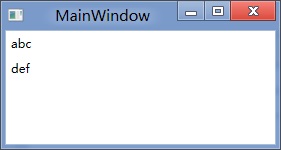
效果:
<StackPanel DataContext="abc"> <Label Content="{Binding}"></Label> <Label Content="{Binding RelativeSource={RelativeSource Self},Path=DataContext}"></Label> </StackPanel>

<StackPanel DataContext="abc"> <Label Content="{Binding}"></Label> <Label DataContext="def" Content="{Binding RelativeSource={RelativeSource Self},Path=DataContext}"></Label> </StackPanel>
2.在Template的Trigger中改变Template中某个样式控件的属性
<Style TargetType="{x:Type Button}"> <Setter Property="Template"> <Setter.Value> <ControlTemplate TargetType="{x:Type Button}"> <Border> <Label x:Name="PART_Label" Content="{TemplateBinding ContentA}" /> </Border>
<ControlTemplate.Triggers> <Trigger Property="IsChecked" Value="True"> 注: <Setter TargetName="PART_Label" Property="Content" Value="{Binding Path=ContentB, RelativeSource={RelativeSource TemplatedParent}}" /> </Trigger> </ControlTemplate.Triggers> </ControlTemplate> </Setter.Value> </Setter> </Style>
当然把注:的这句改成<Setter TargetName="PART_Label" Property="Content" Value="{Binding Path=ContentB, RelativeSource={RelativeSource AncestorType={x:Type Button}}}">效果一样。
我们来看一看Elementname,Source,RelativeSource 三种绑定的方式
1.ElementName顾名思义就是根据Ui元素的Name来进行绑定:
例子:
<Window x:Name="MainWindow">
<Grid> <Button Background=”{Binding ElementName=MainWindow, Path=Background}”/> </Grid>
</Window>
效果等同于
<Window>
<Grid> <Button Background=”{Binding RelativeSource={RelativeSource Mode=FindAncestor, AncestorType={x:Type Window},Path=Background}”/> </Grid>
</Window>
区别:
ElementName属性用于引用一个UI对象的名称,其的作用域在同一XAML文件内,不能引用另一XAML文件的某个Ui元素名。
2.Source属性用于指定对象绑定路径的引用。 其特点是:Source属性通常用于绑定设置的对象时,是已知的。
<Window x:Name="MainWindow">
<Grid> <Button Background=”{Binding Source={StaticResource ButtonStyle}}”/> </Grid>
</Window>
3.RelativeSource
在不确定绑定的Source时,但知道与绑定对象两者相对关系时就需要使用RelativeSource,这也是RelativeSource 与ElementName和Source的最大区别。
RelativeSource 的三种典型用法:
/1.UI元素的一个属性绑定在自身的另一个属性上
<Label Background = {Binding Path=Forgroud, RelativeSource={RelativeSource Self}} />
/2.UI元素的一个属性绑定在某个父元素的属性上
<Grid>
<Label Background = {Binding Path=Background, RelativeSource={RelativeSource AncestorType={x:Type Grid}}}/>
</Grid>
/3.Template中的元素的属性绑定在Template使用者元素的属性上
{Binding Path=PathToProperty, RelativeSource={RelativeSource TemplatedParent}}
例子:
<Style TargetType="{x:Type local:NumericUpDown}"> <Setter Property="HorizontalAlignment" Value="Center"/> <Setter Property="VerticalAlignment" Value="Center"/> <Setter Property="Template"> <Setter.Value> <ControlTemplate TargetType="{x:Type local:NumericUpDown}"> <Grid Margin="3"> <Grid.RowDefinitions> <RowDefinition/> <RowDefinition/> </Grid.RowDefinitions> <Grid.ColumnDefinitions> <ColumnDefinition/> <ColumnDefinition/> </Grid.ColumnDefinitions> <Border BorderThickness="1" BorderBrush="Gray" Margin="2" Grid.RowSpan="2" VerticalAlignment="Center" HorizontalAlignment="Stretch">
<TextBlock Text="{Binding RelativeSource={RelativeSource TemplatedParent}, Path=Value}" Width="60" TextAlignment="Right" Padding="5"/> </Border> </Grid> </ControlTemplate> </Setter.Value> </Setter> </Style>
利用TemplateBinding 绑定模板与原对象之间的属性
{TemplateBinding Path=PathToProperty}
例子:
<ControlTemplate TargetType="{x:Type Button}" x:Key="buttonTemp"> <Border BorderThickness="3" Background="{TemplateBinding Foreground}"> <TextBlock Foreground="{TemplateBinding Background}"/> </Border> </ControlTemplate>
<转>WPF 中的绑定的更多相关文章
- 封装:WPF中可以绑定的BindPassWord控件
原文:封装:WPF中可以绑定的BindPassWord控件 一.目的:本身自带的PassWord不支持绑定 二.Xaml部分 <UserControl x:Class="HeBianG ...
- WPF 中双向绑定通知机制之ObservableCollection使用
msdn中 ObservableCollection<T> 类 表示一个动态数据集合,在添加项.移除项或刷新整个列表时,此集合将提供通知. 在许多情况下,所使用的数据是对象的集合 ...
- WPF中RadioButton绑定数据的正确方法
RadioButton一般用于单选的时候,也就是从一组值中选择一个值. 比如性别有“男”和“女”两种取值,而对于一个员工的实例来说,性别的取值要么是男,要么是女. 这种时候一般就会用到RadioBut ...
- ComboBox在WPF中的绑定示例:绑定项、集合、转换,及其源代码
示例1.Selector(基类) 的示例Controls/SelectionControl/SelectorDemo.xaml <Page x:Class="Windows10.Con ...
- WPF中Grid绑定DataTable数据。
1.首先引用DocumentFormat.OpenXml.dll 2.然后新建一个OpenExcelHelper类,将Excel转化为Datatable. /// <summary> ...
- WPF 中的绑定方式
1.元素间的绑定 xaml方式 <Slider Name="slider1" Value="20"/> <TextBlock T ...
- WPF中ItemsControl绑定到Google ProtocolBuffer的结构体时的性能问题
背景: 最近遇到一个DataGrid的性能问题:里面大概有4000个数据, 绑定的ItemSource的类也只有一层数据,即简单的List(里面每个是Protocol Buffer自动产生的一个类,1 ...
- wpf中datagrid绑定数据源发生改变
1.若datagrid绑定的数据源是同一个的话,即使里面的数据不同.页面也不会刷新,则需要重置数据源,再绑定.处理如下: datagrid1.ItemsSource=ListModule; 若List ...
- WPF中ComboBox绑定数据库自动读取产生数据
前台端 <ComboBox HorizontalAlignment="Name="cmb_SSBM" DisplayMemberPath="NAME&qu ...
随机推荐
- 【LeetCode】437. 路径总和 III
437. 路径总和 III 给定一个二叉树,它的每个结点都存放着一个整数值. 找出路径和等于给定数值的路径总数. 路径不需要从根节点开始,也不需要在叶子节点结束,但是路径方向必须是向下的(只能从父节点 ...
- 【微信小程序】安装DingoApi开发小程序api
1.安装 composer require dingo/api 2.发布配置: php artisan vendor:publish 选择DingoApi发布. 3.向.env文件添加配置 (1)项目 ...
- MySQL日常使用遵循的规范建议
一 . 基础规范 1.必须使用InnoDB存储引擎 解读:支持事务:支持行级锁:支持MVCC多版本控制:支持外键:死锁自动检测:并发性能更好.CPU及内存缓存页优化使得资源利用率更高. 2. 表字符 ...
- Python—实现ssl认证
https://blog.csdn.net/vip97yigang/article/details/84721027 https://www.cnblogs.com/lsdb/p/9397530.ht ...
- [Go] 利用channel形成管道沟通循环内外
这个要解决的问题是,比如如果有一个大循环,取自一个大的文件,要进行逻辑处理,那么这个逻辑的代码要放在循环每一行的循环体里面,这样有可能会出现一个for循环的逻辑嵌套,一层又一层,类似俄罗斯套娃.如果放 ...
- nginx 的 proxy_cache 缓存配置
开头:某个项目涉及到 视频切片下载到本地,然后提供服务给客户端.一个视频有多个文件,存储在本地路径下.当客户端请求的视频在本地没有就会回源, 回源拿到的视频文件再返回给客户端,同时在本地缓存一份,提供 ...
- 1. 配置Java开发环境
一.JDK & JRE & JVM 1. JDK是什么? JDK的全称是Java SE Development Kit,即Java标准版开发包,是Oracle提供的一套用于开发Java ...
- vue2.0教手架安装
- lua 10 迭代器
转自:http://www.runoob.com/lua/lua-iterators.html 迭代器(iterator)是一种对象,它能够用来遍历标准模板库容器中的部分或全部元素,每个迭代器对象代表 ...
- 消息中间件(二)MQ使用场景
一.消息队列概述 消息队列中间件是分布式系统中重要的组件,主要解决应用解耦,异步消息,流量削锋等问题,实现高性能,高可用,可伸缩和最终一致性架构.目前使用较多的消息队列有ActiveMQ,Rabbit ...