
【React】Redux入门 & store体验
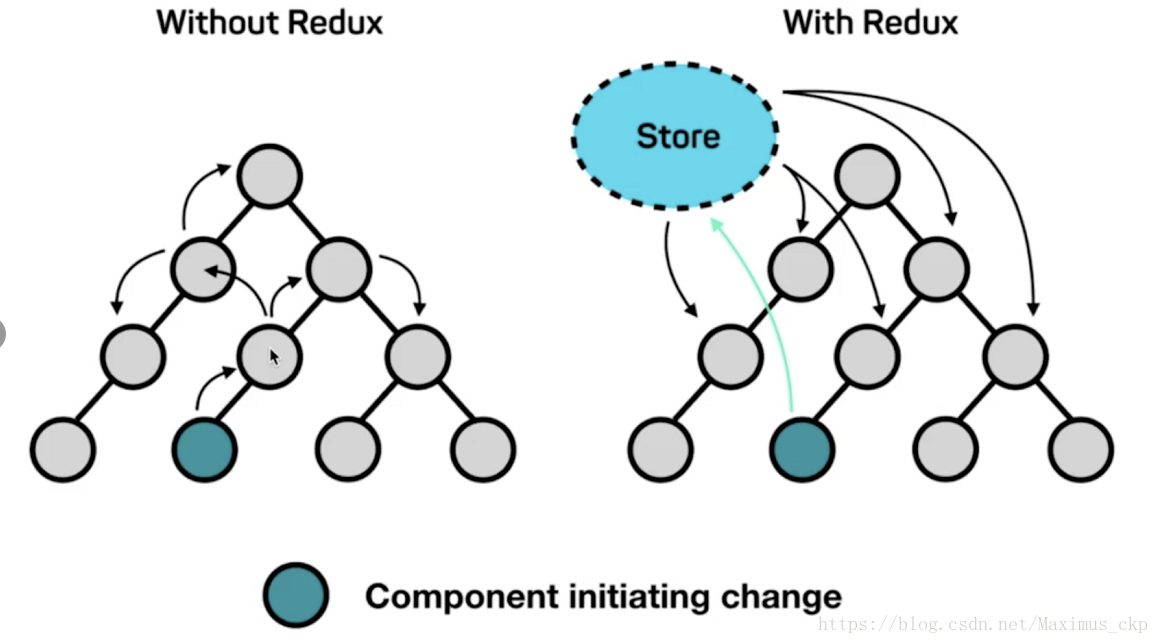
组件间传值联动是令人头疼的问题,尤其是一个组件影响多个其他组件状态变化的时候,常常需要一级一级与父组件传值,与父组件的兄弟组件传值等等,
如何化繁为简地处理‘牵一发动全身’的清理就是将所有组件的state中的值,用redux数据框架store统一记录管理。
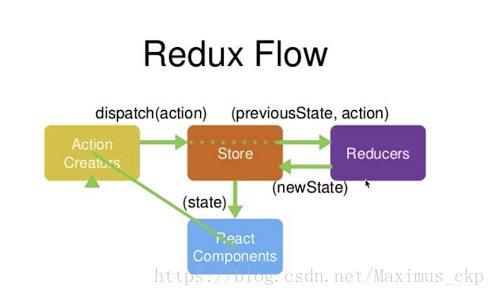
ReactComponents(组件)通过ActionCreators告诉Store要获取/更改哪个值,Store通过查询Reducer后,更新Reducer的值再将更新后的值传递给ReactCompnents
保持组件与Store中的存储数据的同步。可以理解为ReactCompents为借书的人,ActionCreators为借书人说出的借书请求,Store为图书管理员,Reducer是记录书籍的小本本儿
使用步骤:
1.安装Redux
npm install --save redux
2.src下新建 store 文件夹,并新建index.js
3.index.js中 通过 createStore 方法创建 store
import { createStore } from 'redux';

const store =createStore();

export default store;
4.store 文件夹下新建 reducer.js 并声明各组件所需 state 中的变量
const defaultState = {

    inputValue: '',

    list:[1,2],

    showMsg:false

}

export default (state = defaultState,action)=>{

    return state;

}
5.将 reducer 作为参数传给 createStore 方法,创建 store
import { createStore } from 'redux';

import reducer from './reducer';

const store =createStore(reducer);

export default store;
6.将组件文件中引入 store 并将 state 与 store 进行绑定
// 引入store

import store from './store'; // './store/index.js'的简写

...

class Todolist extends Component {

  constructor(props){

    super(props);

    // 原组件中的state与store进行绑定

    // this.state={

    //   inputValue: '', // 输入框中的值

    //   list: [], // todolist数组

    //   showMsg: false

    // }

    this.state = store.getState();

    ...

  }

  ...

}
7.方法中声明 action 传递给 store,让 store 去根据 action.type 在 reducer 中做判断,决定将 reducer 中哪个值改为 action.value,并返回一个新 state 让 store 通知组件去更新
<input type="text" value={this.state.inputValue} onChange={this.handleInput}/>
// 动态监听输入变化inputValue值

handleInput(e) {

   // let inputValue = e.target.value; // 获取input值

   // this.setState({

   //   inputValue // 键值对相同时 可简写

   // });

   const action = {

     type:'change_input_value',

     value:e.target.value

   }

   store.dispatch(action); // 解析action

}
reducer.js 中接收 action,返回最新数据给 store
const defaultState = {

    inputValue: '',

    list:[1,2],

    showMsg:false

}

export default (state = defaultState,action)=>{

    // 根绝action.type 判断更改何值

    if(action.type === 'change_input_value'){

        // why copy old state -> newState ? reducer 可以接收state 不能修改state!!!

        const newState = JSON.parse(JSON.stringify(state)); // 深度拷贝

        newState.inputValue = action.value;

        return newState;

    }

    return state;

}
8.store 的变化要与组件联动,组件需要注册监听 store 的变化,并通过回调更新组件的state
// 引入store

import store from './store'; // './store/index.js'的简写

...

class Todolist extends Component {

  constructor(props){

    super(props);

    this.state = store.getState();

    // 注意需要绑定 this

    this.handleStoreChange = this.handleStoreChange.bind(this);

    // 注册监听store,store变化后调用组件的handleStoreChange方法更新组件的state

    store.subscribe(this.handleStoreChange);

    ...

  }

  ...

  // store 变化后,更新组件的 state

  handleStoreChange() {

    this.setState(

      store.getState()

    )

  }

}
总结
- reducer 中定义好所有组件中需要的 state 中对应的变量结构
- const store = createStore(reducer) 新建 store
- 组件构造方法中 this.state = store.getState(); 从 store 中同步初始数据
- 组件订阅 store 变化 , store.subscribe(this.handleStoreChange.bind(this));
- 组件通过方法 传递 action 给 store, store 通过 dispatch(action) 解析,让reducer 更新数据,返回新 state 给 store
原文链接:https://blog.csdn.net/Maximus_ckp/article/details/81872273
【React】Redux入门 & store体验的更多相关文章
- 看了就学会之React redux入门示例
环境准备 为了方便,这里使用create-react-app搭建react环境 create-react-app mydemo 弹出配置 如果需要自定义react的配置,需要运行下面的命令把配置文件弹 ...
- React + Redux 入门(一):抛开 React 学 Redux
http://www.hacke2.cn/think-in-react-redux-1/
- react+redux官方实例TODO从最简单的入门(6)-- 完结
通过实现了增-->删-->改-->查,对react结合redux的机制差不多已经了解,那么把剩下的功能一起完成吧 全选 1.声明状态,这个是全选状态 2.action约定 3.red ...
- react+redux官方实例TODO从最简单的入门(1)-- 前言
刚进公司的时候,一点react不会,有一个需求要改,重构页面!!!完全懵逼,一点不知道怎么办!然后就去官方文档,花了一周时间,就纯react实现了页面重构,总体来说,react还是比较简单的,由于当初 ...
- React从入门到放弃之前奏(3):Redux简介
安装 npm i -S redux react-redux redux-devtools 概念 在redux中分为3个对象:Action.Reducer.Store Action 对行为(如用户行为) ...
- React从入门到放弃之前奏(4):Redux中间件
redux 提供了类似后端 Express 的中间件概念. 最适合扩展的是redux中的 store.dispatch 方法,中间件实际就是通过 override redux的store.dispat ...
- 6周学习计划,攻克JavaScript难关(React/Redux/ES6 etc.)
作者:余博伦链接:https://zhuanlan.zhihu.com/p/23412169来源:知乎著作权归作者所有.商业转载请联系作者获得授权,非商业转载请注明出处. 和大家一样,最近我也看了Jo ...
- React Redux Sever Rendering实战
# React Redux Sever Rendering(Isomorphic JavaScript) :Android仿写微信发现
首先我们来看看仿写之后的效果: 看到是这个界面我们首先应该思考这些按钮是怎么做出来的?有了一个整体的思路之后才知道该怎么办.最开始我想的就直接利用button控件上面直接加上png的图片就可以形成一个 ...
- 安装新版Magisk卡在启动页面等问题以及解决办法
手持小米9,之前更新了新版本的Magisk Manager之后,发现手机再打开会一直卡在进入界面无法启动(如下图显示) 逛了逛Github.XDA.Stack Overflow等论坛,大致结论 ...
- 【JavaWeb】EL表达式
EL表达式 EL表达式语言,用于简化JSP的输出: EL表达式的基本语法:${表达式}: 示例:<h1>学生姓名:${student.name}</h1> 作用域对象 忽略书写 ...
- UML类图和用例图
软件体系结构的多视图 kruchten提出了软件体系结构的4+1视图模型,其中用例图位于中心位置(4+1视图中的1). 逻辑视图 一种静态建模视图 进程视图 一种并发进程或任务视图 开发视 ...
- typora使用说明
一级标题 # 空格 编写内容 二级标题 ## 空格 编写内容 有序内容 1.+Tab 无序内容 -+Tab 代码块 print("hello wrold") typora快捷键 c ...
- Jinkins自动构建
Jinkins自动构建 1.项目添加 点击左侧操作栏“新建”,填写项目基础信息,如下图: 2. General配置 2.1 丢弃旧的构建 注:此处勾选丢弃旧的构建,默认天数为1,最大个数建议填写3-5 ...
- 开源项目 13 log4net
原文:https://www.cnblogs.com/pudefu/p/9300697.html 官方的api: http://logging.apache.org/log4net/release/s ...
- pycharm配置docker
- 认识一下transition
transition 以前的CSS属性切换时,由于只有开始和截止两个状态,切换时略显生硬 jquery.animate 传说中的jquery在保证兼容性之后,又为开发者提供了简洁的过渡(动画其中之一效 ...
- poi实现excel数据的导入和导出
内容来源于网络,侵删. 1.需要的jar包 <dependency> <groupId>org.apache.poi</groupId> <artifactI ...