
Winform组合ComboBox和TreeView实现ComboTree
最近做Winform项目需要用到类似ComboBox的TreeView控件。
虽然各种第三方控件很多,但是存在各种版本不兼容问题。所以自己写了个简单的ComboTreeView控件。
下图是实现效果:
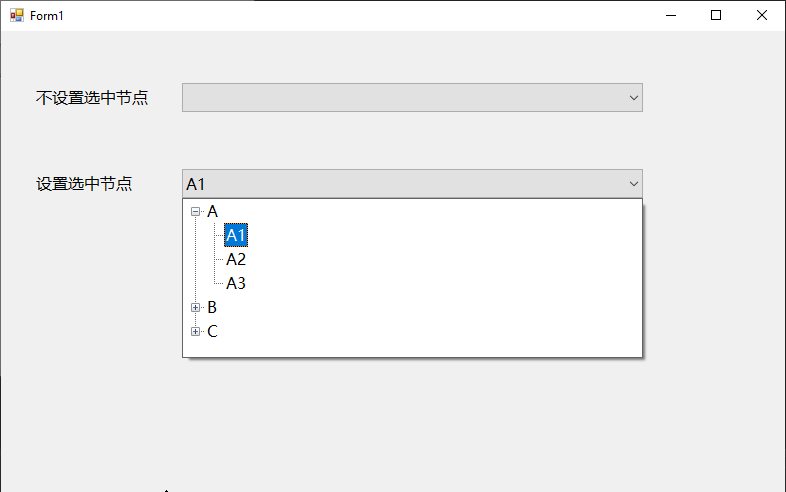
目前实现的比较简单,能满足我项目中的需求。
此处是项目中的代码简化后的版本,供大家参考。
 using System;

 using System.Collections.Generic;

 using System.Windows.Forms;

 namespace CustomControl.Tree

 {

     public abstract class ComboTreeView<T> : ComboBox where T : class

     {

         protected const int WM_LBUTTONDOWN = 0x0201, WM_LBUTTONDBLCLK = 0x0203;

         protected TreeView treeView;

         protected ToolStripControlHost treeViewHost;

         protected ToolStripDropDown dropDown;

         protected bool dropDownOpen = false;

         protected TreeNode selectedNode;

         protected T toBeSelected;

         public ComboTreeView(TreeView internalTreeView)

         {

             if (null == internalTreeView)

             {

                 throw new ArgumentNullException("internalTreeView");

             }

             this.InitializeControls(internalTreeView);

         }

         public event TreeNodeChangedEventHandler TreeNodeChanged;

         protected virtual void InitializeControls(TreeView internalTreeView)

         {

             this.treeView = internalTreeView;

             this.treeView.BorderStyle = BorderStyle.FixedSingle;

             this.treeView.Margin = new Padding();

             this.treeView.Padding = new Padding();

             this.treeView.AfterExpand += new TreeViewEventHandler(this.WhenAfterExpand);

             this.treeViewHost = new ToolStripControlHost(this.treeView);

             this.treeViewHost.Margin = new Padding();

             this.treeViewHost.Padding = new Padding();

             this.treeViewHost.AutoSize = false;

             this.dropDown = new ToolStripDropDown();

             this.dropDown.Margin = new Padding();

             this.dropDown.Padding = new Padding();

             this.dropDown.AutoSize = false;

             this.dropDown.DropShadowEnabled = true;

             this.dropDown.Items.Add(this.treeViewHost);

             this.dropDown.Closed += new ToolStripDropDownClosedEventHandler(this.OnDropDownClosed);

             this.DropDownWidth = this.Width;

             base.DropDownStyle = ComboBoxStyle.DropDownList;

             base.SizeChanged += new EventHandler(this.WhenComboboxSizeChanged);

         }

         public new ComboBoxStyle DropDownStyle

         {

             get { return base.DropDownStyle; }

             set { base.DropDownStyle = ComboBoxStyle.DropDownList; }

         }

         public virtual TreeNode SelectedNode

         {

             get { return this.selectedNode; }

             private set { this.treeView.SelectedNode = value; }

         }

         public virtual T SelectedNodeData

         {

             get { return (T)base.SelectedItem; }

             set

             {

                 this.toBeSelected = value;

                 this.UpdateComboBox(value);

             }

         }

         protected new int SelectedIndex

         {

             get { return base.SelectedIndex; }

             set { base.SelectedIndex = value; }

         }

         protected new object SelectedItem

         {

             get { return base.SelectedItem; }

             set { base.SelectedItem = value; }

         }

         public virtual string DisplayMember { get; set; } = "Name";

         /// <summary>Gets the internal TreeView control.</summary>

         public virtual TreeView TreeView => this.treeView;

         /// <summary>Gets the collection of tree nodes that are assigned to the tree view control.</summary>

         /// <returns>A <see cref="T:System.Windows.Forms.TreeNodeCollection" /> that represents the tree nodes assigned to the tree view control.</returns>

         public virtual TreeNodeCollection Nodes => this.treeView.Nodes;

         public new int DropDownHeight { get; set; } = ;

         public new int DropDownWidth { get; set; } = ;

         protected virtual void ShowDropDown()

         {

             this.dropDown.Width = this.Width;

             this.dropDown.Height = this.DropDownHeight;

             this.treeViewHost.Width = this.Width;

             this.treeViewHost.Height = this.DropDownHeight;

             this.treeView.Font = this.Font;

             this.dropDown.Focus();

             this.dropDownOpen = true;

             this.dropDown.Show(this, , base.Height);

         }

         protected virtual void HideDropDown()

         {

             this.dropDown.Hide();

             this.dropDownOpen = false;

         }

         protected virtual void ToggleDropDown()

         {

             if (!this.dropDownOpen)

             {

                 this.ShowDropDown();

             }

             else

             {

                 this.HideDropDown();

             }

         }

         protected override void WndProc(ref Message m)

         {

             if ((WM_LBUTTONDOWN == m.Msg) || (WM_LBUTTONDBLCLK == m.Msg))

             {

                 if (!this.Focused)

                 {

                     this.Focus();

                 }

                 this.ToggleDropDown();

             }

             else

             {

                 base.WndProc(ref m);

             }

         }

         protected override void Dispose(bool disposing)

         {

             if (disposing)

             {

                 if (this.dropDown != null)

                 {

                     this.dropDown.Dispose();

                     this.dropDown = null;

                 }

             }

             base.Dispose(disposing);

         }

         protected virtual void WhenTreeNodeChanged(TreeNode newValue)

         {

             if ((null != this.selectedNode) || (null != newValue))

             {

                 bool changed;

                 if ((null != this.selectedNode) && (null != newValue))

                 {

                     changed = (this.selectedNode.GetHashCode() != newValue.GetHashCode());

                 }

                 else

                 {

                     changed = true;

                 }

                 if (changed)

                 {

                     if (null != this.TreeNodeChanged)

                     {

                         try

                         {

                             this.TreeNodeChanged.Invoke(this, new TreeNodeChangedEventArgs(this.selectedNode, newValue));

                         }

                         catch (Exception)

                         {

                             // do nothing

                         }

                     }

                     this.selectedNode = newValue;

                     this.UpdateComboBox(this.GetTreeNodeData(newValue));

                 }

             }

         }

         protected virtual void OnDropDownClosed(object sender, ToolStripDropDownClosedEventArgs e)

         {

             if (null == this.toBeSelected)

             {

                 var selectedNode = this.treeView.SelectedNode;

                 this.WhenTreeNodeChanged(selectedNode);

             }

         }

         protected virtual void UpdateComboBox(T data)

         {

             base.DisplayMember = this.DisplayMember; // update DisplayMember

             if (null != data)

             {

                 this.DataSource = new List<T>() { data };

                 this.SelectedIndex = ;

             }

             else

             {

                 this.DataSource = null;

             }

         }

         protected virtual void WhenAfterExpand(object sender, TreeViewEventArgs e)

         {

             if (null != this.toBeSelected)

             {

                 if (this.SelectChildNode(e.Node.Nodes, this.toBeSelected))

                 {

                     this.toBeSelected = null;

                 }

             }

         }

         protected virtual void WhenComboboxSizeChanged(object sender, EventArgs e)

         {

             this.DropDownWidth = base.Width;

         }

         public virtual bool SelectChildNode(TreeNodeCollection nodes, T data)

         {

             var node = this.FindChildNode(nodes, data);

             if (null != node)

             {

                 this.DoSelectTreeNode(node);

                 return true;

             }

             else

             {

                 return false;

             }

         }

         protected abstract bool Identical(T x, T y);

         protected virtual void DoSelectTreeNode(TreeNode node)

         {

             this.SelectedNode = node;

             this.ExpandTreeNode(node.Parent);

         }

         public virtual TreeNode FindChildNode(TreeNodeCollection nodes, T data)

         {

             foreach (TreeNode node in nodes)

             {

                 var nodeData = this.GetTreeNodeData(node);

                 if (this.Identical(nodeData, data))

                 {

                     return node;

                 }

             }

             return null;

         }

         public virtual void ExpandTreeNode(TreeNode node)

         {

             if (null != node)

             {

                 node.Expand();

                 this.ExpandTreeNode(node.Parent);

             }

         }

         public abstract T GetTreeNodeData(TreeNode node);

     }

 }
Winform组合ComboBox和TreeView实现ComboTree的更多相关文章
- winform中ComboBox实现text和value,使显示和值分开,重写text和value属性
winform的ComboBox中只能赋值text,显示和值是一样的,很多时候不能满足根本需要,熟悉B/S开发的coder最常用的就是text和value分开的,而且web下DropDownList本 ...
- C# WinForm 中ComboBox数据绑定的问题 (转)
来自:http://blog.sina.com.cn/s/blog_5fb9e26301013wga.html C# WinForm 中ComboBox数据绑定的问题 怎样让WinForm中的Comb ...
- [C#]WinForm 中 comboBox控件之数据绑定
[C#]WinForm 中 comboBox控件之数据绑定 一.IList 现在我们直接创建一个List集合,然后绑定 IList<string> list = new List<s ...
- winform的comboBox使鼠标滑轮修改值失效
目标: winform窗体很多combobox下拉框,当他们其中的一个获得焦点的时候,如果滚动鼠标就会改变下拉框的值,要实现让鼠标滚轮不对下拉框的值造成影响 如下代码直接拷贝粘贴,不用修改 方法一: ...
- c#(winform)中ComboBox添加Key/Value项、获取选中项、根据Key
WinForm下的ComboBox默认是以多行文本来设定显示列表的, 这通常不符合大家日常的应用, 因为大家日常应用通常是键/值对的形式去绑定它的. 参考了一些网上的例子,最终写了一个辅助类用于方便对 ...
- Winform控件学习-TreeView - ContextMenuStrip
首先,要向窗体添加一个TreeView控件: 然后再添加一个ContextMenuStrip控件: 接下就要给TreeView添加一个MouseDown事件,代码如下: Example 1 priva ...
- WinForm开发中针对TreeView控件改变当前选择节点的字体与颜色
本文转载:http://www.cnblogs.com/umplatform/archive/2012/08/29/2660240.html 在B/S开发中,对TreeView控件要改变当前选中节点的 ...
- C# winform使用combobox遍历文件夹内所有文件
参考:https://www.cnblogs.com/hxh88/p/5814291.html 相关函数解析: 1.指定目录包含的文件和子目录 DirectoryInfo.GetFiles():获取目 ...
- WinForm下ComboBox设定SelectedValue总结 (SelectedValue==null解决办法)[转]
http://www.cnblogs.com/qqflying/archive/2013/05/23/3096050.html 实践发现:以SelectedIndex赋值让ComboBox自动选中时能 ...
随机推荐
- 利用QGIS下载地图数据
这段时间做了一些利用地理信息进行定位导航的系列工作,其中很重要的一部分是如何获取到地图数据,比如道路的矢量图.某一区域的栅格图,我用到的主要工具是QGIS.QGIS是一个跨平台的免费应用,其中集成了对 ...
- 2019Hexo博客Next主题深度美化 打造一个炫酷博客(2)-奥怪的小栈
219/8/1 更新 本文转载于:奥怪的小栈 这篇文章告诉你在搭建好博客后,面对网上千篇一律的美化教程怎么才能添加自己独特点,使人眼前一亮. 本站基于HEXO+Github搭建. 所以你需要准备好HE ...
- MySQL-InnoDB锁(二)
上篇文章中对InnoDB存储引擎中的锁进行学习,本文是实践部分,根据索引和查询范围,探究加锁范围的情况. 在本实例中,创建简单表如下: mysql> select * from t; +---- ...
- Windows下如何使用Tensorflow Object Detection API
https://blog.csdn.net/mr_jor/article/details/79071963 记得要把model里的research文件夹和research\slim 文件夹 添加到PY ...
- Qt最新版5.12.2在Win10环境静态编译安装和部署的完整过程(VS2017)
一.为什么要静态编译 用QtCreator编译程序时,使用的是动态编译.编译好的程序在运行时需要另外加上相应的Qt库文件,一大堆dll文件.如果想将生成的程序连同所需要的库一起完整地打包成一个可执行程 ...
- java代码实现搜索elasticsearch索引数据
1.关于获取客户端以及增删改操作请看上一篇文章,文章中有详细的讲解 2.本篇文章讲述关于elasticsearch搜索匹配方式,主要有 match.match_phrase.term.regexp.w ...
- HandlerMethodArgumentResolver(二):Map参数类型和固定参数类型【享学Spring MVC】
每篇一句 黄金的导电性最好,为什么电脑主板还是要用铜? 飞机最快,为什么还有人做火车? 清华大学最好,为什么还有人去普通学校? 因为资源都是有限的,我们现实生活中必须兼顾成本与产出的平衡 前言 上文 ...
- 【原创】Linux PSCI框架
背景 Read the fucking source code! --By 鲁迅 A picture is worth a thousand words. --By 高尔基 说明: Kernel版本: ...
- 一 安装docker(详解)
一.安装docker 1 Docker 要求 CentOS 系统的内核版本高于 3.10 执行命令:uname -r 2 添加yum源: yum-config-manager --add-repo h ...
- NLP(十九) 双向LSTM情感分类模型
使用IMDB情绪数据来比较CNN和RNN两种方法,预处理与上节相同 from __future__ import print_function import numpy as np import pa ...