
使用sklearn和caffe进行逻辑回归 | Brewing Logistic Regression then Going Deeper
原文首发于个人博客https://kezunlin.me/post/c50b0018/,欢迎阅读!
Brewing Logistic Regression then Going Deeper.
Brewing Logistic Regression then Going Deeper
While Caffe is made for deep networks it can likewise represent "shallow" models like logistic regression for classification. We'll do simple logistic regression on synthetic data that we'll generate and save to HDF5 to feed vectors to Caffe. Once that model is done, we'll add layers to improve accuracy. That's what Caffe is about: define a model, experiment, and then deploy.
import numpy as np

import matplotlib.pyplot as plt

%matplotlib inline

import os

os.chdir('..')

import sys

sys.path.insert(0, './python')

import caffe

import os

import h5py

import shutil

import tempfile

import sklearn

import sklearn.datasets

import sklearn.linear_model

import pandas as pd
Synthesize a dataset of 10,000 4-vectors for binary classification with 2 informative features and 2 noise features.
X, y = sklearn.datasets.make_classification(

    n_samples=10000, n_features=4, n_redundant=0, n_informative=2,

    n_clusters_per_class=2, hypercube=False, random_state=0

)

print 'data,',X.shape,y.shape # (10000, 4) (10000,) x0,x1,x2,x3, y

# Split into train and test

X, Xt, y, yt = sklearn.model_selection.train_test_split(X, y)

print 'train,',X.shape,y.shape  #train: (7500, 4) (7500,)

print 'test,', Xt.shape,yt.shape#test:  (2500, 4) (2500,)

# Visualize sample of the data

ind = np.random.permutation(X.shape[0])[:1000] # (7500,)--->(1000,)   x0,x1,x2,x3, y

df = pd.DataFrame(X[ind])

_ = pd.plotting.scatter_matrix(df, figsize=(9, 9), diagonal='kde', marker='o', s=40, alpha=.4, c=y[ind])
data, (10000, 4) (10000,)

train, (7500, 4) (7500,)

test, (2500, 4) (2500,)
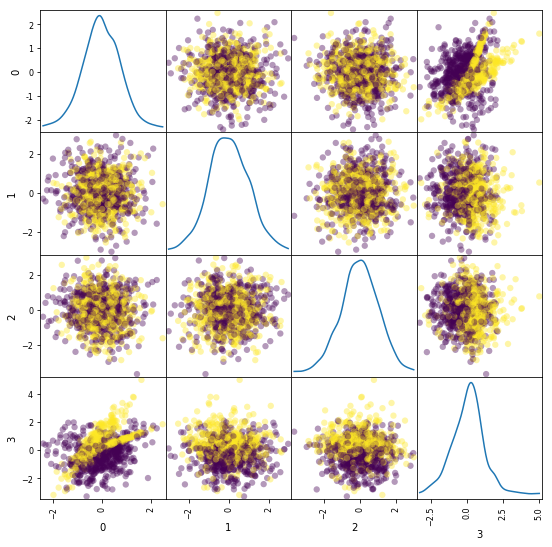
Learn and evaluate scikit-learn's logistic regression with stochastic gradient descent (SGD) training. Time and check the classifier's accuracy.
%%timeit

# Train and test the scikit-learn SGD logistic regression.

clf = sklearn.linear_model.SGDClassifier(

    loss='log', n_iter=1000, penalty='l2', alpha=5e-4, class_weight='balanced')

clf.fit(X, y)

yt_pred = clf.predict(Xt)

print('Accuracy: {:.3f}'.format(sklearn.metrics.accuracy_score(yt, yt_pred)))
Accuracy: 0.781

Accuracy: 0.781

Accuracy: 0.781

Accuracy: 0.781

1 loop, best of 3: 372 ms per loop
Save the dataset to HDF5 for loading in Caffe.
# Write out the data to HDF5 files in a temp directory.

# This file is assumed to be caffe_root/examples/hdf5_classification.ipynb

dirname = os.path.abspath('./examples/hdf5_classification/data')

if not os.path.exists(dirname):

    os.makedirs(dirname)

train_filename = os.path.join(dirname, 'train.h5')

test_filename = os.path.join(dirname, 'test.h5')

# HDF5DataLayer source should be a file containing a list of HDF5 filenames.

# To show this off, we'll list the same data file twice.

with h5py.File(train_filename, 'w') as f:

    f['data'] = X

    f['label'] = y.astype(np.float32)

with open(os.path.join(dirname, 'train.txt'), 'w') as f:

    f.write(train_filename + '\n')

    f.write(train_filename + '\n')

# HDF5 is pretty efficient, but can be further compressed.

comp_kwargs = {'compression': 'gzip', 'compression_opts': 1}

with h5py.File(test_filename, 'w') as f:

    f.create_dataset('data', data=Xt, **comp_kwargs)

    f.create_dataset('label', data=yt.astype(np.float32), **comp_kwargs)

with open(os.path.join(dirname, 'test.txt'), 'w') as f:

    f.write(test_filename + '\n')
Let's define logistic regression in Caffe through Python net specification. This is a quick and natural way to define nets that sidesteps manually editing the protobuf model.
from caffe import layers as L

from caffe import params as P

def logreg(hdf5, batch_size):

    # logistic regression: data, matrix multiplication, and 2-class softmax loss

    n = caffe.NetSpec()

    n.data, n.label = L.HDF5Data(batch_size=batch_size, source=hdf5, ntop=2)

    n.ip1 = L.InnerProduct(n.data, num_output=2, weight_filler=dict(type='xavier'))

    n.accuracy = L.Accuracy(n.ip1, n.label)

    n.loss = L.SoftmaxWithLoss(n.ip1, n.label)

    return n.to_proto()

train_net_path = 'examples/hdf5_classification/logreg_auto_train.prototxt'

with open(train_net_path, 'w') as f:

    f.write(str(logreg('examples/hdf5_classification/data/train.txt', 10)))

test_net_path = 'examples/hdf5_classification/logreg_auto_test.prototxt'

with open(test_net_path, 'w') as f:

    f.write(str(logreg('examples/hdf5_classification/data/test.txt', 10)))
Now, we'll define our "solver" which trains the network by specifying the locations of the train and test nets we defined above, as well as setting values for various parameters used for learning, display, and "snapshotting".
from caffe.proto import caffe_pb2

def solver(train_net_path, test_net_path):

    s = caffe_pb2.SolverParameter()

    # Specify locations of the train and test networks.

    s.train_net = train_net_path

    s.test_net.append(test_net_path)

    s.test_interval = 1000  # Test after every 1000 training iterations.

    s.test_iter.append(250) # Test 250 "batches" each time we test.

    s.max_iter = 10000      # # of times to update the net (training iterations)

    # Set the initial learning rate for stochastic gradient descent (SGD).

    s.base_lr = 0.01

    # Set `lr_policy` to define how the learning rate changes during training.

    # Here, we 'step' the learning rate by multiplying it by a factor `gamma`

    # every `stepsize` iterations.

    s.lr_policy = 'step'

    s.gamma = 0.1

    s.stepsize = 5000

    # Set other optimization parameters. Setting a non-zero `momentum` takes a

    # weighted average of the current gradient and previous gradients to make

    # learning more stable. L2 weight decay regularizes learning, to help prevent

    # the model from overfitting.

    s.momentum = 0.9

    s.weight_decay = 5e-4

    # Display the current training loss and accuracy every 1000 iterations.

    s.display = 1000

    # Snapshots are files used to store networks we've trained.  Here, we'll

    # snapshot every 10K iterations -- just once at the end of training.

    # For larger networks that take longer to train, you may want to set

    # snapshot < max_iter to save the network and training state to disk during

    # optimization, preventing disaster in case of machine crashes, etc.

    s.snapshot = 10000

    s.snapshot_prefix = 'examples/hdf5_classification/data/train'

    # We'll train on the CPU for fair benchmarking against scikit-learn.

    # Changing to GPU should result in much faster training!

    s.solver_mode = caffe_pb2.SolverParameter.CPU

    return s

solver_path = 'examples/hdf5_classification/logreg_solver.prototxt'

with open(solver_path, 'w') as f:

    f.write(str(solver(train_net_path, test_net_path)))
Time to learn and evaluate our Caffeinated logistic regression in Python.
%%timeit

caffe.set_mode_cpu()

solver = caffe.get_solver(solver_path)

solver.solve()

accuracy = 0

batch_size = solver.test_nets[0].blobs['data'].num

test_iters = int(len(Xt) / batch_size)

for i in range(test_iters):

    solver.test_nets[0].forward()

    accuracy += solver.test_nets[0].blobs['accuracy'].data

accuracy /= test_iters

print("Accuracy: {:.3f}".format(accuracy))
Accuracy: 0.770

Accuracy: 0.770

Accuracy: 0.770

Accuracy: 0.770

1 loop, best of 3: 195 ms per loop
Do the same through the command line interface for detailed output on the model and solving.
!./build/tools/caffe train -solver examples/hdf5_classification/logreg_solver.prototxt
I0224 00:32:03.232779   655 caffe.cpp:178] Use CPU.

I0224 00:32:03.391911   655 solver.cpp:48] Initializing solver from parameters:

train_net: "examples/hdf5_classification/logreg_auto_train.prototxt"

test_net: "examples/hdf5_classification/logreg_auto_test.prototxt"

......

I0224 00:32:04.087514   655 solver.cpp:406]     Test net output #0: accuracy = 0.77

I0224 00:32:04.087532   655 solver.cpp:406]     Test net output #1: loss = 0.593815 (* 1 = 0.593815 loss)

I0224 00:32:04.087541   655 solver.cpp:323] Optimization Done.

I0224 00:32:04.087548   655 caffe.cpp:222] Optimization Done.
If you look at output or the logreg_auto_train.prototxt, you'll see that the model is simple logistic regression.
We can make it a little more advanced by introducing a non-linearity between weights that take the input and weights that give the output -- now we have a two-layer network.
That network is given in nonlinear_auto_train.prototxt, and that's the only change made in nonlinear_logreg_solver.prototxt which we will now use.
The final accuracy of the new network should be higher than logistic regression!
from caffe import layers as L

from caffe import params as P

def nonlinear_net(hdf5, batch_size):

    # one small nonlinearity, one leap for model kind

    n = caffe.NetSpec()

    n.data, n.label = L.HDF5Data(batch_size=batch_size, source=hdf5, ntop=2)

    # define a hidden layer of dimension 40

    n.ip1 = L.InnerProduct(n.data, num_output=40, weight_filler=dict(type='xavier'))

    # transform the output through the ReLU (rectified linear) non-linearity

    n.relu1 = L.ReLU(n.ip1, in_place=True)

    # score the (now non-linear) features

    n.ip2 = L.InnerProduct(n.ip1, num_output=2, weight_filler=dict(type='xavier'))

    # same accuracy and loss as before

    n.accuracy = L.Accuracy(n.ip2, n.label)

    n.loss = L.SoftmaxWithLoss(n.ip2, n.label)

    return n.to_proto()

train_net_path = 'examples/hdf5_classification/nonlinear_auto_train.prototxt'

with open(train_net_path, 'w') as f:

    f.write(str(nonlinear_net('examples/hdf5_classification/data/train.txt', 10)))

test_net_path = 'examples/hdf5_classification/nonlinear_auto_test.prototxt'

with open(test_net_path, 'w') as f:

    f.write(str(nonlinear_net('examples/hdf5_classification/data/test.txt', 10)))

solver_path = 'examples/hdf5_classification/nonlinear_logreg_solver.prototxt'

with open(solver_path, 'w') as f:

    f.write(str(solver(train_net_path, test_net_path)))
%%timeit

caffe.set_mode_cpu()

solver = caffe.get_solver(solver_path)

solver.solve()

accuracy = 0

batch_size = solver.test_nets[0].blobs['data'].num

test_iters = int(len(Xt) / batch_size)

for i in range(test_iters):

    solver.test_nets[0].forward()

    accuracy += solver.test_nets[0].blobs['accuracy'].data

accuracy /= test_iters

print("Accuracy: {:.3f}".format(accuracy))
Accuracy: 0.838

Accuracy: 0.837

Accuracy: 0.838

Accuracy: 0.834

1 loop, best of 3: 277 ms per loop
Do the same through the command line interface for detailed output on the model and solving.
!./build/tools/caffe train -solver examples/hdf5_classification/nonlinear_logreg_solver.prototxt
I0224 00:32:05.654265   658 caffe.cpp:178] Use CPU.

I0224 00:32:05.810444   658 solver.cpp:48] Initializing solver from parameters:

train_net: "examples/hdf5_classification/nonlinear_auto_train.prototxt"

test_net: "examples/hdf5_classification/nonlinear_auto_test.prototxt"

......

I0224 00:32:06.078208   658 solver.cpp:406]     Test net output #0: accuracy = 0.8388

I0224 00:32:06.078225   658 solver.cpp:406]     Test net output #1: loss = 0.382042 (* 1 = 0.382042 loss)

I0224 00:32:06.078234   658 solver.cpp:323] Optimization Done.

I0224 00:32:06.078241   658 caffe.cpp:222] Optimization Done.
# Clean up (comment this out if you want to examine the hdf5_classification/data directory).

shutil.rmtree(dirname)
Reference
History
- 20180102: created.
Copyright
- Post author: kezunlin
- Post link: https://kezunlin.me/post/c50b0018/
- Copyright Notice: All articles in this blog are licensed under CC BY-NC-SA 3.0 unless stating additionally.
Brewing Logistic Regression then Going Deeper.
Brewing Logistic Regression then Going Deeper
While Caffe is made for deep networks it can likewise represent "shallow" models like logistic regression for classification. We'll do simple logistic regression on synthetic data that we'll generate and save to HDF5 to feed vectors to Caffe. Once that model is done, we'll add layers to improve accuracy. That's what Caffe is about: define a model, experiment, and then deploy.
import numpy as np

import matplotlib.pyplot as plt

%matplotlib inline

import os

os.chdir('..')

import sys

sys.path.insert(0, './python')

import caffe

import os

import h5py

import shutil

import tempfile

import sklearn

import sklearn.datasets

import sklearn.linear_model

import pandas as pd
Synthesize a dataset of 10,000 4-vectors for binary classification with 2 informative features and 2 noise features.
X, y = sklearn.datasets.make_classification(

    n_samples=10000, n_features=4, n_redundant=0, n_informative=2,

    n_clusters_per_class=2, hypercube=False, random_state=0

)

print 'data,',X.shape,y.shape # (10000, 4) (10000,) x0,x1,x2,x3, y

# Split into train and test

X, Xt, y, yt = sklearn.model_selection.train_test_split(X, y)

print 'train,',X.shape,y.shape  #train: (7500, 4) (7500,)

print 'test,', Xt.shape,yt.shape#test:  (2500, 4) (2500,)

# Visualize sample of the data

ind = np.random.permutation(X.shape[0])[:1000] # (7500,)--->(1000,)   x0,x1,x2,x3, y

df = pd.DataFrame(X[ind])

_ = pd.plotting.scatter_matrix(df, figsize=(9, 9), diagonal='kde', marker='o', s=40, alpha=.4, c=y[ind])
data, (10000, 4) (10000,)

train, (7500, 4) (7500,)

test, (2500, 4) (2500,)

Learn and evaluate scikit-learn's logistic regression with stochastic gradient descent (SGD) training. Time and check the classifier's accuracy.
%%timeit

# Train and test the scikit-learn SGD logistic regression.

clf = sklearn.linear_model.SGDClassifier(

    loss='log', n_iter=1000, penalty='l2', alpha=5e-4, class_weight='balanced')

clf.fit(X, y)

yt_pred = clf.predict(Xt)

print('Accuracy: {:.3f}'.format(sklearn.metrics.accuracy_score(yt, yt_pred)))
Accuracy: 0.781

Accuracy: 0.781

Accuracy: 0.781

Accuracy: 0.781

1 loop, best of 3: 372 ms per loop
Save the dataset to HDF5 for loading in Caffe.
# Write out the data to HDF5 files in a temp directory.

# This file is assumed to be caffe_root/examples/hdf5_classification.ipynb

dirname = os.path.abspath('./examples/hdf5_classification/data')

if not os.path.exists(dirname):

    os.makedirs(dirname)

train_filename = os.path.join(dirname, 'train.h5')

test_filename = os.path.join(dirname, 'test.h5')

# HDF5DataLayer source should be a file containing a list of HDF5 filenames.

# To show this off, we'll list the same data file twice.

with h5py.File(train_filename, 'w') as f:

    f['data'] = X

    f['label'] = y.astype(np.float32)

with open(os.path.join(dirname, 'train.txt'), 'w') as f:

    f.write(train_filename + '\n')

    f.write(train_filename + '\n')

# HDF5 is pretty efficient, but can be further compressed.

comp_kwargs = {'compression': 'gzip', 'compression_opts': 1}

with h5py.File(test_filename, 'w') as f:

    f.create_dataset('data', data=Xt, **comp_kwargs)

    f.create_dataset('label', data=yt.astype(np.float32), **comp_kwargs)

with open(os.path.join(dirname, 'test.txt'), 'w') as f:

    f.write(test_filename + '\n')
Let's define logistic regression in Caffe through Python net specification. This is a quick and natural way to define nets that sidesteps manually editing the protobuf model.
from caffe import layers as L

from caffe import params as P

def logreg(hdf5, batch_size):

    # logistic regression: data, matrix multiplication, and 2-class softmax loss

    n = caffe.NetSpec()

    n.data, n.label = L.HDF5Data(batch_size=batch_size, source=hdf5, ntop=2)

    n.ip1 = L.InnerProduct(n.data, num_output=2, weight_filler=dict(type='xavier'))

    n.accuracy = L.Accuracy(n.ip1, n.label)

    n.loss = L.SoftmaxWithLoss(n.ip1, n.label)

    return n.to_proto()

train_net_path = 'examples/hdf5_classification/logreg_auto_train.prototxt'

with open(train_net_path, 'w') as f:

    f.write(str(logreg('examples/hdf5_classification/data/train.txt', 10)))

test_net_path = 'examples/hdf5_classification/logreg_auto_test.prototxt'

with open(test_net_path, 'w') as f:

    f.write(str(logreg('examples/hdf5_classification/data/test.txt', 10)))
Now, we'll define our "solver" which trains the network by specifying the locations of the train and test nets we defined above, as well as setting values for various parameters used for learning, display, and "snapshotting".
from caffe.proto import caffe_pb2

def solver(train_net_path, test_net_path):

    s = caffe_pb2.SolverParameter()

    # Specify locations of the train and test networks.

    s.train_net = train_net_path

    s.test_net.append(test_net_path)

    s.test_interval = 1000  # Test after every 1000 training iterations.

    s.test_iter.append(250) # Test 250 "batches" each time we test.

    s.max_iter = 10000      # # of times to update the net (training iterations)

    # Set the initial learning rate for stochastic gradient descent (SGD).

    s.base_lr = 0.01

    # Set `lr_policy` to define how the learning rate changes during training.

    # Here, we 'step' the learning rate by multiplying it by a factor `gamma`

    # every `stepsize` iterations.

    s.lr_policy = 'step'

    s.gamma = 0.1

    s.stepsize = 5000

    # Set other optimization parameters. Setting a non-zero `momentum` takes a

    # weighted average of the current gradient and previous gradients to make

    # learning more stable. L2 weight decay regularizes learning, to help prevent

    # the model from overfitting.

    s.momentum = 0.9

    s.weight_decay = 5e-4

    # Display the current training loss and accuracy every 1000 iterations.

    s.display = 1000

    # Snapshots are files used to store networks we've trained.  Here, we'll

    # snapshot every 10K iterations -- just once at the end of training.

    # For larger networks that take longer to train, you may want to set

    # snapshot < max_iter to save the network and training state to disk during

    # optimization, preventing disaster in case of machine crashes, etc.

    s.snapshot = 10000

    s.snapshot_prefix = 'examples/hdf5_classification/data/train'

    # We'll train on the CPU for fair benchmarking against scikit-learn.

    # Changing to GPU should result in much faster training!

    s.solver_mode = caffe_pb2.SolverParameter.CPU

    return s

solver_path = 'examples/hdf5_classification/logreg_solver.prototxt'

with open(solver_path, 'w') as f:

    f.write(str(solver(train_net_path, test_net_path)))
Time to learn and evaluate our Caffeinated logistic regression in Python.
%%timeit

caffe.set_mode_cpu()

solver = caffe.get_solver(solver_path)

solver.solve()

accuracy = 0

batch_size = solver.test_nets[0].blobs['data'].num

test_iters = int(len(Xt) / batch_size)

for i in range(test_iters):

    solver.test_nets[0].forward()

    accuracy += solver.test_nets[0].blobs['accuracy'].data

accuracy /= test_iters

print("Accuracy: {:.3f}".format(accuracy))
Accuracy: 0.770

Accuracy: 0.770

Accuracy: 0.770

Accuracy: 0.770

1 loop, best of 3: 195 ms per loop
Do the same through the command line interface for detailed output on the model and solving.
!./build/tools/caffe train -solver examples/hdf5_classification/logreg_solver.prototxt
I0224 00:32:03.232779   655 caffe.cpp:178] Use CPU.

I0224 00:32:03.391911   655 solver.cpp:48] Initializing solver from parameters:

train_net: "examples/hdf5_classification/logreg_auto_train.prototxt"

test_net: "examples/hdf5_classification/logreg_auto_test.prototxt"

......

I0224 00:32:04.087514   655 solver.cpp:406]     Test net output #0: accuracy = 0.77

I0224 00:32:04.087532   655 solver.cpp:406]     Test net output #1: loss = 0.593815 (* 1 = 0.593815 loss)

I0224 00:32:04.087541   655 solver.cpp:323] Optimization Done.

I0224 00:32:04.087548   655 caffe.cpp:222] Optimization Done.
If you look at output or the logreg_auto_train.prototxt, you'll see that the model is simple logistic regression.
We can make it a little more advanced by introducing a non-linearity between weights that take the input and weights that give the output -- now we have a two-layer network.
That network is given in nonlinear_auto_train.prototxt, and that's the only change made in nonlinear_logreg_solver.prototxt which we will now use.
The final accuracy of the new network should be higher than logistic regression!
from caffe import layers as L

from caffe import params as P

def nonlinear_net(hdf5, batch_size):

    # one small nonlinearity, one leap for model kind

    n = caffe.NetSpec()

    n.data, n.label = L.HDF5Data(batch_size=batch_size, source=hdf5, ntop=2)

    # define a hidden layer of dimension 40

    n.ip1 = L.InnerProduct(n.data, num_output=40, weight_filler=dict(type='xavier'))

    # transform the output through the ReLU (rectified linear) non-linearity

    n.relu1 = L.ReLU(n.ip1, in_place=True)

    # score the (now non-linear) features

    n.ip2 = L.InnerProduct(n.ip1, num_output=2, weight_filler=dict(type='xavier'))

    # same accuracy and loss as before

    n.accuracy = L.Accuracy(n.ip2, n.label)

    n.loss = L.SoftmaxWithLoss(n.ip2, n.label)

    return n.to_proto()

train_net_path = 'examples/hdf5_classification/nonlinear_auto_train.prototxt'

with open(train_net_path, 'w') as f:

    f.write(str(nonlinear_net('examples/hdf5_classification/data/train.txt', 10)))

test_net_path = 'examples/hdf5_classification/nonlinear_auto_test.prototxt'

with open(test_net_path, 'w') as f:

    f.write(str(nonlinear_net('examples/hdf5_classification/data/test.txt', 10)))

solver_path = 'examples/hdf5_classification/nonlinear_logreg_solver.prototxt'

with open(solver_path, 'w') as f:

    f.write(str(solver(train_net_path, test_net_path)))
%%timeit

caffe.set_mode_cpu()

solver = caffe.get_solver(solver_path)

solver.solve()

accuracy = 0

batch_size = solver.test_nets[0].blobs['data'].num

test_iters = int(len(Xt) / batch_size)

for i in range(test_iters):

    solver.test_nets[0].forward()

    accuracy += solver.test_nets[0].blobs['accuracy'].data

accuracy /= test_iters

print("Accuracy: {:.3f}".format(accuracy))
Accuracy: 0.838

Accuracy: 0.837

Accuracy: 0.838

Accuracy: 0.834

1 loop, best of 3: 277 ms per loop
Do the same through the command line interface for detailed output on the model and solving.
!./build/tools/caffe train -solver examples/hdf5_classification/nonlinear_logreg_solver.prototxt
I0224 00:32:05.654265   658 caffe.cpp:178] Use CPU.

I0224 00:32:05.810444   658 solver.cpp:48] Initializing solver from parameters:

train_net: "examples/hdf5_classification/nonlinear_auto_train.prototxt"

test_net: "examples/hdf5_classification/nonlinear_auto_test.prototxt"

......

I0224 00:32:06.078208   658 solver.cpp:406]     Test net output #0: accuracy = 0.8388

I0224 00:32:06.078225   658 solver.cpp:406]     Test net output #1: loss = 0.382042 (* 1 = 0.382042 loss)

I0224 00:32:06.078234   658 solver.cpp:323] Optimization Done.

I0224 00:32:06.078241   658 caffe.cpp:222] Optimization Done.
# Clean up (comment this out if you want to examine the hdf5_classification/data directory).

shutil.rmtree(dirname)
Reference
History
- 20180102: created.
Copyright
- Post author: kezunlin
- Post link: https://kezunlin.me/post/c50b0018/
- Copyright Notice: All articles in this blog are licensed under CC BY-NC-SA 3.0 unless stating additionally.
使用sklearn和caffe进行逻辑回归 | Brewing Logistic Regression then Going Deeper的更多相关文章
- 通俗地说逻辑回归【Logistic regression】算法(二)sklearn逻辑回归实战
前情提要: 通俗地说逻辑回归[Logistic regression]算法(一) 逻辑回归模型原理介绍 上一篇主要介绍了逻辑回归中,相对理论化的知识,这次主要是对上篇做一点点补充,以及介绍sklear ...
- 逻辑回归(Logistic Regression)算法小结
一.逻辑回归简述: 回顾线性回归算法,对于给定的一些n维特征(x1,x2,x3,......xn),我们想通过对这些特征进行加权求和汇总的方法来描绘出事物的最终运算结果.从而衍生出我们线性回归的计算公 ...
- 机器学习二 逻辑回归作业、逻辑回归(Logistic Regression)
机器学习二 逻辑回归作业 作业在这,http://speech.ee.ntu.edu.tw/~tlkagk/courses/ML_2016/Lecture/hw2.pdf 是区分spam的. 57 ...
- Python实践之(七)逻辑回归(Logistic Regression)
机器学习算法与Python实践之(七)逻辑回归(Logistic Regression) zouxy09@qq.com http://blog.csdn.net/zouxy09 机器学习算法与Pyth ...
- 逻辑回归模型(Logistic Regression, LR)基础
逻辑回归模型(Logistic Regression, LR)基础 逻辑回归(Logistic Regression, LR)模型其实仅在线性回归的基础上,套用了一个逻辑函数,但也就由于这个逻辑函 ...
- 机器学习算法与Python实践之(七)逻辑回归(Logistic Regression)
http://blog.csdn.net/zouxy09/article/details/20319673 机器学习算法与Python实践之(七)逻辑回归(Logistic Regression) z ...
- 机器学习/逻辑回归(logistic regression)/--附python代码
个人分类: 机器学习 本文为吴恩达<机器学习>课程的读书笔记,并用python实现. 前一篇讲了线性回归,这一篇讲逻辑回归,有了上一篇的基础,这一篇的内容会显得比较简单. 逻辑回归(log ...
- Python机器学习算法 — 逻辑回归(Logistic Regression)
逻辑回归--简介 逻辑回归(Logistic Regression)就是这样的一个过程:面对一个回归或者分类问题,建立代价函数,然后通过优化方法迭代求解出最优的模型参数,然后测试验证我们这个求解的模型 ...
- [机器学习] Coursera ML笔记 - 逻辑回归(Logistic Regression)
引言 机器学习栏目记录我在学习Machine Learning过程的一些心得笔记,涵盖线性回归.逻辑回归.Softmax回归.神经网络和SVM等等.主要学习资料来自Standford Andrew N ...
随机推荐
- 解决tortoiseSvn 访问版本库的时候一直初始化,或者无响应的问题
现象 svn访问版本库时一直提示: please wait while the repository browser is initializing 没有反应,甚至3-4分钟才会出来,即便出来也会很卡 ...
- 文件的处理(day09整理)
目录 昨日回顾 二十八.字符编码 1.什么是字符编码 2.字符编码的发展史 3.gbk和gb2312 二十九.python2和python3的区别 python解释器启动的流程 今日内容 三十.文件处 ...
- React Ref 和 React forwardRef
Ref 和Dom,Ref是reference(引用)的简写. 能力:大多数情况下,props前递可以解决一切问题,但是依然有需要触达React实例或者Dom节点的情况,这时候应该使用React Ref ...
- Java基础(三十二)JDBC(2)连接数据库
一.连接数据库的过程 连接数据库的过程:加载数据库驱动程序,不过只需在第一次访问数据库时加载一次,然后在每次访问数据库时创建一个Connection实例,然后执行操作数据库的SQL语句,并返回执行结果 ...
- SQLAlchemy的基础使用
一.ORM 与 SQLAlchemy 简介 ORM 全称 Object Relational Mapping, 翻译过来叫对象关系映射.简单的说,ORM 将数据库中的表与面向对象语言中的类建立了一种对 ...
- 阿里六面,挂在hrg,我真的不甘心!
前言最近跟一位朋友聊天,福报场-阿里是大部分程序员的梦想.这位老哥梦想进入阿里很久了,连续两年面试阿里不同bu,有几次是技术面挂,最冤的一次是技术6面了,连P10大老板都面了,但是挂在了hrg. 我以 ...
- 【C#多线程】1.Thread类的使用及注意要点
Thread随便讲讲 因为在C#中,Thread类在我们的新业务上并不常用了(因为创建一个新线程要比直接从线程池拿线程更加耗费资源),并且在.NET4.0后新增了Task类即Async与await关键 ...
- tensorflow制作tfrecord格式数据
tf.Example msg tensorflow提供了一种统一的格式.tfrecord来存储图像数据.用的是自家的google protobuf.就是把图像数据序列化成自定义格式的二进制数据. To ...
- 使用msfvenom生成木马
msfvenom Options: -p, --payload < payload> 指定需要使用的payload(攻击荷载).如果需要使用自定义的payload,请使用& #03 ...
- Flex简记
display的flex属性的使用对象分为1.容器即包含有元素的元素,2.项目,即某一个元素.就容器而言,flex可以实现换行(flex-wrap),改变容器内元素的排列方向(flex-directi ...