
.NET Core 读取配置文件方式总结
基于.NET Core的跨平台开发,配置文件与之前.NET Framework采用xml的config文件不同,目前主要是采用json文件键值对配置方式读取。
参考网上相关资料总结如下:
一、引入扩展 System.Configuration.ConfigurationManager
Nuget 下载扩展,Install-Package System.Configuration.ConfigurationManager
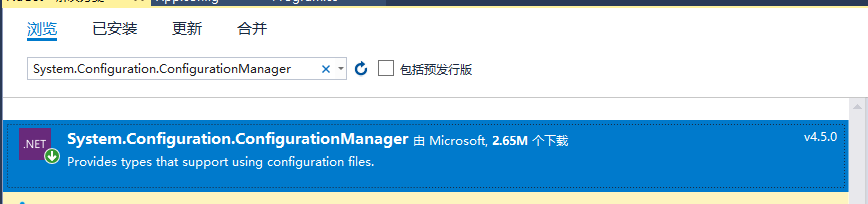
使用方式:添加配置文件App.config。读取方式与原.NET Framework方式一致
优点:兼容.NET Framework 原有配置方式
缺点:项目运行过程中若需修改App.config文件,对项目中输出的内容没有丝毫影响,Debug发现获取到的值的确没有变化,需要重新编译才生效。
二、引入扩展 Microsoft.Extensions.Options.ConfigurationExtensions
Nuget 下载扩展,
Install-Package Microsoft.Extensions.Options.ConfigurationExtensions
Install-Package Microsoft.Extensions.Configuration.FileExtensions
Install-Package Microsoft.Extensions.Configuration.Json



优点:可以读取application.json中的配置参数,不再使用XML可以说很好的贴近Core的设计理念
缺点:运行时修改json文件读取到的内容不会改变,但是至少重启项目可以修改,若要运行时候修改json文件监听实现监听变化。查看源码,可以发现 虽然配置信息是通过AddSingleton注入的
但同时也注入了IOptionsChangeTokenSource ,故只需要在获取配置信息时将IOptions<> 替换为 IOptionsMonitor<>(通过监听的Option来获取信息),并通过 IOptionsMonitor<>.CurrentValue获取即可实时获取到最新的配置信息(存在修改监听)
另外就是,这个方法采用的是反序列化的原理,也就是必须有一个跟配置文件对应的实体类才可以,这个感觉比较鸡肋,放弃。
三、自定义扩展方法,这个实现自己写,原理是监听文件是否变更,来刷新Configuration 配置实现。
参考园友一个实现,具体需要是否有效,要花时间实践一下,原链接地址:http://www.cnblogs.com/kasimlz/p/7515810.html,代码如下:
public class ConfigurationManager

    {

        /// <summary>

        /// 配置内容

        /// </summary>

        private static NameValueCollection _configurationCollection = new NameValueCollection();

        /// <summary>

        /// 配置监听响应链堆栈

        /// </summary>

        private static Stack<KeyValuePair<string, FileSystemWatcher>> FileListeners = new Stack<KeyValuePair<string, FileSystemWatcher>>();

        /// <summary>

        /// 默认路径

        /// </summary>

        private static string _defaultPath = Directory.GetCurrentDirectory() + "\\appsettings.json";

        /// <summary>

        /// 最终配置文件路径

        /// </summary>

        private static string _configPath = null;

        /// <summary>

        /// 配置节点关键字

        /// </summary>

        private static string _configSection = "AppSettings";

        /// <summary>

        /// 配置外连接的后缀

        /// </summary>

        private static string _configUrlPostfix = "Url";

        /// <summary>

        /// 最终修改时间戳

        /// </summary>

        private static long _timeStamp = 0L;

        /// <summary>

        /// 配置外链关键词,例如:AppSettings.Url

        /// </summary>

        private static string _configUrlSection { get { return _configSection + "." + _configUrlPostfix; } }

        static ConfigurationManager()

        {

            ConfigFinder(_defaultPath);

        }

        /// <summary>

        /// 确定配置文件路径

        /// </summary>

        private static void ConfigFinder(string Path)

        {

            _configPath = Path;

            JObject config_json = new JObject();

            while (config_json != null)

            {

                config_json = null;

                FileInfo config_info = new FileInfo(_configPath);

                if (!config_info.Exists) break;

                FileListeners.Push(CreateListener(config_info));

                config_json = LoadJsonFile(_configPath);

                if (config_json[_configUrlSection] != null)

                    _configPath = config_json[_configUrlSection].ToString();

                else break;

            }

            if (config_json == null || config_json[_configSection] == null) return;

            LoadConfiguration();

        }

        /// <summary>

        /// 读取配置文件内容

        /// </summary>

        private static void LoadConfiguration()

        {

            FileInfo config = new FileInfo(_configPath);

            var configColltion = new NameValueCollection();

            JObject config_object = LoadJsonFile(_configPath);

            if (config_object == null || !(config_object is JObject)) return;

            if (config_object[_configSection]!=null)

            {

                foreach (JProperty prop in config_object[_configSection])

                {

                    configColltion[prop.Name] = prop.Value.ToString();

                }

            }

            _configurationCollection = configColltion;

        }

        /// <summary>

        /// 解析Json文件

        /// </summary>

        /// <param name="FilePath">文件路径</param>

        /// <returns></returns>

        private static JObject LoadJsonFile(string FilePath)

        {

            JObject config_object = null;

            try

            {

                StreamReader sr = new StreamReader(FilePath, Encoding.Default);

                config_object = JObject.Parse(sr.ReadToEnd());

                sr.Close();

            }

            catch { }

            return config_object;

        }

        /// <summary>

        /// 添加监听树节点

        /// </summary>

        /// <param name="info"></param>

        /// <returns></returns>

        private static KeyValuePair<string, FileSystemWatcher> CreateListener(FileInfo info)

        {

            FileSystemWatcher watcher = new FileSystemWatcher();

            watcher.BeginInit();

            watcher.Path = info.DirectoryName;

            watcher.Filter = info.Name;

            watcher.IncludeSubdirectories = false;

            watcher.EnableRaisingEvents = true;

            watcher.NotifyFilter = NotifyFilters.Attributes | NotifyFilters.CreationTime | NotifyFilters.DirectoryName | NotifyFilters.FileName | NotifyFilters.LastAccess | NotifyFilters.LastWrite | NotifyFilters.Size;

            watcher.Changed += new FileSystemEventHandler(ConfigChangeListener);

            watcher.EndInit();

            return new KeyValuePair<string, FileSystemWatcher>(info.FullName, watcher);

        }

        private static void ConfigChangeListener(object sender, FileSystemEventArgs e)

        {

            long time = TimeStamp();

            lock (FileListeners)

            {

                if (time > _timeStamp)

                {

                    _timeStamp = time;

                    if (e.FullPath != _configPath || e.FullPath == _defaultPath)

                    {

                        while (FileListeners.Count > )

                        {

                            var listener = FileListeners.Pop();

                            listener.Value.Dispose();

                            if (listener.Key == e.FullPath) break;

                        }

                        ConfigFinder(e.FullPath);

                    }

                    else

                    {

                        LoadConfiguration();

                    }

                }

            }

        }

        private static long TimeStamp()

        {

            return (long)((DateTime.UtcNow - new DateTime(, , , , , , DateTimeKind.Utc)).TotalMilliseconds * );

        }

        private static string c_configSection = null;

        public static string ConfigSection

        {

            get { return _configSection; }

            set { c_configSection = value; }

        }

        private static string c_configUrlPostfix = null;

        public static string ConfigUrlPostfix

        {

            get { return _configUrlPostfix; }

            set { c_configUrlPostfix = value; }

        }

        private static string c_defaultPath = null;

        public static string DefaultPath

        {

            get { return _defaultPath; }

            set { c_defaultPath = value; }

        }

        public static NameValueCollection AppSettings

        {

            get { return _configurationCollection; }

        }

        /// <summary>

        /// 手动刷新配置,修改配置后,请手动调用此方法,以便更新配置参数

        /// </summary>

        public static void RefreshConfiguration()

        {

            lock (FileListeners)

            {

                //修改配置

                if (c_configSection != null) { _configSection = c_configSection; c_configSection = null; }

                if (c_configUrlPostfix != null) { _configUrlPostfix = c_configUrlPostfix; c_configUrlPostfix = null; }

                if (c_defaultPath != null) { _defaultPath = c_defaultPath; c_defaultPath = null; }

                //释放掉全部监听响应链

                while (FileListeners.Count > )

                    FileListeners.Pop().Value.Dispose();

                ConfigFinder(_defaultPath);

            }

        }

    }
.NET Core 读取配置文件方式总结的更多相关文章
- Core 读取配置文件
新建控制台 static void Main(string[] args) { Console.WriteLine("Hello World!"); //获取应用程序的当前工作目录 ...
- .net core 读取配置文件的值
.net core中的配置文件可以存一些自定义的值,我们需要去读取 在配置中添加json: "name": "sealee", "Connection ...
- ASP .NET CORE 读取配置文件的方法
老式的config文件在ASP.net core2.0中变成了appsettings.json,如果想要读取自定义配置,可以写如下代码 { "Logging": { "I ...
- .net core 读取配置文件
/// <summary> /// 读取配置信息 /// </summary> public class Zconfig { #region 读取配置信息 /// <su ...
- .Net Core 读取配置文件 appsettings.json
1. 首先些一个类 public class MySettings { public string P1 { get; set; } public string P2 { get; set; } } ...
- Asp.net Core 和类库读取配置文件信息
Asp.net Core 和类库读取配置文件信息 看干货请移步至.net core 读取配置文件公共类 首先开一个脑洞,Asp.net core 被使用这么长时间了,但是关于配置文件(json)的读取 ...
- .net core 学习 读取配置文件
在空项目中是没有配置文件的,首先要新建一个,配置文件内容如下,下面来读取各个内容 { "ConnectionStrings": { "DefaultConnection& ...
- 【转】spring boot mybatis 读取配置文件
spring boot mybatis 配置整理 一.加载mybatis的配置 1.手写配置,写死在代码里 import java.io.IOException; import java.util.P ...
- .net core 读取appsettings.json乱码
.net core 读取配置文件乱码:vs2019读取appsettings.json乱码问题; .net core 读取appsettings.json乱码问题;用notepad++或者其他编辑器打 ...
随机推荐
- window下tomcat的下载安装和环境配置
一.下载安装tomcat 去官网:http://tomcat.apache.org/ 下载自己所需要的版本,解压在没有中文的文件夹路径下. 直接打开压缩包下面,进入bin目录,双击startup.b ...
- MM52 历史库存及历史金额查询
"表:TABLES:MSEG,LFA1,MARA,EKPO,EKKO,MARD,EKBE,EKET.********************************************* ...
- 彻底解决android拍照后无法显示的问题
这是对上篇"android 图片拍照,相册选图,剪切并显示"的文章之后的 改进 上一篇文章虽然能解决图片的拍照剪切以及显示,但是发现他有一个缺点, 如果该程序单独运行,貌似没有任何 ...
- Quartz技术原理
Quartz运行基本: (1) 创建任务jobDetail(放入具体的jobImpl),触发器trigger(保存job的触发策略),均放入调度器scheduler. (2) ...
- mysql解压版服务启动方式
使用mysql解压版,在不安装为windows服务时,使用下面的方式启动. 1.打开命令行,首先进入mysql解压目录的bin目录下 d:\mysql\bin 2.输入mysqld --console ...
- html的表格边框为什么会这么粗?
因为默认情况下,cellspacing = 2px. 当表格的 border 不为 0 的时候,单元格(cell)的 border 为 1. 只有当表格的 border 设置为 0 的时候,单元格的 ...
- JAVA多线程高并发面试题总结
ReadMe : 括号里的内容为补充或解释说明. 多线程和高并发是毕业后求职大厂面试中必问的知识点,自己之前总是面试前才去找相关的知识点面试题来背背,隔段时间又忘了,没有沉淀下来,于是自己总结了下相关 ...
- 创建型模式总结(2.x)
顾名思义,创建型模式的聚焦点在如何创建对象能够将对象的创建与使用最大化的分离从而降低系统的耦合度. 创建型模式可分为: 单例模式:一个类只能有一个实例对象 工厂模式: 简单工厂模式:聚焦单个产品种类的 ...
- 001: html基础标签
一:浏览器内核(理解) 序言: 1:web标准 主要包括结构(Structure).表现(Presentation)和行为(Behavior)三个方面. 2:常见标签 2.1:HTML head bo ...
- [原创] 为Visio添加公式编辑器工具栏按钮
前言 作为理工科的学生,在写论文时,难免会在示意图中添加一些公式来说明研究内容.常用的画图工具就是 Visio .而常用的公式编辑器就是 Mathtype .对于 Word 这种软件,Mathtype ...