
springboot使用HttpSessionListener 监听器统计当前在线人数
概括:
request.getSession(true):若存在会话则返回该会话,否则新建一个会话。
request.getSession(false):若存在会话则返回该会话,否则返回NULL
https://blog.csdn.net/qq_38091831/article/details/82912831

原理就是很简单,就是利用HttpSessionListener 监听session的创建和销毁,然后定义个静态变量存储在线人数的变化。

说两种方式,第一种是使用配置类,第二种是使用@WebListener注解,都差不多

方式一:使用配置类

1.创建session监听器

package com.sdsft.pcweb.common.listener;

import javax.servlet.http.HttpSessionEvent;

import javax.servlet.http.HttpSessionListener;

public class MyHttpSessionListener implements HttpSessionListener {

    public static int online = 0;

    @Override

    public void sessionCreated(HttpSessionEvent se) {

        System.out.println("创建session");

        online ++;

    }

    @Override

    public void sessionDestroyed(HttpSessionEvent se) {

        System.out.println("销毁session");

        online --;

    }

}

2.配置类

package com.sdsft.pcweb.common.config;

import com.sdsft.pcweb.common.listener.MyHttpSessionListener;

import org.springframework.boot.web.servlet.ServletListenerRegistrationBean;

import org.springframework.context.annotation.Bean;

import org.springframework.context.annotation.Configuration;

import org.springframework.web.servlet.config.annotation.WebMvcConfigurer;

@Configuration

public class MywebConfig implements WebMvcConfigurer {

    @Bean

    public ServletListenerRegistrationBean listenerRegist() {

        ServletListenerRegistrationBean srb = new ServletListenerRegistrationBean();

        srb.setListener(new MyHttpSessionListener());

        System.out.println("listener");

        return srb;

    }

}

3.控制器

package com.sdsft.pcweb.controller;

import com.sdsft.pcweb.common.entity.CommonResult;

import com.sdsft.pcweb.common.enums.ResultEnum;

import com.sdsft.pcweb.common.listener.MyHttpSessionListener;

import com.sdsft.pcweb.service.LoginService;

import org.apache.commons.lang3.StringUtils;

import org.slf4j.Logger;

import org.slf4j.LoggerFactory;

import org.springframework.beans.factory.annotation.Autowired;

import org.springframework.web.bind.annotation.PostMapping;

import org.springframework.web.bind.annotation.RequestMapping;

import org.springframework.web.bind.annotation.ResponseBody;

import org.springframework.web.bind.annotation.RestController;

import javax.servlet.http.HttpServletRequest;

import javax.servlet.http.HttpSession;

/**

 * LoginController class

 * @author zcz

 * @date 2018/09/20

 */

@RequestMapping("/userInfo")

@RestController

public class LoginController {

    private static Logger logger = LoggerFactory.getLogger(LoginController.class);

    /**

     * 登录

     */

    @PostMapping("/Login")

    public void getUserByUserNameAndPassword(String username, String password, HttpSession  session) {

        logger.info("用户【"+username+"】登陆开始!");

        if("admin".equals(username) && "123456".equals(password)){

            session.setAttribute("loginName",username);

            logger.info("用户【"+username+"】登陆成功!");

        }else{

            logger.info("用户【"+username+"】登录失败!");

        }

    }

    /**

     *查询在线人数

     */

    @RequestMapping("/online")

    public Object online() {

        return  "当前在线人数:" + MyHttpSessionListener.online + "人";

    }

    /**

     * 退出登录

     */

    @RequestMapping("/Logout")

    public CommonResult Logout( HttpServletRequest request) {

        logger.info("用户退出登录开始!");

        HttpSession session = request.getSession(false);//防止创建Session

        if(session != null){

            session.removeAttribute("loginName");

            session.invalidate();

        }

        logger.info("用户退出登录结束!");

        return new CommonResult(ResultEnum.SUCCESS.getCode(), "退出成功!");

    }

    /**

     * 判断session是否有效

     * @param httpServletRequest

     * @return

     */

    @RequestMapping("/getSession")

    public String getSession(HttpServletRequest httpServletRequest) {

        HttpSession session = httpServletRequest.getSession();

        String loginName = (String) session.getAttribute("loginName");

        if (StringUtils.isNotBlank(loginName)) {

            return "200";

        }

        return "";

    }

}

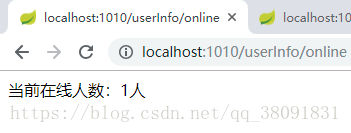
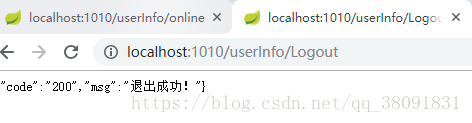
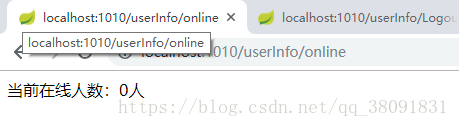
测试一下吧

方式二:使用@WebListener注解

1.创建监听器,加注解@WebListener

package com.sdsft.pcweb.common.listener;

import javax.servlet.http.HttpSessionEvent;

import javax.servlet.http.HttpSessionListener;

@WebListener

public class MyHttpSessionListener implements HttpSessionListener {

    public static int online = 0;

    @Override

    public void sessionCreated(HttpSessionEvent se) {

        System.out.println("创建session");

        online ++;

    }

    @Override

    public void sessionDestroyed(HttpSessionEvent se) {

        System.out.println("销毁session");

        online --;

    }

}

2.控制器

package com.sdsft.pcweb.controller;

import com.sdsft.pcweb.common.entity.CommonResult;

import com.sdsft.pcweb.common.enums.ResultEnum;

import com.sdsft.pcweb.common.listener.MyHttpSessionListener;

import com.sdsft.pcweb.service.LoginService;

import org.apache.commons.lang3.StringUtils;

import org.slf4j.Logger;

import org.slf4j.LoggerFactory;

import org.springframework.beans.factory.annotation.Autowired;

import org.springframework.web.bind.annotation.PostMapping;

import org.springframework.web.bind.annotation.RequestMapping;

import org.springframework.web.bind.annotation.ResponseBody;

import org.springframework.web.bind.annotation.RestController;

import javax.servlet.http.HttpServletRequest;

import javax.servlet.http.HttpSession;

/**

 * LoginController class

 * @author zcz

 * @date 2018/09/20

 */

@RequestMapping("/userInfo")

@RestController

public class LoginController {

    private static Logger logger = LoggerFactory.getLogger(LoginController.class);

    /**

     * 登录

     */

    @PostMapping("/Login")

    public void getUserByUserNameAndPassword(String username, String password, HttpSession  session) {

        logger.info("用户【"+username+"】登陆开始!");

        if("admin".equals(username) && "123456".equals(password)){

            session.setAttribute("loginName",username);

            logger.info("用户【"+username+"】登陆成功!");

        }else{

            logger.info("用户【"+username+"】登录失败!");

        }

    }

    /**

     *查询在线人数

     */

    @RequestMapping("/online")

    public Object online() {

        return  "当前在线人数:" + MyHttpSessionListener.online + "人";

    }

    /**

     * 退出登录

     */

    @RequestMapping("/Logout")

    public CommonResult Logout( HttpServletRequest request) {

        logger.info("用户退出登录开始!");

        HttpSession session = request.getSession(false);//防止创建Session

        if(session != null){

            session.removeAttribute("loginName");

            session.invalidate();

        }

        logger.info("用户退出登录结束!");

        return new CommonResult(ResultEnum.SUCCESS.getCode(), "退出成功!");

    }

    /**

     * 判断session是否有效

     * @param httpServletRequest

     * @return

     */

    @RequestMapping("/getSession")

    public String getSession(HttpServletRequest httpServletRequest) {

        HttpSession session = httpServletRequest.getSession();

        String loginName = (String) session.getAttribute("loginName");

        if (StringUtils.isNotBlank(loginName)) {

            return "200";

        }

        return "";

    }

}

3.启动类加@ServletComponentScan注解,这样才能在程序启动时将对应的bean加载进来

package com.sdsft.pcweb;

import org.springframework.boot.SpringApplication;

import org.springframework.boot.autoconfigure.SpringBootApplication;

import org.springframework.boot.web.servlet.ServletComponentScan;

@SpringBootApplication

@ServletComponentScan

public class PcwebApplication {

    public static void main(String[] args) {

        SpringApplication.run(PcwebApplication.class, args);

    }

}

开始测试吧
springboot统计当前在线人数,springboot使用HttpSessionListener 监听器统计当前在线人数,拿来即用,不忽悠
原理就是很简单,就是利用HttpSessionListener 监听session的创建和销毁,然后定义个静态变量存储在线人数的变化。
说两种方式,第一种是使用配置类,第二种是使用@WebListener注解,都差不多
方式一:使用配置类
1.创建session监听器
- package com.sdsft.pcweb.common.listener;
- import javax.servlet.http.HttpSessionEvent;
- import javax.servlet.http.HttpSessionListener;
- public class MyHttpSessionListener implements HttpSessionListener {
- public static int online = 0;
- @Override
- public void sessionCreated(HttpSessionEvent se) {
- System.out.println("创建session");
- online ++;
- }
- @Override
- public void sessionDestroyed(HttpSessionEvent se) {
- System.out.println("销毁session");
- online --;
- }
- }
2.配置类
- package com.sdsft.pcweb.common.config;
- import com.sdsft.pcweb.common.listener.MyHttpSessionListener;
- import org.springframework.boot.web.servlet.ServletListenerRegistrationBean;
- import org.springframework.context.annotation.Bean;
- import org.springframework.context.annotation.Configuration;
- import org.springframework.web.servlet.config.annotation.WebMvcConfigurer;
- @Configuration
- public class MywebConfig implements WebMvcConfigurer {
- @Bean
- public ServletListenerRegistrationBean listenerRegist() {
- ServletListenerRegistrationBean srb = new ServletListenerRegistrationBean();
- srb.setListener(new MyHttpSessionListener());
- System.out.println("listener");
- return srb;
- }
- }
3.控制器
- package com.sdsft.pcweb.controller;
- import com.sdsft.pcweb.common.entity.CommonResult;
- import com.sdsft.pcweb.common.enums.ResultEnum;
- import com.sdsft.pcweb.common.listener.MyHttpSessionListener;
- import com.sdsft.pcweb.service.LoginService;
- import org.apache.commons.lang3.StringUtils;
- import org.slf4j.Logger;
- import org.slf4j.LoggerFactory;
- import org.springframework.beans.factory.annotation.Autowired;
- import org.springframework.web.bind.annotation.PostMapping;
- import org.springframework.web.bind.annotation.RequestMapping;
- import org.springframework.web.bind.annotation.ResponseBody;
- import org.springframework.web.bind.annotation.RestController;
- import javax.servlet.http.HttpServletRequest;
- import javax.servlet.http.HttpSession;
- /**
- * LoginController class
- * @author zcz
- * @date 2018/09/20
- */
- @RequestMapping("/userInfo")
- @RestController
- public class LoginController {
- private static Logger logger = LoggerFactory.getLogger(LoginController.class);
- /**
- * 登录
- */
- @PostMapping("/Login")
- public void getUserByUserNameAndPassword(String username, String password, HttpSession session) {
- logger.info("用户【"+username+"】登陆开始!");
- if("admin".equals(username) && "123456".equals(password)){
- session.setAttribute("loginName",username);
- logger.info("用户【"+username+"】登陆成功!");
- }else{
- logger.info("用户【"+username+"】登录失败!");
- }
- }
- /**
- *查询在线人数
- */
- @RequestMapping("/online")
- public Object online() {
- return "当前在线人数:" + MyHttpSessionListener.online + "人";
- }
- /**
- * 退出登录
- */
- @RequestMapping("/Logout")
- public CommonResult Logout( HttpServletRequest request) {
- logger.info("用户退出登录开始!");
- HttpSession session = request.getSession(false);//防止创建Session
- if(session != null){
- session.removeAttribute("loginName");
- session.invalidate();
- }
- logger.info("用户退出登录结束!");
- return new CommonResult(ResultEnum.SUCCESS.getCode(), "退出成功!");
- }
- /**
- * 判断session是否有效
- * @param httpServletRequest
- * @return
- */
- @RequestMapping("/getSession")
- public String getSession(HttpServletRequest httpServletRequest) {
- HttpSession session = httpServletRequest.getSession();
- String loginName = (String) session.getAttribute("loginName");
- if (StringUtils.isNotBlank(loginName)) {
- return "200";
- }
- return "";
- }
- }
测试一下吧
方式二:使用@WebListener注解
1.创建监听器,加注解@WebListener
- package com.sdsft.pcweb.common.listener;
- import javax.servlet.http.HttpSessionEvent;
- import javax.servlet.http.HttpSessionListener;
- @WebListener
- public class MyHttpSessionListener implements HttpSessionListener {
- public static int online = 0;
- @Override
- public void sessionCreated(HttpSessionEvent se) {
- System.out.println("创建session");
- online ++;
- }
- @Override
- public void sessionDestroyed(HttpSessionEvent se) {
- System.out.println("销毁session");
- online --;
- }
- }
2.控制器
- package com.sdsft.pcweb.controller;
- import com.sdsft.pcweb.common.entity.CommonResult;
- import com.sdsft.pcweb.common.enums.ResultEnum;
- import com.sdsft.pcweb.common.listener.MyHttpSessionListener;
- import com.sdsft.pcweb.service.LoginService;
- import org.apache.commons.lang3.StringUtils;
- import org.slf4j.Logger;
- import org.slf4j.LoggerFactory;
- import org.springframework.beans.factory.annotation.Autowired;
- import org.springframework.web.bind.annotation.PostMapping;
- import org.springframework.web.bind.annotation.RequestMapping;
- import org.springframework.web.bind.annotation.ResponseBody;
- import org.springframework.web.bind.annotation.RestController;
- import javax.servlet.http.HttpServletRequest;
- import javax.servlet.http.HttpSession;
- /**
- * LoginController class
- * @author zcz
- * @date 2018/09/20
- */
- @RequestMapping("/userInfo")
- @RestController
- public class LoginController {
- private static Logger logger = LoggerFactory.getLogger(LoginController.class);
- /**
- * 登录
- */
- @PostMapping("/Login")
- public void getUserByUserNameAndPassword(String username, String password, HttpSession session) {
- logger.info("用户【"+username+"】登陆开始!");
- if("admin".equals(username) && "123456".equals(password)){
- session.setAttribute("loginName",username);
- logger.info("用户【"+username+"】登陆成功!");
- }else{
- logger.info("用户【"+username+"】登录失败!");
- }
- }
- /**
- *查询在线人数
- */
- @RequestMapping("/online")
- public Object online() {
- return "当前在线人数:" + MyHttpSessionListener.online + "人";
- }
- /**
- * 退出登录
- */
- @RequestMapping("/Logout")
- public CommonResult Logout( HttpServletRequest request) {
- logger.info("用户退出登录开始!");
- HttpSession session = request.getSession(false);//防止创建Session
- if(session != null){
- session.removeAttribute("loginName");
- session.invalidate();
- }
- logger.info("用户退出登录结束!");
- return new CommonResult(ResultEnum.SUCCESS.getCode(), "退出成功!");
- }
- /**
- * 判断session是否有效
- * @param httpServletRequest
- * @return
- */
- @RequestMapping("/getSession")
- public String getSession(HttpServletRequest httpServletRequest) {
- HttpSession session = httpServletRequest.getSession();
- String loginName = (String) session.getAttribute("loginName");
- if (StringUtils.isNotBlank(loginName)) {
- return "200";
- }
- return "";
- }
- }
3.启动类加@ServletComponentScan注解,这样才能在程序启动时将对应的bean加载进来
- package com.sdsft.pcweb;
- import org.springframework.boot.SpringApplication;
- import org.springframework.boot.autoconfigure.SpringBootApplication;
- import org.springframework.boot.web.servlet.ServletComponentScan;
- @SpringBootApplication
- @ServletComponentScan
- public class PcwebApplication {
- public static void main(String[] args) {
- SpringApplication.run(PcwebApplication.class, args);
- }
- }
开始测试吧
springboot使用HttpSessionListener 监听器统计当前在线人数的更多相关文章
- Servlet监听器统计网站在线人数
本节我们利用 Servlet 监听器接口,完成一个统计网站在线人数的案例.当一个用户登录后,显示欢迎信息,同时显示出当前在线人数和用户名单.当用户退出登录或 Session 过期时,从在线用户名单中删 ...
- Servlet监听器统计在线人数
监听器的作用是监听Web容器的有效事件,它由Servlet容器管理,利用Listener接口监听某个执行程序,并根据该程序的需求做出适应的响应. 例1 应用Servlet监听器统计在线人数. (1)创 ...
- 监听器的配置,绑定HttpSessionListener监听器的使用
监听器的配置,绑定 <listener> <listener-class>监听器的全路径</listener-class> </listener> Se ...
- java-web项目:用servlet监听器实现显示在线人数
1.创建一个监听器 package com.listener; import javax.servlet.ServletContext; import javax.servlet.http.HttpS ...
- 用HttpSessionListener与HttpSessionBindingListener实现在线人数统计
在线人数统计方面的实现,最初我的想法是,管理session,如果session销毁了就减少,如果登陆用户了就新增一个,但是如果是用户非法退出,如:未注销,关闭浏览器等,这个用户的session是管理不 ...
- [转]用HttpSessionListener与HttpSessionBindingListener实现在线人数统计
原文链接:http://www.cnblogs.com/shencheng/archive/2011/01/07/1930227.html 下午比较闲(其实今天都很闲),想了一下在线人数统计方面的实现 ...
- javaEE之--------统计站点在线人数,安全登录等(观察者设计模式)
整体介绍下: 监听器:监听器-就是一个实现待定接口的普通Java程序,此程序专门用于监听别一个类的方法调用.都是使用观察者设计模式. 小弟刚接触这个,做了些简单的介绍.大神请绕道,技术仅仅是一点点, ...
- java监听器之实现在线人数显示
在码农的世界里只有bug才能让人成长,The more bugs you encounter, the more efficient you will be! java中的监听器分为三种:Servle ...
- 使用session的监听器获取当前在线人数
1首先在web.xml中配置Session的监听器 2创建监听器并且继承HttpSessionListener 3.在jsp中导入监听器 4.获取当前在线人数 5.配置到公共网络(使用natapp的免 ...
随机推荐
- SpringBoot:使用Jenkins自动部署SpringBoot项目(二)具体配置
1.启动Jenkins 在浏览器输入ip:port后,进入Jenkins初始化界面,需要查看文件,得到密码. 输入密码进入初始化界面,选择推荐插件安装. 安装完成创建账号,进入Jenkins主界面. ...
- 条件随机场CRF原理介绍 以及Keras实现
本文是对CRF基本原理的一个简明的介绍.当然,“简明”是相对而言中,要想真的弄清楚CRF,免不了要提及一些公式,如果只关心调用的读者,可以直接移到文末. 图示# 按照之前的思路,我们依旧来对比一下普通 ...
- python之turtle使用:画一颗美美哒的树
关于工具介绍这里小生就不赘述了,这里附上个人觉得最详细的文档地址:https://docs.python.org/zh-cn/3/library/turtle.html?highlight=turtl ...
- SpringMVC实现文件下载的两种方式及多文件下载
1.传统方法 @RequestMapping("/download") public String download( String fileName ,String filePa ...
- 解决IDEA中maven导入jar包
查 看: File------>Project Structure--------->Libraries如下面没有maven所引入的jar包则为该错误[1] 错误原因: 是 ...
- win10 安装mysql 8.0.18 解决Navicat初次连接报错
win10 安装mysql 8.0.18 解决Navicat初次连接报错 win10 安装mysql 8.0.18-winx64 一,先去官网下载mysql 安装包 https://dev.mysql ...
- linux pip
$ wget https://bootstrap.pypa.io/get-pip.py$ python get-pip.py$ pip -V #查看pip版本 接下来就可以随便pip安装东西了 首先查 ...
- 使用hdfs-mount挂载HDFS
目录 1.特性(计划)简介 2.构建程序 3.使用hdfs-mount挂载HDFS hdfs-mount是一个将HDFS挂载为本地Linux文件系统的工具,使用go语言开发,不依赖libdfs和jav ...
- Flutter的Padding、Raw、Column、Expanded组件的基本使用
Padding组件: Padding组件的基本使用代码: import 'package:flutter/material.dart'; import 'package:flutter_testdem ...
- LeetCode_453. Minimum Moves to Equal Array Elements
453. Minimum Moves to Equal Array Elements Easy Given a non-empty integer array of size n, find the ...