
Select 查询语句
1.1 查询语句
1.1.1 select
select 用于从数据看查询数据。语法
select field1,filed2,.. .

from tablename

[where condition]
 -- 查询所有员工的名字和雇员号

 select empno,ename from emp;

 -- 查询所有员工的雇员号、姓名、岗位

 select empno,ename,job from emp;

 -- 字段的别名 as

 select ename as "姓名" from emp;

 select ename as "姓名",job as "岗位" from emp;

 -- 别名一定要用双引号,不能用单引号

 select ename "姓名",job "岗位" from emp;

 -- 双引号可以省略

 select ename 姓名 from emp;

 -- 表的别名

 select emp.ename,emp.job from emp;

 select e.ename,e.job from emp e;
* 是通配符表示查询所有字段。如果要查特定的字段时,不要使用*,影响查询效率。
1.1.2 distinct 去重
把重复性的记录去掉,只保留一条。
select empno,ename,job,mgr,hiredate,sal,comm,deptno

from emp;

-- * 通配符表示所有字段

select * from emp;
修饰多字段时,多个字段的值都不一样才保留。
1.1.3 where 子句
where 表示查询的条件。
[1] =,!= ,<>,<,>,<=,>= 关系运算符
<> 表示不等于
 -- where 子句

 -- 把部分10的雇员查询出来

 select *

 from emp

 where deptno = 10;

 -- 把名称为smith的雇员

 select e.*

 from emp e

 where e.ename = 'SMITH';

 -- 查询底薪大于等于1000的员工

 select e.*

 from emp e

 where e.sal >= 1000;

 select e.*

 from emp e

 where e.sal <> 800
any/som/all(list)
any/some(list) 满足list列表中的任意一个条件
all(list) 满足list列表的中所有条件
 -- any some all

 -- 查询薪资大于1000或者薪资大于800的雇员

 select e.*

 from emp e

 where e.sal > some(1000,800);

 -- 查询薪资大于1000

 select e.*

 from emp e

 where e.sal > all(1000,800);
[2] null
null 在sql中表示的是不确定 => 可以认为没有值(一些情况下)
 -- null/not null

 -- 查询没有津贴的雇员

 select e.*

 from emp e

 where e.comm is null

 select e.*

 from emp e

 where e.comm is not null
【3】betweem x and y
表示一个值位于【x,y】区间,x与Y一般都是数字
-- between x and y

-- 查询薪资在1000-5000之间的雇员

select e.*

from emp e

where e.sal between 1000 and 5000

-- 查询薪资在(3000,5000]之间的雇员

select e.*

from emp e

where e.sal between 3000.01 and 5000
【4】in/not in list
表示字段值是否在list列表中
 -- in/not in(list)

 -- 查询部分号是10和20的员工

 select e.*

 from emp e

 where e.deptno in(10,20);

 select e.*

 from emp e

 where e.deptno not in(10,20);

 -- 查询薪资是1000,2000,5000的员工

 select e.*

 from emp e

 where e.sal in (1000,2000,5000);
【5】模糊查询
like 关键字 用于模糊查询中
%:表示任意字符出现多次(含0次),
_:表示任意字符出现1次。
escape(‘x’)表示指定的转义字符为x,一般指定为\
-- 查询名字是c开头的雇员

select e.*

from emp e

where e.ename like 'c%';

-- 查询名字中第二个字母是M的雇员

select e.*

from emp e

where e.ename like '_M%'

-- 查询名字中含有M的雇员

select e.*

from emp e

where e.ename like '%M%';

-- 查询名字中含有%的雇员

select e.*

from emp e

where e.ename like '%\%%' escape('\');
1.2 复杂查询(and /or)
where 后面的条件可以跟多个and或者or连接
and:且、并且
or:或、或者
 -- 查询部门10且薪资大于等2000的雇员

 select e.*

 from emp e

 where e.deptno = 10 and e.sal >= 2000;

 -- 查询名字中含M且薪资大于1000的雇员

 select e.*

 from emp e

 where e.ename like '%M%' and e.sal > 1000

 -- 查询部门在10或20的雇员

 select e.*

 from emp e

 where e.deptno = 10 or e.deptno = 20
where 中and、or的执行效率问题
-- 思考:查询条件的顺序对查询速度是否有影响?

/*

分析:

and 表示且,条件越多,检索的数据量越来越少

or 表示或,条件越多,检索的数据量越来越多

where 条件的执行顺序从后向前

*/

-- 优化后的sql

select e.*

from emp e

where e.sal>=2000 and e.deptno = 10

-- 结论

-- AND:  把检索结果较少的条件放到后面

-- 查部门10或30的雇员

select e.*

from emp e

where e.deptno = 10 or e.deptno = 30;
综合案例
 --使用in查询部门名称为 SALES 和 RESEARCH 的雇员姓名、工资、部门编号

 -- 思考:部门名称位于dept,雇员信息位于emp表

 select e.ename,e.sal,e.deptno

 from emp e

 where e.deptno in

 (

 select d.deptno

 from dept d

 where d.dname = 'SALES' or d.dname = 'RESEARCH'

 );
1.3 计算字段
我们经常需要把数据库中检索出来的信息进行再加工,允许的操作+、-、*、/。通过四个运算得到新的字段(计算字段)。
计算字段在数据表中不存在。
-- 查询出每个雇员的月薪(收入)

select e.ename,e.sal+e.comm as "收入",e.deptno

from emp e
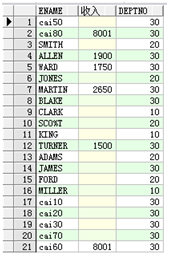
注意:很多记录中的comm是null,表示不确定的值,经常四则运算后的值也不确定。
当遇到字段时null时,可以通过nvl函数把null转化便于运算的类型。
-- nvl函数优化

select e.ename,e.sal+nvl(e.comm,0) "收入",e.deptno

from emp e
Select 查询语句的更多相关文章
- create table 使用select查询语句创建表的方法分享
转自:http://www.maomao365.com/?p=6642 摘要:下文讲述使用select查询语句建立新的数据表的方法分享 ---1 mysql create table `新数据表名` ...
- Mysql常用sql语句(3)- select 查询语句基础使用
测试必备的Mysql常用sql语句系列 https://www.cnblogs.com/poloyy/category/1683347.html 前言 针对数据表里面的每条记录,select查询语句叫 ...
- 转载《mysql 一》:mysql的select查询语句内在逻辑执行顺序
原文:http://www.jellythink.com/archives/924 我的抱怨 我一个搞应用开发的,非要会数据库,这不是专门的数据库开发人员干的事么?话说,小公司也没有数 据库开发人员这 ...
- Mybatis-plus在原有的select查询语句中动态追加查询条件
一.适用场景 1.使用了xml形式的mapper.2.不想在select查询中大量使用<if>标签来判断条件是否存在而加入条件. 二.步骤 1.自定义wrapper继承QueryWrapp ...
- MySQL命令:select查询语句
SQL 中最常用的 SELECT 语句,用来在表中选取数据. 要记得的知识点如下: SELECT 语句格式: SELECT 要查询的列名 FROM 表名字 WHERE 限制条件: WHERE语句后: ...
- select查询语句执行顺序
查询中用到的关键词主要包含六个,并且他们的顺序依次为select--from--where--group by--having--order by其中select和from是必须的,其他关键词是可选的 ...
- 一条SELECT查询语句在数据库里执行时都经历了什么
每天都在跟 mysql 打交道,你知道执行一条简单的 select 语句,都经历了哪些过程吗? 首先,mysql 主要是由 server 层和存储层两部分构成的.server 层主要包括连接器.查询缓 ...
- Select查询语句2
一.模糊查询 1.语法结构 select*from table_name where column like '%context%' 在使用like运算符时如果不使用通配符“%”,则like的作用与= ...
- Select查询语句1
一.语法结构 select[all|distinct]select_list from table_name[join join_condition] where search_condition g ...
随机推荐
- ORA-01033:ORACLE initialization or shutdown
ora-01033 错误处理:DOS下依次执行以下命令sqlplus/nologconnect sys/密码@orcl as sysdbashutdown normalstartup mountSQL ...
- distribution system index
Resiliency:可译为容错性,强调从错误状态恢复的能力.形容词Resilient可译作“可容错的”. Elasticity:可译为伸缩性,强调根据负载进行水平伸缩的能力.形容词Elastic可译 ...
- Shell登陆远程服务器
现场服务器较多,密码3个月过期,在到期时需更改密码. 使用expect编写,尝试登陆2次后退出(防止密码错误时账号锁定),超时重试一次. shell脚本调用并定时执行,登陆成功后执行一条命令,如:ho ...
- XML 中的 xmlns 等属性的意义
原文:https://blog.csdn.net/lengxiao1993/article/details/77914155 Maven 是一个 java 开发人员很难绕过的构建工具, 因为有众多的开 ...
- Android Studio: 查看SDK源代码
有时候在AS里点击某个类跳转到的仍然是这个类反编译的源代码,看起来依然不舒服,今天分享个办法: 1. 查看当前编译的SDK Version: 2. 确保当前版本的SDK源码已下载: 3. 找到andr ...
- 16个python常用魔法函数
==,is的使用 ·is是比较两个引用是否指向了同一个对象(引用比较). ·==是比较两个对象是否相等 1.__ init__(): 所有类的超类object,有一个默认包含pass的__ init ...
- java-mybaits-016-mybatis知识点StatementType
1.statementType 在mapper文件中可以使用statementType标记使用什么的对象操作SQL语句. statementType:标记操作SQL的对象 要实现动态传入表名.列名,需 ...
- Opencv加载网络图片
opencv加载网络图片 #include <iostream> #include <opencv2/opencv.hpp> using namespace std; usin ...
- linux记录-安装elk记录(参考博文)
什么是ELK? 通俗来讲,ELK是由Elasticsearch.Logstash.Kibana .filebeat三个开源软件的组成的一个组合体,这三个软件当中,每个软件用于完成不同的功能,ELK 又 ...
- iOS点击按钮第二次不能旋转View
原因: 用CGAffineTransformMakeRotation,每次旋转都要在之前最后的角度基础之上再转才有效果. - (void)clickAction: (UIButton *)button ...