
python测试工具nosetests
今天在github上找东西,找到个工具是python写的,但是需要安装nosetests,因此了解了下nosetests
python除了unittest,还有nosetests,使用更快捷
nosetests的口号:
nose extends unittest to make testing easier
特点:
自动发现测试用例(包含[Tt]est文件以及文件包中包含test的函数)
如:以test开头的文件;以test开头的函数或方法;以Test开头的类
nose自动收集单元测试,会自动识别源代码文件、目录或包中的测试用例,任何符合正则表达式:(?:^|[b_.-])[Tt]est的类、函数、文件或目录,以及TestCase的子类都会被识别并执行,匹配成功的包、任何python的源文件都会被当做测试用例。
1.安装
pip install nose
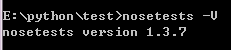
测试安装是否成功
nosetests -V
2.使用
常用命令
nosetests –h    查看所有nose相关命令

nosetests –s     执行并捕获输出

nosetests –with-xunit  输出xml结果报告

nosetests -w    查看指定目录下的

nosetests -v     查看nose的运行信息和调试信息
nose支持setup和teardown函数,在测试用例的前后执行。作用域:
1、package
可以在__init__.py中定义
setup方法名可以是setup, setup_package, setUp, or setUpPackage
teardown方法名可以是teardown, teardown_package, tearDown or tearDownPackage。比如定义数据库的连接和释放
2、module
在模块内定义setup,setup_module, setUp or setUpModule,和/或teardown,teardown_module, or tearDownModule
3、class
4、function
任何符合正则的函数都会被包装成FunctionTestCase
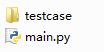
testcase下面test.py
def Testfunc():

    a = 1

    b = 2

    assert a == b
运行测试
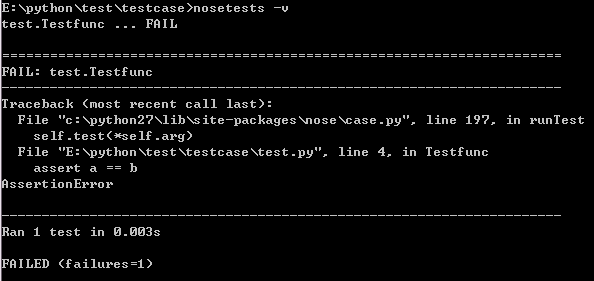
(1)自动发现和执行
进入testcase目录执行
nosetests -v
(2)编码实现测试用例的执行
在main.py所在的目录
main.py
import nose

result = nose.run()

print(result)
执行
python main.py

3.测试用例
(1)函数形式
def test_1():

    print("test_1")

    pass

def test_2():

    print("test_2")

def test_3():

    print("test_3")

def setUp():

    print "test setUp"

def tearDown():

    print "test teardown"

test_1.teardown=test_2.teardown= tearDown
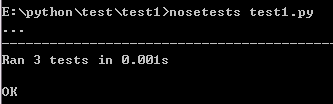
运行某个文件
nosetests test1.py
nosetests -s
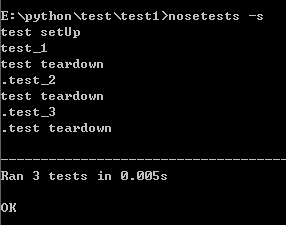
nosetests -s test1.test_3
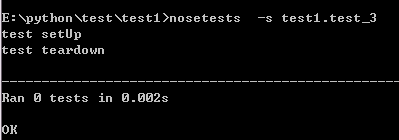
test_1.teardown=test_2.teardown= tearDown,说明在运行完成后就执行tearDown操作
(2)类形式
test/test2下新建test2.py
class Testclass:

    def __init__(self):

        pass

    def testfunc1(self):

        print 'this is case1'

    def testfunc2(self):

        print 'this is case2'

    def testfunc3(self):

        print 'this is case3'
执行
nosetests -s

执行
nosetests -v

在test目录执行
nosetests -v -s test2
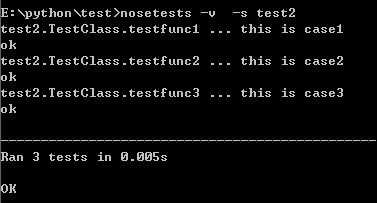
nosetests -v -s test2.test2
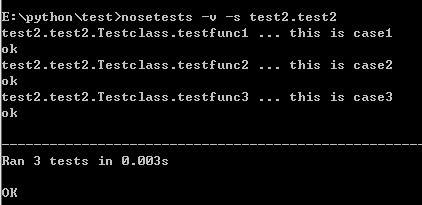
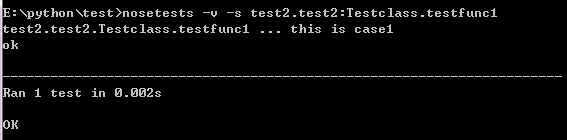
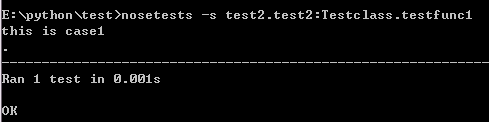
nosetests -v -s test2.test2:Testclass.testfunc1
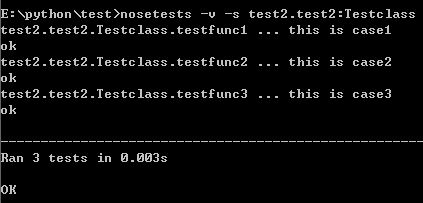
nosetests -v -s test2.test2:Testclass.testfunc1
nosetests -s test2.test2:Testclass.testfunc1
补充:
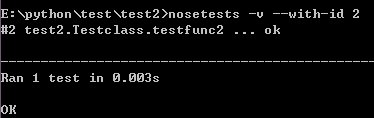
在输出文件中填加testid的显示 nosetests -v --with-id
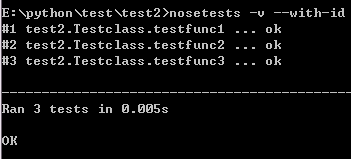
通过id,自定义要运行的测试用例 nosetests -v --with-id id号
python测试工具nosetests的更多相关文章
- Python测试工具——nose
1.nose 特点: a) 自动发现测试用例(包含[Tt]est文件以及文件包中包含test的函数) b) 以test开头的文件 c) 以test开头的 ...
- python测试工具
https://wiki.python.org/moin/PythonTestingToolsTaxonomy mac pip安装 https://blog.csdn.net/ywj_486/arti ...
- python测试框架&&数据生成&&工具最全资源汇总
xUnit frameworks 单元测试框架frameworks 框架unittest - python自带的单元测试库,开箱即用unittest2 - 加强版的单元测试框架,适用于Python 2 ...
- 收藏清单: python测试框架最全资源汇总
xUnit frameworks 单元测试框架 frameworks 框架 unittest - python自带的单元测试库,开箱即用 unittest2 - 加强版的单元测试框架,适用于Pytho ...
- 转 python测试框架最全资源汇总
转自: http://www.testclass.net/list/python_list_1/ xUnit frameworks(单元测试框架) frameworks 框架 unittest - p ...
- Python渗透测试工具合集
摘自:http://www.freebuf.com/tools/94777.html 如果你热爱漏洞研究.逆向工程或者渗透测试,我强烈推荐你使用 Python 作为编程语言.它包含大量实用的库和工具, ...
- python的web压力测试工具-pylot安装使用
http://blog.csdn.net/chenggong2dm/article/details/10106517 pylot是python编写的一款web压力测试工具.使用比较简单.而且测试结果相 ...
- 使用python实现测试工具(一)
本系列教程我们将使用python实现一些简单的测试工具,为了尽可能的简单,我们的工具以命令行工具为主. 本系列教程使用的python版本是3.6.3. 背景 这一节我们实现简单的命令行发送get请求的 ...
- Python测试 ——开发工具库
Web UI测试自动化 splinter - web UI测试工具,基于selnium封装. selenium - web UI自动化测试. mechanize- Python中有状态的程序化Web浏 ...
随机推荐
- HDU - 4059: The Boss on Mars (容斥 拉格朗日 小小的优化搜索)
pro: T次询问,每次给出N(N<1e8),求所有Σi^4 (i<=N,且gcd(i,N)==1) ; sol: 因为N比较小,我们可以求出素因子,然后容斥. 主要问题就是求1到P的 ...
- MySQL高级管理
#mysql数据库密码的修改 一.mysql密码的修改与恢复 1.修改密码 mysqladmin -u root -p123 password 456 数据库内修改 method.first: upd ...
- rustup 使用
rustup 可以帮助我们安装不同版本的rust 编程需要的工具连,同时可以方便的进行不同版本 之间的切换,类似nodejs 的nvm,n, ruby 的 rvm python 的 venv ... ...
- hasura graphql-engine 最近版本的一些更新
好久没有在关注hasura graphql-engine 了,从最新的release 信息可以看到graphql-engine 已经beta 阶段了,而且目前是v1.0.0-beta.2 估计离生产可 ...
- 函数(定义、参数、return、变量、作用域、预解析)
一.函数定义 1.方式一 function 函数名(参数){ 函数体 }——————函数声明的方法 function fn(a){ console.log(a); }: 2.方式二 ...
- svn项目迁移至gitlab
关于svn项目迁移有人可能会说,新建一个git项目,把原来的代码直接扔进去提交不完了吗.恩,是的,没错.但是为了保留之前的历史提交记录,还是得做下面的步骤 首先确保本地正常安装配置好git,具体步骤不 ...
- 【loj2567】【APIO2016】划艇
题目 \(N\)个位置,每个位置要么不选,要么选\([ a_i, b_i ]\)中的一个数: 问最后的单调上升序列(mod 1e9+7)有多少种: \(1 \le N \le 500\) 题解 orz ...
- hbase 监控指标项
名词解释 JMX:Java Management Extensions,用于用于Java程序扩展监控和管理项 GC:Garbage Collection,垃圾收集,垃圾回收机制 指标项来源 主机名 u ...
- linux下将终端的输入存入文件中
代码很简单: #include <stdlib.h> #include <fcntl.h> #include <stdio.h> #include <unis ...
- ICEM-二维Y型网格的一种做法
原视频下载地址:https://pan.baidu.com/s/1nvSBHoP 密码: uqy3