
Python - Django - 装饰器版的登陆校验
urls.py:
from django.conf.urls import url

from app01 import views

urlpatterns = [

    url(r'^login/', views.login),

    url(r'^home/', views.home),

    url(r'^index/', views.index),

    url(r'^logout/', views.logout),

]
views.py:
from django.shortcuts import render, redirect

from app01 import models

from functools import wraps

# 登录校验的装饰器

def check_login(func):

    @wraps(func)  # 装饰器修复技术

    def inner(request, *args, **kwargs):

        ret = request.get_signed_cookie("login", default="0", salt="whoami")

        if ret == "success":

            # 已经登录过,继续执行

            return func(request, *args, **kwargs)

        else:

            # 否则跳转到登录页面

            next_url = request.path_info  # 获取当前访问的 URL

            # next_url = request.get_full_path()  # 获取当前请求的路径和参数

            return redirect("/login/?next={}".format(next_url))

    return inner

def login(request):

    if request.method == "POST":

        username = request.POST.get("user")

        password = request.POST.get("pwd")

        next_url = request.GET.get("next")

        if username == "admin" and password == "admin":

            if next_url:

                rep = redirect(next_url)  # 得到一个响应对象

            else:

                rep = redirect("/home/")  # 得到一个响应对象

            # rep.set_cookie("login", "success")  # 设置 cookie

            rep.set_signed_cookie("login", "success", salt="whoami")  # 设置 cookie 并加盐

            return rep

    ret = request.get_signed_cookie("login", default="0", salt="whoami")

    if ret == "success":

        return redirect("/home/")  # 如果已经登录过,再访问 login,直接跳转到 home

    else:

        return render(request, "login.html")

def home(request):

    # ret = request.COOKIES.get("login")  # 获取 cookie 的 value

    ret = request.get_signed_cookie("login", default="0", salt="whoami")  # 获取加盐后 cookie 的 value

    if ret == "success":

        # cookie 验证成功

        return render(request, "home.html")

    else:

        return redirect("/login/")

@check_login

def index(request):

    return render(request, "index.html")

# 注销函数

def logout(request):

    rep = redirect("/login/")

    rep.delete_cookie("login")  # 删除 cookie

    return rep
login.html:
<!DOCTYPE html>

<html lang="en">

<head>

    <meta charset="UTF-8">

    <title>登录页面</title>

</head>

<body>

<p>登录页面</p>

<form action="{{ request.get_full_path }}" method="post">

    {% csrf_token %}

    <p>

        账号:

        <input type="text" name="user">

    </p>

    <p>

        密码:

        <input type="text" name="pwd">

    </p>

    <p>

        <input type="submit" value="登录">

    </p>

</form>

</body>

</html>
home.html:
<!DOCTYPE html>

<html lang="en">

<head>

    <meta charset="UTF-8">

    <title>个人信息页面</title>

</head>

<body>

<p>个人信息页面</p>

<a href="/logout/">注销</a>

</body>

</html>
index.html:
<!DOCTYPE html>

<html lang="en">

<head>

    <meta charset="UTF-8">

    <title>主页面</title>

</head>

<body>

<p>主页面</p>

</body>

</html>
访问,http://127.0.0.1:8888/index/
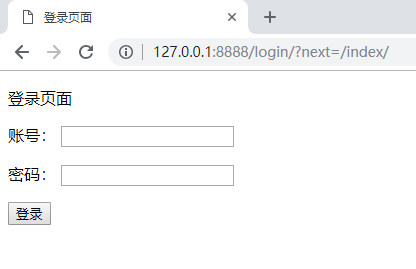
输入,admin、admin

直接跳转到了 index 页面
这时再访问 login 页面,就会跳转到 home 页面
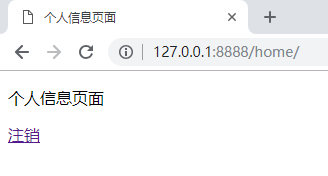
点击 “注销”
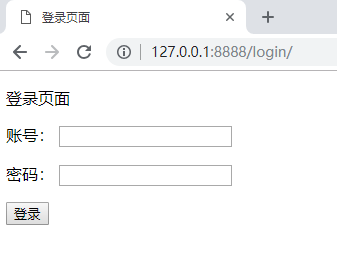
回到了登录界面
Python - Django - 装饰器版的登陆校验的更多相关文章
- Python练习-装饰器版-为什么我的用户总被锁定
参考代码如下: 1.用户登录程序流程控制代码: # 编辑者:闫龙 if __name__ == '__main__': import UserLoginFuncation LoclCount=[]; ...
- 浅谈Django的中间件与Python的装饰器
浅谈Django的中间件 与Python的装饰器 一.原理 1.装饰器是Python的一种语法应用,利用闭包的原理去更改一个函数的功能,即让一个函数执行之前先到另外一个函数中执行其他需求语句,在执行该 ...
- django 使用装饰器验证用户登陆
使用装饰器验证用户登陆,需要使用@method_decorator 首先需引用,method_decorator,并定义一个闭包 from django.utils.decorators import ...
- Python的装饰器实例用法小结
这篇文章主要介绍了Python装饰器用法,结合实例形式总结分析了Python常用装饰器的概念.功能.使用方法及相关注意事项 一.装饰器是什么 python的装饰器本质上是一个Python函数,它可以让 ...
- 【转】详解Python的装饰器
原文链接:http://python.jobbole.com/86717/ Python中的装饰器是你进入Python大门的一道坎,不管你跨不跨过去它都在那里. 为什么需要装饰器 我们假设你的程序实现 ...
- 详解Python的装饰器
Python中的装饰器是你进入Python大门的一道坎,不管你跨不跨过去它都在那里. 为什么需要装饰器 我们假设你的程序实现了say_hello()和say_goodbye()两个函数. def sa ...
- 【转】【Python】装饰器
1.闭包 >>> def outer(): ... x = 1 ... def inner(): ... ... return inner >>> foo = ou ...
- Python学习---装饰器的学习1210
装饰器的基础 学习前提: 作用域 + 函数的理解 + 闭包 [学习,理解] 代码编写原则: 对修改开放对扩展开放 装饰器本质上是一个函数,该函数用来处理其他函数,它可以让其他函数在不需要修改代码的前 ...
- Python中装饰器(转)
本文由 伯乐在线 - 7even 翻译,艾凌风 校稿.未经许可,禁止转载!英文出处:Simeon Franklin.欢迎加入翻译组. 好吧,我标题党了.作为 Python 教师,我发现理解装饰器是学生 ...
随机推荐
- mysql 端口号被占用
开始-运行-cmd, 输入 netstat -ano, 看第一列,后面的就是端口,找到3306 ,记住对应的PID!! 然后打开任务管理器 查看 -> 选择列 -> 勾上 PID(进 ...
- matlab的正则表达式
第一部分——单个字符的匹配1 句点符号 '.' ——匹配任意一个(只有一个)字符(包括空格).例如:t.n,它匹配tan. ten.tin和ton,还匹配t#n.tpn甚至t nMatlab例子程序: ...
- 织梦DedeCMS会员空间内的文章列表无法分页的解决方法
DedeCMS 5.7会员空间的文章列表分页显示不正常,总是显示0页0条记录错误.下面告诉大家如何解决这个问题: 找到并打开include/arc.memberlistview.class.php文件 ...
- 如何轻松愉快地理解条件随机场(CRF)
https://blog.csdn.net/DCX_abc/article/details/78319246 机器学习之条件随机场(CRF): https://blog.csdn.net/wangya ...
- jumpserver 安装
# CentOS 7 安装jumpserver $ setenforce 0 # 可以设置配置文件永久关闭$ systemctl stop iptables.service$ systemctl st ...
- 流媒体知识 wiki
媒体业务是网络的主要业务之间.尤其移动互联网业务的兴起,在运营商和应用开发商中,媒体业务份量极重,其中媒体的编解码服务涉及需求分析.应用开发.释放license收费等等.最近因为项目的关系,需要理清媒 ...
- RS译码的描述
在描述Reed-Solomon码的译码时,需要确定错误多项式的系数,然后进行搜索.通常,错误多项式的最高次数与错误的符号数相同. 如: λ(X)= λ0+ λ1X+ ...+ λνXν. 设该RS码最 ...
- Mybatis 通用Mapper增强
1.确保是个Maven项目,确保Spring与Mybatis正确配置. 2.新建一个自定义通用Mapper. /** * BaseMapper接口:使mapper包含完整的CRUD方法<br&g ...
- shell history 命令
1.history命令可以显示历史执行过的命令: 2.使用!+序号执行该序号对应的命令: 例子 $ history sed 's/haha/hello/g' test cat test cat tes ...
- ROS里程计的学习
采用增量式编码器来实现odometry的计算,首先采用编码器对脉冲进行采样实现左右轮运动状态的获取,然后再利用增量式测程法得到机器人车体当前坐标系的位姿. 增量式测量法是使用从编码器采样到的数据并依据 ...