
efCore+Mysql+Net Core
1.首先新建一个空的Asp.net core项目
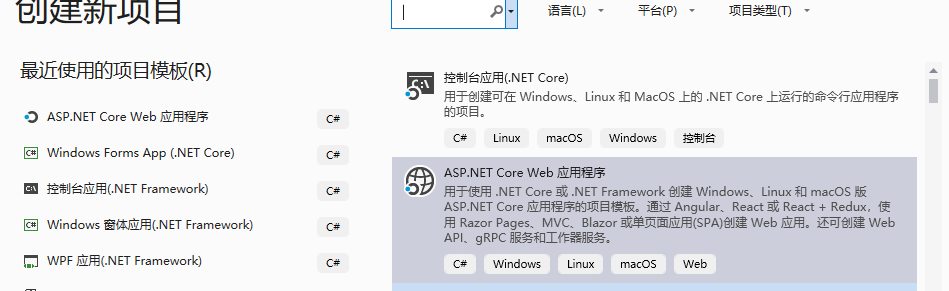
2.新建一个类 gj.cs
public class gj

    {

        // <summary>

        /// 主键

        /// </summary>

        public int id { get; set; }

        /// <summary>

        /// 标题

        /// </summary>

        public string method { get; set; }

        /// <summary>

        /// 内容

        /// </summary>

        public string text { get; set; }

        public string type { get; set; }

    }
3.添加数据库上下文类。
public class DbGj:DbContext

    {

        public DbSet<gj> gj { set; get; }

        protected override void OnConfiguring(DbContextOptionsBuilder optionsBuilder)

            => optionsBuilder.UseMySQL(@"Server=localhost;database=testapp;uid=root;pwd=woshishui");

    }
4.添加控制器
public class GJController : Controller

    {

        public IActionResult Index()

        {

            using (var db = new DbGj())

            {

                var lis = db.Set<gj>().ToList();

                 return View(lis);

            }

        }

    }
5.视图
@model IEnumerable<CoreTest_1.Models.gj>

@{

    ViewData["Title"] = "Index";

}

<h1>Index</h1>

<p>

    <a asp-action="Create">Create New</a>

</p>

<table class="table">

    <thead>

        <tr>

            <th>

                @Html.DisplayNameFor(model => model.method)

            </th>

            <th>

                @Html.DisplayNameFor(model => model.text)

            </th>

            <th>

                @Html.DisplayNameFor(model => model.type)

            </th>

            <th></th>

        </tr>

    </thead>

    <tbody>

@foreach (var item in Model) {

        <tr>

            <td>

                @Html.DisplayFor(modelItem => item.method)

            </td>

            @*<td>

                @Html.DisplayFor(modelItem => item.text)

            </td>*@

            <td>

                @Html.DisplayFor(modelItem => item.type)

            </td>

            <td>

                <a asp-action="Edit" asp-route-id="@item.id">Edit</a> |

                <a asp-action="Details" asp-route-id="@item.id">Details</a> |

                <a asp-action="Delete" asp-route-id="@item.id">Delete</a>

            </td>

        </tr>

}

    </tbody>

</table>
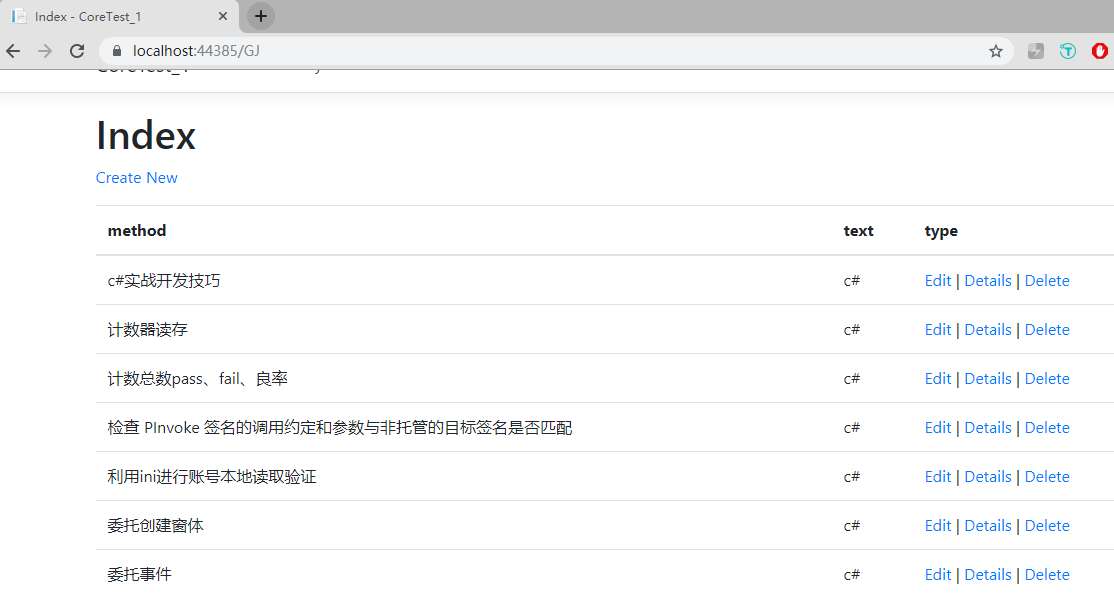
F5运行程序 (如图)
efCore+Mysql+Net Core的更多相关文章
- EFCore+Mysql仓储层建设(分页、多字段排序、部分字段更新)
前沿 园子里已有挺多博文介绍了EFCore+Mysql/MSSql如何进行使用,但实际开发不会把EF层放在Web层混合起来,需要多个项目配合结构清晰的进行分层工作,本文根据个人实践经验总结将各个项目进 ...
- asp.net core + mysql + ef core + linux
asp.net core + mysql + ef core + linux 以前开发网站是针对windows平台,在iis上部署.由于这次需求的目标服务器是linux系统,就尝试用跨平台的.NET ...
- Spring Boot连接MySQL长时间不连接后报错`com.mysql.cj.core.exceptions.ConnectionIsClosedException: No operations allowed after connection closed.`的解决办法
报错:com.mysql.cj.core.exceptions.ConnectionIsClosedException: No operations allowed after connection ...
- Asp.Net Core Identity+EFCore + Mysql踩坑记录
搭建基础框架准备试试传说中的Identity,本以为很顺利,结果一路踩了N多坑 遂就把过程记录下来.方便自己以后查看,也希望能帮到遇到同样问题的朋友. 1.首先,引入Identity需要的类库,还有M ...
- CodeFirst+MySQL+.Net Core配置详情
EF 基础操作:http://www.cnblogs.com/M-LittleBird/p/5852395.html 一.使用CodeFirst模式 1.在需要添加的项目上右键点击选择添加ADD.NE ...
- Mysql EF Core 快速构建 Web Api
(1)首先创建一个.net core web api web项目; (2)因为我们使用的是ef连接mysql数据库,通过NuGet安装MySql.Data.EntityFrameworkCore,以来 ...
- com.mysql.cj.core.exceptions.InvalidConnectionAttributeException: The server time zone value '��� mysql-installer-community-8.0.15.0
<properties> <project.build.sourceEncoding>UTF-8</project.build.sourceEncoding> &l ...
- EFCore.MySql当模型遇到int[]怎么办
我使用的是Pomole.EntityFrameworkCore.MySql 需要将旧项目中的excels表转成实体,其中有一列是json格式的int[] 当遇到第一张表的时候,我使用了这样的方法来读取 ...
- Caused by: com.mysql.cj.core.exceptions.InvalidConnectionAttributeException: The server time zone value '�й���ʱ��' is unrecognized or represents more than one time zone. You must configure either the
mysql6.0里面改成新的配置方式: hibernate.dialect=org.hibernate.dialect.MySQL5InnoDBDialect #old #driverClassNam ...
随机推荐
- [转]【HttpServlet】HttpServletResponse接口 案例:完成文件下载
创建时间:6.19 & 6.24 1.案例-完成文件下载 1) 什么情况下会文件下载? 浏览器不能解析的文件就下载 *使用a标签直接指向服务器上的资源 2)什么情况下需要在服务端编写文件下载 ...
- linux突然不能上网,eth0网卡消失
情况:之前可以正常浏览网页,没有动其它的地方,浏览器突然不能上网 ifconfig # 发现eth0网卡不见了,只有lo卡 ifconfig -a # 发现了eth0,但是没有IP地址 dhclien ...
- discuz支持的mysql的配置(docker版本)
作个笔录. conf/discuz.conf [client] port=3306 default-character-set=utf8 [mysqld] port=3306 default-stor ...
- 让istio中的jaeger跑起来
现在的水平,仅止于让它跑起来.:) 同样的环境,microk8s+istio. 步骤如下: 一,使用kubectl get pod -n istio-system查看所有istio的POD运行正常. ...
- Comet OJ - Contest #10 C.鱼跃龙门
传送门 题意: 求最小的\(x\),满足\(\frac{x(x+1)}{2}\% n=0,n\leq 10^{12}\). 多组数据,\(T\leq 100\). 思路: 直接考虑模运算似乎涉及到二次 ...
- 我以为我对Kafka很了解,直到我看了此文章
Kafka 是一个消息系统,原本开发自 LinkedIn,用作 LinkedIn 的活动流(Activity Stream)和运营数据处理管道(Pipeline)的基础. 现在它已被多家不同类型的公司 ...
- 使用Psi Probe监控Tomcat8.5
一.从GitHub上下载Psi Probe的war包 https://github.com/psi-probe/psi-probe/releases 可以看到当前最新版是3.3.1,下载 probe. ...
- Kdevelop的安装-2种方法
使用 Ubuntu 的自带的源: sudo apt-get update sudo apt-get install kdevelop 这就可以了.update这部,假如不换源,更新非常慢.换源方法很简 ...
- (HK1-1)海康网络摄像机的使用
https://blog.csdn.net/u014552102/article/details/86700057 一.手机客户端操作: 首先在莹石商城官网https://www.ys7.com/下 ...
- 网页网站基础入门篇: 使用Adobe Dreamweaver CS6 制作网页/网站
咱开发网页或者网站呢,最好使用个软件,我使用的是Adobe Dreamweaver CS6 (自行下载安装) 打开软件 现在呢咱使用 html5 <!doctype html> <h ...