
nginx访问限制
nginx的访问控制
1.http_access_module 基于ip的访问控制
允许的访问配置

不允许的访问配置

server {
    listen       80;
    server_name  localhost;

    #charset koi8-r;
    #access_log  /var/log/nginx/log/host.access.log  main;

    location / {
        root   /opt/app/code;
        index  index.html index.htm;
    }

    location ~ ^/admin.html {
        root   /opt/app/code;
        deny 222.128.189.17;(限制ip)
        allow all;(允许其他所有ip)
        index  index.html index.htm;
    }

    location ~ ^/admin.html {
        root   /opt/app/code;
        allow 222.128.189.0/24;  (允许访问ip)
        deny all;  (不允许访问)
        index  index.html index.htm;
    }

    #error_page  404              /404.html;

    # redirect server error pages to the static page /50x.html
    #
    error_page   500 502 503 504 404  /50x.html;
    location = /50x.html {
        root   /usr/share/nginx/html;
    }

    # proxy the PHP scripts to Apache listening on 127.0.0.1:80
    #
    #location ~ \.php$ {
    #    proxy_pass   http://127.0.0.1;
    #}

    # pass the PHP scripts to FastCGI server listening on 127.0.0.1:9000
    #
    #location ~ \.php$ {
    #    root           html;
    #    fastcgi_pass   127.0.0.1:9000;
    #    fastcgi_index  index.php;
    #    fastcgi_param  SCRIPT_FILENAME  /scripts$fastcgi_script_name;
    #    include        fastcgi_params;
    #}

    # deny access to .htaccess files, if Apache's document root
    # concurs with nginx's one
    #
    #location ~ /\.ht {
    #    deny  all;
    #}
}
利用x_forwarded_for进行访问限制
location / {
        if ( $http_x_forwarded_for !~* "^116\.62\.103\.228"(不是这个ip的返回403)) {
            return 403;
        }
        root   /opt/app/code;
        index  index.html index.htm;
2.http_auth_basic_module 基于用户的信任登入
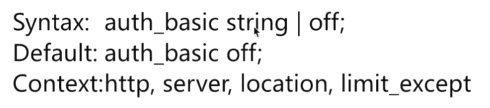
存储用户信息文件
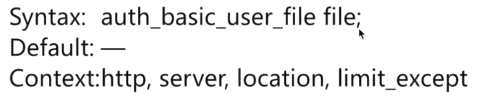
1.安装httpd-tools
yum -y install httpd-tools
2.设置认证账号密码
htpasswd -c ./auth_conf(文件名称) yoyo(账号)
根据提示输入密码
3.配置文件
location ~(匹配文件) ^/admin.html {
        root   /opt/app/code;
        auth_basic 'auth access test! input you password!';
        auth_basic_user_file /etc/nginx/auth_conf;
        index  index.html index.htm;
    }
4.查看语法是否正确
nginx -t -c /etc/nginx/nginx.conf
5.重启配置
nginx -s reload -c /etc/nginx/nginx.conf
nginx访问限制的更多相关文章
- Nginx 访问日志轮询切割
Nginx 访问日志轮询切割脚本 #!/bin/sh Dateformat=`date +%Y%m%d` Basedir="/application/nginx" Nginxlog ...
- 按日期切割nginx访问日志--及性能优化
先谈下我们需求,一个比较大的nginx访问日志,根据访问日期切割日志,保存在/tmp目录下. 测试机器为腾讯云机子,单核1G内存.测试日志大小80M. 不使用多线程版: #!/usr/bin/env ...
- 一、基于hadoop的nginx访问日志分析---解析日志篇
前一阵子,搭建了ELK日志分析平台,用着挺爽的,再也不用给开发拉各种日志,节省了很多时间. 这篇博文是介绍用python代码实现日志分析的,用MRJob实现hadoop上的mapreduce,可以直接 ...
- Python正则表达式,统计分析nginx访问日志
目标: 1.正则表达式 2.oop编程,统计nginx访问日志中不同IP地址出现的次数并排序 1.正则表达式 #!/usr/bin/env python # -*- coding: utf-8 -*- ...
- Nginx访问控制模块
一.Nginx访问控制模块 Nginx默认安装的模块http_access_module,可以基于来源IP进行访问控制. 1.模块安装 nginx中内置ngx_http_access_module,除 ...
- logstash收集nginx访问日志
logstash收集nginx访问日志 安装nginx #直接yum安装: [root@elk-node1 ~]# yum install nginx -y 官方文档:http://nginx.org ...
- 使用python找出nginx访问日志中访问次数最多的10个ip排序生成网页
使用python找出nginx访问日志中访问次数最多的10个ip排序生成网页 方法1:linux下使用awk命令 # cat access1.log | awk '{print $1" &q ...
- nginx访问不到
nginx访问不到 今天,一朋友的一台linux服务器上部署了nginx,但是外部(公网)就是不能访问,于是协助其排查.整体思路如下: 1.确认nginx配置是否ok. 2.确认网络是否可达. 3.是 ...
- Nginx 访问日志配置
一.Nginx 访问日志介绍 Nginx 软件会把每个用户访问网站的日志信息记录到指定的日志文件里,供网站提供者分析用户的浏览行为等,此功能由 ngx_http_log_module 模块负责. 二. ...
- Nginx访问日志、 Nginx日志切割、静态文件不记录日志和过期时间
1.Nginx访问日志 配制访问日志:默认定义格式: log_format combined_realip '$remote_addr $http_x_forwarded_for [$time_loc ...
随机推荐
- oracle 块速查
头信息区 这个区包括数据块的地址,数据块类型,检查点信息,scn信息等信息. --------- Start minblk maxblk buffer tsn: rdba: ) scn: 0x0000 ...
- tomcat 指定(自定义)JDK路径的两种方式
1.情景展示 tomcat7使用jdk1.7:tomcat8使用jdk1.8.两个tomcat在一台机器下同时启动,你会发现这两个tomcat使用的是一个版本的jdk, 那就是你配置过的JAVA_ ...
- Comet OJ - Contest #13-C2
Comet OJ - Contest #13-C2 C2-佛御石之钵 -不碎的意志-」(困难版) 又是一道并查集.最近做过的并查集的题貌似蛮多的. 思路 首先考虑,每次处理矩形只考虑从0变成1的点.这 ...
- windows php 下的各个版本的资源下载地址
历史版本: https://windows.php.net/downloads/releases/archives/ 新版本: https://windows.php.net/download/ 找的 ...
- k8s集群-node节点设置不可调度或者删除node节点
在master 执行1, 不可调度 kubectl cordon k8s-node- kubectl uncordon k8s-node- #取消 2,驱逐已经运行的业务容器 kubectl drai ...
- c# 自动给版本升级,遇9变0且前面一个版本加1
/// <summary> /// 版本辅助类 /// 创建人: /// 创建时间:2019-11-18 13:53:55 /// </summary> public clas ...
- pandas的使用(4)
pandas的使用(4)--文件读取和保存
- update改数据详解
update修改数据的要素 : 改哪张表? 改哪几列的值? 分别改成什么值? 在哪些行生效?(这个很重要,否则所有行都会受影响) mysql> update class ; where 表达式 ...
- axios浏览器异步请求方法封装 XMLHttpRequest
axios学习笔记defaults(浏览器端异步请求处理方式) 浏览器异步请求方法封装,主要使用XMLHttpRequest lib/adapters/xhr.js //入口 var utils = ...
- vue 复制文本到剪切板上
1.下载clipboard.js npm install vue-clipboard2 --save 2.引入,可以在mian.js中全局引入也可以在单个vue中引入 import Clipboard ...