
我是如何一步步编码完成万仓网ERP系统的(三)登录
https://www.cnblogs.com/smh188/p/11533668.html(我是如何一步步编码完成万仓网ERP系统的(一)系统架构)
https://www.cnblogs.com/smh188/p/11534451.html(我是如何一步步编码完成万仓网ERP系统的(二)前端框架)
https://www.cnblogs.com/smh188/p/11535449.html(我是如何一步步编码完成万仓网ERP系统的(三)登录)
https://www.cnblogs.com/smh188/p/11541033.html(我是如何一步步编码完成万仓网ERP系统的(四)登录的具体实现)
https://www.cnblogs.com/smh188/p/11542310.html(我是如何一步步编码完成万仓网ERP系统的(五)产品库设计 1.产品类别)
https://www.cnblogs.com/smh188/p/11546917.html(我是如何一步步编码完成万仓网ERP系统的(六)产品库设计 2.百度Ueditor编辑器)
https://www.cnblogs.com/smh188/p/11572668.html(我是如何一步步编码完成万仓网ERP系统的(七)产品库设计 3.品牌图片跨域上传)
https://www.cnblogs.com/smh188/p/11576543.html(我是如何一步步编码完成万仓网ERP系统的(八)产品库设计 4.品牌类别)
https://www.cnblogs.com/smh188/p/11578185.html(我是如何一步步编码完成万仓网ERP系统的(九)产品库设计 5.产品属性项)
https://www.cnblogs.com/smh188/p/11589264.html(我是如何一步步编码完成万仓网ERP系统的(十)产品库设计 6.属性项和类别关联)
https://www.cnblogs.com/smh188/p/11596459.html(我是如何一步步编码完成万仓网ERP系统的(十一)产品库设计 7.发布商品)
https://www.cnblogs.com/smh188/p/11610960.html(我是如何一步步编码完成万仓网ERP系统的(十二)库存 1.概述)
https://www.cnblogs.com/smh188/p/11669871.html(我是如何一步步编码完成万仓网ERP系统的(十三)库存 2.加权平均价)
https://www.cnblogs.com/smh188/p/11763319.html(我是如何一步步编码完成万仓网ERP系统的(十四)库存 3.库存日志)
万仓网ERP系统不开源,准备做一个系列,讲一讲主要的技术点,这些技术点会有源代码。如果想看所有的源代码,可以打道回府了,没必要再阅读下去了,浪费您宝贵的时间。
首先用户进入到一个后台系统,肯定是先要登录,这篇咱们就说说登录(当然万仓网ERP系统开发的第一个页面并不是登录)。
登录页面主要的是注意保护用户的密码不能被窃取,不能是明文,不能被穷举撞库(简单密码),那怎样才能实现这3个小目标呢?
1.不能被窃取,可以使用证书(let's encrypt的免费证书)
2.最好在前端加密后在通过网络进行传输。
3.最好有大小字母、数字和特殊符号组成8位及以上密码,防止暴力破解。
现在咱们主要说第2中情况,如何在前端使用js加密,后端.Net进行解密?密码学和TLS的知识不在本文的介绍范围之内,直接上硬核内容吧,前端使用基于X25519密钥交换(RSA密钥交换已经过时,最新的Tls1.3只有ecc椭圆曲线密钥交换这一种,x25519就属于ecc椭圆曲线的一种)的aes-128-gcm(加解密速度和安全与一身的加密方式,比上一版本aes-cbc加密安全,cpu硬件内置aes-gcm加密模块)加密,后端.net进行解密,验证用户名和密码是否正确。
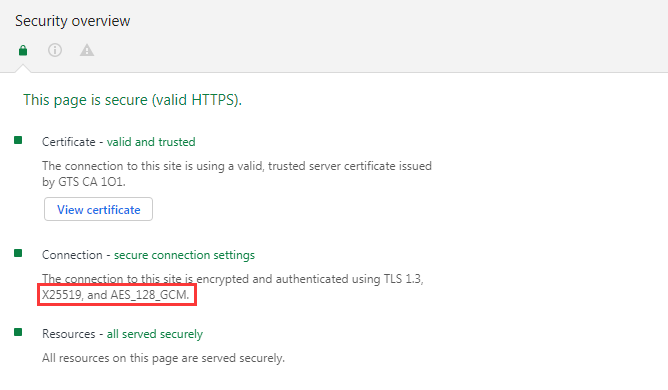
google的证书使用的就是基于X25519的AES_128_GCM证书,等于咱们现在手工用js+.net实现一个基于X25519的AES_128_GCM的证书。
引用js插件
https://github.com/brix/crypto-js sha512.min.js 主要用于原始密码加密。
https://github.com/bitwiseshiftleft/sjcl sjcl.min.js 需要重新压缩一下,主要用于aes-gcm加密。
https://github.com/gimer/curve25519nxt curve.js 可重新压缩一下,主要用于X25519的密钥交换。
前端代码:
function login() {
   //声明一个椭圆曲线对象
   var curve = new Curve25519();

   //随机一个64位的hex数值,并转化为字节类型,做为x25519的私钥

    var privateKey = new Key25519(hexToBytes(randomWord(64)));

   //得到椭圆曲线的公钥

    var publickey = curve.genPub(privateKey).key;

   //把前端的私钥传入到后端,后端计算得出公用的aes加密的密钥,同时得到后端的公钥

    $.post("/Login/GetX25519PublicKey", { publicKey: bytesToHex(publickey) }, function (data) {

     //得到后端的公钥,结合前端的私钥,计算得出前端aes加密的密钥(前后端计算的密钥是一致的)

        var shareKey = bytesToHex(curve.genShared(privateKey, new Key25519(hexToBytes(data.PublicKey))).key);

      //声明一个登录对象

        var loginUser = new Object();

     //用户名

        loginUser.UserName = $.trim($("#txtUserName").val());


      //密码两次sha384加密
        loginUser.Password = sha384(sha384($.trim($("#txtPWD").val())));


       //验证码
     loginUser.ValidateCode = $.trim($("#txtValidateCode").val());

      //使用公用密钥shareKey进行ase加密(aes后边的参数介绍下mode有gcm和ccm模式,这里用gcm模式;ts长度gcm模式是128;iter轮询次数默认10000,咱们改为1000,10000次数太多了会卡顿;salt盐随机数,iv是向量)

        var aesData = sjcl.encrypt(shareKey, JSON.stringify(loginUser), { mode: 'gcm', ts: 128, iter: 1000, salt: sjcl.random.randomWords(4), iv: sjcl.random.randomWords(3) });

      //传入加密后的login字符串,同时需要传入后端返回的key(用于后端方便查找对应的公用密钥)

        $.post("/Login/UserLogin", { loginUser: aesData, key: data.Key }, function (data) {

            if (data.Result == false)
       {
          alert("登录失败")

            } else {

                window.location = "/";

            }

        });

    });

}

//随机一定长度的hex数值

function randomWord(len) {

    var str = "",

        arr = ['0', '1', '2', '3', '4', '5', '6', '7', '8', '9', 'a', 'b', 'c', 'd', 'e', 'f'];

    for (var i = 0; i < len; i++) {

        var pos = Math.round(Math.random() * (arr.length - 1));

        str += arr[pos];

    }

    return str;

}
后端代码(传入前端的公钥,生成aes公用密钥,返回后端的公钥):
       //后端得到前端传过来的公钥,生成aes公用密钥,使用的是 BouncyCastle 类库

    public static Dictionary<string, string> GenerateX25519Keys(string publicKey)

        {

            SecureRandom secureRandom = new SecureRandom();

            byte[] privateByte = new byte[X25519.ScalarSize];

            byte[] publicByte = new byte[X25519.PointSize];

            byte[] shareByte = new byte[X25519.PointSize];

            secureRandom.NextBytes(privateByte);

            X25519.ScalarMultBase(privateByte, , publicByte, );

            X25519.ScalarMult(privateByte, , Hex.Decode(publicKey), , shareByte, );

            Dictionary<string, string> dc = new Dictionary<string, string>();

       //生成x25519 hex公钥

            dc.Add("PublicKey", Hex.ToHexString(publicByte));

        //生成x25519 hex私钥

            dc.Add("PrivateKey", Hex.ToHexString(privateByte));

           //生成aes公用密钥

            dc.Add("ShareKey", Hex.ToHexString(shareByte));

           //返回一个dictionary对象

            return dc;

        }

        public ActionResult GetX25519PublicKey(string publicKey)

        {

        //得到x25519key

            Dictionary<string, string> eccKeys = GenerateX25519Keys(publicKey);

       //Redis

            NewtonsoftSerializer serializer = new NewtonsoftSerializer();

            RedisConfiguration redisConfiguration = RedisCachingSectionHandler.GetConfig();

            IRedisCacheConnectionPoolManager connectionPoolManager = new RedisCacheConnectionPoolManager(redisConfiguration);

            IRedisCacheClient redisClient = new RedisCacheClient(connectionPoolManager, serializer, redisConfiguration);

            //使用guid key

            string key = Guid.NewGuid().ToString("n") + Guid.NewGuid().ToString("n");

        //把x25519字典用redis缓存起来

            redisClient.GetDbFromConfiguration().Add(key, eccKeys, DateTime.Now.AddSeconds());

            //返回guid key和x25519 公钥

            return Json(new { Key = key, PublicKey = eccKeys["PublicKey"] });

        }
后端代码(解密前端传过来的aes密文):
        //根据aes公用key 解密前端传进来的aes密文,使用的是 BouncyCastle 类库
     //传进来的密文 {"iv":"r5idcq/NZ7VEpZv9","v":1,"iter":1000,"ks":128,"ts":128,"mode":"gcm","adata":"","cipher":"aes","salt":"rEwzN7o5UANsLvB4xf4bZg==","ct":"YI5Ubuvev8787ryV4+X+/1+ICXixZfqkhRxKg0zfi/27M24+Y8w9BOeIhe0tTEa1B1WP8tPYpcTYTHw58G/rpZUxSPNurhUXaAZKoiigl5eeaqOqNq9xHd0s+mKi+l1zuiL3qo5sxb0OcDxuL0clp46UyN0y8gr6xmimuszXalWdssfvCuoT8saJ4rwrcmM2TrjBMP/HG96VjAEzBD1q+teHFWJ50q4PLw=="}

        public static string DecryptString(string ciphertext, string key)

        {

            //把aes密文转换为json对象

            JObject aesJObject = JObject.Parse(ciphertext);

            //把json对象的ct属性转换为字节(ct就是加密后的密文)

            byte[] ciphertextByte = Convert.FromBase64String(aesJObject["ct"].ToString());

            //把json的salt属性转换为字节

            byte[] salt = Convert.FromBase64String(aesJObject["salt"].ToString());

            //把json的iv属性转换为字节

            byte[] iv = Convert.FromBase64String(aesJObject["iv"].ToString());

            //声明一个PBKDF2对象

            Pkcs5S2ParametersGenerator pbkdf2 = new Pkcs5S2ParametersGenerator(new Sha256Digest());

            //根据aes公用key,salt,iter轮询次数(前面传进来的是1000,这里也是1000)初始化PBKDF2对象

            pbkdf2.Init(Encoding.UTF8.GetBytes(key), salt, 1000);

            byte[] keyByte = ((KeyParameter)pbkdf2.GenerateDerivedMacParameters(16 * )).GetKey();

            // 解密得到字符串

            return Encoding.UTF8.GetString(Decrypt(ciphertextByte, keyByte, iv));

        }

        //解密aes密文

        public static byte[] Decrypt(byte[] ciphertext, byte[] key, byte[] iv)

        {

            //声明aes gcm对象

            GcmBlockCipher cipher = new GcmBlockCipher(new AesEngine());

            KeyParameter keyParam = ParameterUtilities.CreateKeyParameter("AES", key);

            //根据key和IV初始化

            ParametersWithIV cipherParameters = new ParametersWithIV(keyParam, iv);

            cipher.Init(false, cipherParameters);

            //解密

            byte[] plaintext = new byte[cipher.GetOutputSize(ciphertext.Length)];

            int length = cipher.ProcessBytes(ciphertext, , ciphertext.Length, plaintext, );

            cipher.DoFinal(plaintext, length);

            //返还前端加密前的login字节

            return plaintext;

        }

    }

        //解密aes login密文

        public ActionResult UserLogin(string loginUser, string key)

        {
      try

            {

                //Redis相关

                NewtonsoftSerializer serializer = new NewtonsoftSerializer();

                RedisConfiguration redisConfiguration = RedisCachingSectionHandler.GetConfig();

                IRedisCacheConnectionPoolManager connectionPoolManager = new RedisCacheConnectionPoolManager(redisConfiguration);

                IRedisCacheClient redisClient = new RedisCacheClient(connectionPoolManager, serializer, redisConfiguration);

                //使用传进来的来 Key获取Redis缓存的x25519 Dictionary

                Dictionary<string, string> eccKey = redisClient.GetDbFromConfiguration().Get<Dictionary<string, string>>(key);

                if (eccKey == null)

                {return;

                }

                //移除redis中x25519

                redisClient.GetDbFromConfiguration().Remove(key);

                //解密得到前端的login对象

                LoginViewModel loginUserView = JsonConvert.DeserializeObject<LoginViewModel>(DecryptString(loginUser, eccKey["ShareKey"]));

                //业务逻辑

                // ...

                return Json(new { Result = true });

            }

            catch (Exception ex)

            {

                logError.Error(ex);
          return ;

            }

        }
这样一个还算完整的登录就算完成了,有兴趣的可以自己敲敲代码,做个小测试。
PS:客官有时间光临我的小站 万仓网。
我是如何一步步编码完成万仓网ERP系统的(三)登录的更多相关文章
- 我是如何一步步编码完成万仓网ERP系统的(一)系统架构
https://www.cnblogs.com/smh188/p/11533668.html(我是如何一步步编码完成万仓网ERP系统的(一)系统架构) https://www.cnblogs.com/ ...
- 我是如何一步步编码完成万仓网ERP系统的(二)前端框架
https://www.cnblogs.com/smh188/p/11533668.html(我是如何一步步编码完成万仓网ERP系统的(一)系统架构) https://www.cnblogs.com/ ...
- 我是如何一步步编码完成万仓网ERP系统的(四)登录的具体实现
https://www.cnblogs.com/smh188/p/11533668.html(我是如何一步步编码完成万仓网ERP系统的(一)系统架构) https://www.cnblogs.com/ ...
- 我是如何一步步编码完成万仓网ERP系统的(五)产品库设计 1.产品类别
https://www.cnblogs.com/smh188/p/11533668.html(我是如何一步步编码完成万仓网ERP系统的(一)系统架构) https://www.cnblogs.com/ ...
- 我是如何一步步编码完成万仓网ERP系统的(六)产品库设计 2.百度Ueditor编辑器
https://www.cnblogs.com/smh188/p/11533668.html(我是如何一步步编码完成万仓网ERP系统的(一)系统架构) https://www.cnblogs.com/ ...
- 我是如何一步步编码完成万仓网ERP系统的(七)产品库设计 3.品牌图片跨域上传
https://www.cnblogs.com/smh188/p/11533668.html(我是如何一步步编码完成万仓网ERP系统的(一)系统架构) https://www.cnblogs.com/ ...
- 我是如何一步步编码完成万仓网ERP系统的(八)产品库设计 4.品牌类别
https://www.cnblogs.com/smh188/p/11533668.html(我是如何一步步编码完成万仓网ERP系统的(一)系统架构) https://www.cnblogs.com/ ...
- 我是如何一步步编码完成万仓网ERP系统的(九)产品库设计 5.产品属性项
https://www.cnblogs.com/smh188/p/11533668.html(我是如何一步步编码完成万仓网ERP系统的(一)系统架构) https://www.cnblogs.com/ ...
- 我是如何一步步编码完成万仓网ERP系统的(十)产品库设计 6.属性项和类别关联
https://www.cnblogs.com/smh188/p/11533668.html(我是如何一步步编码完成万仓网ERP系统的(一)系统架构) https://www.cnblogs.com/ ...
随机推荐
- 阿里云部署SSL证书
查找中间证书 为了确保兼容到所有浏览器,我们必须在阿里云上部署中间证书,如果不部署证书,虽然安装过程可以完全也不会报错,但可能导致Android系统,Chrome 和 Firefox等浏览器无法识别. ...
- Linux编译安装相关命令
1. configuer configure 是一个shell脚本,用来检测安装平台是否符合要求,并通过配置参数生成makefile文件 2. make (make all 的简写) 编译命令, ...
- Python环境安装与基础语法(3)——进制、运算符和优先级、原码、补码
进制 转十进制:基本运算方法(权算方式) 0b1111——>1*2**3 + 1*2**2 + 1*2**1 + 1*2**0 0x7F——>7*16**1 + F*16**0 转二进制: ...
- Microsoft Surface 2019新品发布会汇总
Microsoft Surface 2019 新品发布会汇总 10月2日晚,微软举行了Microsoft Surface 2019秋季新品发布会,本次发布会涉及如下设备内容等: SurfaceLapt ...
- ConcurrentSkipListMap的常用方法
package com.geo.map; import java.util.Iterator;import java.util.Map.Entry;import java.util.Set;impo ...
- Nginx配置参数中文详细说明
#定义Nginx运行的用户和用户组user www www;##nginx进程数,建议设置为等于CPU总核心数.worker_processes 8;##全局错误日志定义类型,[ debug | in ...
- Druid(数据库连接池) 学习资料
学习资料 网址 官方文档 https://github.com/alibaba/druid/wiki/%E5%B8%B8%E8%A7%81%E9%97%AE%E9%A2%98 主流Java数据库连接池 ...
- Java8——Lambda表达式
/* * 一.Lambda 表达式的基础语法:Java8中引入了一个新的操作符 "->" 该操作符称为箭头操作符或 Lambda 操作符 * 箭头操作符将 Lambda 表达 ...
- NOIP 2002 产生数
洛谷 P1037 产生数 https://www.luogu.org/problemnew/show/P1037 JDOJ 1298: [NOIP2002]产生数 T3 https://neooj.c ...
- luoguP3327 [SDOI2015]约数个数和
题意 首先有个结论: \(d(i,j)=\sum\limits_{x|i}\sum\limits_{y|j}[gcd(x,y)=1]\) 证明: 假设\(i=p_1^{a_1}*p_2^{a_2}*. ...